
1. Product Overview
The AWEI H27 Smart Watch is designed to provide comprehensive health monitoring, fitness tracking, and communication features. It features a 1.43-inch AMOLED HD screen, supports Bluetooth calls, and offers a variety of sports modes. The device is IP68 waterproof, making it suitable for daily use and various activities.
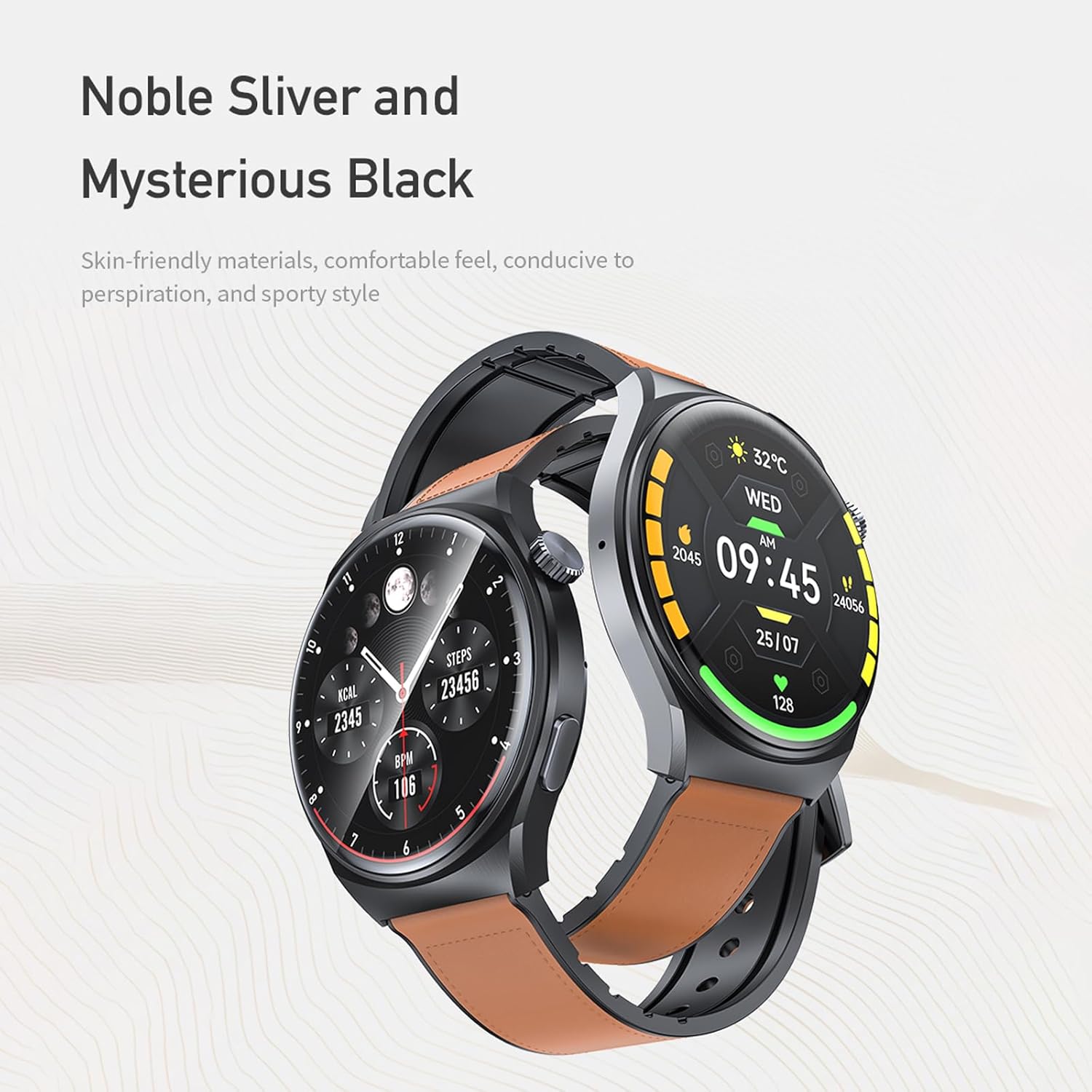
Image 1.1: AWEI H27 Smart Watch with two strap options, showcasing its design.

Image 1.2: Close-up view of the AWEI H27 Smart Watch screen, highlighting its 46mm round watch face, 72% screen-to-body ratio, 466x466 resolution, and 500nit luminance.
2. Package Contents
Please check the package contents upon unboxing. If any items are missing or damaged, contact customer support.
- AWEI H27 Smart Watch
- Magnetic Charging Cable
- User Manual
3. Setup
3.1 Charging the Device
- Connect the magnetic charging cable to the charging contacts on the back of the watch.
- Plug the USB end of the cable into a standard USB power adapter (not included) or a computer's USB port.
- Ensure the watch screen indicates charging. A full charge typically takes approximately 4 hours.
A full charge provides up to 7-10 days of daily use and up to 30 days of standby time. Actual battery life may vary based on usage frequency and settings.

Image 3.1: The AWEI H27 Smart Watch connected to its magnetic charging cable, displaying a charging icon on the screen.
3.2 Power On/Off
- Power On: Press and hold the side button until the screen lights up.
- Power Off: Press and hold the side button, then select the 'Power Off' option on the screen.
3.3 App Installation and Pairing
- Download the App: Scan the QR code provided in the physical manual or search for the official AWEI Smart Watch app in your smartphone's app store (compatible with Android and iOS).
- Create Account: Open the app and follow the on-screen instructions to create an account or log in.
- Pair Device: Enable Bluetooth on your smartphone. In the app, navigate to 'Add Device' or 'Pair Device' and select 'AWEI H27' from the list of available devices. Confirm the pairing request on both your phone and the watch.
- Complete Setup: Follow any additional prompts in the app to complete the initial setup, including personal profile information and notification permissions.
4. Operation
4.1 Basic Navigation
- Touchscreen: Swipe left, right, up, or down to navigate through menus and screens. Tap to select items.
- Side Button: Press to return to the previous screen or the watch face. Press and hold for power options or to access specific functions (customizable via app).
4.2 Making and Answering Calls
Once paired with your smartphone via Bluetooth, the AWEI H27 allows you to make and answer calls directly from your wrist.
- Answering Calls: When an incoming call is received, tap the green answer icon on the watch screen.
- Making Calls: Access the dialer or contact list on the watch (enabled via app settings) to initiate a call.
4.3 Sports Modes
The watch supports a variety of sports modes to track your physical activity. These include:
- Running
- Walking
- Hiking
- Basketball
- Badminton
- Boating
- Climbing
- Fitness
- Cycling
- Football
- Yoga
- And more.
Select the desired sport mode before starting your activity to accurately track exercise duration, calories burned, and other relevant metrics.

Image 4.1: The AWEI H27 Smart Watch screen showing a selection of icons representing over 100 sports modes.
4.4 Watch Faces
Customize the appearance of your watch by changing watch faces. The AWEI H27 supports multiple cloud-based watch faces and allows you to upload personal photos.
- Changing Watch Faces: Swipe on the watch face or use the companion app to browse and select different designs.
- Custom Watch Faces: Use the app to upload images from your phone to create personalized watch faces.

Image 4.2: A collage of various customizable watch faces available for the AWEI H27 Smart Watch, demonstrating personalization options.
4.5 Health Monitoring
The watch provides all-day health monitoring features, which may include heart rate tracking, sleep monitoring, and other health-related data. Refer to the companion app for detailed insights and historical data.
4.6 Other Functions
The AWEI H27 Smart Watch includes additional features for convenience:
- Music Control
- Remote Photography
- Alarm Clock
- Female Physiological Cycle Tracking
- Sedentary Reminders
- Wrist-flip Display Activation
5. Maintenance
5.1 Water Resistance (IP68)
The AWEI H27 Smart Watch has an IP68 waterproof rating. This means it is resistant to dust and can withstand immersion in water up to 1.5 meters for 30 minutes. It is suitable for daily activities such as hand washing, face washing, and sweating during exercise.
Important: The IP68 rating does not mean the watch is suitable for swimming, diving, or exposure to hot water, steam, or high-pressure water jets. Water resistance may decrease over time with normal wear and tear. Avoid using the watch in saunas, hot tubs, or during activities involving high-speed water. If the watch gets wet, dry it thoroughly before charging or using buttons.
5.2 Cleaning
- Wipe the watch and strap regularly with a soft, dry, lint-free cloth.
- If necessary, dampen the cloth slightly with water. Do not use soap, cleaning agents, abrasive materials, or compressed air.
- Ensure the charging contacts are clean and dry before charging.
5.3 Storage
Store the watch in a cool, dry place away from direct sunlight and extreme temperatures when not in use for extended periods.
6. Troubleshooting
6.1 Device Not Powering On
- Ensure the watch is fully charged. Connect it to the charger for at least 30 minutes.
- Press and hold the side button for 10-15 seconds to attempt a forced restart.
6.2 Connectivity Issues (Bluetooth)
- Ensure Bluetooth is enabled on your smartphone.
- Make sure the watch is within the Bluetooth range of your phone (typically 10 meters).
- Restart both your watch and smartphone.
- If the issue persists, unpair the device from your phone's Bluetooth settings and re-pair it through the app.
6.3 Inaccurate Data (Heart Rate, Steps)
- Ensure the watch is worn snugly on your wrist, not too tight or too loose.
- Clean the sensors on the back of the watch to remove any dirt or debris.
- Ensure your personal information (height, weight, age) is accurately entered in the companion app.
6.4 Short Battery Life
- Frequent use of features like Bluetooth calling, continuous heart rate monitoring, and high screen brightness can reduce battery life.
- Reduce screen brightness and screen-on time.
- Limit the number of notifications received on the watch.
- Disable continuous health monitoring features if not needed constantly.
7. Specifications
| Brand | Awei |
| Model | H27 |
| Screen Size | 1.43 Inches |
| Display Type | AMOLED |
| Battery Capacity | 300 Milliamp Hours |
| Charging Time | Approximately 4 Hours |
| Connectivity | Bluetooth |
| Water Resistance | IP68 |
| Compatible Devices | Smartphone (Android and iOS) |
| Human Interface Input | Buttons, Touchscreen |
| Special Features | Multi-sport mode, One-touch Bluetooth calling |
8. Warranty and Support
The AWEI H27 Smart Watch comes with a one-year warranty from the date of purchase. This warranty covers manufacturing defects under normal use.
For warranty claims, technical support, or any questions regarding your device, please contact the seller or manufacturer's customer service. Refer to your purchase documentation for specific contact details.
