1. Introduction
Thank you for choosing the TYOTY A93 Portable Bluetooth Speaker. This manual provides essential information for setting up, operating, and maintaining your speaker to ensure optimal performance and longevity. Please read this manual thoroughly before using the product.

Image: Front view of the TYOTY A93 Portable Bluetooth Speaker, showcasing its dual speakers with vibrant, multi-colored LED lights.
2. Product Overview
Key Features:
- Powerful Audio: 100W output with 2 x 5-inch subwoofers for deep bass and surround stereo sound.
- Wireless Connectivity: Advanced Bluetooth 5.0 for stable connection up to 100ft.
- Dynamic LED Lights: Multiple light modes that synchronize with music rhythm.
- Multi-functionality: Supports TWS (True Wireless Stereo) pairing, TF Card, AUX input, U-disk playback, and 6.35mm Microphone jack.
- Long Battery Life: Built-in 10800mAh rechargeable battery provides 6-12 hours of playtime.
- Durable Design: Wooden cabinet construction to reduce vibration and enhance sound quality.
Component Identification:
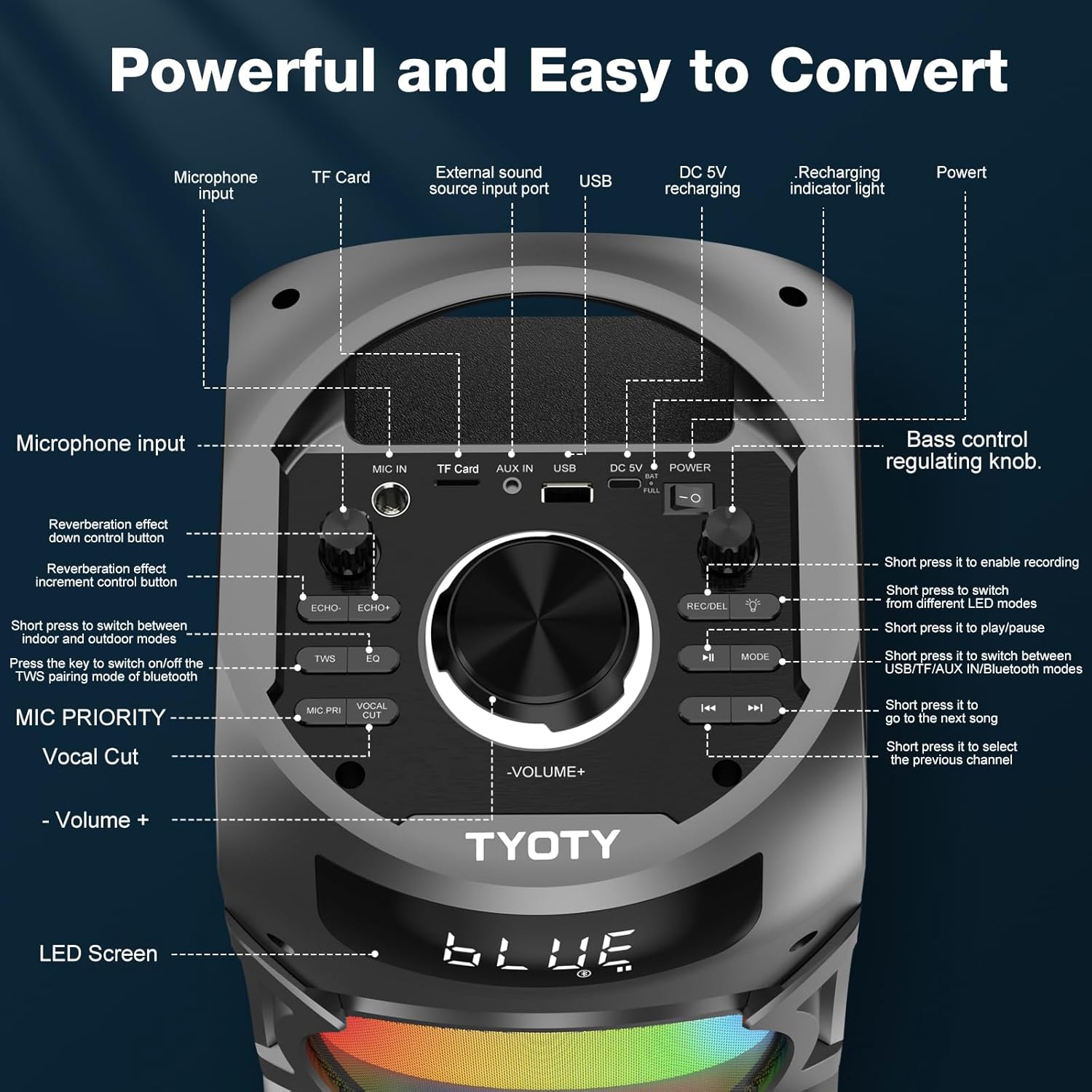
Image: Top control panel of the TYOTY A93 speaker, showing various inputs and controls.
- Microphone Input: 6.35mm jack for external microphone.
- TF Card Slot: For music playback from a TF (MicroSD) card.
- AUX In: 3.5mm audio jack for wired connection to external devices.
- USB Port: For U-disk music playback.
- DC 5V Recharging Port: USB-C port for charging the speaker.
- Power Switch: On/Off toggle for the speaker.
- Bass Control Knob: Adjusts the bass level.
- REC/DEL Button: Record microphone input or delete recordings.
- Light Mode Button: Cycles through LED light modes or turns them off.
- Play/Pause Button: Controls media playback.
- Mode Button: Switches between input modes (Bluetooth, TF Card, AUX, USB).
- Previous Track Button: Skips to the previous track.
- Next Track Button: Skips to the next track.
- Volume Knob: Main volume control.
- TWS Button: Initiates True Wireless Stereo pairing.
- EQ Button: Switches between indoor and outdoor sound modes.
- Echo +/- Buttons: Adjusts microphone echo effect.
- MIC PRI Button: Microphone priority function (lowers music volume when speaking).
- Vocal Cut Button: Attempts to remove vocals from music tracks for karaoke.
- LED Screen: Displays current mode, volume, and battery status.
3. Setup
Initial Charging:
Before first use, fully charge the speaker for approximately 6 hours. Connect the provided USB charger cable to the DC 5V Recharging Port on the speaker and a compatible USB power adapter (not included). The LED screen will indicate charging status.
Powering On/Off:
To power on the speaker, toggle the Power Switch to the 'ON' position. To power off, toggle the switch to the 'OFF' position.
4. Operating Instructions
Bluetooth Pairing:
- Ensure the speaker is powered on and in Bluetooth mode (indicated by 'BLUE' on the LED screen). If not, press the Mode Button to switch.
- On your mobile device, enable Bluetooth and search for available devices.
- Select 'A93' from the list of devices to connect.
- A confirmation sound will indicate successful pairing.
True Wireless Stereo (TWS) Pairing:
To achieve 200W powerful stereo sound, you can pair two A93 speakers together:
- Ensure both A93 speakers are powered on and in Bluetooth mode.
- On one speaker (this will be your primary speaker), press the TWS Button. The speaker will emit a pairing tone.
- The two speakers will automatically connect to each other. A successful connection will be indicated by a confirmation tone.
- Once TWS paired, connect your mobile device to the primary speaker via Bluetooth as described above.

Image: Two TYOTY A93 speakers wirelessly connected, demonstrating the TWS feature for enhanced stereo sound.
LED Lights:
The speaker features multiple dynamic LED light modes. Press the Light Mode Button to cycle through the available patterns or to turn the lights off. The lights can change effect according to the rhythm of the music.
Video: Demonstration of the TYOTY A93 Portable Bluetooth Speaker's dynamic LED light modes, showing various colors and patterns.
Audio Inputs (TF Card, AUX, USB):
Insert a TF card or U-disk into the respective slot, or connect an external audio device via the 3.5mm AUX In port. Use the Mode Button to select the desired input source. The speaker will automatically begin playback if media is detected.
Microphone Use:
Connect a 6.35mm microphone to the Microphone Input. Adjust microphone volume using the MIC VOL+/- knob. Use the Echo +/- Buttons to add or reduce echo effects. The MIC PRI Button will lower background music volume when the microphone is in use. The Vocal Cut Button attempts to remove vocals from playing music for karaoke purposes.
Volume and Bass Control:
Adjust the main playback volume using the large Volume Knob. The Bass Control Knob allows you to fine-tune the bass output.
EQ Mode (Indoor/Outdoor):
Press the EQ Button to switch between indoor and outdoor sound equalization modes. The outdoor mode is optimized for wider sound dispersion and clarity in open environments.
5. Maintenance
- Clean the speaker with a soft, dry cloth. Do not use abrasive cleaners or solvents.
- Avoid exposing the speaker to extreme temperatures, direct sunlight, or moisture.
- Store the speaker in a cool, dry place when not in use.
- Do not attempt to disassemble or repair the speaker yourself, as this will void the warranty.
6. Troubleshooting
| Problem | Possible Cause | Solution |
|---|---|---|
| Speaker does not power on. | Low battery or power switch off. | Charge the speaker fully. Ensure the power switch is in the 'ON' position. |
| No sound. | Volume too low, incorrect input mode, or device not connected. | Increase volume. Press the Mode Button to select the correct input. Re-pair Bluetooth device or check AUX/USB connection. |
| Bluetooth pairing fails. | Speaker not in pairing mode, device too far, or interference. | Ensure speaker is in Bluetooth mode. Move device closer to speaker. Disconnect other Bluetooth devices. |
| TWS pairing fails. | Speakers too far apart or not in Bluetooth mode. | Ensure both speakers are in Bluetooth mode and within close proximity. Re-initiate TWS pairing. |
| Distorted sound at high volume. | Excessive bass or source audio quality. | Reduce the Bass Control Knob. Lower the overall volume. Use high-quality audio files. |
7. Specifications
| Feature | Detail |
|---|---|
| Model Number | A93 |
| Output Power | 100W |
| Speaker Drivers | 2 x 5-inch Subwoofers |
| Bluetooth Version | 5.0 |
| Wireless Range | Up to 100ft |
| Battery Capacity | 10800mAh Lithium Ion |
| Playtime | 6-12 hours (volume dependent) |
| Charging Time | Approx. 6 hours |
| Audio Inputs | Bluetooth, TF Card, AUX (3.5mm), USB, Microphone (6.35mm) |
| Frequency Response | 20 KHz |
| Material | Wood |
| Product Dimensions | 7.1 x 8.2 x 17.1 inches |
| Item Weight | 10.56 pounds (4.8 kg) |
8. What's in the Box

Image: The TYOTY A93 speaker along with its included accessories: USB charger cable, AUX cable, and user manual.
- 1 x TYOTY A93 Bluetooth Speaker
- 1 x USB Charger Cable
- 1 x 3.5mm AUX Cable
- 1 x User Manual
9. Warranty and Support
For any questions or support regarding your TYOTY A93 Portable Bluetooth Speaker, please contact customer service. We aim to reply within 7-24 hours to provide assistance.
Please refer to the product packaging or official TYOTY website for specific warranty details and contact information.


