
1. Introduction
This manual provides essential information for the safe operation, assembly, maintenance, and troubleshooting of your MOVEMAGIC 4-Wheel Electric Mobility Scooter. Please read this manual thoroughly before using the scooter to ensure proper function and safety.
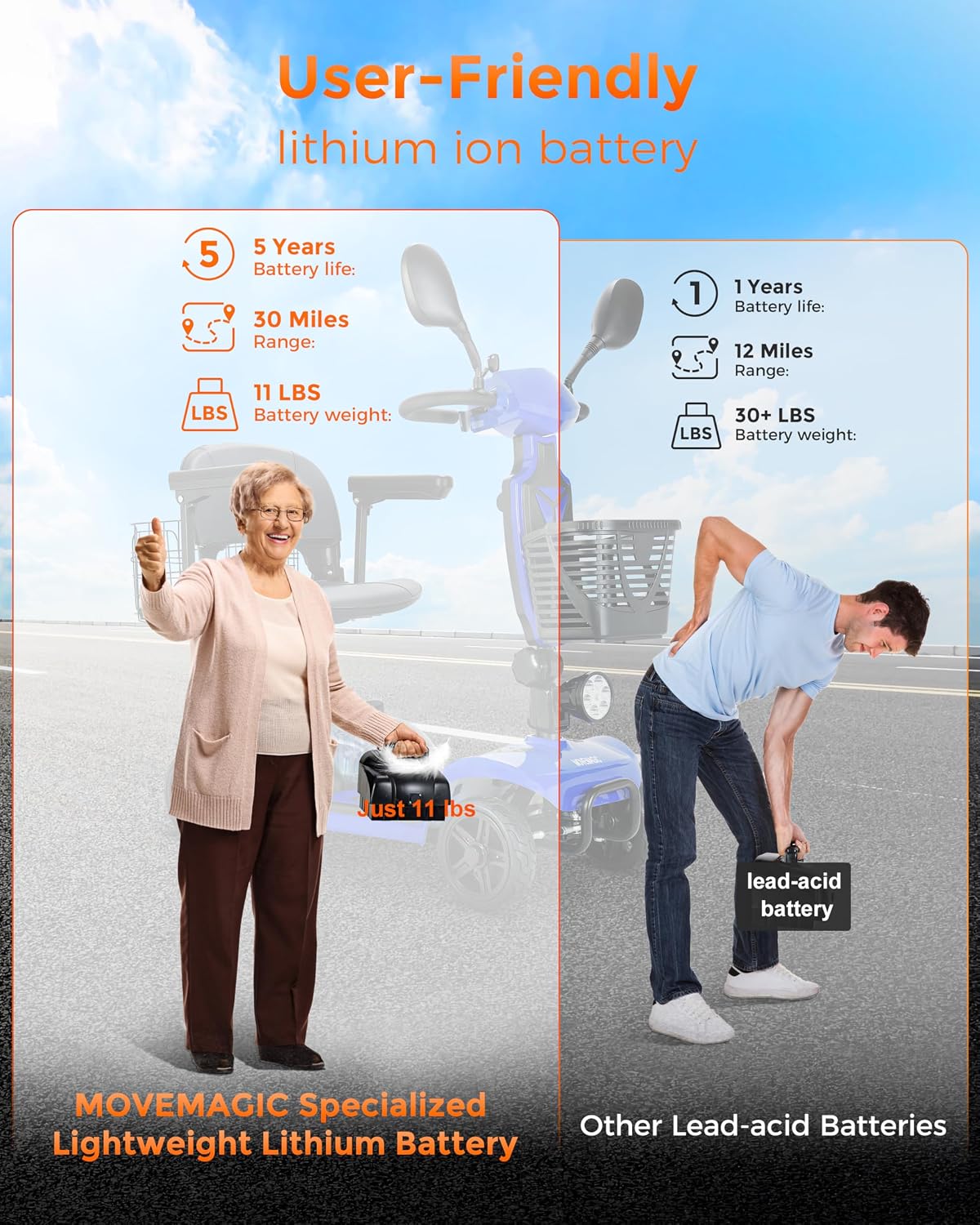
Image: The MOVEMAGIC 4-Wheel Electric Mobility Scooter, showcasing its design and features.
2. Safety Information
Your safety is paramount. Always adhere to the following guidelines:
- Read the Manual: Familiarize yourself with all controls and features before operation.
- Electromagnetic Brake: The scooter is equipped with an electromagnetic brake system. It will automatically engage and bring the scooter to a stop when the joystick is released.
- Anti-Rollover Device: An anti-rollover device is integrated to enhance stability and prevent tipping.
- Weight Capacity: Do not exceed the maximum load capacity of 300 lbs (136 kg).
- Speed Control: Always adjust your speed according to the environment and your comfort level. The maximum speed is 6.2 MPH.
- Terrain: While designed for various terrains, exercise caution on uneven surfaces, inclines, and slippery conditions.
- Visibility: Use the headlight in low-light conditions. Be aware of your surroundings.
- Charging: Only use the provided charger. Do not attempt to charge the battery with unapproved devices.
3. Package Contents
Verify that all items listed below are included in your package:
- MOVEMAGIC 4-Wheel Electric Mobility Scooter (main unit)
- Instruction Manual (x1)
- Rearview Mirrors (x2)
- Installation Tool (x1)
- Charger (x1)
- Anti-tilt Wheels (x2)
- Cell Phone Holder (x1)

Image: A visual representation of all components included in the MOVEMAGIC scooter package.
4. Assembly and Setup
The MOVEMAGIC scooter features a quick-disassembly design for easy transport and storage. Follow these steps for assembly or disassembly:
- Remove the Seat: Lift the seat straight up from its post.
- Fold the Front End: Release the locking mechanism on the tiller (handlebar column) and fold it down towards the base.
- Separate Sections (if applicable): Some models allow for further separation of the front and rear sections for lighter lifting. Consult the specific instructions for your model if this feature is desired.

Image: Visual guide demonstrating the steps for folding and disassembling the scooter for transport.
Battery Installation
The 720Wh lithium-ion battery is designed for easy removal and installation:
- Locate the battery compartment, typically under the seat or rear section.
- Align the battery with the connectors and gently slide it into place until it clicks securely.
- To remove, press the release latch (if present) and pull the battery upwards.

Image: The removable lithium-ion battery pack, shown being inserted or removed from the scooter.
5. Product Features
Motor and Performance
The scooter is powered by a 350W pure copper brushless motor, providing efficient and reliable performance. It can accelerate up to 6.2 MPH and is suitable for various road conditions.

Image: An illustration highlighting the 350W brushless motor system and its components.
Battery System
Equipped with a high-capacity 720Wh (30AH) lithium-ion battery, weighing approximately 11 lbs. This battery offers an impressive range of up to 30 miles on a single charge. Its lightweight and removable design facilitate convenient charging and transport.
Comfort and Adjustability
The scooter features a padded swivel seat with adjustable height and armrests, ensuring a comfortable ride for various users. The armrests can be flipped up for easier access.

Image: The scooter's seat, demonstrating its swivel function, adjustable height, and flip-up armrests.
Storage and Convenience
The scooter includes dual large-capacity shopping baskets, one at the front and one at the rear, for carrying personal items. A USB mobile charging port, rearview mirrors, and a cell phone holder are also integrated for added convenience.
Load Capacity
The robust design supports a maximum load capacity of 300 lbs (136 kg).

Image: The scooter with a visual indicator of its 300 lbs maximum load capacity.
6. Operating Instructions
Control Panel Overview
The control panel on the tiller provides access to all operational functions:

Image: A close-up view of the scooter's control panel, showing the key switch, speed control knob, battery life indicator, safety horn, and headlight switch.
- Key Switch: Insert the key and turn it to the 'ON' position to power on the scooter.
- Speed Control Knob: Adjust the maximum speed using this knob. Turn clockwise to increase speed, counter-clockwise to decrease.
- Battery Life Indicator: Displays the current charge level of the battery.
- Forward/Backward Levers: Press the right lever for forward motion, and the left lever for backward motion. Releasing either lever engages the electromagnetic brake.
- Safety Horn: Press the button to activate the horn.
- Headlight Switch: Turn on/off the front headlight.
Drive Mode Selection
The scooter features a mode switching device, typically located near the rear wheel or motor, to select between drive modes:

Image: A close-up of the mode switching device, indicating 'Mode D' (Drive) and 'Mode N' (Neutral/Freewheel).
- Mode D (Drive): This is the standard operating mode where the motor is engaged, and the scooter is ready to drive.
- Mode N (Neutral/Freewheel): In this mode, the motor is disengaged, allowing the scooter to be manually pushed. Use this mode only when the scooter is powered off or when you need to move it without power. Ensure the scooter is on a flat surface when in Neutral mode to prevent unintended movement.
7. Battery Information
Charging the Battery
To charge the battery, connect the provided charger to the charging port on the battery pack or directly to the scooter if an onboard charging port is available. Plug the charger into a standard wall outlet. The charging indicator on the charger will show the charging status (e.g., red for charging, green for fully charged). A full charge typically takes approximately 6 hours.
Battery Care and Maintenance
- Charge the battery fully before first use.
- Avoid completely draining the battery. Recharge it after each use, even if only partially discharged.
- If storing the scooter for an extended period, charge the battery to approximately 50-70% and recharge it every 1-2 months to maintain battery health.
- Store the battery in a cool, dry place, away from direct sunlight and extreme temperatures.
8. Maintenance
Regular maintenance ensures the longevity and safe operation of your scooter.
- Cleaning: Wipe down the scooter with a damp cloth. Avoid using excessive water or harsh chemicals.
- Tires: The scooter is equipped with solid tires, which do not require inflation. Periodically inspect them for wear or damage.
- Fasteners: Periodically check all nuts, bolts, and fasteners to ensure they are tight. Do not overtighten.
- Electrical Connections: Ensure all electrical connections are secure and free from corrosion.
- Brakes: The electromagnetic brake system is generally maintenance-free. If you notice any issues with braking, contact customer support.
9. Troubleshooting
If you encounter issues with your scooter, refer to the following common problems and solutions:
| Problem | Possible Cause | Solution |
|---|---|---|
| Scooter does not power on. | Battery not charged, battery not properly connected, key not in 'ON' position. | Charge the battery, ensure battery is securely connected, turn key to 'ON'. |
| Scooter moves slowly or has reduced range. | Low battery charge, speed control knob set too low, heavy load, rough terrain. | Recharge battery, adjust speed knob, reduce load, operate on smoother surfaces. |
| Scooter stops unexpectedly. | Joystick released (electromagnetic brake engaged), low battery, loose connection. | Ensure joystick is continuously pressed, check battery level, inspect connections. |
| Unusual noises during operation. | Loose components, foreign object, motor issue. | Inspect for loose parts or obstructions. If noise persists, contact support. |
If the problem persists after attempting these solutions, please contact MOVEMAGIC customer support for assistance.
10. Specifications
| Feature | Specification |
|---|---|
| Overall Vehicle Length | 42.5 inches (108 cm) |
| Overall Vehicle Width | 20.4 inches (52 cm) |
| Maximum Overall Height | 45.2 inches (115 cm) |
| Folded Height | 21.7 inches (55 cm) |
| Seat Width | 18 inches (45.7 cm) |
| Seat Depth | 16 inches (40.6 cm) |
| Seat Height (adjustable) | 19.68 - 23.6 inches (50 - 60 cm) |
| Ground Clearance | 3.14 inches (8 cm) |
| Wheel Diameter | 8 inches (20.3 cm) |
| Frame Weight | 77 lbs (35 kg) |
| Maximum Load Capacity | 300 lbs (136 kg) |
| Motor Power | 350W Brushless |
| Battery Type | 720Wh (30AH) Lithium-ion |
| Battery Weight | 11 lbs (5 kg) |
| Maximum Range | Up to 30 miles (48 km) |
| Maximum Speed | 6.2 MPH (10 km/h) |
| Brake Style | Electromagnetic |
| Charging Time | Approximately 6 hours |
| Frame Material | Aluminum |

Image: Detailed diagram illustrating the key dimensions and frame size of the mobility scooter.
11. Warranty and Support
MOVEMAGIC products are designed for durability and performance. The lithium-ion battery is noted for a lifespan of up to 5 years under proper care. For specific warranty terms and conditions, please refer to the warranty card included with your purchase or contact MOVEMAGIC customer support.
Customer Support
For technical assistance, parts, or any questions regarding your MOVEMAGIC Electric Mobility Scooter, please contact our customer support team. Contact information can typically be found on the product packaging or our official website.