
DWVO MADWV9pJNh
DWVO Height Adjustable Drawing Desk
Model: MADWV9pJNh
Brand: DWVO
1. Introduction
Thank you for choosing the DWVO Height Adjustable Drawing Desk. This manual provides essential information for the safe assembly, operation, and maintenance of your new desk. Please read it thoroughly before use and retain it for future reference.
This versatile desk is designed to adapt to various needs, featuring a tilting tabletop, adjustable height for sitting or standing, an integrated charging station, and mobile wheels for easy relocation.
2. Safety Guidelines
To ensure safe operation and prevent damage, please observe the following:
- Always follow the assembly instructions provided. Ensure the desk is fully assembled and stable before use.
- When adjusting the height, use the provided controls carefully and avoid placing heavy objects on the desk while adjusting.
- Keep the desk away from heat sources and do not place it on uneven surfaces to prevent tipping.
- Always supervise children when they are near the desk.
- Do not overload the desk or shelves beyond their intended capacity.
3. Assembly Instructions
This product requires assembly. Please refer to the separate assembly guide included in your package for detailed, step-by-step instructions. It is recommended that one person performs the assembly. Ensure all parts are present before beginning and use the appropriate tools as specified in the assembly guide.

Figure 3.1: Detailed product dimensions of the DWVO Height Adjustable Drawing Desk, including height range, tabletop size, and storage bag dimensions.
4. Operating Instructions
4.1 Height Adjustment
The desk features a flexible height range of 25.6 inches to 41.34 inches, allowing seamless transitions between sitting and standing positions. To adjust the height, locate the adjustment knobs on the desk legs. Loosen the knobs, carefully raise or lower the tabletop to your desired height, and then securely tighten the knobs to lock the desk in place.

Figure 4.1: Illustration demonstrating the height adjustment feature, allowing transition from sitting to standing.
4.2 Tilting Desktop
The tabletop can be adjusted to 5 different angles, from 0 to 45 degrees, providing an ergonomic surface for drawing, reading, or working. To tilt the tabletop, lift the front edge of the designated section. The integrated stopper will prevent items from sliding off when the top is tilted.
4.3 Integrated Charging Station
The desk includes a built-in charging station with two USB ports and two standard power outlets. Connect the desk's 6.56ft power cord to a wall outlet. You can then charge your devices directly from the desk, ensuring continuous productivity.

Figure 4.2: Close-up view of the integrated charging station with USB ports and AC outlets.
4.4 Mobility and Storage
The desk is equipped with 360-degree swivel wheels for easy movement. To move the desk, unlock the wheels. Once in the desired location, lock the wheels to ensure stability. A side storage bag and a headphone hook are provided for organizing essentials and keeping your workspace tidy.
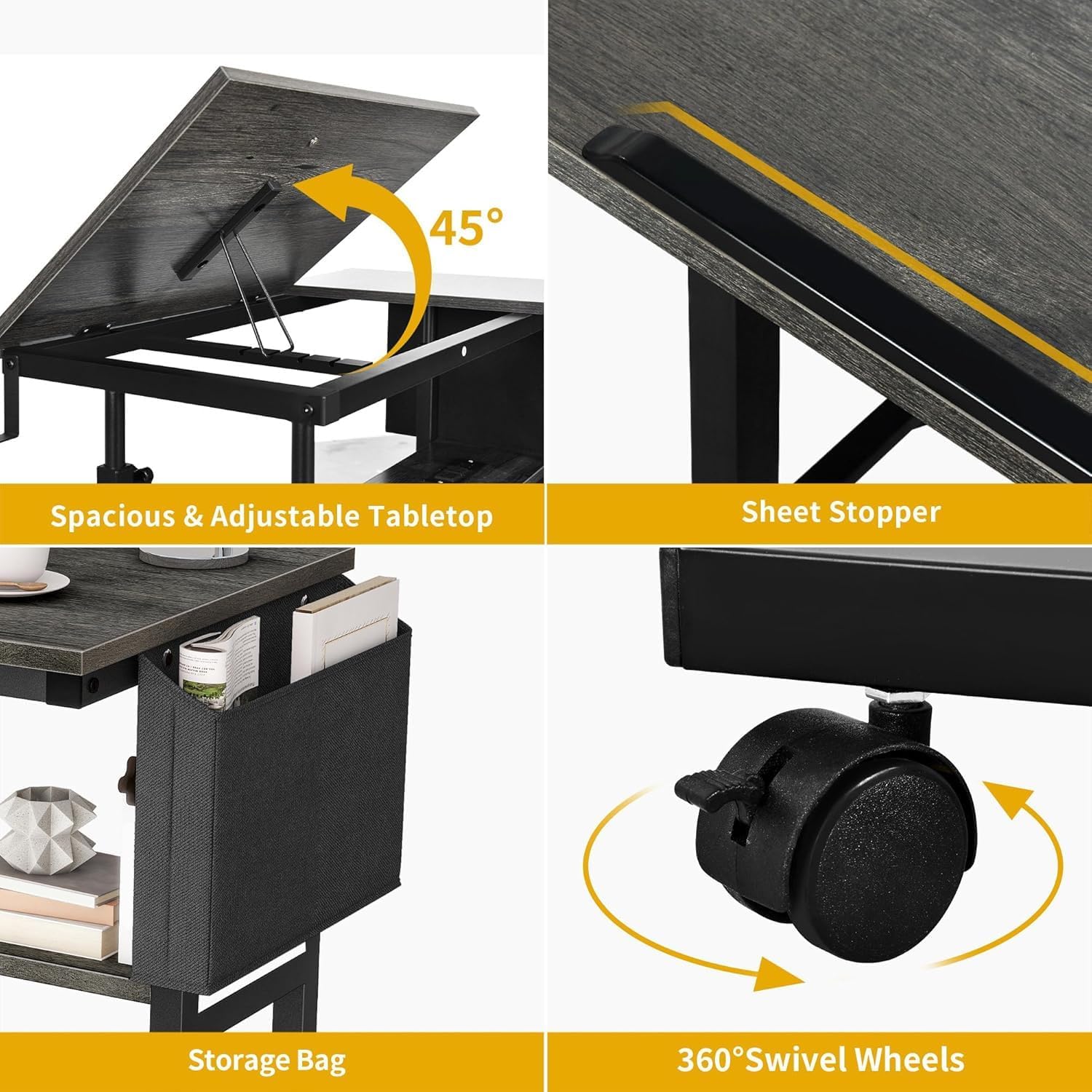
Figure 4.3: Key features including tilting tabletop, sheet stopper, storage bag, and swivel wheels.
Video 4.1: Demonstration of the DWVO Height Adjustable Drawing Desk's versatile features, including height adjustment, tilting tabletop, and portability.
5. Care and Maintenance
To maintain the appearance and functionality of your DWVO desk, follow these guidelines:
- Wipe surfaces with a soft, damp cloth. Avoid harsh chemicals or abrasive cleaners.
- Periodically check all screws and fasteners to ensure they are tight. Retighten if necessary.
- Keep the desk away from direct sunlight and extreme temperature changes to prevent material damage.
- Ensure the power cord is not pinched or damaged.
6. Troubleshooting
If you encounter any issues with your DWVO Height Adjustable Drawing Desk, please refer to the following common solutions:
- Desk is unstable: Ensure all assembly screws are securely tightened. Check that the desk is placed on a flat, even surface. Lock the swivel wheels if they are unlocked.
- Height adjustment is difficult: Loosen the adjustment knobs sufficiently before attempting to change the height. Ensure no heavy objects are obstructing the mechanism.
- Charging station not working: Verify that the desk's main power cord is securely plugged into a functional wall outlet. Check for any visible damage to the cord or outlets.
- Tilting top not holding position: Ensure the tilting mechanism is properly engaged and the stopper is in place to support your items.
If problems persist, please contact DWVO customer support for assistance.
7. Product Specifications
| Feature | Detail |
|---|---|
| Brand | DWVO |
| Model Number | MADWV9pJNh |
| Product Dimensions | 15.74"D x 31.49"W x 25.6"H |
| Item Weight | 23.6 Pounds |
| Color | Grey |
| Style | Height Adjustable |
| Base Material | Metal |
| Top Material Type | Engineered Wood |
| Minimum Height | 25.6 Inches |
| Maximum Height | 41.34 Inches |
| Maximum Tilt Angle | 45 Degrees |
| Number Of Shelves | 1 |
| Special Feature | Portable, Charging Station, Tilting Top |
| Included Components | Headphone Hook, Storage Bag |
| Required Assembly | Yes |
| Recommended Number of People for Assembly | 1 |
| Power Outlets | 2 AC Outlets, 2 USB Ports |
8. Warranty and Support
This DWVO product comes with a limited warranty. For specific details regarding warranty coverage, terms, and conditions, please refer to the warranty information provided with your purchase or contact DWVO customer support.
For technical support, replacement parts, or any inquiries not covered in this manual, please contact DWVO customer service through their official website or the contact information provided in your product packaging.
Ask a question about this manual
Ask about setup, troubleshooting, compatibility, parts, safety, or missing instructions. Manuals+ will review the question and use this page’s manual context to help answer it.