
Introduction
Thank you for purchasing the Qaba 12V Ride on Truck. This manual provides essential information for the safe assembly, operation, and maintenance of your new electric ride-on toy. Please read this manual thoroughly before use and retain it for future reference.
Safety Information
WARNING: To avoid serious injury, adult supervision is required. Never use in roadways, near motor vehicles, on or near steep inclines or steps, swimming pools or other bodies of water. Always wear shoes, and never allow more than one rider.
- This product is intended for children aged 3 to 8 years.
- Maximum weight capacity: 66 lbs (30 kg).
- Ensure the child is securely fastened with the seat belt provided.
- Always operate the vehicle on flat, dry surfaces away from traffic.
- Do not allow children to touch the wheels or motors when the vehicle is in motion.
- Keep hands, hair, and clothing away from moving parts.
- Only use the charger and battery supplied by the manufacturer.
- Regularly inspect the vehicle for damage, loose parts, or wear.
Package Contents
Please check that all components are present before beginning assembly:
- Qaba 12V Ride on Truck Body
- Wheels (4)
- Steering Wheel
- Seat
- Seat Belt
- Rearview Mirrors (2)
- Windshield
- Charger
- Remote Control
- Instruction Manual
- Assembly Hardware (screws, washers, nuts)
Setup and Assembly
Assembly requires adult supervision and approximately 30-60 minutes. Please follow these steps carefully.
- Attach the Wheels: Secure each wheel to its axle using the provided washers and nuts. Ensure they are firmly attached but can still rotate freely.
- Install the Steering Wheel: Connect the steering column to the vehicle's body. Attach the steering wheel, ensuring the electrical connectors for the horn and music (if applicable) are properly plugged in.
- Mount the Seat: Place the seat onto the designated area on the vehicle body and secure it with the screws. Ensure the seat belt is accessible and properly installed.
- Attach Accessories: Install the windshield, rearview mirrors, and any other decorative elements as per the diagrams in the included printed manual.
- Connect Battery: Locate the battery compartment, usually under the seat or hood. Connect the battery terminals (red to red, black to black). Ensure all connections are secure.
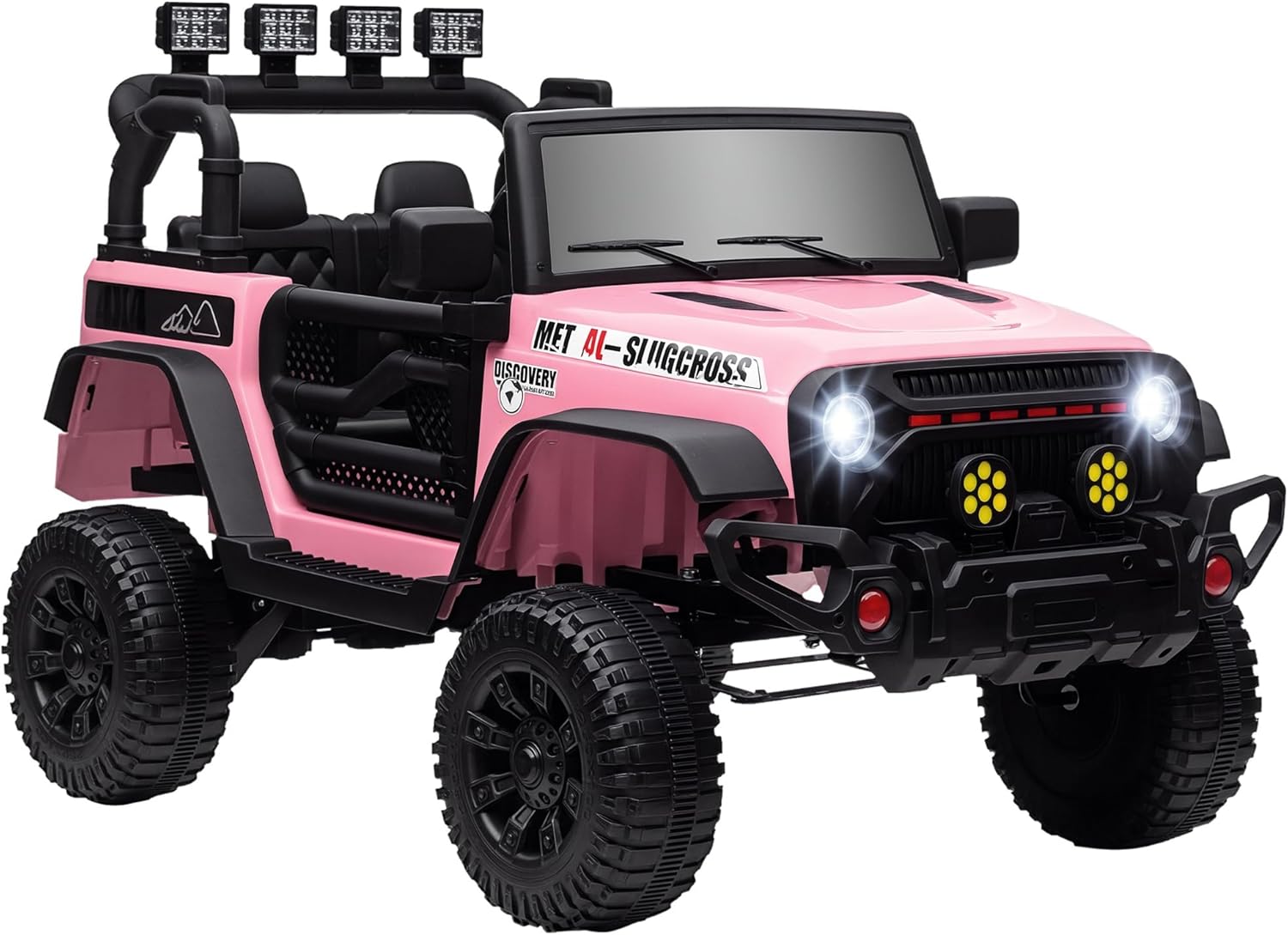
Image: Fully assembled Qaba 12V Ride on Truck in pink, ready for use.
Operating Instructions
Familiarize yourself with the controls before allowing a child to operate the vehicle.
Vehicle Controls

Image: Detailed view of the vehicle's control panel, including buttons for horn, music, start/stop, speed selection, and forward/reverse.
- Start/Stop Button: Press to turn the vehicle on or off.
- Forward/Reverse Switch: Select desired driving direction.
- Speed Switch: Adjust between low and high speeds (1.6 mph, 1.9 mph, 2.2 mph). The vehicle features a soft start function for smooth acceleration.
- Horn Button: Activates the horn sound.
- Music/Media Controls: Play pre-loaded music or connect an external device via USB or AUX input.
- LED Lights: Headlights illuminate when the vehicle is on.
Remote Control Operation

Image: The 2.4G parental remote control, illustrating buttons for speed selection, forward/reverse, left/right turning, and emergency brake.
The 2.4G remote control allows parents to override child operation for safety. Ensure the remote is paired with the vehicle according to the instructions in the printed manual.
- Forward/Reverse Buttons: Control the vehicle's direction.
- Left/Right Turning Buttons: Steer the vehicle.
- Speed Select Button: Adjust the vehicle's speed (low, medium, high).
- Brake Button: Activates an emergency stop.

Image: A child operating the ride-on truck, demonstrating the three available speed settings.
Charging the Battery
The vehicle is powered by a 12V rechargeable battery. Proper charging is crucial for battery longevity.
- Ensure the vehicle is turned off before charging.
- Locate the charging port, typically near the battery compartment or on the dashboard.
- Plug the charger into a standard wall outlet, then connect the charger to the vehicle's charging port.
- The charging indicator light on the charger will show the charging status (e.g., red for charging, green for fully charged).
- Initial charge time should be 8-12 hours. Subsequent charges should be 8-12 hours, but no more than 18 hours.
- Do not overcharge the battery, as this can shorten its lifespan.
Maintenance
Regular maintenance ensures the safe and optimal performance of your ride-on truck.
- Cleaning: Wipe the vehicle with a soft, damp cloth. Do not use abrasive cleaners or solvents. Avoid spraying water directly onto electrical components.
- Storage: Store the vehicle in a dry, cool place away from direct sunlight and moisture. If storing for extended periods, charge the battery fully every 30 days to prevent deep discharge.
- Battery Care: Always disconnect the battery if the vehicle will not be used for a long time. Do not store the battery in extreme temperatures.
- Inspection: Periodically check all screws, nuts, and connections to ensure they are tight. Inspect wheels, steering, and electrical wiring for any signs of wear or damage.
Troubleshooting
If you encounter issues, refer to this section for common problems and solutions.
| Problem | Possible Cause | Solution |
|---|---|---|
| Vehicle does not move | Battery not charged Battery connection loose Overload protection activated | Charge the battery Check and secure battery terminals Turn off, wait a few minutes, then restart |
| Short running time | Battery not fully charged Old battery Overloaded vehicle | Charge battery for 8-12 hours Replace battery Ensure weight limit is not exceeded |
| Vehicle runs slowly | Low battery charge Operating on rough terrain Overloaded vehicle | Charge the battery Move to a smoother surface Reduce load |
| Remote control not working | Remote batteries dead Remote not paired | Replace remote batteries Refer to printed manual for pairing instructions |
| No sound/lights | Loose wire connection Component malfunction | Check all visible wire connections Contact customer support |
Specifications

Image: Dimensional drawing of the Qaba 12V Ride on Truck, indicating overall length, width, and height.
- Model Number: 370-329V80PK
- Overall Dimensions (L x W x H): 39.4" x 24.8" x 25.6"
- Item Weight: 31 lbs
- Weight Capacity: 66 lbs (30 kg)
- Recommended Age: 3 - 8 years
- Battery: 12V (included)
- Motors: 2
- Speed Options: 1.6 mph, 1.9 mph, 2.2 mph
- Remote Control: 2.4G (Remote Distance: 20m/65.6ft)
- Features: Music, Horn, LED Lights, 4-Wheel Suspension, Soft Start
- Certifications: ASTM F963, CPSIA
Warranty and Support
For warranty information or technical support, please refer to the contact details provided in your purchase documentation or visit the official Qaba website. Keep your proof of purchase for any warranty claims.


