
1. Introduction
This manual provides instructions for the installation, operation, and maintenance of the Fdit K1H16A Smart Thermostat. This device is designed for controlling electric heating systems, including floor heating and radiators, utilizing a microcomputer for precise temperature management.
Key Features:
- Wide Temperature Range: Measurement accuracy of ±1℃ within a 0-50℃ range, allowing a set temperature range of 5-60℃.
- Microcomputer Control: Utilizes a single-chip microcomputer for enhanced stability and anti-interference.
- Clear LCD Display: Provides clear data display for easy reading and operation.
- Accurate Temperature Detection: Equipped with a high-precision sensor for reliable temperature monitoring.
2. Safety Information
Please read all safety instructions before installation and operation. Failure to follow these instructions may result in electric shock, fire, or damage to the product.
- Installation must be performed by a qualified electrician.
- Disconnect power at the circuit breaker before installing or servicing the thermostat.
- Ensure wiring complies with local electrical codes.
- Do not install in locations with excessive vibration, direct sunlight, or extreme temperature fluctuations.
- This thermostat is designed for AC 90V-240V, 16A electric heating systems. Verify your system's voltage and current requirements.
3. Package Contents
Verify that all items are present in the package:
- Fdit K1H16A Smart Thermostat
- External NTC Temperature Sensor Cable
- Mounting Screws (2)
- User Manual (this document)

Image: Contents of the Fdit K1H16A Smart Thermostat package, including the thermostat unit, the external NTC temperature sensor cable, and two mounting screws.
4. Installation
4.1 Mounting the Thermostat
- Choose a suitable location on an interior wall, away from direct sunlight, drafts, or heat sources.
- Ensure the mounting type is surface mount.
- Secure the thermostat base to the wall using the provided mounting screws.
4.2 Wiring Instructions
WARNING: Disconnect power before wiring.
Refer to the wiring diagram on the back of the thermostat unit for correct connections. The thermostat supports AC 90V-240V, 16A electric heating systems.
- Connect the Live (L) and Neutral (N) power supply wires to terminals 1 and 2 respectively.
- Connect the heating load wires (L1 and N1) to terminals 3 and 4 respectively.
- Connect the external NTC temperature sensor wires to terminals 5 and 6.
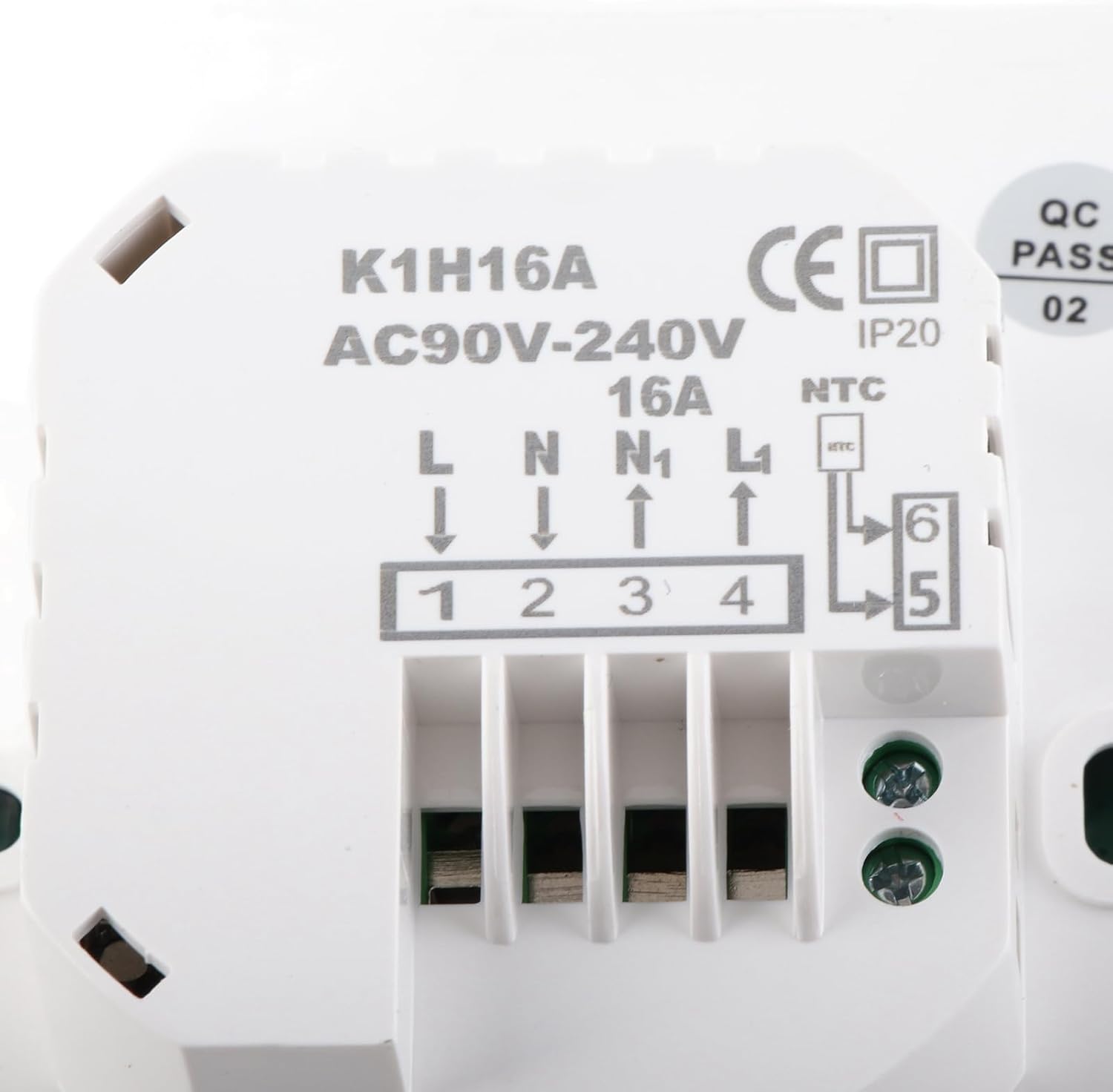
Image: Detailed view of the thermostat's rear, illustrating the wiring terminals (1-6) and the corresponding labels for Live, Neutral, Load, and NTC sensor connections. The model number K1H16A and voltage range AC90V-240V 16A are visible.

Image: The external NTC temperature sensor cable, typically used for floor temperature sensing in electric floor heating systems.
5. Operation
5.1 LCD Display Overview
The thermostat features a clear LCD display that shows the current temperature, set temperature, operating mode, and other relevant information. The display has a backlight for visibility in various lighting conditions.

Image: The thermostat installed on a wall, showing its LCD display with current and set temperatures.
5.2 Button Functions
The thermostat is controlled via push buttons located below the LCD display:

Image: Close-up view of the thermostat's control panel, highlighting the power, ECO, time, and up/down arrow buttons.
- Power Button (⏻): Turns the thermostat ON or OFF.
- ECO Button: Activates or deactivates economy mode, if available. Refer to advanced settings for configuration.
- Time Button (⏱): Used for setting the clock and accessing programmable schedules.
- Up Arrow (▲): Increases the set temperature or navigates menu options.
- Down Arrow (▼): Decreases the set temperature or navigates menu options.
5.3 Setting Temperature
In normal operating mode, use the Up (▲) and Down (▼) arrow buttons to adjust the desired temperature. The new setting will be displayed and saved automatically.
5.4 Programmable Features
The thermostat supports programmable schedules. Press the Time (⏱) button to enter programming mode. Detailed instructions for setting daily or weekly schedules are typically found in the advanced settings menu, which can be accessed by specific button combinations (e.g., holding the Time button for several seconds).
5.5 App Control
This thermostat supports control via a mobile application. Please refer to the specific app's instructions for pairing and remote operation. App availability and features may vary.
6. Maintenance
The Fdit K1H16A Smart Thermostat requires minimal maintenance.
- Cleaning: Wipe the thermostat's surface with a soft, damp cloth. Do not use abrasive cleaners or solvents.
- Inspection: Periodically check the wiring connections for tightness and ensure the thermostat is securely mounted.
7. Troubleshooting
If you encounter issues with your thermostat, refer to the following common troubleshooting steps:
| Problem | Possible Cause | Solution |
|---|---|---|
| Thermostat display is blank | No power supply | Check circuit breaker. Ensure wiring connections are secure. |
| Heating system not responding | Incorrect wiring; Thermostat in OFF mode; Heating system fault | Verify wiring connections. Ensure thermostat is ON and set to a temperature above ambient. Check heating system for faults. |
| Inaccurate temperature reading | Sensor issue; Thermostat location | Check external sensor connection. Ensure thermostat is not exposed to drafts or direct heat sources. |
If the problem persists, contact customer support.
8. Specifications
| Feature | Specification |
|---|---|
| Brand | Fdit |
| Model Name | K1H16A |
| Controller Type | Push Button |
| Special Features | Programmable, Temperature Display |
| Color | White |
| Temperature Control Type | Digital |
| Power Source | Corded Electric |
| Operating Voltage | AC 90V-240V |
| Max Current Load | 16A |
| Item Weight | 188 Grams (6.6 ounces) |
| Material | Acrylonitrile Butadiene Styrene (ABS) |
| Display Type | LCD |
| Control Method | Button Control, App |
| Mounting Type | Surface Mount |
| Backlight | Yes |
| Measurement Accuracy | ±1℃ |
| Measurement Temperature Range | 0-50℃ |
| Set Temperature Range | 5-60℃ |
| Package Dimensions | 4.37 x 3.9 x 2.72 inches |
9. Warranty and Support
For warranty information or technical support, please refer to the retailer's policy or contact Fdit customer service directly. Keep your purchase receipt for warranty claims.
Contact information can typically be found on the product packaging or the official Fdit website.