
ACiQ ACiQ-24-AC / ACIQ-24-ACL
ACiQ 16.5 SEER2 Inverter Air Conditioner & Evaporator Coil System User Manual
Model: ACiQ-24-AC / ACIQ-24-ACL | Brand: ACiQ
1. Introduction
This manual provides essential information for the safe and efficient operation, installation, and maintenance of your ACiQ High Efficiency 16.5 SEER2 24,000 Cooling BTU Inverter Air Conditioner and Multi-Positional Cased Evaporator Coil System. Please read this manual thoroughly before installation or operation and keep it for future reference.
The ACiQ system is designed to provide optimal cooling performance with advanced inverter technology, ensuring consistent temperature control and energy efficiency. This system includes an outdoor inverter unit, a multi-positional cased evaporator coil, and a smart thermostat for convenient control.
2. Important Safety Information
WARNING: Improper installation, adjustment, alteration, service, or maintenance can cause property damage, injury, or death. Refer to this manual. For assistance or additional information, consult a qualified installer or service agency.
- Always disconnect power before servicing the unit.
- Ensure proper grounding to prevent electrical shock.
- Installation and service must be performed by qualified personnel only.
- Do not block airflow to the outdoor or indoor units.
- Keep children away from the unit during operation and maintenance.
- Use only manufacturer-approved replacement parts.
3. Package Contents
Verify that all components are present and undamaged upon receipt:
- ACiQ Inverter Outdoor Unit
- ACiQ Multi-Positional Cased Evaporator Coil
- Cielo Smart Thermostat
- Installation Manuals and User Guides

Figure 3.1: Overview of the ACiQ Inverter Air Conditioner and Evaporator Coil System, including the outdoor unit, cased evaporator coil, and smart thermostat.
4. Setup and Installation
Installation of this system requires specialized knowledge and tools. It is strongly recommended that installation be performed by a certified HVAC technician to ensure proper function, safety, and warranty validity.
4.1 Unit Placement and Dimensions
Ensure adequate clearance around both the outdoor and indoor units for proper airflow and maintenance access. Refer to the following dimensions for planning:

Figure 4.1: Detailed measurements for the ACiQ outdoor unit and evaporator coil, indicating dimensions for installation planning.
4.2 Evaporator Coil Installation
The cased multi-positional evaporator coil is designed for versatile installation in various configurations. It is specifically designed for use with gas furnaces or modular blowers and cannot be substituted for a one-piece air handler.

Figure 4.2: Specifications for the ACiQ evaporator coil, including air flow, pressure, and physical dimensions.
4.3 Electrical Connections
The system requires a 208-230 voltage, 1-Phase, 60Hz electrical supply. All electrical wiring must comply with local and national electrical codes. Ensure proper circuit breaker sizing and wiring gauge for the unit's power requirements.
4.4 Refrigerant Piping
This system uses R 410A refrigerant. Proper evacuation and charging procedures are critical for system performance and longevity. This process must be performed by a licensed HVAC technician.
5. Operating Instructions
Your ACiQ system is controlled by the included Cielo Smart Thermostat, designed for user convenience and energy efficiency.
5.1 Cielo Smart Thermostat Overview
The Cielo Smart Thermostat allows you to manage your cooling and heating settings efficiently. It ensures your system runs only when needed, helping to reduce energy consumption without compromising comfort.
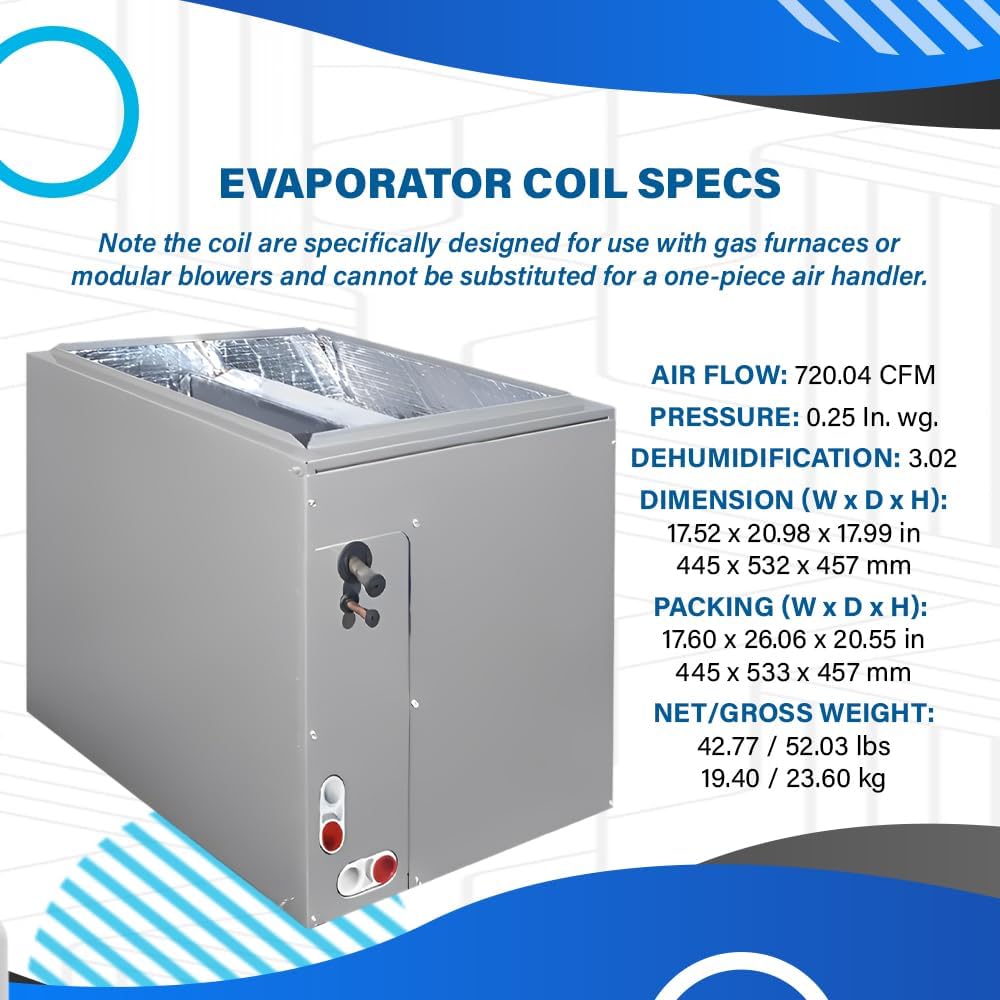
Figure 5.1: The Cielo Smart Thermostat, illustrating its sleek design and integration with a mobile application for remote control.
5.2 Thermostat Features and Controls
The thermostat offers various features for precise climate control and smart home integration:
- Mode Selection: Switch between cooling, heating, fan, and auto modes.
- Temperature Setting: Adjust desired indoor temperature.
- Humidity Display: Monitor indoor humidity levels.
- Scheduling: Program daily or weekly schedules for automated comfort and energy savings.
- Smart Home Integration: Compatible with Alexa, Hey Google, Add to Siri, SmartThings, IFTTT, and Cielo Linked for voice control and smart home automation.
- Remote Control: Manage settings via the Cielo mobile application from anywhere.

Figure 5.2: An illustrative diagram detailing the various features and control points of the Cielo Smart Thermostat, including its compatibility with popular smart home platforms.
6. Maintenance
Regular maintenance ensures the longevity and efficiency of your ACiQ system. Always disconnect power to the unit before performing any maintenance.
6.1 Air Filter Replacement/Cleaning
Check and clean or replace the air filter in your furnace or air handler every 1-3 months, or more frequently if you have pets or allergies. A dirty filter restricts airflow and reduces efficiency.
6.2 Outdoor Unit Coil Cleaning
Periodically inspect the outdoor unit's condenser coil for dirt, leaves, and debris. Gently clean the coil with a soft brush or hose. Avoid bending the fins. Ensure the area around the outdoor unit is clear of obstructions.
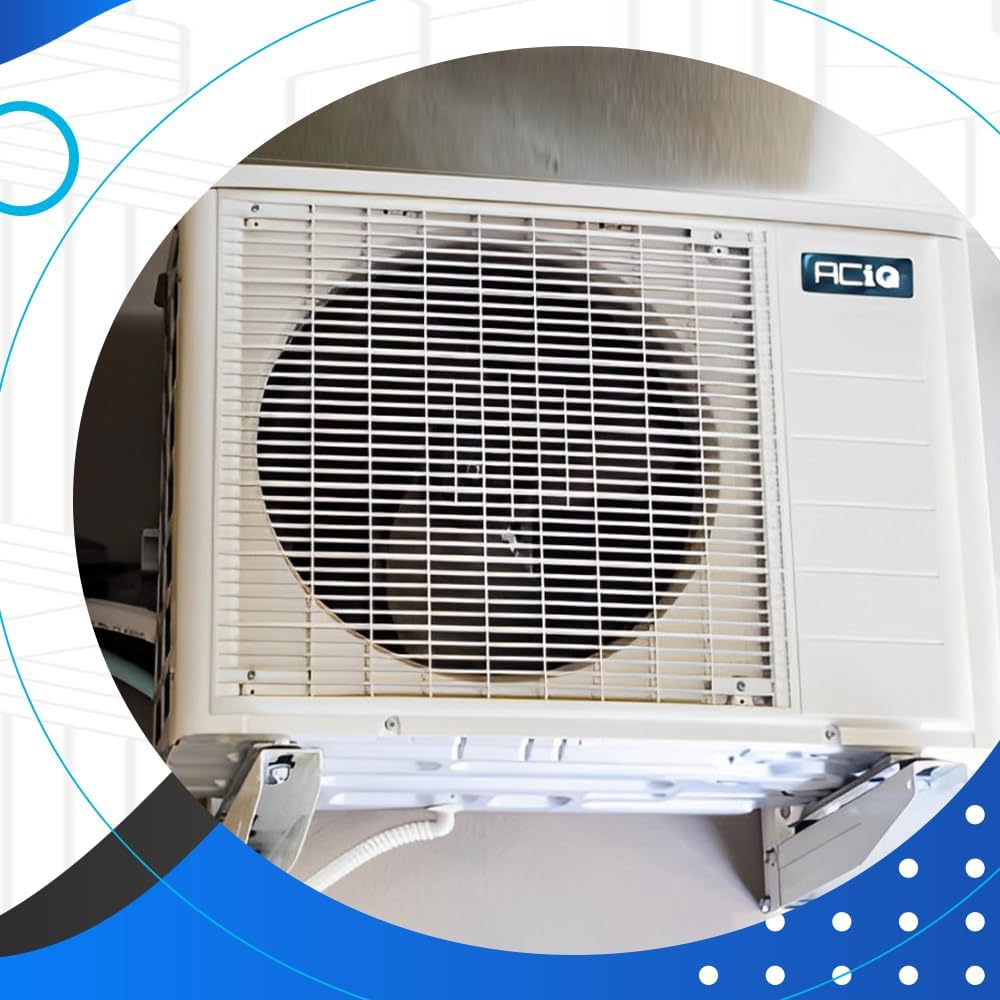
Figure 6.1: A close-up view of the ACiQ outdoor unit, highlighting the fan and condenser coil, which require periodic cleaning for optimal performance.
6.3 Professional Servicing
It is recommended to have a qualified HVAC technician perform annual maintenance on your system. This includes checking refrigerant levels, electrical connections, and overall system performance.
7. Troubleshooting
Before contacting customer support, review the following common issues and their solutions:
| Problem | Possible Cause | Solution |
|---|---|---|
| System not cooling/heating | Thermostat settings incorrect, dirty air filter, tripped circuit breaker, outdoor unit obstructed. | Check thermostat mode and temperature settings. Clean/replace air filter. Reset circuit breaker. Clear obstructions around outdoor unit. |
| Weak airflow | Dirty air filter, blocked return air vents, duct leaks. | Clean/replace air filter. Ensure vents are open and unobstructed. Inspect ducts for leaks (professional service recommended). |
| Unusual noises | Loose parts, fan motor issues, refrigerant issues. | Turn off unit and inspect for loose panels or debris. If noise persists, contact a qualified technician. |
| System cycles on and off frequently | Oversized unit, low refrigerant, dirty coils. | Ensure proper sizing during installation. Check for refrigerant leaks and clean coils. Contact a technician for diagnosis. |
| Leak detection alert | Refrigerant leak. | The system is equipped with leak detection. If an alert occurs, immediately contact a qualified HVAC technician for inspection and repair. |
8. Specifications
Key technical specifications for the ACiQ 16.5 SEER2 24,000 BTU Inverter Air Conditioner and Evaporator Coil System:
| Feature | Detail |
|---|---|
| Brand | ACiQ |
| Model Name | ACiQ-24-AC / ACIQ-24-ACL |
| Cooling Capacity | 24,000 BTU/h (2 Tons) |
| SEER2 Rating | Up to 16.5 |
| Power Source | Corded Electric |
| Voltage | 208-230V, 1-Phase, 60Hz |
| Refrigerant Type | R 410A |
| Outdoor Unit Dimensions (W x D x H) | 35.04" x 13.46" x 26.5" |
| Evaporator Coil Dimensions (W x D x H) | 17.52" x 20.98" x 17.99" |
| Control Method | Remote Control (Cielo Smart Thermostat) |

Figure 8.1: AHRI Certification and EnergyGuide label, confirming the system's performance ratings and energy efficiency.
9. Warranty and Support
9.1 Warranty Conditions
The ACiQ system comes with a 10-year parts warranty when installed by a qualified technician and registered online with the manufacturer at no additional charge. Please retain your proof of purchase and installation records for warranty claims.
For detailed warranty terms and conditions, please refer to the warranty documentation included with your product or visit the official ACiQ website.
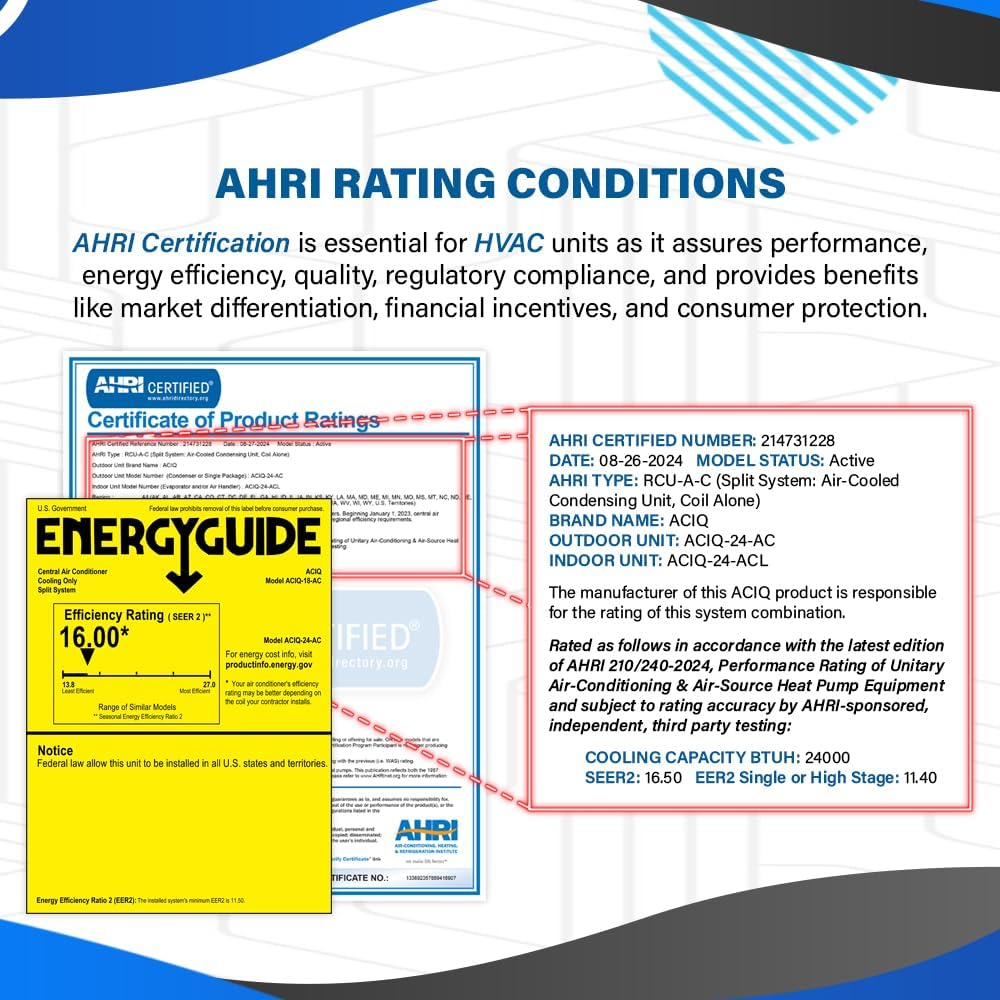
Figure 9.1: Expert packaging of ACiQ units in a warehouse, ensuring product integrity during transit.

Figure 9.2: Interior view of a well-maintained ACiQ warehouse, demonstrating careful handling and storage of products.
9.2 Customer Support
For technical assistance, troubleshooting beyond this manual, or warranty inquiries, please contact ACiQ customer support. Contact information can typically be found on the manufacturer's website or on the product packaging.
When contacting support, please have your model number (ACiQ-24-AC / ACIQ-24-ACL) and purchase date readily available.
10. Additional Resources
For further information, product updates, or to explore other ACiQ products, please visit the official ACiQ website:
Related documentsACiQ-24-AC / ACIQ-24-ACL


Ask a question about this manual
Ask about setup, troubleshooting, compatibility, parts, safety, or missing instructions. Manuals+ will review the question and use this page’s manual context to help answer it.