
1. Overview
This manual provides instructions for the Slevoo PPC Replacement Filter Cartridge, designed for use with the Slevoo RO-100R Reverse Osmosis Water Filter Countertop system. This filter is crucial for maintaining the performance and water quality of your RO system.
2. Setup & Installation (Filter Replacement)
Follow these steps to replace the filter cartridge in your Slevoo RO-100R Reverse Osmosis Water Filter Countertop system. Always prioritize safety by turning off the power and unplugging the unit before beginning. Ensure the water tank is empty.

Image: Quick Steps to Replace Your Filter (Steps 1-4). This image illustrates the initial stages of filter replacement, showing the removal of the tank cover, tank, and top cover, followed by the removal of the expired filter, insertion of the new filter, and reassembly of the covers.
- Step 1: Remove Tank Cover, Tank, and Top Cover. Carefully lift and remove the outer tank cover, then the water tank, and finally the top cover of the main unit to access the filter compartments.
- Step 2: Remove the Expired Filter. Identify the PPC filter. Gently twist and pull the expired filter upwards to remove it from its housing.
- Step 3: Insert the New Filter. Align the new PPC filter cartridge with the corresponding slot. Push it down firmly and twist slightly until it is securely seated.
- Step 4: Put Top Cover, Tank, and Tank Cover Back. Reassemble the unit by placing the top cover back, then the water tank, and finally the outer tank cover.

Image: Quick Steps to Replace Your Filter (Steps 5-6). This image shows the process of resetting the filter life indicator on the control panel and initiating the flushing cycle for the newly installed filter.
- Step 5: Enter Filter Reset Mode. After replacing the filter, plug in the unit and turn on the power. On the control panel, locate and press the 'Reset' button to enter the filter reset mode.
- Step 6: Flush the New Filter. Initiate the flushing process as indicated on the control panel. This flushes out any carbon fines and prepares the filter for use.
Important: The water is not drinkable during the flushing process. Discard the flushed water.
3. Operation (Filtration Process)
The Slevoo PPC Replacement Filter Cartridge works in conjunction with the RO filter to provide multi-stage filtration, effectively removing a wide range of contaminants from your tap water. The system is designed for high efficiency and water purification.

Image: 5-Stage Filtration Process. This diagram illustrates the layered filtration stages, including PP, CTO, RO, PCF, and Mineral Filter, detailing what each stage removes or adds to the water.
Filtration Stages:
- 1. PP (Polypropylene) Filter: Removes larger particles such as plastics, rust, sand, and dirt.
- 2. CTO (Carbon Block) Filter: Absorbs chlorine, odors, and chloramine.
- 3. RO (Reverse Osmosis) Membrane: Removes bacteria, chemicals (PFAS/PFOA/PFOS), and other dissolved solids.
- 4. PCF (Post Carbon Filter): Improves the taste of the filtered water.
- 5. Mineral Filter: Restores beneficial minerals such as Magnesium (Mg), Calcium (Ca), Sodium (Na), Potassium (K), Zinc (Zn), and Strontium (Sr).
The system achieves a high percentage of contaminant removal and significant TDS (Total Dissolved Solids) reduction. It is also BPA-Free. For optimal performance, ensure the feed water type is tap/well water with drinking water standards (TDS < 500ppm).
4. Maintenance
Regular replacement of the PPC filter cartridge is essential for the continued high performance of your Slevoo RO-100R system. The PPC filter has an estimated lifetime of 12 months, depending on usage and water quality.

Image: True One-Touch Replacement. This image highlights the user-friendly design of the filter system, allowing for easy, tool-free filter replacement with a simple twist and pull motion.
Filter Life Monitoring:
Your Slevoo RO-100R system features a filter life indicator on its display panel. Monitor this indicator to determine when a filter replacement is due. The system will typically alert you when the filter is nearing the end of its service life.
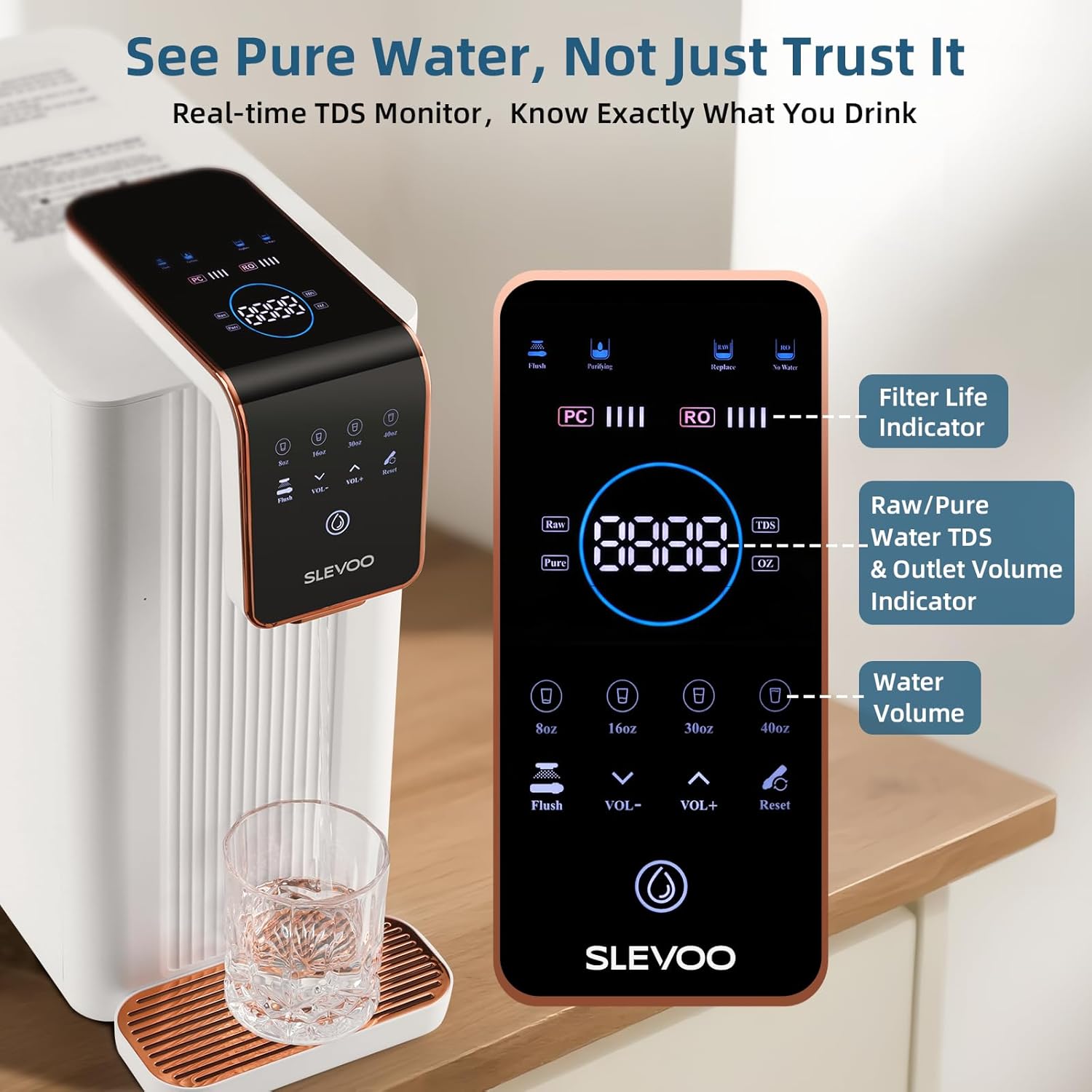
Image: Real-time TDS Monitor and Filter Life Indicator. This image displays the control panel of the Slevoo RO-100R system, showing the digital display for TDS levels, filter life indicators for both PPC and RO filters, and water volume selection options.
After replacing the filter, always remember to reset the filter life indicator on the control panel as described in the Setup & Installation section (Step 5).
5. Troubleshooting
This section addresses common issues you might encounter with your Slevoo PPC Replacement Filter Cartridge or the RO-100R system.
Common Issues:
- Reduced Water Flow: If water flow decreases significantly before the recommended filter change interval, it might indicate a clogged filter due to unusually high sediment in the source water. Ensure the feed water meets the specified quality (TDS < 500ppm).
- Unusual Taste or Odor: If you notice an unusual taste or odor in the filtered water, it may indicate that the filter needs replacement, or the flushing process was insufficient after installation. Ensure the filter is properly seated and flushed.
- Filter Life Indicator Not Resetting: If the filter life indicator does not reset after replacement, ensure you have followed Step 5 of the installation instructions correctly. Refer to your main RO-100R system manual for specific button press sequences if needed.
- Leaking: If there is any leaking after filter replacement, ensure the filter cartridge is fully inserted and twisted securely into its housing. Check that all covers are properly reassembled.
For issues not covered here, please refer to the complete Slevoo RO-100R Reverse Osmosis Water Filter Countertop system manual or contact Slevoo customer support.
6. Specifications
| Feature | Detail |
|---|---|
| Product Name | PPC Replacement Filter Cartridge |
| Brand | Slevoo |
| Model Number | SJ-RO100R |
| Compatible System | Slevoo RO-100R Reverse Osmosis Water Filter Countertop |
| Material | Carbon Fiber (PPC filter contains PP and Carbon stages) |
| Product Dimensions | 2.4"D x 2.4"W x 10.6"H (6.1 cm D x 6.1 cm W x 26.9 cm H) |
| Item Weight | 1.31 Pounds (0.59 kg) |
| Unit Count | 1.0 Count |
| Estimated Filter Lifetime | 12 Months (varies with usage and water quality) |
7. Warranty and Support
Specific warranty information for the Slevoo PPC Replacement Filter Cartridge is typically provided with the main Slevoo RO-100R Reverse Osmosis Water Filter Countertop system or can be found on the manufacturer's official website. Please refer to your original product documentation for warranty details.
For technical support, replacement parts, or further assistance, please contact Slevoo customer service through their official channels. Contact information is usually available on the product packaging or the manufacturer's website.