
1. Product Overview
The CAPOXO Wired 1080p Full HD Video Recording Camera is designed for discreet surveillance and recording. This device captures high-definition video with audio, features motion detection, and includes a night lamp for low-light conditions. It operates without Wi-Fi, storing recordings directly onto a memory card for easy access.
This manual provides detailed instructions for setting up, operating, and maintaining your CAPOXO camera to ensure optimal performance.
2. Package Contents
Verify that all items are present in your package:
- CAPOXO Wired 1080p Full HD Video Recording Camera
- USB Cable
- User Manual
Note: A Micro SD card (16GB, 32GB, or 64GB Class 10 recommended) and a 5V/1A charger are not included and must be purchased separately.
3. Product Features
- Full HD 1080p Video Recording: Captures clear, high-definition video footage.
- Audio Recording: Records audio along with video.
- Motion Detection: Automatically triggers video recording when motion is detected.
- Night Lamp Capability: Equipped with white LED lights for recording in low-light or dark conditions.
- Continuous Recording: Records directly to a Micro SD card (not included).
- Easy Setup: Wired operation, no complex Wi-Fi configuration required.
- Portable Design: Compact and easy to carry or clip.
- Rotatable Lens: 90° rotatable lens for wider viewing angles.

Image: The CAPOXO camera featuring its 90-degree rotatable lens, allowing for flexible recording angles.

Image: Close-up view of the CAPOXO camera's rotatable lens mechanism, highlighting its design for wider field of view.
4. Setup Guide
4.1 Charging the Camera
- Before first use, charge the camera for at least 1 hour.
- Connect the camera to a 5V/1A charger (not included) using the provided USB cable.
- The charging indicator light will illuminate during charging and turn off when fully charged.
- A full charge provides up to 3 hours of continuous operation. The camera can also be used while charging for extended recording.
4.2 Inserting the Micro SD Card
- Ensure the camera is powered off.
- Locate the Micro SD card slot on the side of the camera.
- Gently insert a Class 10 Micro SD card (16GB, 32GB, or 64GB) into the slot until it clicks into place.
- To remove, gently push the card in again until it springs out.

Image: Diagram showing the CAPOXO camera's various components, including the Micro SD card slot, ON/OFF switch, and recording buttons.
5. Operating Instructions
5.1 Powering On/Off
- To power on, slide the ON/OFF switch to the "ON" position.
- To power off, slide the ON/OFF switch to the "OFF" position.

Image: A hand demonstrating how to operate the CAPOXO camera, highlighting the easy-to-use ON/OFF switch for one-button recording.
5.2 Video Recording
- Ensure the camera is powered on and a Micro SD card is inserted.
- Slide the "SAVE -> VIDEO" switch to the "VIDEO" position to start recording.
- The indicator light will flash to confirm recording is in progress.
- To stop recording, slide the "SAVE -> VIDEO" switch back to the "SAVE" position. The video file will be saved to the Micro SD card.
5.3 Motion Detection Recording
The camera automatically records 1080p HD videos when motion is detected. This feature is active when the camera is powered on and in recording mode.
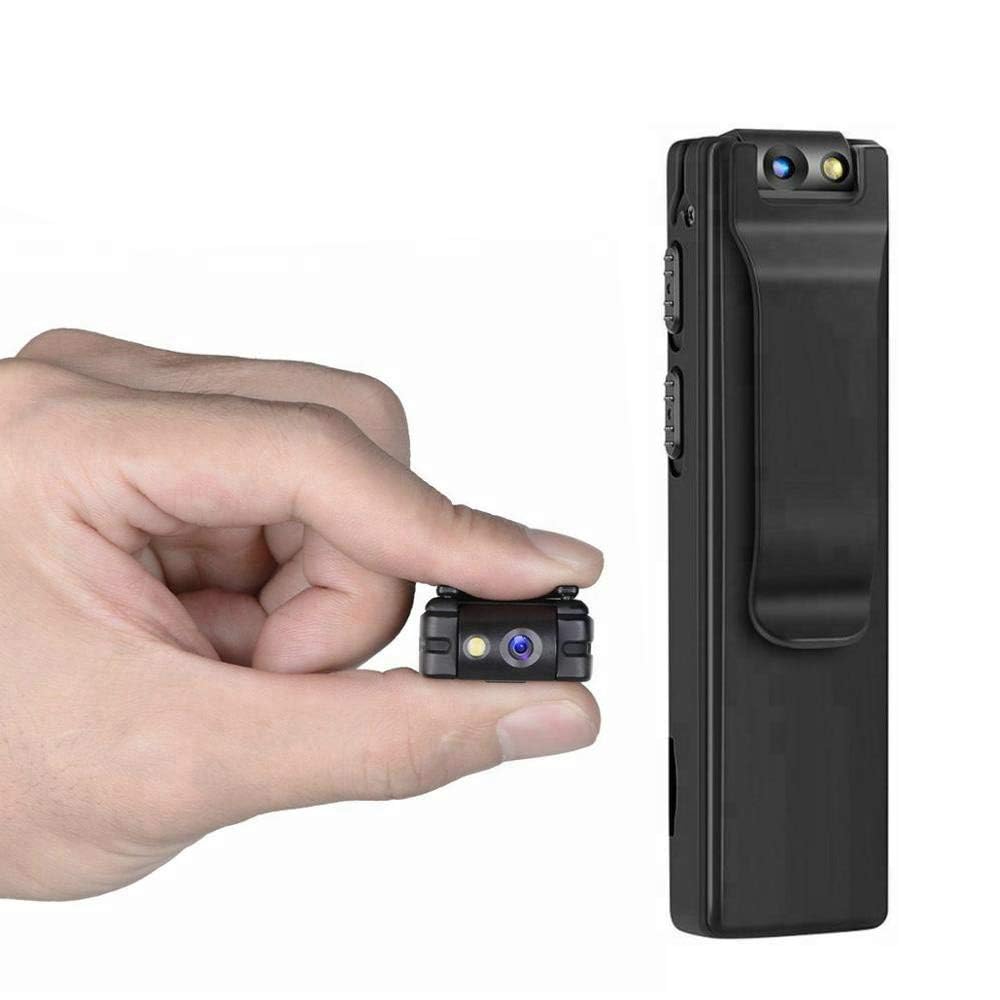
Image: Illustration of the CAPOXO camera's motion detection feature, showing it capturing activity in a room.
5.4 Night Lamp Mode
The camera is equipped with white LED lights to enhance visibility and recording quality in low-light or dark environments.
- To activate the night lamp, slide the "ON -> LAMP" switch to the "LAMP" position.
- To deactivate, slide the switch back to the "ON" position.
5.5 Taking Photos
- Ensure the camera is powered on.
- Press the "PHOTO" button once to take a still image. The indicator light may flash briefly.
- Photos are saved to the Micro SD card.
5.6 Viewing Recordings
- Power off the camera.
- Remove the Micro SD card from the camera.
- Insert the Micro SD card into a computer's card reader or a compatible device.
- Access the files on the Micro SD card to view your recorded videos and photos.

Image: The CAPOXO camera shown in different usage environments, including an office, car, laboratory, and home, demonstrating its versatility.

Image: The CAPOXO camera depicted in diverse settings such as business meetings, family gatherings, children playing, and outdoor adventures, illustrating its broad application.
6. Maintenance
- Cleaning: Use a soft, dry cloth to clean the camera body. Do not use liquid cleaners or solvents.
- Lens Care: Gently wipe the lens with a microfiber cloth designed for optics. Avoid touching the lens with bare fingers.
- Storage: Store the camera in a cool, dry place away from direct sunlight and extreme temperatures.
- Battery Life: To prolong battery life, avoid fully discharging the battery frequently. Charge it regularly, even if not in use for extended periods.
- SD Card Management: Regularly back up important recordings and format the Micro SD card periodically to maintain optimal performance and prevent data corruption.
7. Troubleshooting
Camera Not Turning On
- Ensure the battery is charged. Connect the camera to a charger for at least 1 hour.
- Verify the ON/OFF switch is in the "ON" position.
Cannot Record Video
- Check if a Micro SD card is properly inserted.
- Ensure the Micro SD card has sufficient free space.
- Verify the Micro SD card is Class 10 and within the supported capacity (16GB, 32GB, 64GB).
- Format the Micro SD card if it's a new card or if you encounter issues.
Poor Video Quality
- Ensure the camera lens is clean and free from smudges or dust.
- Check lighting conditions. Use the night lamp in low-light environments.
Motion Detection Not Working
- Ensure the camera is powered on and in recording mode.
- Verify there are no obstructions blocking the camera's view.
Camera Unresponsive (Reset)
- If the camera becomes unresponsive, locate the "RESET" button (often a small pinhole).
- Use a thin object (like a paperclip) to gently press and hold the reset button for a few seconds.
- The camera should restart.
8. Specifications
| Brand | CAPOXO |
| Model Number | Capoxo-A-Cctv-Camera |
| Video Capture Resolution | 1080p Full HD |
| Connectivity Technology | Wired (USB for charging/data transfer) |
| Flash Memory Type | Micro SD (supports 16GB, 32GB, 64GB Class 10) |
| Video Capture Format | AVI |
| Supported Audio Format | AAC |
| Special Features | Motion Detection, Night Lamp, HD Resolution, 90° Rotatable Lens |
| Battery Life | Up to 3 hours (after full charge) |
| Charging Input | 5V/1A (charger not included) |
| Dimensions (LxWxH) | 9 x 2.5 x 1 Centimeters |
| Item Weight | 250 g |
| Included Components | Camera, USB Cable, Manual |
9. Warranty and Support
For warranty information or technical support, please refer to the contact details provided with your purchase documentation or visit the official CAPOXO website.
Please retain your proof of purchase for any warranty claims.