
Introduction
This manual provides comprehensive instructions for the Northpoint NP-BDS-Parent LED Spotlights. These battery-powered spotlights feature an integrated motion sensor, adjustable light heads, and are designed for outdoor use, providing 400 lumens of cool white light. Please read this manual carefully before installation and operation to ensure proper use and longevity of your product.

Image: Northpoint LED Spotlight with Motion Sensor. This image shows the overall design of the spotlight unit, featuring two adjustable light heads and a central motion sensor.
Setup and Installation
Your Northpoint LED Spotlights come with all necessary mounting hardware and batteries for immediate use. Follow these steps for proper installation:
- Battery Installation: Open the battery compartment (usually located at the back or base of the unit). Insert 3 x 1.5V C batteries, ensuring correct polarity. Close the compartment securely.
- Mounting Plate Attachment: Choose a suitable outdoor location for installation. Using the provided screws and wall plugs, securely attach the mounting plate to the desired surface.
- Spotlight Placement: Carefully align the spotlight unit with the attached wall mount.
- Secure Spotlight: Twist or slide the spotlight unit onto the wall mount until it clicks or locks into place, ensuring it is firmly secured.
- Adjust Position: Once mounted, adjust the spotlight heads and motion sensor to your desired coverage area.

Image: Installation steps for Northpoint LED Spotlight. This image illustrates the four key steps: attaching the mounting plate, placing the spotlight on the mount, securing it by twisting, and adjusting the heads.
Operating Instructions
The Northpoint LED Spotlights are designed for automatic operation based on motion detection.
- Motion Sensor Activation: The integrated infrared motion sensor has a 180° detection angle and a realistic range of 6 meters. The light will automatically activate when motion is detected within this range, providing 400 lumens of cool white light.
- Adjustable Light Heads: The two spotlight heads can be adjusted both horizontally and vertically to direct light precisely where needed.
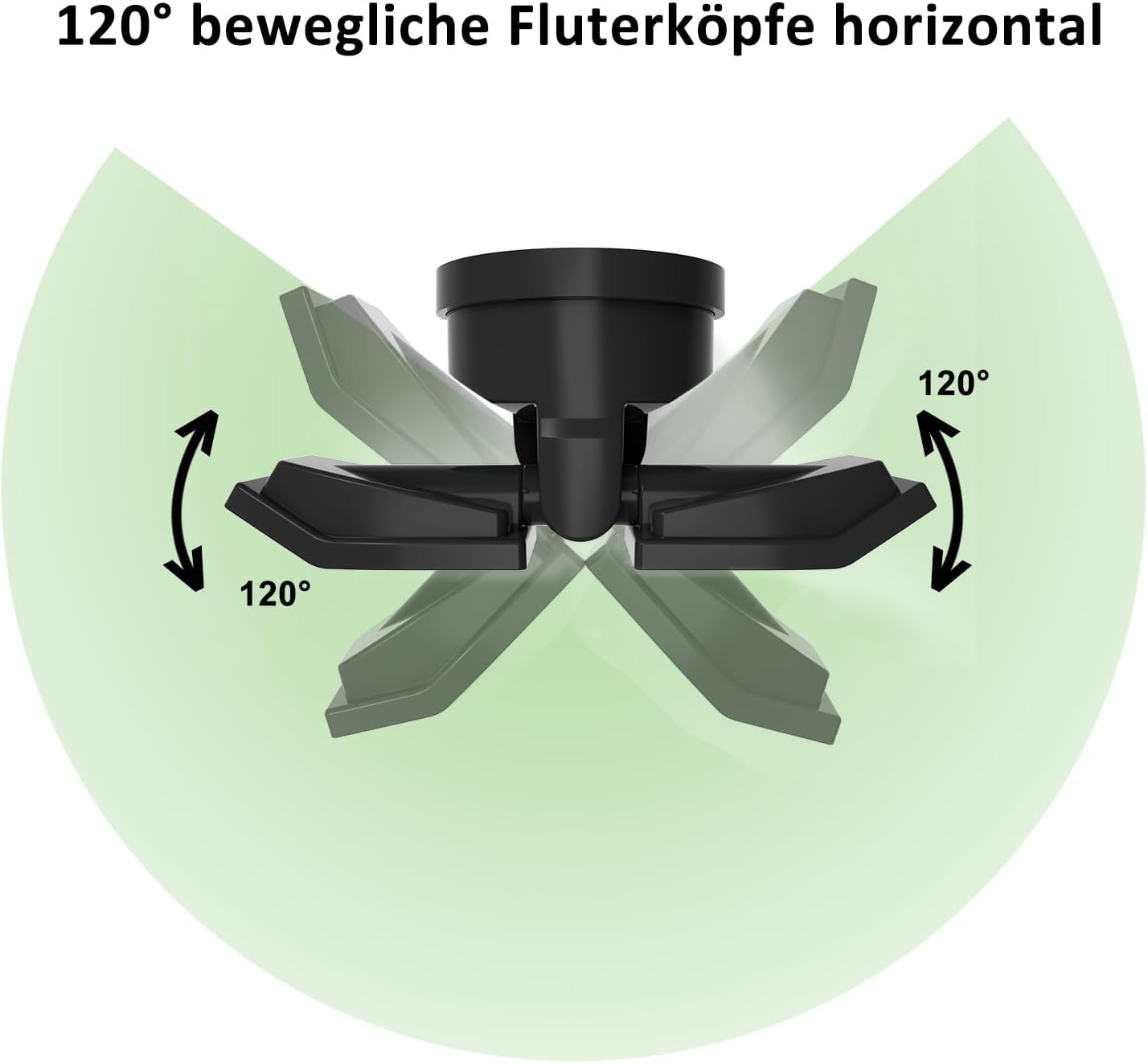
Image: 120° Horizontal Adjustable Floodlight Heads. This diagram shows the horizontal swivel capability of the spotlight heads, allowing for a 120-degree range of motion.
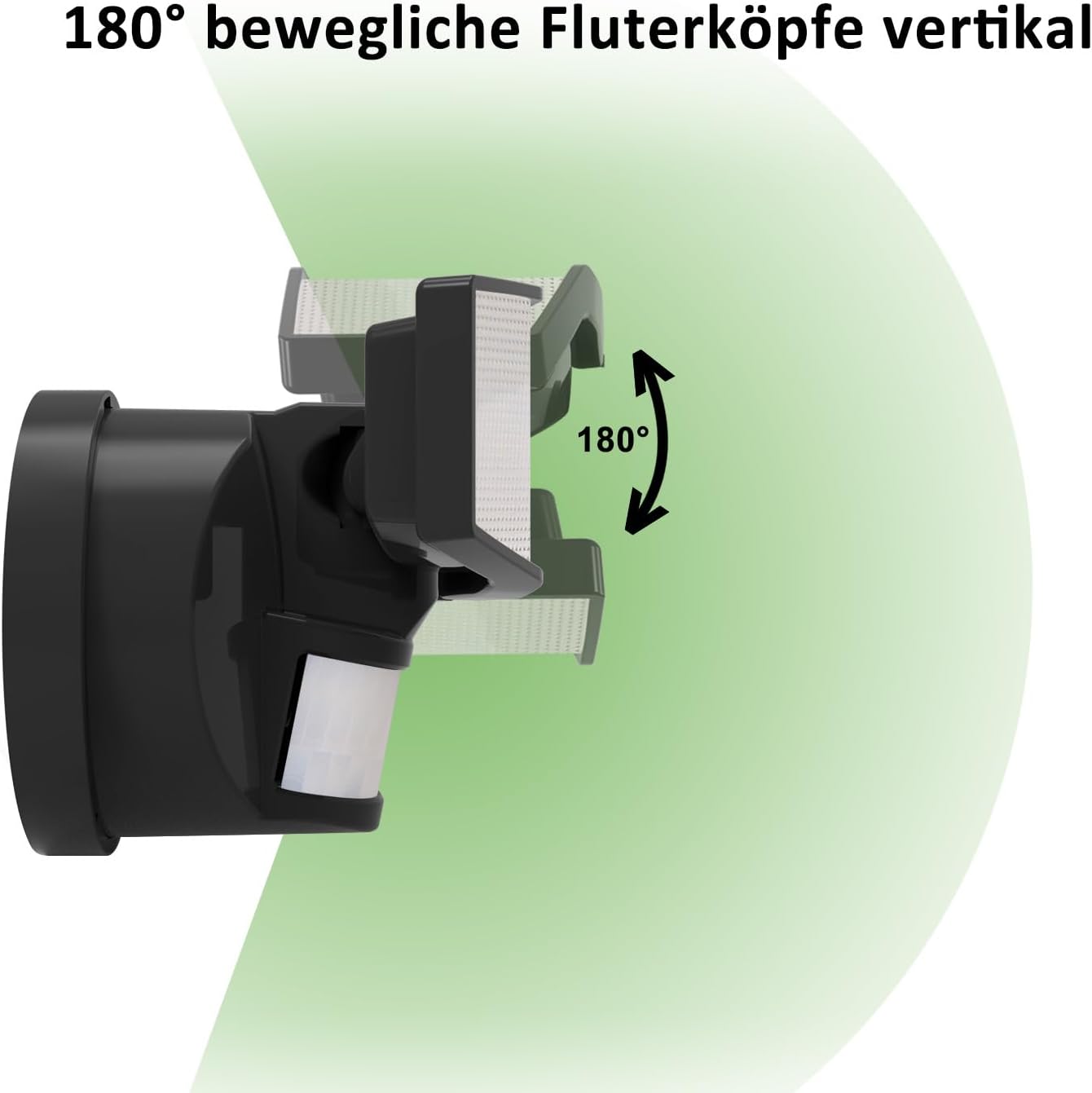
Image: 180° Vertical Adjustable Floodlight Heads. This diagram illustrates the vertical tilt capability of the spotlight heads, offering a 180-degree range of motion.
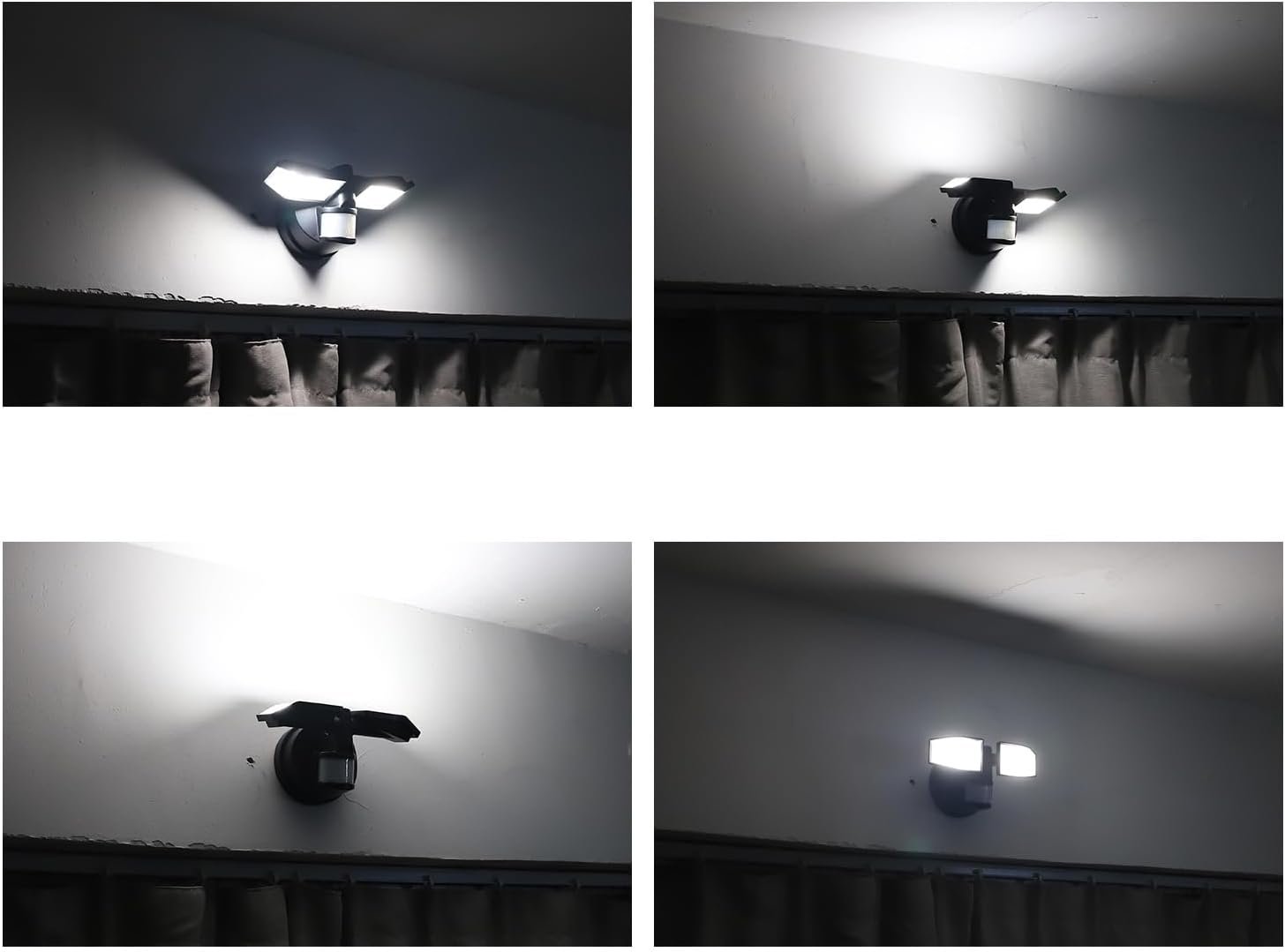
Image: Northpoint LED Spotlight in various lighting conditions. This collage shows the spotlight illuminating different areas, demonstrating its effectiveness.
Maintenance
To ensure optimal performance and longevity of your spotlights, follow these simple maintenance guidelines:
- Battery Replacement: When the light output diminishes or the unit stops functioning, replace all three 1.5V C batteries with new ones. Always replace all batteries at the same time.
- Cleaning: Periodically wipe the surface of the spotlight and motion sensor with a soft, damp cloth to remove dust and dirt. Do not use abrasive cleaners or solvents.
- Weather Protection: The spotlights are splash-proof (IP44 rated), meaning they are protected against splashing water from any direction. While designed for outdoor use, avoid submerging the unit in water or exposing it to extreme weather conditions for extended periods.

Image: Northpoint LED Spotlight with IP44 splash protection. This image visually represents the spotlight's resistance to splashing water, indicating its suitability for outdoor environments.
Troubleshooting
If you encounter issues with your Northpoint LED Spotlights, refer to the following common problems and solutions:
| Problem | Possible Cause | Solution |
|---|---|---|
| Light does not turn on. | Dead or incorrectly installed batteries. | Check battery polarity and replace with fresh 1.5V C batteries. |
| Motion sensor not detecting movement. | Sensor obstructed or positioned incorrectly. | Ensure the sensor is clear of obstructions. Adjust the sensor's angle to cover the desired area. |
| Light stays on continuously or turns on randomly. | Sensor sensitivity too high or detecting unwanted movement (e.g., trees, small animals). | Adjust the sensor's position or angle to minimize false triggers. |
| Light output is dim. | Low battery power. | Replace batteries with new ones. |
Specifications
Detailed technical specifications for the Northpoint NP-BDS-Parent LED Spotlights:
| Feature | Detail |
|---|---|
| Model Number | NP-BDS-Parent |
| Dimensions (L x W x H) | 24.1 x 10.6 x 12.4 cm |
| Weight | 800 grams |
| Power Source | 3 x 1.5V C Batteries (included) |
| Light Type | LED |
| Luminous Flux | 400 lumens (lm) |
| Light Color | Cool White (5000K) |
| Motion Sensor Detection Angle | 180° |
| Motion Sensor Detection Range | Up to 6 meters |
| Adjustability (Horizontal) | 120° |
| Adjustability (Vertical) | 180° |
| Material | Metal (body), Plastic (shade) |
| Waterproof Rating | IP44 (Splash-proof) |
| Mounting Type | Wall Mount |
| Intended Use | Outdoor |
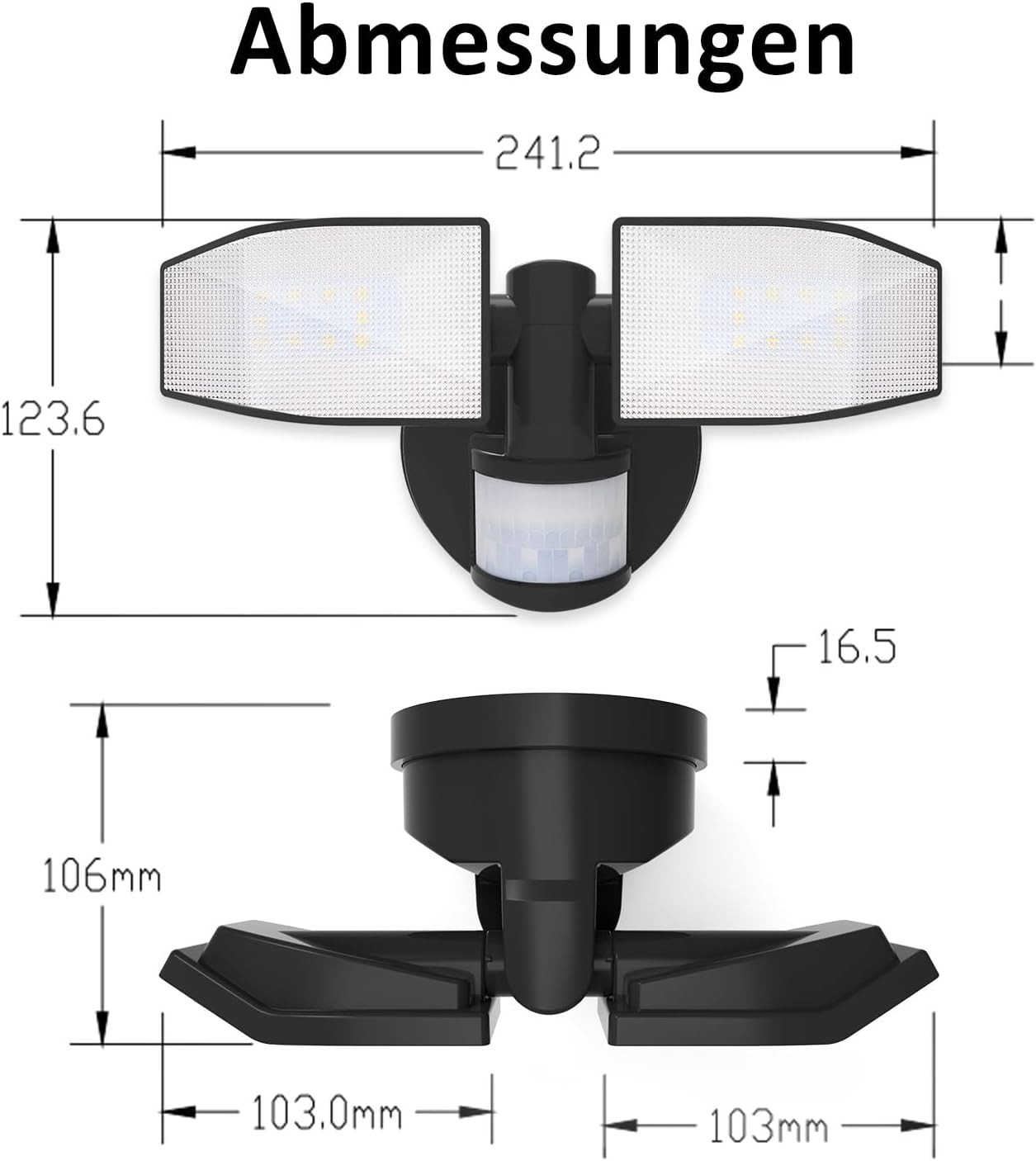
Image: Dimensions diagram for Northpoint LED Spotlight. This technical drawing provides precise measurements of the spotlight unit in millimeters.
Warranty Information
Specific warranty details for this product are not provided in the available information. Please refer to your purchase documentation or contact your retailer for warranty terms and conditions.
Customer Support
For technical assistance, troubleshooting beyond this guide, or general inquiries, please contact your retailer or visit the official Northpoint website for further support.


