
1. Introduction
The Heal Force Easy PC-80A Handheld ECG Monitor is designed for non-invasive detection and display of ECG waveforms and average heart rate in adult patients. This device is suitable for both home use and clinical settings, providing valuable data on current and recent cardiac activity. It allows for quick and easy measurement, as well as monitoring and recording of transient cardiac events.

Image 1.1: Front view of the PC-80A monitor, showing the screen displaying an ECG waveform and heart rate.
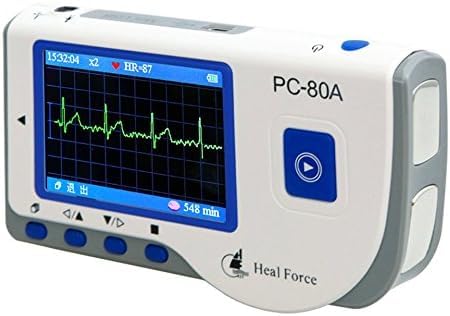
Image 1.2: Angled view of the PC-80A monitor, highlighting its compact design.
2. Safety Information
This device is intended for informational purposes and should not be used as a sole basis for medical diagnosis or treatment. Always consult a healthcare professional for interpretation of results and medical advice. Keep the device dry and away from extreme temperatures. Do not immerse in water. Use only specified accessories and batteries.
3. Package Contents
Verify that all items listed below are present in the package:
- PC-80A monitor
- USB data transfer cable
- ECG Viewer Software on mini-CD (Windows compatible)
- ECG electrodes (1 pack)
- ECG cable
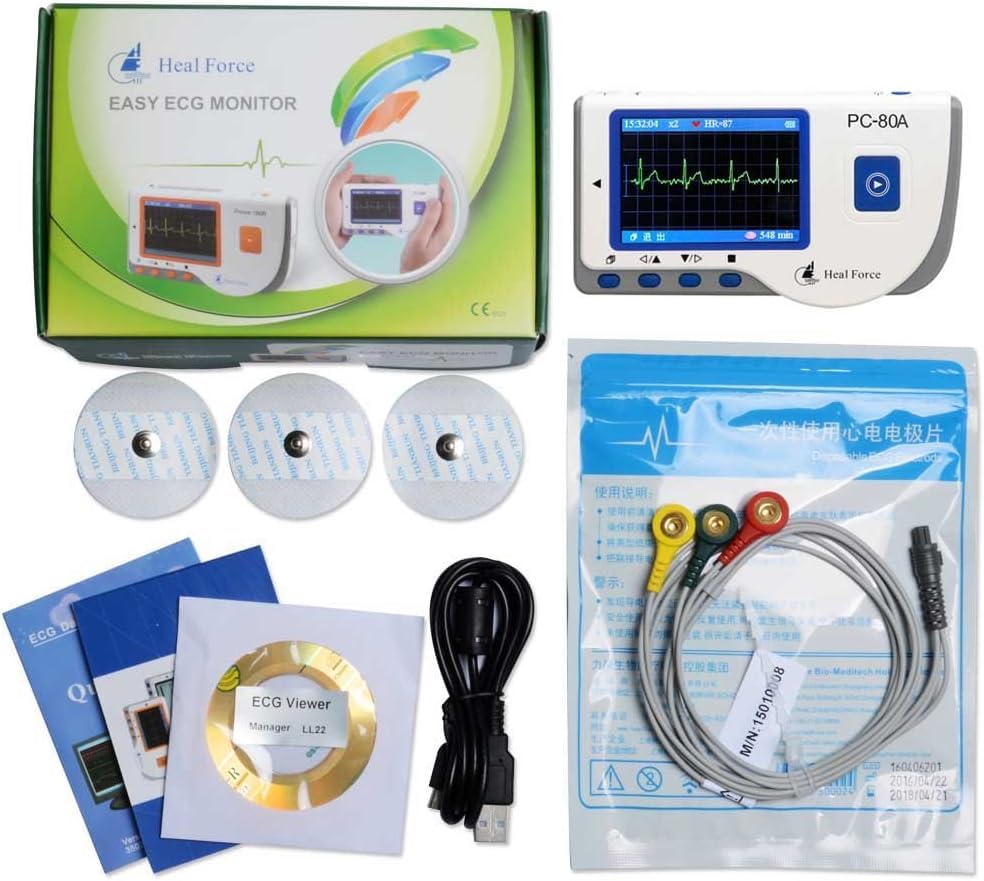
Image 3.1: All components included in the PC-80A package, including the monitor, cables, electrodes, and software CD.
4. Product Features
- Measures and records ECG waveform and average heart rate.
- Suitable for use in clinics and homes.
- One-key measurement for ease of operation.
- Displays seventeen types of measurement results.
- ECG waveform and interpretation displayed on a dot-matrix LCD screen.
- Powered by two AAA batteries, providing over 10 hours of working time (wireless transmission disabled).
- Wireless data upload function (specific to PC-80A model).
- Internal memory stores up to 1200 quick measurement records or 10 hours of continuous data.
5. Setup
5.1 Battery Installation
- Locate the battery compartment on the back of the PC-80A monitor.
- Slide the battery compartment cover open.
- Insert two AAA batteries, ensuring correct polarity (+/-).
- Close the battery compartment cover securely.
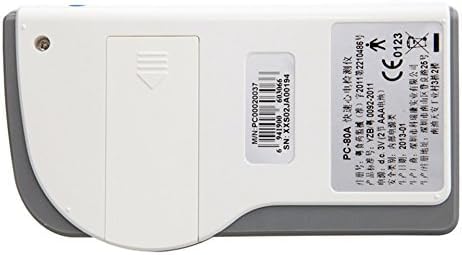
Image 5.1: Rear view of the PC-80A monitor, indicating the battery compartment location.
5.2 Connecting ECG Cable and Electrodes
- Connect the ECG cable to the designated port on the PC-80A monitor.
- Attach the ECG electrodes to the leads of the ECG cable. Ensure a secure connection.
- Prepare the skin where electrodes will be placed (clean and dry).
- Apply the electrodes to the appropriate body locations as instructed by a healthcare professional or the device's quick guide.
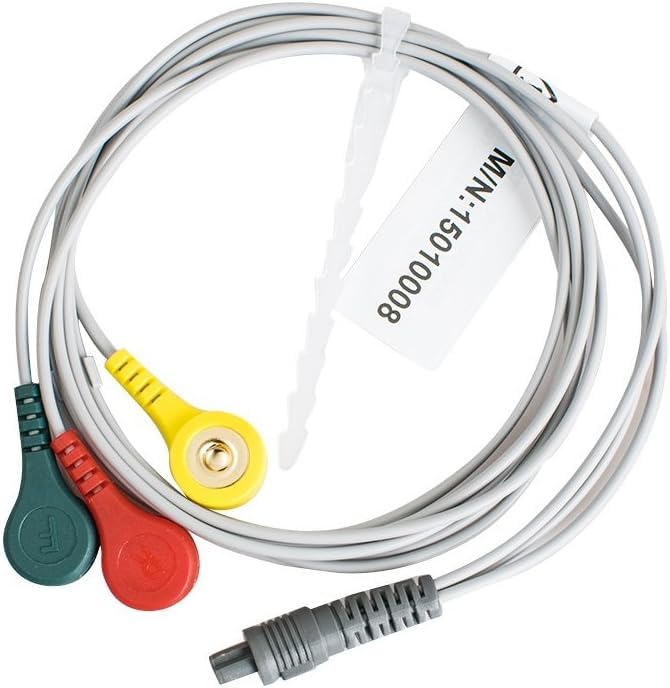
Image 5.2: The ECG cable with its three color-coded leads for connecting to electrodes.
5.3 Software Installation
The included mini-CD contains the ECG Viewer Software, compatible with Windows operating systems. Insert the mini-CD into your computer's CD drive and follow the on-screen instructions to install the software. This software is used for viewing, analyzing, and managing recorded ECG data.
6. Operating Instructions
6.1 Powering On/Off
Press and hold the power button (usually marked with a power symbol) to turn the device on or off.
6.2 Performing a Measurement
- Ensure the ECG cable and electrodes are properly connected and applied to the patient.
- Press the 'One-key measurement' button (often a large central button with a play/start symbol).
- The device will begin recording the ECG waveform. Remain still during the measurement.
- The ECG waveform and heart rate will be displayed on the screen.
- After the measurement is complete, the device will display the results and store the data.
6.3 Viewing Stored Records
Navigate through the device's menu using the arrow buttons to access stored measurement records. The device can store up to 1200 quick measurements or 10 hours of continuous data.
6.4 Data Transfer to PC
Connect the PC-80A monitor to your computer using the provided USB data transfer cable. Use the ECG Viewer Software to download, view, and analyze the recorded ECG data. The PC-80A model also supports wireless data upload.
7. Maintenance and Care
- Clean the device regularly with a soft, dry cloth. Do not use abrasive cleaners or immerse the device in liquids.
- Store the device in a cool, dry place, away from direct sunlight and extreme temperatures.
- Replace batteries when the low battery indicator appears on the screen to ensure accurate readings.
- Inspect the ECG cable and electrodes for any signs of wear or damage before each use. Replace if necessary.
8. Troubleshooting
8.1 No Display/Device Not Powering On
- Check if the batteries are inserted correctly with the right polarity.
- Replace with new AAA batteries.
- Ensure the power button is pressed and held sufficiently.
8.2 Irregular or No ECG Waveform
- Ensure electrodes are firmly attached to clean, dry skin.
- Check that the ECG cable is securely connected to both the device and the electrodes.
- Minimize movement during measurement.
- Ensure the electrodes are not expired and have sufficient gel.
8.3 Data Transfer Issues
- Verify the USB cable is properly connected to both the device and the computer.
- Ensure the ECG Viewer Software is correctly installed and running on your computer.
- Check for any driver issues on your computer.
9. Specifications
| Brand | Heal Force |
| Model Number | PC-80A |
| Material | Plastic |
| Color | White |
| Screen Size | 0.75 Inches |
| Product Dimensions | 12.7L x 11W x 17.8H Centimeters |
| Item Weight | 318 Grams |
| Battery Type | AAA |
| Battery Life | Approximately 10 hours (wireless transmission disabled) |
| Memory Capacity | Up to 1200 quick records or 10 hours continuous data |
| Compatible Devices | Desktops (for software) |
| Country of Origin | China |
10. Warranty and Support
For warranty information, technical support, or service inquiries, please refer to the documentation provided with your purchase or contact the manufacturer, Heal Force, directly. Contact details can typically be found on the product packaging or the official Heal Force website. Please retain your proof of purchase for warranty claims.