
1. Introduction
Thank you for choosing the Devoko Electric Standing Desk. This manual provides essential information for the safe assembly, operation, and maintenance of your new height-adjustable desk. Please read these instructions carefully before use and retain them for future reference.

Image: Devoko Electric Standing Desk 140x80cm. This image displays the overall design of the black electric standing desk with its spacious desktop and sturdy frame.
2. Safety Information
- This desk has a maximum load capacity of 80 kg. Do not exceed this weight limit.
- For stability, ensure the desk is placed on a level and even surface.
- Avoid overloading the desk, especially on one side, to maintain balance.
- The desk features anti-collision technology to prevent accidents. However, always be aware of your surroundings during height adjustments.
- Always supervise children when the desk is in use or being adjusted to prevent accidental touching and potential injuries.
- Keep hands and objects clear of moving parts during height adjustments.
3. Package Contents
Before assembly, please verify that all components are present and undamaged. If any parts are missing or damaged, contact customer support.
- Desktop (140x80cm)
- Electric Lifting Columns (Legs)
- Desk Frame Components
- Control Panel with LED Display
- Power Adapter and Cables
- 2 x Hooks
- 1 x Cable Management Tray
- Assembly Hardware (screws, tools)
- User Manual
4. Assembly Instructions
Assembly is required for this product. It is recommended that two people perform the assembly to ensure safety and ease of installation.
- Unpack Components: Carefully remove all parts from the packaging and lay them out on a clean, soft surface to prevent scratches.
- Assemble Desk Frame: Attach the crossbars to the lifting columns. Ensure all screws are tightened securely.
- Connect Drive Shaft: Insert the drive shaft to connect the two lifting columns. Ensure it is properly aligned and secured for synchronized movement.
- Attach Feet: Secure the stabilizing footrests to the bottom of the lifting columns. The leg width is 80x50mm, and the rounded spacers on the bottom are 8cm in diameter. Silent wheels are also available for replacement if desired.

Image: Sturdy Steel Construction. This image highlights the robust steel frame of the desk, showing the dimensions of the leg (80x50mm) and the base (6cm height, 70cm length), emphasizing stability.
- Mount Desktop: Carefully place the desktop onto the assembled frame and secure it using the provided screws.
- Install Accessories: Attach the 2 hooks and the cable management tray as desired. Utilize the wire collecting hole for cable routing.

Image: Desk Features. This image illustrates the wire collecting hole for cable organization, the two hooks for hanging items, the cable management tray for tidiness, and the integrated USB charging port.
- Install Control Panel: Connect the control panel to the desk frame. It is recommended to fix the controller at the end of the assembly process to avoid damage during movement.
- Connect Power: Plug the power adapter into the desk and then into a wall outlet.
5. Operating Instructions
Your Devoko Electric Standing Desk is equipped with a smart control panel for easy height adjustment and personalized settings.
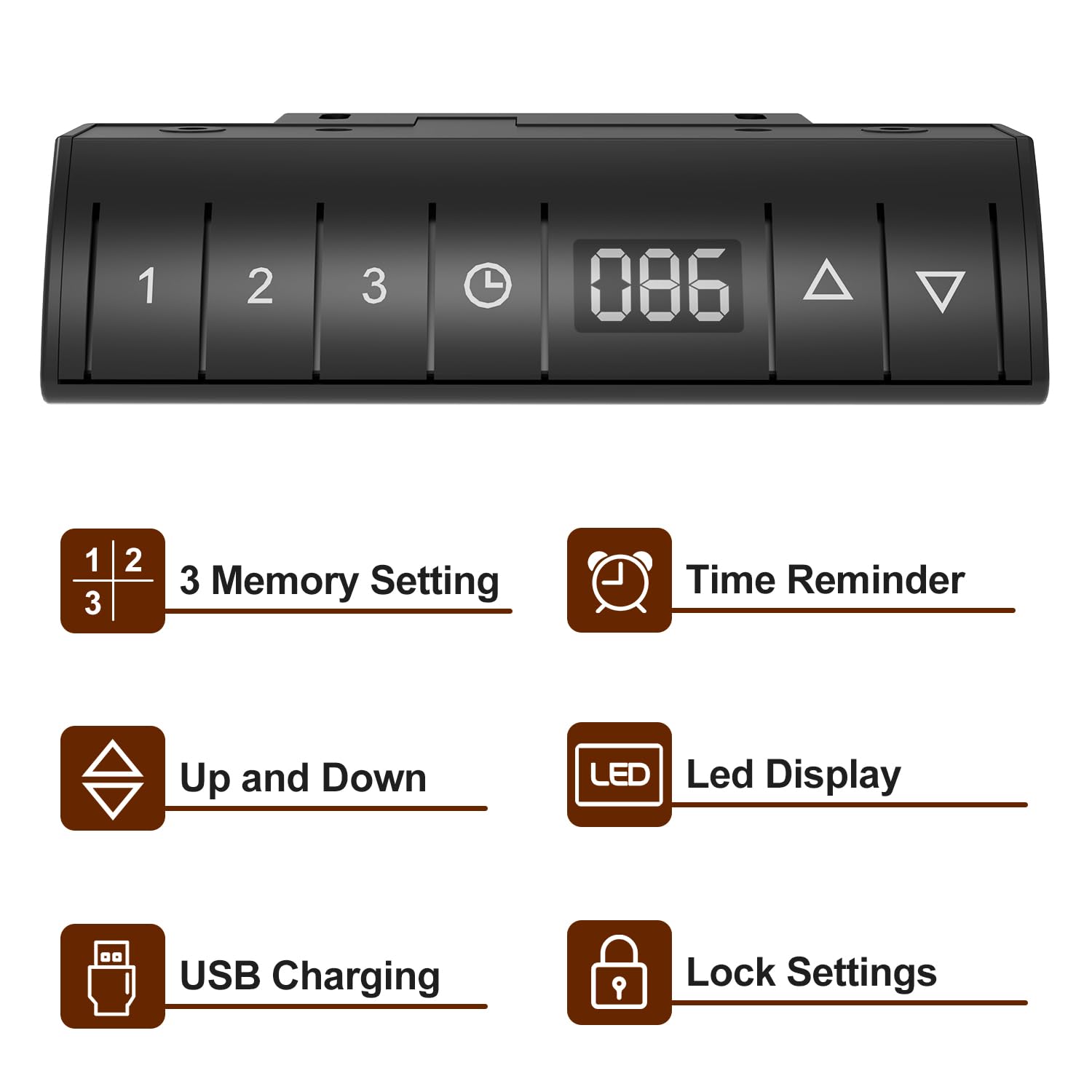
Image: Devoko Desk Control Panel. This image shows the control panel with buttons for 3 memory settings, time reminder, up/down adjustment, LED display, USB charging port, and lock settings.
- Height Adjustment: Use the Up (▲) and Down (▼) buttons on the control panel to adjust the desk to your desired height. The current height will be displayed on the LED Display.
- Memory Settings (1, 2, 3):
- Adjust the desk to a desired height.
- Press the Memory (M) button, then press one of the numbered buttons (1, 2, or 3) to save the current height.
- To recall a saved height, simply press the corresponding numbered button.
- Time Reminder: Set reminders for standing or sitting intervals (0.5, 1.0, 1.5, 2.0 hours) to promote healthier work habits. Consult the full manual for specific programming steps.
- USB Charging: The integrated USB port allows convenient charging of your devices.
- Lock Setting: Activate the lock function to prevent accidental height adjustments, especially useful in households with children. Consult the full manual for activation/deactivation steps.
- Anti-Collision Technology: The desk is designed to stop movement if it encounters an obstruction during adjustment.

Image: Anti-collision Technology and Stabilizing Footrests. This image demonstrates the anti-collision feature, where the desk stops if an object is detected, and also shows the design of the stabilizing footrests.
6. Maintenance
- Cleaning: Wipe the desk surface and frame with a soft, damp cloth. Avoid harsh chemicals or abrasive cleaners.
- Cable Management: Regularly check and organize cables to prevent tangles and damage. Use the provided cable management tray and stickable storage design to keep cables tidy.
- Fasteners: Periodically check all screws and fasteners to ensure they remain tight. Retighten if necessary.
- Motor Care: Do not attempt to open or service the motor or control unit. Refer to qualified personnel for any repairs.
7. Troubleshooting
| Problem | Possible Cause | Solution |
|---|---|---|
| Desk does not move | Power cable disconnected; Overload; Motor error | Check power connections; Reduce weight on desk; Unplug for 30 seconds and plug back in to reset. |
| Uneven height adjustment | Drive shaft not properly connected; Obstruction | Ensure drive shaft is securely installed; Check for obstructions under the desk. |
| Control panel unresponsive | Lock function activated; Cable connection issue | Deactivate lock function; Check control panel cable connection. |
| Anti-collision activates frequently | Sensitivity too high; Obstruction | Check for objects near the desk's path; Refer to the full manual for anti-collision sensitivity adjustment. |
8. Specifications
- Brand: Devoko
- Model: Electric Standing Desk 140x80cm
- Product Dimensions (D x W x H): 140D x 80W x 116H Centimeters (Maximum Height)
- Minimum Height: 72 Centimeters
- Maximum Height: 116 Centimeters
- Maximum Load Capacity: 80 kg
- Base Material: Alloy Steel
- Top Material: Wood (Laminated Finish)
- Color: Black
- Lifting Mechanism: Electric
- Special Features: Adjustable Height, Built-In USB Outlet, Electric, Ergonomic, Hooks, 3 Memory Settings, Time Reminder, LED Display, Lock Setting, Anti-Collision Technology, Cable Management Tray.
- Assembly Required: Yes (Recommended 2 people)
9. Warranty and Support
This Devoko Electric Standing Desk comes with a Limited Warranty. For specific details regarding warranty coverage, terms, and conditions, please refer to the warranty card included with your product or contact Devoko customer support.
For technical assistance, troubleshooting, or to inquire about replacement parts, please contact Devoko customer service through the retailer where the product was purchased or via the official Devoko website.


