
1. Introduction
The Amaran Ace 25c is a versatile, full-color on-camera RGBWW LED light designed for mobile creators. This compact and powerful lighting solution offers up to 32W of output, a wide color temperature range from 2,300K to 10,000K, and a robust 4500mAh battery with PD charging capabilities. Featuring the innovative Amaran Ace Lock quick-release mount, the Ace 25c ensures rapid setup and secure attachment, making it ideal for dynamic shooting environments. This manual provides detailed instructions for setting up, operating, maintaining, and troubleshooting your Amaran Ace 25c Kit.

Figure 1.1: The Amaran Ace 25c Kit, showcasing the main light unit, mini tripod, dome diffuser, light control grid, cold shoe adapter, USB-C charging cable, and carrying bag.
2. What's in the Box
Verify that all components listed below are included in your Amaran Ace 25c Kit package:
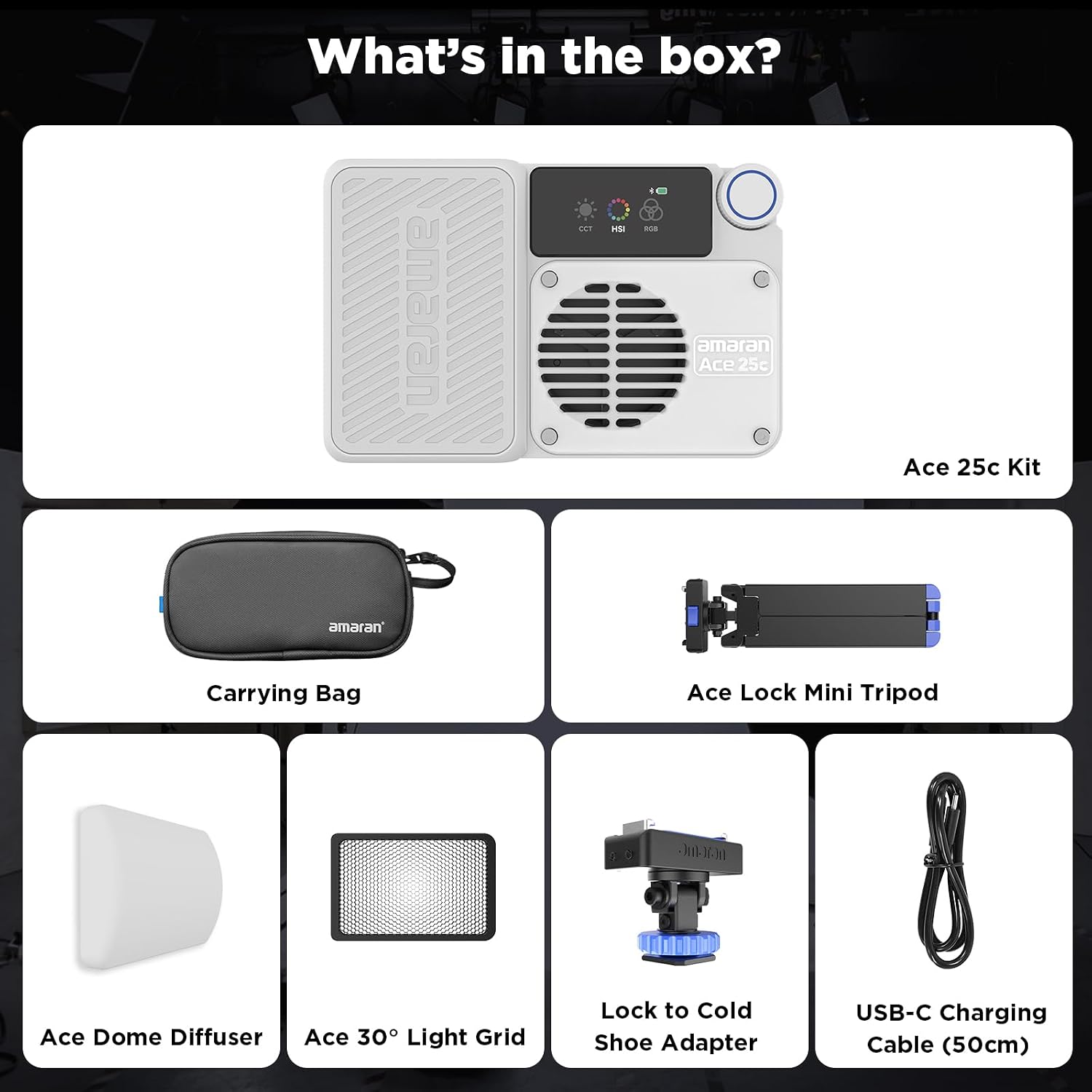
Figure 2.1: All components included in the Amaran Ace 25c Kit.
- 1x Amaran Ace 25c LED Light
- 1x Amaran Ace Dome Diffuser
- 1x Amaran Ace 30° Light Control Grid
- 1x Amaran Ace Lock to Cold Shoe Adapter
- 1x Amaran Ace Lock Mini Tripod
- 1x Amaran USB-C Charging Cable (50cm)
- 1x 5mm Hex Key
- 1x Amaran Ace Carrying Bag
3. Product Features
3.1 Best-in-Class Brightness
The Amaran Ace 25c delivers powerful illumination with up to 32W of output in Boost Mode. Its advanced optical design provides 5,908 lux of soft, natural light at 0.5m (4,300K), ensuring exceptional brightness for various lighting needs. The RGBWW full-color chipset allows for a vast spectrum of colors to enhance your creative content.

Figure 3.1: The Amaran Ace 25c's impressive brightness and color capabilities.
3.2 One-Second Setup with Amaran Ace Lock
The Amaran Ace Lock system provides efficient and secure mounting. This quick-release mechanism allows for rapid attachment and detachment of the light to cameras, tripods, or other compatible accessories, saving valuable setup time and ensuring stability during shoots.

Figure 3.2: The Amaran Ace 25c mounted on a camera, demonstrating the quick-release Ace Lock system.
3.3 Long Battery Life & Fast Charging
Equipped with a 4500mAh battery, the Ace 25c offers extended operational times: up to 4 hours and 40 minutes in Silent Mode and 70 minutes in Standard Mode. The light supports fast charging, reaching 0-90% in just 40 minutes. Additionally, it can function as a reverse charging supply to power other devices in emergency situations.

Figure 3.3: The Amaran Ace 25c can charge other devices via its USB-C port.
3.4 Efficient Lighting Control with App
Control your Amaran Ace 25c effortlessly via its user-friendly color screen or wirelessly through the intuitive Amaran app. The app provides comprehensive control over settings, including CCT, HSI, and special effects, allowing for precise adjustments and creative flexibility.
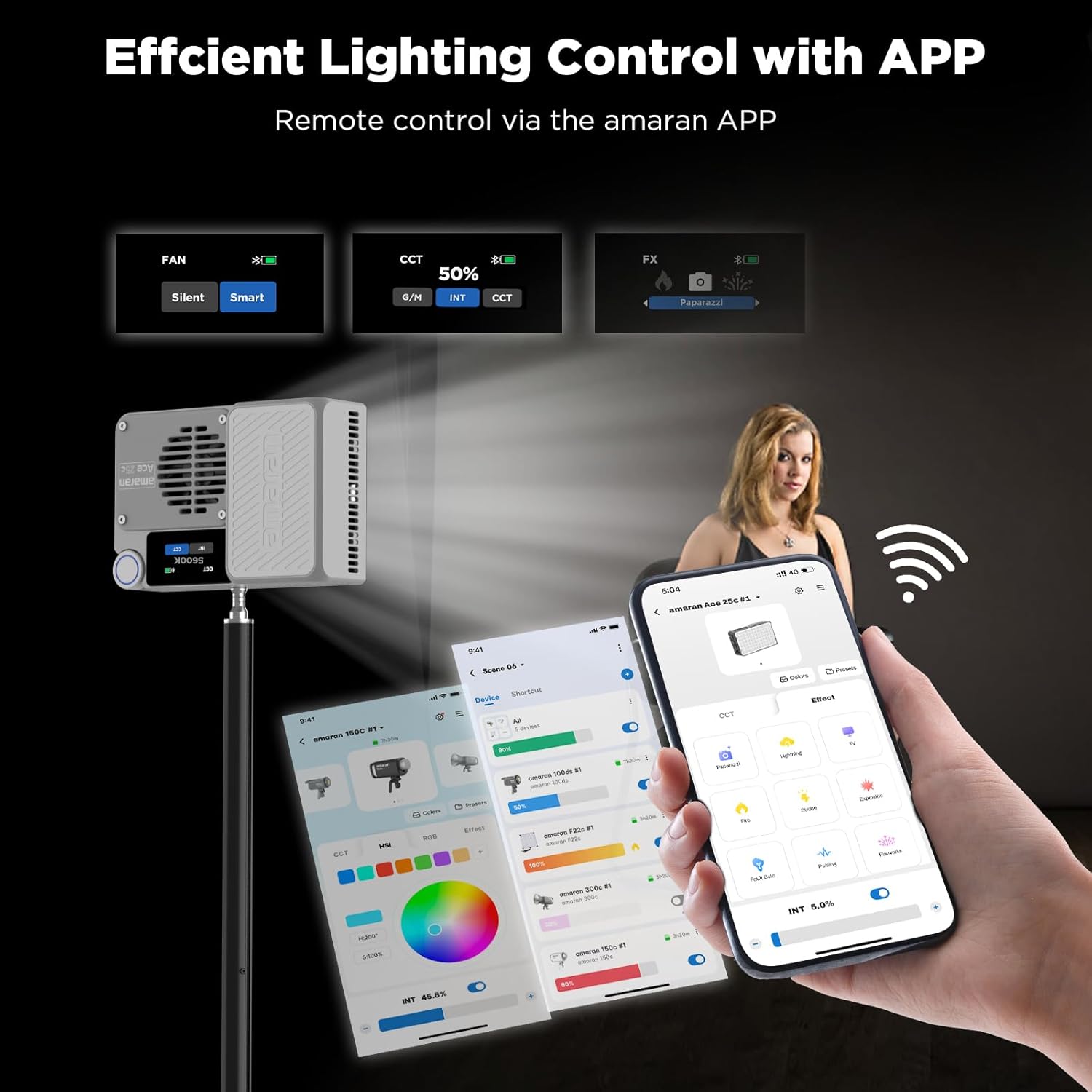
Figure 3.4: Wireless control of the Amaran Ace 25c using the dedicated Amaran app.
3.5 Super Quiet Cooling System
The Amaran Ace 25c features an advanced cooling system designed for long-lasting durability and minimal noise. It operates at a maximum noise level of 28dB within 1m/3.28ft, even in high-temperature environments, ensuring quiet operation during video recording or sensitive audio capture.

Figure 3.5: The efficient and quiet cooling system of the Amaran Ace 25c.
3.6 Portability
Weighing only 416g (0.92lb) and with compact dimensions (118mm x 74mm x 33mm), the Amaran Ace 25c is designed for ultimate portability. It easily fits into pockets or small bags, making it an ideal travel companion for creators on the go.

Figure 3.6: The compact size of the Amaran Ace 25c, demonstrating its portability.
4. Setup Guide
4.1 Initial Charging
Before first use, fully charge the Amaran Ace 25c using the provided USB-C charging cable. Connect the cable to the light's USB-C port and to a compatible USB power adapter (not included). The battery indicator on the display will show charging progress.
4.2 Attaching Accessories
The Amaran Ace 25c features a magnetic attachment system for its accessories. Simply align the Amaran Ace Dome Diffuser or the Amaran Ace 30° Light Control Grid with the front of the light until they magnetically snap into place.

Figure 4.1: Magnetic attachment of the dome diffuser and magnetic fixation of the light.
4.3 Mounting the Light
To mount the light, attach the Amaran Ace Lock to Cold Shoe Adapter to your camera's hot shoe or a tripod. Then, slide the Amaran Ace 25c onto the Ace Lock adapter until it clicks securely into place. For tabletop use, attach the Amaran Ace Lock Mini Tripod directly to the light.
5. Operating Instructions
5.1 Power On/Off
Locate the power switch on the side of the Amaran Ace 25c. Slide the switch to the 'ON' position to power on the device. Slide it to the 'OFF' position to power off.

Figure 5.1: Side view of the Amaran Ace 25c, highlighting the power switch and USB-C port.
5.2 Basic Controls
The Amaran Ace 25c features a control dial and buttons for intuitive operation. The color display provides real-time feedback on settings.
- Control Dial: Rotate to adjust brightness, color temperature (CCT), hue, saturation, or intensity depending on the selected mode. Press to confirm selections or switch between parameters.
- Mode Button: Press to cycle through different lighting modes (CCT, HSI, FX).
- Boost Button: Activates Boost Mode for maximum light output.
- Fan Control: Adjust fan settings (Silent, Smart, Fan).
5.3 Adjusting CCT (Color Temperature)
In CCT mode, rotate the control dial to adjust the color temperature from 2,300K (warm) to 10,000K (cool). This allows you to match ambient light or create specific moods.
5.4 Adjusting HSI (Hue, Saturation, Intensity)
In HSI mode, you can precisely control the color output. Rotate the dial to select the desired hue (color), then press the dial to switch to saturation or intensity adjustment. Adjust saturation to control color vibrancy and intensity for overall brightness.
5.5 Special Effects (FX) Modes
The Amaran Ace 25c includes various built-in special effects to enhance your creative productions. Cycle through the FX modes using the mode button and adjust parameters with the control dial.
5.6 Using the Amaran App
For advanced control and convenience, download the official Amaran app from your device's app store. Pair your Amaran Ace 25c via Bluetooth to access a full suite of controls, including precise color selection, custom effects, and firmware updates.

Figure 5.2: Controlling the Amaran Ace 25c wirelessly via the Amaran app.
6. Maintenance
Proper maintenance ensures the longevity and optimal performance of your Amaran Ace 25c.
- Cleaning: Use a soft, dry cloth to clean the light's exterior. For stubborn marks, a slightly damp cloth with mild soap can be used, ensuring no liquid enters the device. Do not use harsh chemicals or abrasive cleaners.
- Storage: Store the light in a cool, dry place away from direct sunlight and extreme temperatures. Use the provided carrying bag for protection during transport and storage.
- Battery Care: To maintain battery health, avoid fully discharging the battery frequently. If storing for extended periods, charge the battery to approximately 50-70% every three months.
7. Troubleshooting
If you encounter issues with your Amaran Ace 25c, refer to the following common problems and solutions:
- Light Not Turning On:
- Ensure the battery is charged. Connect to a power source and check the charging indicator.
- Verify the power switch is fully in the 'ON' position.
- App Connectivity Issues:
- Ensure Bluetooth is enabled on your smartphone.
- Make sure the light is within Bluetooth range.
- Restart both the light and the app.
- Check for app updates.
- Light Overheating:
- Ensure the fan is set to 'Smart' or 'Fan' mode.
- Operate in a well-ventilated area.
- Reduce the brightness output if operating in high ambient temperatures.
- Inconsistent Brightness/Color:
- Check for any obstructions on the light panel or diffuser.
- Ensure the light is not in a low-power mode.
- Perform a factory reset if issues persist (refer to the app or online resources for instructions).
8. Technical Specifications
| Feature | Specification |
|---|---|
| Product Dimensions | 4.65 x 3.03 x 1.3 inches |
| Item Weight | 1.96 pounds |
| ASIN | B0DDY913PB |
| Batteries | 1 Lithium Ion batteries required (included) |
| Battery Life (Standard Mode) | 70 minutes |
| Connectivity Technology | Wireless (Bluetooth) |
| Manufacturer | Amaran |
| Date First Available | October 24, 2024 |
9. Warranty and Customer Support
The Amaran Ace 25c Kit comes with a standard manufacturer's warranty. For detailed warranty information, terms, and conditions, please refer to the warranty card included in your product packaging or visit the official Amaran website. If you require technical assistance, have questions about product operation, or need to report a defect, please contact Amaran customer support through their official channels. Keep your purchase receipt as proof of purchase for warranty claims.


