
Introduction
This manual provides detailed instructions for the operation and maintenance of your LIGE 8922 Men's Chronograph Digital Analog Watch. Please read this manual thoroughly before using your watch to ensure proper function and longevity. Keep this manual for future reference.
Product Overview
The LIGE 8922 watch combines a sporty design with advanced features, including both analog and digital time displays, a chronograph, alarm, and backlight. It is designed for various activities, including swimming and water sports, with a 5 ATM water resistance rating.

Image: Front view of the LIGE 8922 watch, showcasing its silver and black design with both analog hands and digital displays. The watch features multiple buttons for various functions.
Watch Components
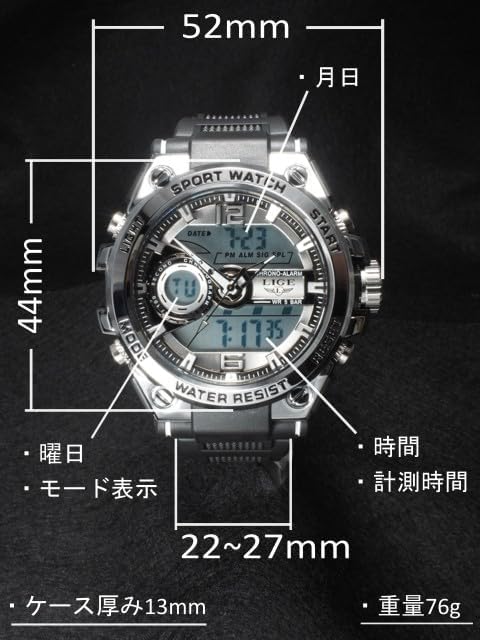
Image: Diagram of the LIGE 8922 watch with key components labeled. Labels indicate the date, time, measurement time, day of the week, and mode display. Dimensions are also shown: 52mm width, 44mm height, 13mm case thickness, and a band circumference of approximately 14-19cm (max 20cm).
- A. Light Button: Activates the backlight.
- B. Mode Button: Cycles through different modes (Time, Stopwatch, Alarm, Dual Time).
- C. Start Button: Used for starting/stopping stopwatch, adjusting settings.
- D. Reset Button: Used for resetting stopwatch, confirming settings.
- E. Crown: Adjusts analog time.
- Digital Display: Shows time, date, day, stopwatch, and alarm information.
- Analog Hands: Display current time.
Setup
Setting Analog Time
- Pull out the crown (E) to the first position.
- Rotate the crown to set the analog hour and minute hands to the desired time.
- Push the crown back in to secure the time.
Setting Digital Time and Date
- In normal time display mode, press the Mode button (B) repeatedly until you enter the time setting mode (usually indicated by flashing digits).
- Press the Start button (C) to select the digit you wish to adjust (seconds, hour, minute, month, date, day).
- Press the Reset button (D) to increase the value of the selected digit.
- Continue pressing Start (C) and Reset (D) until all desired settings are made.
- Press the Mode button (B) to exit the setting mode.
Operating Instructions
Mode Switching
Press the Mode button (B) to cycle through the following modes:
- Normal Time Display
- Stopwatch Mode
- Alarm Mode
- Dual Time Mode
Stopwatch Function
The stopwatch measures time with a minimum unit of 0.01 seconds and supports cumulative measurement.
- Enter Stopwatch Mode by pressing the Mode button (B).
- Press the Start button (C) to begin timing.
- Press the Start button (C) again to pause timing.
- Press the Reset button (D) to reset the stopwatch to zero.
- To resume timing after pausing, press the Start button (C).
Alarm Function
The watch features an alarm clock function that sounds for 20 seconds and a just-in-time alarm.
- Enter Alarm Mode by pressing the Mode button (B).
- Press the Start button (C) to select the hour or minute digit to set.
- Press the Reset button (D) to adjust the selected digit.
- Once the desired alarm time is set, press the Mode button (B) to confirm and exit.
- To turn the alarm ON/OFF, press the Start button (C) while in Alarm Mode (without entering setting mode). An alarm icon will indicate its status.
Backlight
To illuminate the display in dark conditions:
- Press the Light button (A). The backlight will activate for a few seconds.

Image: The LIGE 8922 watch display illuminated by its backlight in a dark environment, showing the digital time clearly.
Dual Time Display
The watch supports displaying time for two different time zones simultaneously.
- Enter Dual Time Mode by pressing the Mode button (B).
- Follow similar steps as setting the main digital time to adjust the second time zone.
Water Resistance Guidelines
Your LIGE 8922 watch is designed with 5 ATM (50 meters) water resistance, making it suitable for swimming and water sports. However, it is important to observe the following precautions:
- Do NOT use for bathing, hot showers, or saunas: High temperatures and steam can compromise the watch's seals, leading to water damage.
- Do NOT use for diving: 5 ATM water resistance is not sufficient for diving activities.
- Avoid strong water flow: Direct strong jets of water (e.g., from a faucet or high-pressure hose) can exceed the 5 ATM pressure rating and cause water ingress.
- Do NOT operate buttons underwater: Pressing buttons while the watch is submerged can allow water to enter the case.

Image: The LIGE 8922 watch partially submerged in clear water, demonstrating its water-resistant design.
Maintenance
Cleaning
To maintain the appearance and function of your watch:
- Wipe the watch case and band regularly with a soft, dry cloth.
- For stubborn dirt, use a slightly damp cloth and mild soap, then wipe dry immediately.
- Avoid using chemical cleaners, as they can damage the watch's materials.
Battery Replacement
The watch is powered by a lithium metal battery. When the display becomes dim or functions become erratic, it may be time for a battery replacement. It is recommended to have the battery replaced by a qualified watch technician to ensure the water resistance seal is properly maintained.
Troubleshooting
| Problem | Possible Cause | Solution |
|---|---|---|
| Digital display is blank or dim. | Low battery. | Replace the battery. |
| Analog hands are not moving. | Crown is pulled out; low battery. | Push the crown in; replace the battery. |
| Watch is not water resistant after exposure to water. | Seals compromised due to heat or impact; buttons pressed underwater. | Avoid extreme temperatures; do not press buttons underwater. Seek professional inspection if damage is suspected. |
| Time is incorrect. | Time not set correctly; accidental button press. | Refer to "Setting Analog Time" and "Setting Digital Time and Date" sections to reset. |
Specifications
- Model: LIGE-8922
- Display Type: Analog and Digital
- Case Diameter: 42.0 mm
- Case Thickness: Approximately 13 mm
- Band Material: Soft Plastic
- Wrist Circumference: Approximately 14-19 cm (Max 20 cm)
- Water Resistance: 5 ATM (50 meters)
- Movement: Quartz
- Battery: 1 Lithium Metal battery (included)
- Functions: Time, Date, Day, Stopwatch (0.01s unit, cumulative), Alarm (20s duration, just-in-time), Dual Time, Backlight.
- Origin: China
Warranty and Support
For information regarding product warranty, accessories, and customer support, please refer to the specific details provided by your seller at the time of purchase. If your seller is TWJ Time Traveler Watch Japan, a Japanese instruction manual is included with your product. For further assistance, please contact your point of purchase.
Note: Product specifications and features are subject to change without prior notice.


