
1. Introduction
Thank you for choosing the Coleshome 71-Inch Computer Desk. This manual provides detailed instructions for assembly, operation, and maintenance to ensure you get the most out of your new desk. Designed for versatility and durability, this desk is an ideal solution for home offices, study areas, gaming setups, and creative workspaces.
2. Key Features
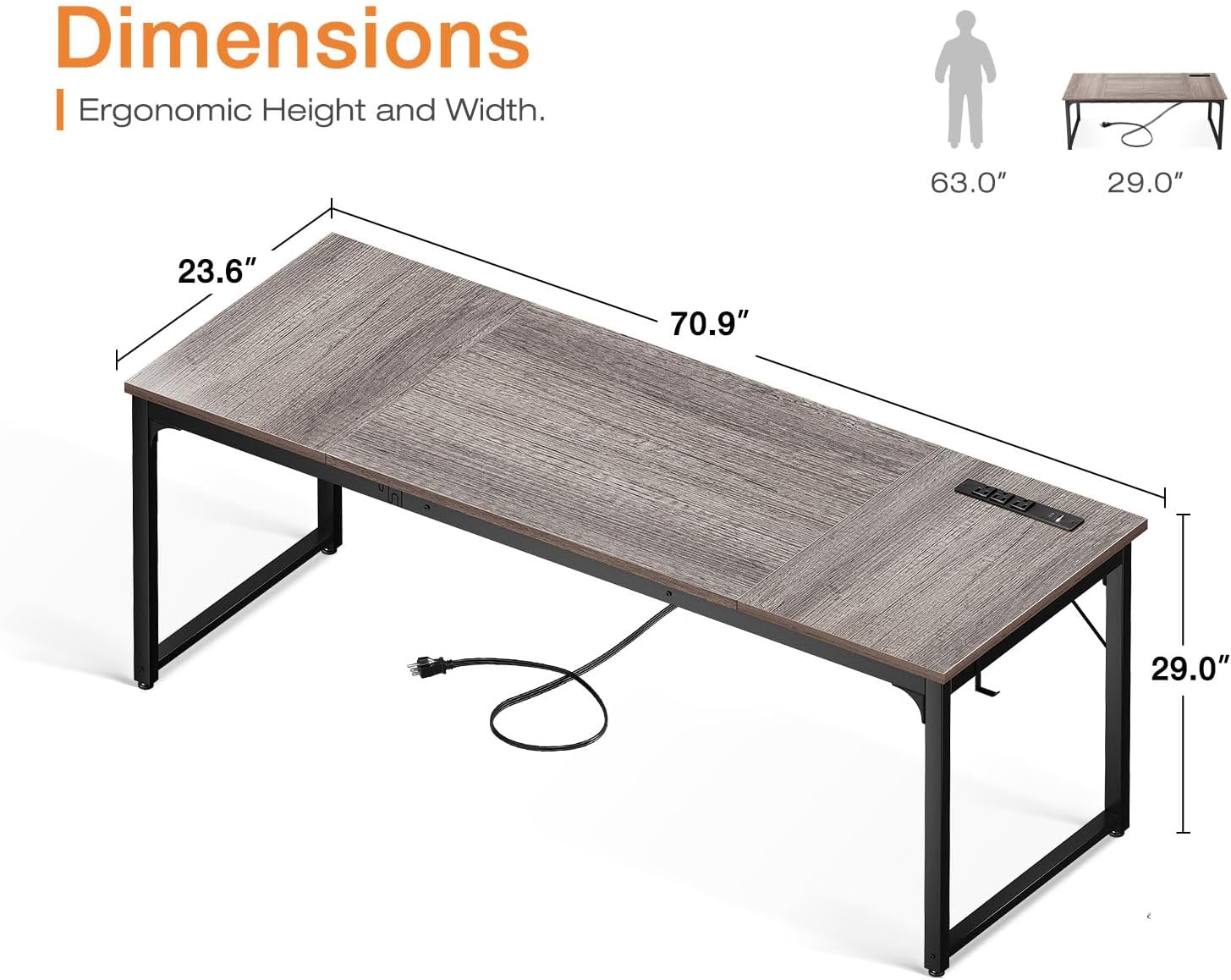
- Large Desk Panel: Measuring 70.9"(L) x 23.6"(W) x 29.0"(H), the spacious desktop accommodates multiple monitors, printers, and other essentials, providing ample room for various activities.
- Integrated Power Outlets & Charging Ports: Equipped with 3 standard AC power outlets, 1 USB charging port, and 1 Type-C port, allowing convenient charging for smartphones, gaming gear, and other electronic devices directly from your desk.
- Sturdy Construction: Features thick metal frames made of heavy-duty, powder-coated steel for enhanced stability and safety. A triangular support structure under the panel ensures long-term durability.
- Versatile Side Hook: Includes a convenient side hook for hanging headphones, bags, or other accessories, keeping your workspace tidy.
- Adjustable Foot Pads: Equipped with adjustable foot pads to ensure stability on uneven floors and protect your flooring from scratches.
3. Package Contents
Please verify that all components are present before beginning assembly. All necessary tools are included in the package.
- Desktop Panels (2 sections)
- Metal Legs/Frame Components
- Integrated Power Strip with USB and Type-C ports
- Side Hook
- Adjustable Foot Pads
- Assembly Hardware (screws, bolts, Allen wrench)
- Instruction Manual
4. Setup and Assembly
The Coleshome 71-Inch Computer Desk is designed for quick and easy assembly, typically completed within 30 minutes. Follow these general steps:
- Unpack Components: Carefully remove all parts from the packaging and lay them out on a clean, soft surface to prevent scratches.
- Assemble Frame: Attach the metal leg frames to the main support beams using the provided hardware. Ensure all connections are secure but do not fully tighten screws until the desk is fully assembled.
- Attach Desktop Panels: Place the desktop panels onto the assembled frame. Align the pre-drilled holes with the frame and secure them with the appropriate screws. The desktop may consist of two sections that join together.
- Install Power Strip: The integrated power strip can be installed on either the left or right side of the desk, depending on your preference. Secure it into the designated slot on the desktop.
- Attach Side Hook: Install the side hook to the desired location on the desk frame.
- Adjust Foot Pads: Once the desk is upright, adjust the foot pads at the bottom of each leg to level the desk and prevent wobbling.
- Final Tightening: Double-check all screws and connections, then fully tighten them to ensure maximum stability.


5. Operating Instructions
Using your Coleshome Computer Desk is straightforward:
- Power Outlets: Plug the desk's main power cord into a wall outlet. You can then use the 3 AC outlets on the integrated power strip for your computer, monitor, or other devices.
- USB & Type-C Charging: Connect your compatible devices to the USB or Type-C ports for convenient charging. These ports are designed for electronic devices such as smartphones, tablets, and gaming accessories.
- Workspace Organization: Utilize the large desktop surface to arrange your equipment and materials. The side hook can be used to keep headphones or bags off the floor and within easy reach.
6. Maintenance
To maintain the appearance and longevity of your desk:
- Cleaning: Wipe the desktop and metal frame with a soft, damp cloth. Avoid harsh chemicals or abrasive cleaners that could damage the finish.
- Weight Distribution: Distribute weight evenly across the desktop. Avoid placing excessively heavy items on one spot.
- Check Connections: Periodically check all screws and bolts to ensure they remain tight. Re-tighten if necessary to maintain stability.
- Power Strip Care: Ensure the power strip is kept dry and free from dust. Do not overload the outlets.
7. Troubleshooting
- Desk is Wobbly:
- Ensure all assembly screws are fully tightened.
- Adjust the foot pads on each leg to compensate for uneven flooring.
- Power Outlets/USB Ports Not Working:
- Verify that the desk's main power cord is securely plugged into a functional wall outlet.
- Check if the power strip's circuit breaker (if present) has tripped. Reset if needed.
- Ensure devices are properly connected to the ports.
- Missing or Damaged Parts: If your desk arrives with damaged or missing parts, please refer to the Warranty & Support section for contact information.
8. Specifications
| Feature | Detail |
|---|---|
| Brand | Coleshome |
| Model | B0DDPW6ZMD |
| Product Dimensions (D x W x H) | 23.6"D x 70.9"W x 29"H |
| Color | Grey Oak |
| Material | Wood (Top), Metal (Frame) |
| Desk Design | Computer Desk, Writing Desk |
| Special Feature | Built-In USB Outlet (3 AC, 1 USB, 1 Type-C) |
| Assembly Required | Yes |
9. Warranty & Support
Coleshome offers up to a 1-year warranty for your peace of mind. If your desk arrives damaged, has missing parts, or is scratched, please contact our professional customer support team. We are committed to helping you solve any problems within 24 hours and offer fast refunds or replacements for any quality issues.
For support, please visit the official Coleshome store or contact customer service through your purchase platform.