
1. Introduction
This manual provides comprehensive instructions for the EunnacoTop Multi-Frequency Remote Control Duplicator, Model EUC07. This device is designed to copy signals from various remote controls for garage doors, gate openers, and other compatible systems. Please read these instructions carefully before use to ensure proper operation and programming.

Image 1.1: EunnacoTop Multi-Frequency Remote Control Duplicator.
2. Product Features
- Multi-Frequency Compatibility: Supports a wide range of frequencies including 315MHz, 433.92MHz, 306MHz, 310MHz, 318MHz, 330MHz, 350MHz, 370MHz, 390MHz, 418MHz, 430.5MHz, 431.5MHz, 432.8MHz, 580MHz, 868.35MHz, and 915MHz.
- Three Code Cloning: Capable of cloning Fixed Code, Learning Code, and Rolling Code remotes.
- 2-in-1 Functionality: One four-button remote can store two sets of four signals (total 8 channels), allowing it to function as two separate four-button remotes.
- Extended Range: Provides a reliable signal up to 50 meters, capable of penetrating walls, doors, and floors.
- Easy Programming: Simplified copying process for most remote types.

Image 2.1: Multi-frequency compatibility overview.
3. Package Contents
Upon opening your EunnacoTop Multi-Frequency Remote Control Duplicator package, you should find the following items:
- 2 x Remote Control Duplicators (batteries included)
- 2 x Lanyards
- 2 x Instruction Manuals

Image 3.1: Contents of the EunnacoTop remote control duplicator package.
4. Compatibility
The EunnacoTop Multi-Frequency Remote Control Duplicator is compatible with a wide range of remote control models and brands. Before purchasing or attempting to clone, ensure your original remote meets the following conditions:
- Your original remote control can be used normally.
- You know the original remote control's transmitting frequency.
- You know the remote control's code chip type.
To determine your remote control model, frequency, and code chip, you can often find this information printed on the remote's circuit board. Look for a silver-white sound table with a frequency number (e.g., 433MHz) and a black chip with a model number (e.g., HT-12E).
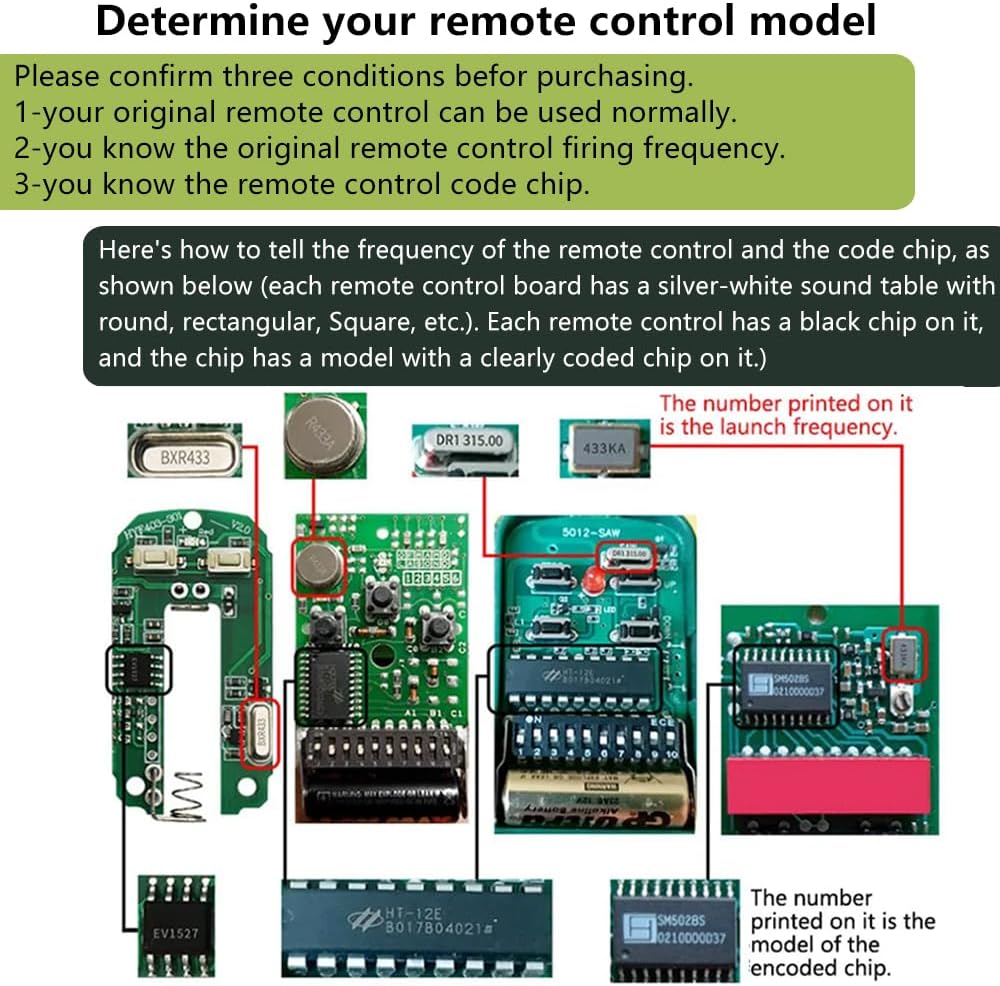
Image 4.1: Identifying original remote control specifications.
4.1. Common Coding Chips
The duplicator supports common coding chips such as 2260, 2262, PT2264, SMC5326, SC5262, HT12E, HT12D, HT600, HT680, HT6207, HT6010, HT6012, SMC918, SM5028S series, 527, 1527, 2240, and applicable models in the international market.

Image 4.2: List of reproducible original remote control chips.
4.2. Compatible Rolling Code Brands (433MHz)
For rolling code remotes, direct cloning may require additional programming on the motor/receiver unit after the initial cloning process. Compatible rolling code brands (some models) include:
- CAME (TOP432NA, TOP432EE, TOP432EV)
- FAAC (XT4 433RC)
- NICE (FLORS, Flor-s 2/4, Smilo 2/4)
- BENINCA
- BFT (MITTO2, MITTO4 - old version)
- Motorline MX4SP DSM
- DEA MIO TR2
- Peccinin TX3C
- Centurion NOVA
- AN MOTOR AT-4
- FADINI JUBI
- DOORHAN TX4
- KEY TXB-42R
- ATA PTX4
- GBD AU1600
- Nice-Smilo
- V2
- NOVOFERM
- Hiland
- ROSSI
Note: After cloning a rolling code remote, it needs to be matched with the original receiver. Consult your original receiver manufacturer's instructions for matching procedures.

Image 4.3: Examples of compatible rolling code remote brands.
5. Setup and Programming
5.1. Clearing Existing Codes
Before programming, it is essential to clear any pre-existing codes from the duplicator remote.
- Press and hold buttons A and B simultaneously on the duplicator remote.
- The LED indicator will flash rapidly three times, then pause, and then flash continuously. This indicates that all stored codes have been successfully cleared.
- Release both buttons.

Image 5.1: Clearing memory and initial setup.
5.2. Copying Fixed and Learning Codes
This method applies to most fixed code and learning code remotes.
- Place the original remote control and the duplicator remote side-by-side, as close as possible.
- Press and hold the desired button on the original remote control (e.g., button A).
- While still holding the original button, press and hold the corresponding button on the duplicator remote (e.g., button A).
- Continue holding both buttons until the LED indicator on the duplicator remote flashes rapidly and then changes to a constant light. This signifies successful copying.
- Release both buttons.
- Repeat these steps for any remaining buttons you wish to copy (B, C, D).
5.3. Programming Rolling Codes
For rolling code remotes, the cloning process is similar to fixed/learning codes, but an additional step is required to pair the duplicator remote with your receiver/motor unit.
- Follow steps 1-5 from Section 5.2 to copy the rolling code signal from your original remote to the duplicator.
- After successful cloning, you must program the duplicator remote directly to your garage door opener or gate motor's receiver. This usually involves pressing a 'Learn' or 'Program' button on the receiver unit and then pressing a button on the newly cloned duplicator remote.
- Refer to the specific instruction manual for your garage door opener or gate motor for detailed pairing procedures.
6. Operating Instructions
6.1. 2-in-1 Mode
The EUC07 remote control duplicator features a 2-in-1 mode, allowing it to store two sets of four signals (total 8 channels) independently. This means one physical remote can act as two distinct 4-button remotes.
- To switch between the two modes (Remote Control "1" and Remote Control "2"), press and hold buttons B and C simultaneously.
- The LED indicator will change color to indicate the active mode:
- Green LED: Indicates Remote Control "1" is active.
- Blue LED: Indicates Remote Control "2" is active.
- You can program different signals to each mode's A, B, C, and D buttons without affecting the other mode.

Image 6.1: Understanding the 2-in-1 mode functionality.
6.2. General Operation
Once programmed, simply press the corresponding button (A, B, C, or D) on the duplicator remote to activate the cloned function (e.g., open/close garage door, operate gate).

Image 6.2: Operating the remote control for a garage door.

Image 6.3: Diverse applications of the remote control duplicator.
7. Specifications
| Feature | Specification |
|---|---|
| Model Number | EUC07 |
| Brand | EunnacoTop |
| Item Weight | 2.39 ounces |
| Product Dimensions | 2.64 x 1.46 x 0.47 inches |
| Color | Blue |
| Batteries Included | Yes |
| Battery Cell Type | Alkaline |
| Encoding Type | Fixed Code, Learning Code, Rolling Code (some models) |
| Transmitting Range | Up to 50 meters |
| RF Frequency | 300MHz ~ 915MHz (Multi-frequency) |
8. Troubleshooting
If you encounter issues with your EunnacoTop Remote Control Duplicator, consider the following:
- Remote not copying:
- Ensure the duplicator's existing codes are cleared (Section 5.1).
- Verify the original remote is functioning correctly and has sufficient battery power.
- Confirm the original remote's frequency and chip type are compatible (Section 4).
- Ensure the original and duplicator remotes are placed very close during the copying process.
- Try different positions or angles when holding the remotes together.
- If the LED flashes but doesn't become constant, the signal may not have been fully captured. Repeat the process.
- Cloned remote not operating device (e.g., garage door):
- For rolling code remotes, remember that an additional pairing step with the receiver/motor unit is required after cloning (Section 5.3).
- Ensure the correct button on the duplicator remote was programmed for the desired function.
- Check the battery in the duplicator remote.
- Short operating range:
- Replace the battery in the duplicator remote.
- Ensure there are no significant obstructions between the remote and the receiver.
9. Warranty and Support
The EunnacoTop Multi-Frequency Remote Control Duplicator comes with a 1-YEAR WARRANTY.
If you have any questions, require assistance, or experience issues not covered in this manual, please contact EunnacoTop customer support. We are committed to providing high-quality pre-sales and after-sales services within 24 hours.