
1. Product Overview
The NEW BAXS M4G is a compact 4-channel audio mixer designed for various audio applications, including DJ setups, studio recording, live streaming, and KTV stage performances. It offers versatile connectivity options, including XLR, 1/4-inch, USB, and Bluetooth, along with 48V phantom power for condenser microphones.

Figure 1: Front view of the NEW BAXS M4G 4-Channel DJ Audio Mixer.
Key Features:
- 4-Channel Input: Supports multiple audio sources simultaneously.
- Bluetooth Connectivity: Wireless audio streaming from mobile devices or computers.
- USB/MP3 Input: Direct playback from USB flash drives and computer connection for mixing and recording.
- XLR and 1/4" Inputs: Versatile connections for microphones and line-level instruments.
- +48V Phantom Power: Essential for condenser microphones.
- 3-Band EQ: High, Mid, and Low frequency adjustment on each channel.
- Built-in Effects: Delay and Repeat functions for enhanced audio.
- Headphone Output: For monitoring audio.
Video 1: A detailed demonstration of the features and various connection options of the NEW BAXS M4G 4-Channel DJ Audio Mixer.
2. Setup Guide
2.1 Unboxing and Power Connection
Carefully remove all components from the packaging. The box should contain the NEW BAXS M4G Audio Mixer, a power adapter, and a USB cable.

Figure 2: Contents of the NEW BAXS M4G Audio Mixer package.
Connect the power adapter to the mixer's power input and then to a suitable power outlet. Alternatively, the mixer can be powered via the USB port using a computer or a 5V charger/power bank.
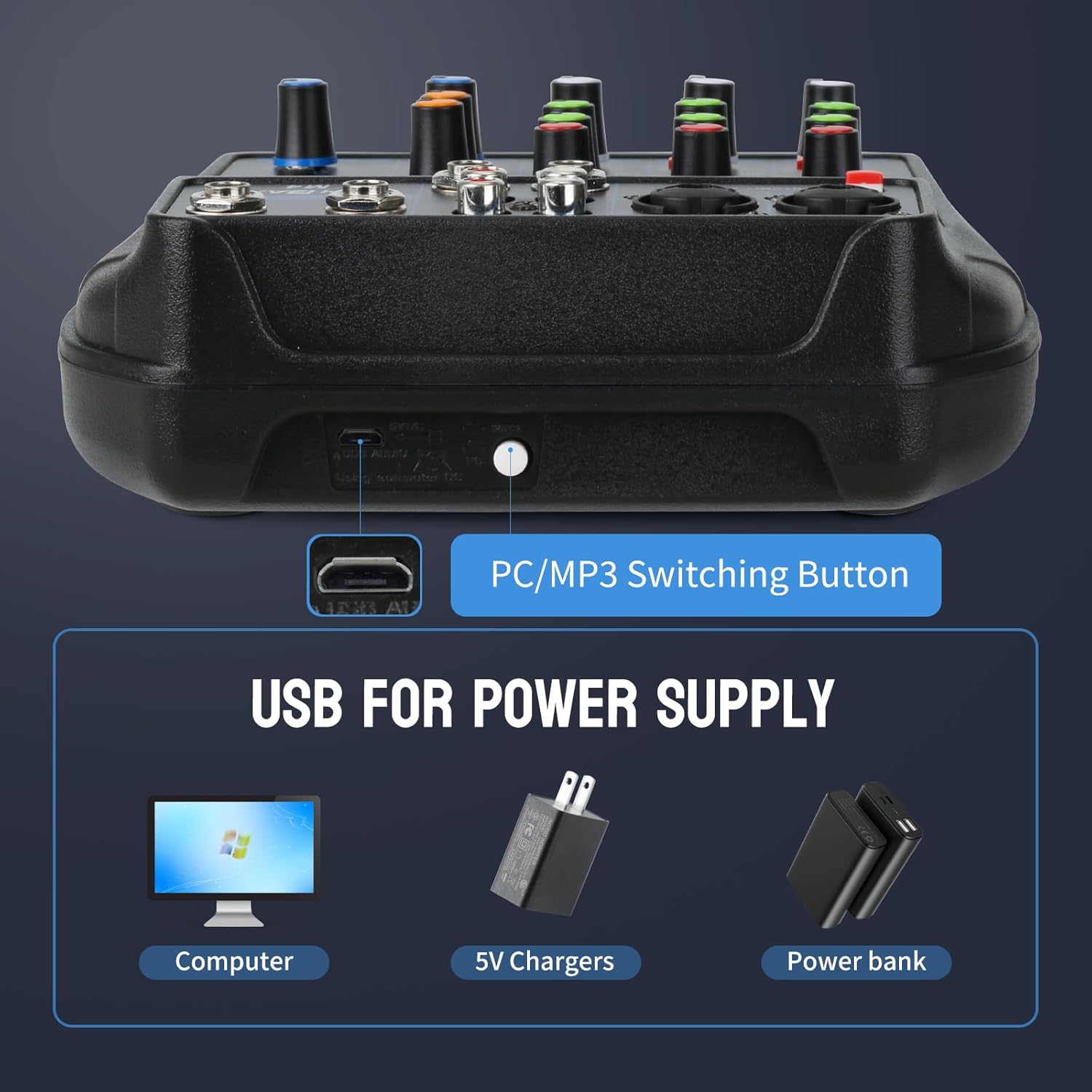
Figure 3: USB power supply options for the mixer.
2.2 Connecting Audio Sources
The M4G mixer supports various input types for microphones, instruments, and other audio devices.

Figure 4: Overview of supported device connections.
- Microphone/Line Inputs (Channels 1-2): Use XLR or 1/4" (TRS/TS) cables for microphones or line-level instruments.
- +48V Phantom Power: For condenser microphones, press the +48V PHANTOM button. Caution: Always turn off phantom power before plugging in or unplugging microphones to prevent damage.

Figure 5: Activating 48V Phantom Power for condenser microphones.
- Stereo Line Inputs (Channels 3/4): Use 1/4" (TRS/TS) or RCA cables for stereo devices like keyboards, CD players, or other mixers.
- USB Input: Insert a USB flash drive for MP3 playback or connect the mixer to a computer via USB for audio input/output.

Figure 6: Using the USB interface for media playback.
- Bluetooth Connection: Activate Bluetooth on your device and pair with the mixer (refer to Operating section for details).

Figure 7: Wireless Bluetooth playback setup.
2.3 Connecting Output Devices
Connect your main speakers or monitors to the MAIN OUT (Left/Right) jacks using 1/4" (TRS/TS) cables. For monitoring, connect headphones to the PHONE output.
3. Operating Instructions
The NEW BAXS M4G mixer features intuitive controls for managing your audio. Familiarize yourself with the layout:
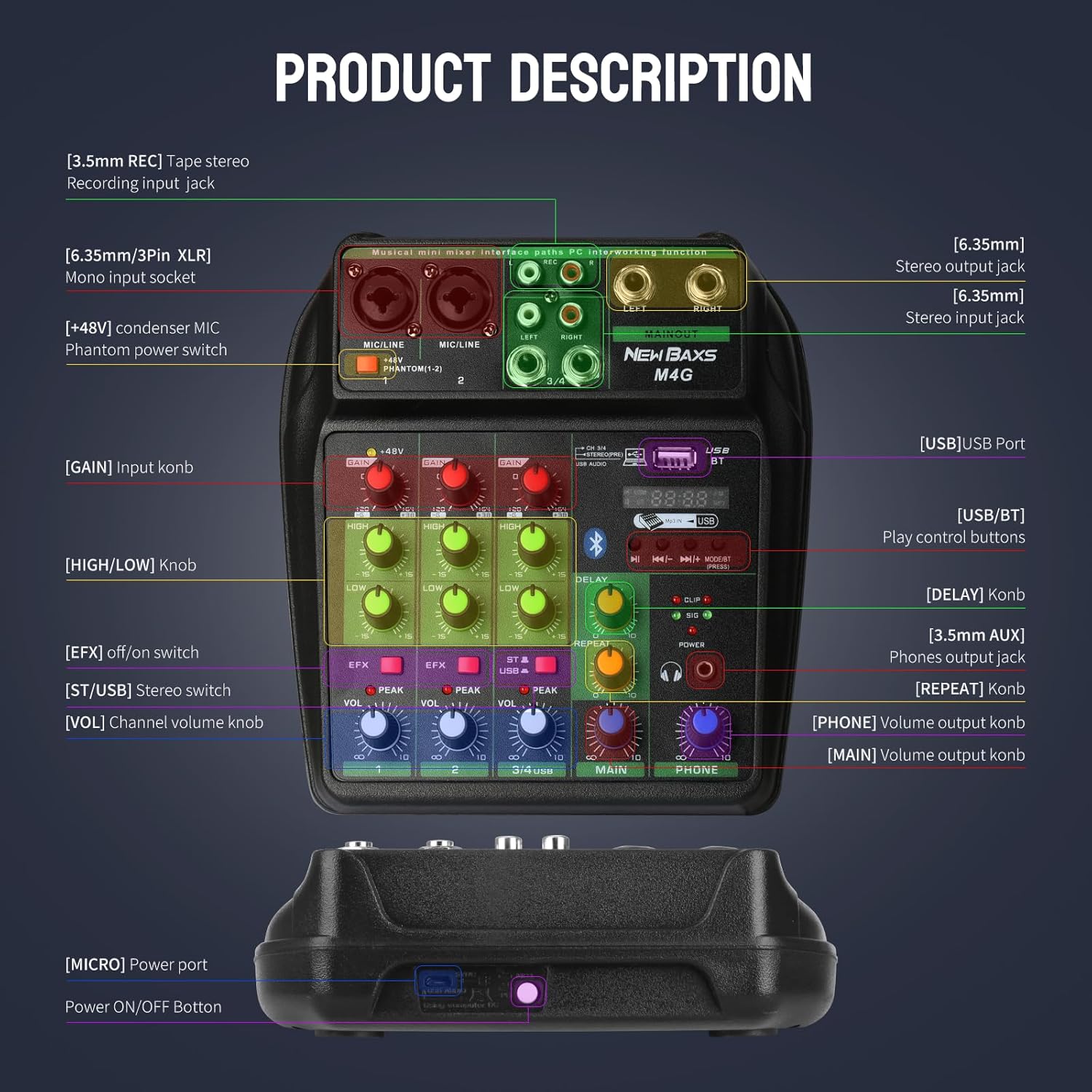
Figure 8: Labeled controls of the NEW BAXS M4G Audio Mixer.
3.1 Channel Controls (Channels 1-4)
- GAIN: Adjusts the input sensitivity for each channel. Set this to an appropriate level to prevent clipping (indicated by the PEAK LED).
- HIGH/LOW (EQ): Controls the treble (HIGH) and bass (LOW) frequencies for each channel.
- EFX: Adjusts the amount of effect (delay/repeat) applied to the channel.
- VOL (Volume): Controls the output volume of the individual channel.
- PEAK LED: Illuminates when the input signal is too high, indicating potential clipping. Reduce the GAIN if this LED lights up frequently.
3.2 Master and Effect Controls
- DELAY: Adjusts the delay time of the built-in effect.
- REPEAT: Controls the number of repetitions for the delay effect.

Figure 9: Adjusting the reverberation (EFX) effect.
- MAIN (Volume): Controls the overall output volume of the mixer to your main speakers.
- PHONE (Volume): Adjusts the volume for the headphone output.
3.3 Bluetooth Pairing
- Press the MODE button on the USB/BT section until 'BT' appears on the display.
- On your mobile device or computer, enable Bluetooth and search for available devices.
- Select 'NEW BAXS M4G' from the list to pair.
- Once paired, you can stream audio wirelessly to the mixer and control its volume via the mixer's controls.
3.4 USB/MP3 Playback
- Insert a USB flash drive containing MP3 files into the USB port.
- The mixer will automatically switch to USB mode or you may need to press the MODE button.
- Use the playback controls (Play/Pause, Next/Previous Track) on the mixer to manage your music.
4. Maintenance
Proper maintenance ensures the longevity and optimal performance of your NEW BAXS M4G Audio Mixer.
- Cleaning: Use a soft, dry cloth to clean the exterior of the mixer. Avoid using liquid cleaners or solvents, as they may damage the finish or internal components.
- Dust Protection: Keep the mixer covered when not in use to prevent dust and grime from accumulating in the rotary controls and ports.
- Storage: Store the mixer in a cool, dry place away from direct sunlight, extreme temperatures, and high humidity.
- Cable Management: Ensure all cables are connected securely and are not under undue strain. Avoid sharp bends or kinks in cables.
- Power Off: Always power off the mixer and disconnect it from the power source when not in use for extended periods or during electrical storms.
5. Troubleshooting
If you encounter issues with your NEW BAXS M4G Audio Mixer, refer to the following common problems and solutions:
- No Sound Output:
- Check all cable connections (input, output, power).
- Ensure all volume knobs (channel, main, phone) are turned up.
- Verify that your speakers/headphones are connected correctly and powered on.
- If using Bluetooth, ensure the device is paired and playing audio.
- Distorted Sound / Clipping:
- Reduce the GAIN knob for the affected channel.
- Check if the PEAK LED is illuminating; if so, reduce input gain.
- Ensure the main output volume is not set too high, causing distortion in connected speakers.
- Microphone Not Working (Condenser Mic):
- Ensure +48V Phantom Power is activated for the correct channel.
- Check the microphone cable and connection.
- Bluetooth Connection Issues:
- Ensure the mixer is in Bluetooth mode ('BT' on display).
- Try unpairing and re-pairing the device.
- Ensure no other devices are actively connected to the mixer via Bluetooth.
- Humming Noise:
- Check for ground loops. Try connecting all audio equipment to the same power strip.
- Ensure all cables are properly shielded and in good condition.
If the issue persists after attempting these troubleshooting steps, please contact customer support.
6. Specifications
| Feature | Specification |
|---|---|
| Brand | NEW BAXS |
| Model Number | M4G |
| Number of Channels | 4 |
| Connectivity Technology | Bluetooth, USB |
| Power Source | Corded Electric |
| Voltage | 220 Volts |
| Item Weight | 0.7 Pounds (11.2 ounces) |
| Product Dimensions | 7.4"D x 2.12"W x 6.22"H (7.4 x 2.12 x 6.22 inches) |
7. Warranty and Support
7.1 Warranty Information
The NEW BAXS M4G Audio Mixer comes with a 24-month extended warranty from the date of purchase. This warranty covers manufacturing defects and ensures your complete satisfaction. Please retain your proof of purchase for warranty claims.
7.2 Customer Support
For any questions, technical assistance, or warranty claims, please contact our customer service team. We provide 24-hour prompt customer service to resolve any issues you may encounter.
Contact Information: Refer to the contact details provided with your product packaging or visit the official NEW BAXS website for support options.