
LIGE EF5 PRO
LIGE Military Smart Watch (EF5 PRO) User Manual
Your comprehensive guide to setting up, operating, and maintaining your LIGE Smart Watch.
1. Introduction
Thank you for choosing the LIGE Military Smart Watch (EF5 PRO). This device is designed to be a robust and versatile companion for your daily life, fitness activities, and outdoor adventures. Featuring a 1.43" HD AMOLED display, Bluetooth calling, extensive health monitoring, and military-grade durability, it offers a seamless blend of technology and resilience. This manual will guide you through its features and ensure optimal use.
2. Package Contents
Please verify that all items are present in your package:
- LIGE Military Smart Watch (EF5 PRO)
- Stainless Steel Strap
- Black Silicone Strap
- Camouflage Silicone Strap
- Magnetic Charging Cable
- User Manual
3. Product Overview
Familiarize yourself with the components of your LIGE Smart Watch:

The LIGE Military Smart Watch (EF5 PRO) showcasing its robust design, interchangeable straps, and various display functionalities including a detailed watch face, notification screen, and app icons.
- 1.43" HD AMOLED Display: High-resolution touchscreen for clear visuals.
- Power Button: Located on the side, used for power on/off and screen control.
- Function Button: Additional button for quick access to features.
- Built-in LED Light: Integrated flashlight on the side.
- Heart Rate/Blood Oxygen Sensor: Located on the back for health monitoring.
- Charging Contacts: Magnetic points on the back for charging.
- Speaker & Microphone: For Bluetooth calling functionality.
4. Setup Guide
4.1 Charging the Smart Watch
Before first use, fully charge your smartwatch. The 530mAh battery provides extended usage.
- Connect the magnetic charging cable to the charging contacts on the back of the watch.
- Plug the USB end of the cable into a standard USB power adapter (5V/1A recommended).
- The watch display will show a charging indicator. A full charge takes approximately 3 hours.

The image illustrates the charging process and the impressive battery life: 3 hours for a full charge, 10 days of working time, and up to 45 days of standby time.
Battery Life: Expect 5-10 days of regular use and up to 45 days on standby.
4.2 App Installation and Pairing
To unlock the full potential of your smartwatch, download and install the companion app.
- Download the App: Search for "FitCloudPro" in your smartphone's app store (Google Play Store for Android, Apple App Store for iOS) or scan the QR code provided in the watch's quick start guide.
- Compatibility: Ensure your smartphone runs Android 4.4+ or iOS 8.0+ for optimal compatibility.
- Register/Log In: Open the FitCloudPro app and follow the on-screen instructions to create an account or log in.
- Pairing:
- Enable Bluetooth on your smartphone.
- Open the FitCloudPro app, navigate to the "Device" or "My Device" section.
- Tap "Add Device" or "Bind Device" and select your LIGE EF5 PRO from the list of discovered devices.
- Confirm the pairing request on both your phone and the watch.
- Background Operation: It is crucial to allow the FitCloudPro app to run in the background on your phone to maintain a stable connection and ensure continuous data synchronization and notification delivery. Refer to your phone's settings for app background permissions.
5. Operating Instructions
5.1 Basic Navigation
- Touchscreen: Swipe left/right, up/down to navigate through menus and features. Tap to select.
- Power Button: Press to wake/sleep the screen. Long press to power on/off.
- Function Button: Customizable shortcut, often used to quickly access sports modes or a specific app.
5.2 Bluetooth Calling & Smart Notifications
Once paired, your smartwatch can handle calls and display notifications.

The image demonstrates the smartwatch's capability to receive and display incoming calls with contact information, as well as notifications from various social media applications like WeChat, Line, Snapchat, Facebook, LinkedIn, and Instagram.
- Answering/Making Calls: The built-in microphone and speaker allow you to answer incoming calls directly from your wrist or dial numbers.
- Notifications: Receive alerts for calls, SMS, and app notifications (e.g., WhatsApp, Facebook, Instagram) directly on your watch. Ensure notification permissions are enabled in the FitCloudPro app.
5.3 Customizing Watch Faces
Personalize your watch with a wide array of watch faces.

This image showcases the diversity of over 200 customizable watch faces available, along with other integrated features such as a stopwatch, remote photography control, music playback control, and weather forecasts.
- Pre-installed Faces: Swipe on the home screen to quickly change watch faces.
- More Faces: Access over 200+ watch faces via the FitCloudPro app.
- Custom Dials: Upload your own photos through the app to create unique custom watch faces.
5.4 Built-in LED Flashlight
Your smartwatch features a convenient LED light for illumination.

The image shows the smartwatch's integrated LED flashlight actively illuminating a dark outdoor environment, demonstrating its utility for navigating in low-light conditions during adventures.
- Access the flashlight function from the quick settings menu or a dedicated app icon.
- Ideal for outdoor activities or finding your way in the dark.
5.5 Sports Modes & Fitness Tracking
Track your workouts with precision using the integrated sports modes.

This image highlights the smartwatch's ability to track over 100 sports modes, displaying key metrics such as distance covered (3.08 km), calories burned (463 kcal), and steps taken (22608 steps), catering to diverse fitness needs.
- 120+ Sports Modes: Select from a wide range of activities including running, hiking, cycling, and more.
- Tracking Metrics: Monitor distance, calories burned, steps taken, and other relevant data for your chosen sport.
- GPS via Smartphone: For accurate outdoor activity tracking, ensure your phone's GPS is active and connected to the watch.
5.6 Health Monitoring
Keep an eye on your vital health metrics.

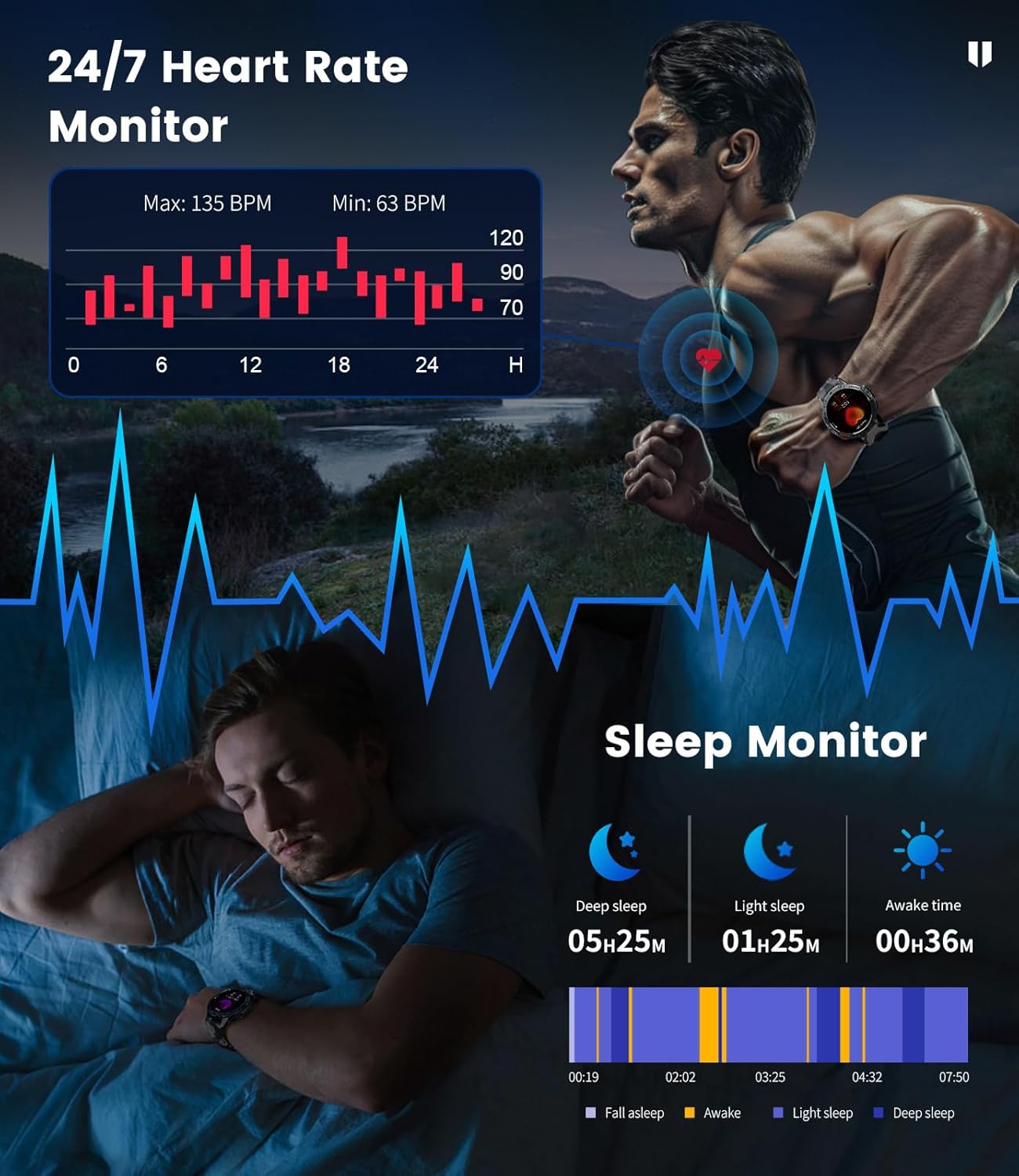
The image illustrates the smartwatch's continuous 24/7 heart rate monitoring, showing a graph of heart rate fluctuations, and its sleep monitoring function, detailing deep sleep, light sleep, and awake times throughout the night.
- Heart Rate Monitoring: Continuous 24/7 heart rate tracking.
- Blood Oxygen Monitoring: Measure your SpO2 levels.
- Sleep Analysis: Track your sleep patterns, including deep sleep, light sleep, and awake times.
- Calorie Consumption: Monitor your daily calorie burn.
5.7 Always-On Display (AOD)
The 1.43" HD AMOLED screen supports an Always-On Display feature.
This image highlights the smartwatch's 1.43-inch AMOLED HD display with a 466x466 resolution, emphasizing its clear view and the 'Rest screen always on' feature, which allows the time to be visible without interaction.
- Allows the time and basic information to be visible without lifting your hand or touching the screen.
- Note: Enabling Always-On Display will increase battery consumption.
6. Maintenance
6.1 Cleaning and Care
- Wipe the watch and straps regularly with a soft, damp cloth.
- Avoid using harsh chemicals or abrasive materials.
- Ensure the charging contacts are clean and dry before charging.
6.2 Water Resistance & Durability
The LIGE Military Smart Watch is built to withstand tough conditions.

This image illustrates the smartwatch's adherence to Military Grade Standard MIL-STD 810H U.S.A., highlighting its resistance to anti-impact, dustproof properties, harsh temperatures (-40°C to 70°C), anti-fluid corrosion, and 5ATM waterproof rating.
- IP68 & 5ATM Waterproof: Suitable for daily use, hand washing, rain, and shallow swimming. Not recommended for hot showers, saunas, or diving.
- Military-Grade Durability: Passed multiple durability tests for shock resistance, drop resistance, and extreme temperatures (-40°C to 70°C).
- Features a stainless steel bezel and PC-ABS alloy bottom shell for enhanced impact resistance.
6.3 Strap Replacement
Your watch comes with three interchangeable straps.
- To change a strap, locate the quick-release pins on the underside of the strap where it connects to the watch body.
- Slide the pin inwards to detach the strap.
- Align the new strap with the watch lugs and slide the pin back into place until it clicks securely.
7. Troubleshooting
If you encounter issues with your smartwatch, refer to the following common problems and solutions:
- Watch not turning on: Ensure the watch is fully charged. Connect it to the charger for at least 30 minutes.
- Unable to pair with phone:
- Ensure Bluetooth is enabled on your phone and the watch.
- Make sure the FitCloudPro app is running and has necessary permissions.
- Try restarting both your phone and the watch.
- Forget the device in your phone's Bluetooth settings and try pairing again.
- Notifications not received:
- Check notification permissions for the FitCloudPro app in your phone's settings.
- Ensure the app is allowed to run in the background.
- Verify that notifications are enabled within the FitCloudPro app for specific applications.
- Inaccurate health data:
- Ensure the watch is worn snugly on your wrist, not too loose or too tight.
- Clean the sensor on the back of the watch.
- Avoid excessive movement during measurements.
- Short battery life:
- Disable Always-On Display if not needed.
- Reduce screen brightness.
- Limit frequent use of power-intensive features like continuous heart rate monitoring or flashlight.
8. Specifications
| Feature | Specification |
|---|---|
| Model | EF5 PRO |
| Display | 1.43 Inches HD AMOLED (466*466 resolution) |
| Operating System Compatibility | Android 4.4+ and iOS 8.0+ |
| Chipset | Realtek8763EWE-VP |
| Memory Storage Capacity | 256 MB |
| Battery Capacity | 530 mAh Lithium Polymer |
| Connectivity Technology | Bluetooth |
| Water Resistance | IP68, 5ATM |
| Special Features | Activity Tracker, Calorie Tracker, 120+ Sports Modes, 200+ DIY Dials, Weather Forecast, Music Player, Always On Display, Rest-screen Clock, Voice Call, Sleep Monitor, Heart Rate Monitor, Message Notification, AI Voice Control, Built-in LED Flashlight |
9. Warranty and Support
LIGE is committed to ensuring your satisfaction. If you have any questions or require assistance with your EF5 PRO smartwatch, please do not hesitate to contact our customer service. We are dedicated to providing reliable service and a delightful shopping experience.
Please refer to your purchase documentation or the official LIGE website for specific warranty terms and contact information.
Ask a question about this manual
Ask about setup, troubleshooting, compatibility, parts, safety, or missing instructions. Manuals+ will review the question and use this page’s manual context to help answer it.