
1. Introduction
This manual provides essential information for the safe and efficient assembly, operation, and maintenance of your FLEXISPOT EJ2 Electric Standing Desk Frame. Please read this manual thoroughly before use and retain it for future reference.
The FLEXISPOT EJ2 is a robust and versatile electric standing desk frame designed to support various tabletop sizes, offering a flexible and ergonomic workspace solution. It features dual quiet motors for smooth height adjustments, a memory function to save preferred heights, and an anti-collision system for enhanced safety.
2. Safety Information
- Weight Capacity: Do not exceed the maximum load capacity of 100 kg (220 lbs). Overloading can cause damage to the desk and potential injury.
- Power Supply: Ensure the desk is connected to a grounded power outlet with the correct voltage. Do not use damaged power cords or adapters.
- Clearance: Keep the area around the desk clear during height adjustments to prevent obstructions.
- Children and Pets: Keep children and pets away from the desk during operation to prevent accidents.
- Anti-Collision Feature: The desk is equipped with an anti-collision system that automatically stops and reverses if it encounters an obstacle during movement. However, always exercise caution.
- Assembly: Due to the weight of the components, assembly is recommended for two people.
- Maintenance: Do not attempt to disassemble or repair the desk yourself. Contact customer support for assistance.
3. Package Contents
Please verify that all components are present before beginning assembly. The package typically includes:
- Desk Legs (2)
- Crossbar/Frame (1)
- Control Box (1)
- Handset/Control Panel (1)
- Power Adapter and Cable (1)
- Mounting Hardware (screws, Allen wrenches, etc.)
- Instruction Manual (this document)
Note: The tabletop is sold separately and is not included with the desk frame.
4. Setup and Assembly
Assembly of the FLEXISPOT EJ2 desk frame requires careful attention to detail. It is highly recommended to have two people for assembly due to the weight of the components. An electric drill can expedite the process of attaching the tabletop.
- Unpack Components: Carefully remove all parts from the packaging and lay them out on a clean, flat surface. Check against the package contents list.
- Attach Feet to Legs: Secure the foot supports to the bottom of each desk leg using the provided screws.
- Assemble Crossbar: Connect the crossbar sections to form the main frame. Ensure the adjustable width mechanism is correctly aligned.
- Connect Legs to Crossbar: Attach the assembled legs to the crossbar, ensuring all connections are secure.
- Install Control Box and Handset: Mount the control box and handset (control panel) to the underside of the desk frame using the designated screws.
- Connect Cables: Connect the motor cables from the legs to the control box, and then connect the handset cable and power cable to the control box.
- Attach Tabletop: Carefully place your chosen tabletop onto the assembled frame. Align it properly and secure it using screws (ensure screws are appropriate length for your tabletop thickness to avoid damage).
- Cable Management: Use cable ties or management accessories (not included) to organize cables for a tidy and safe workspace.

Image: The FLEXISPOT EJ2 electric standing desk frame, shown without a tabletop, highlighting its robust structure and integrated control panel.

Image: A technical diagram illustrating the dimensions and adjustable ranges of the FLEXISPOT EJ2 desk frame, including height, width, and depth specifications.
5. Operating Instructions
5.1. Height Adjustment
The FLEXISPOT EJ2 features smooth electric height adjustment. Use the up and down arrow buttons on the control panel to raise or lower the desk to your desired height.
- Up Button (▲): Press and hold to raise the desk.
- Down Button (▼): Press and hold to lower the desk.

Image: Two FLEXISPOT EJ2 desk frames, one black and one white, demonstrating the adjustable height range from 70cm to 119cm, along with lift speed (25mm/s) and low noise operation (<50dB).
5.2. Memory Presets
The integrated control panel allows you to save up to four preferred height settings for quick adjustments.
- Adjust the desk to your desired height using the up/down buttons.
- Press the 'M' or 'Set' button (if available, or indicated by 'i' on some models) followed by one of the numbered preset buttons (1, 2, 3, or 4). The display will confirm the setting.
- To recall a saved height, simply press the corresponding numbered button (1, 2, 3, or 4). The desk will automatically move to that height.

Image: A close-up of the FLEXISPOT EJ2 control panel, showing the LED display, up/down buttons, and four memory preset buttons (1, 2, 3, 4) for saving preferred desk heights.
5.3. Anti-Collision Function
The EJ2 desk frame is equipped with an obstacle detection system. If the desk encounters a solid object during upward or downward movement, it will automatically stop and reverse slightly to prevent damage or injury.
- The sensitivity of this function can typically be adjusted through the control panel settings (refer to the detailed manual for specific steps, usually involving pressing 'M' and an arrow key).
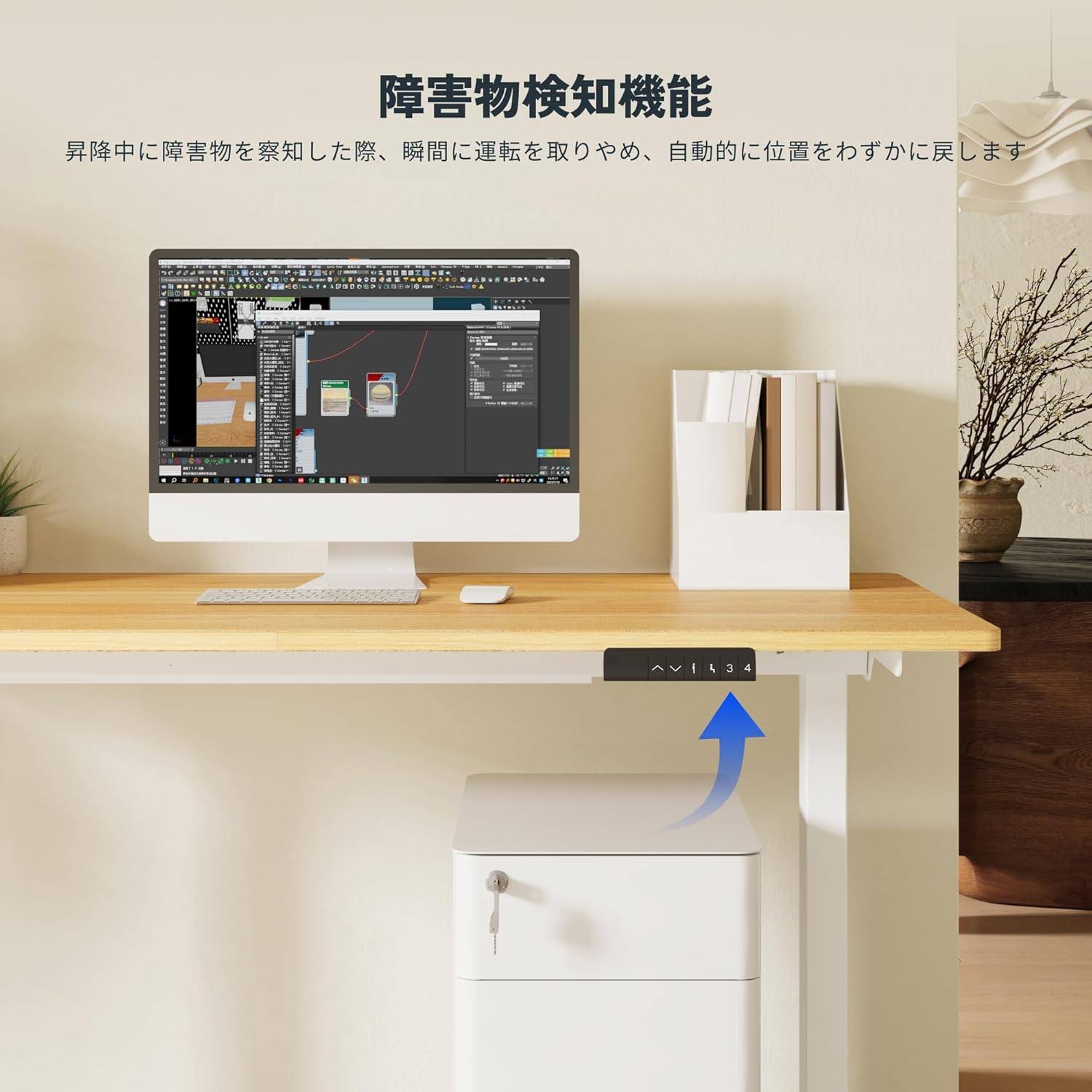
Image: A FLEXISPOT EJ2 desk demonstrating its anti-collision feature, where the desk automatically stops and slightly reverses when an object (like a cabinet) is detected during downward movement.
5.4. Dual Quiet Motors
The EJ2 frame utilizes dual motors for enhanced stability, faster adjustment speed, and quieter operation. The operating noise level is typically below 50dB, comparable to ambient room sounds, making it suitable for various environments, including quiet offices or homes.

Image: A composite image illustrating the quiet operation of the FLEXISPOT EJ2 desk, with a cat sleeping peacefully on a white desk and a dog sitting calmly next to a black desk, emphasizing the low noise level.
6. Maintenance
Regular maintenance ensures the longevity and optimal performance of your FLEXISPOT EJ2 desk frame.
- Cleaning: Wipe the desk frame with a soft, damp cloth. Avoid using harsh chemicals or abrasive cleaners that could damage the finish.
- Check Connections: Periodically check all screws and bolts to ensure they are tight. Re-tighten if necessary.
- Cable Inspection: Inspect power and motor cables for any signs of wear or damage. Replace immediately if damage is found.
- Lubrication: The lifting columns are generally maintenance-free. Do not apply lubricants unless specifically instructed by FLEXISPOT support.

Image: Close-up views of the FLEXISPOT EJ2 desk frame's rubber pads on the support plate (01) to prevent tabletop friction, and adjustable feet (02) for floor protection and vibration reduction during movement.
7. Troubleshooting
If you encounter issues with your FLEXISPOT EJ2 desk frame, refer to the following common troubleshooting steps:
- Desk Not Moving:
- Check if the power cable is securely plugged into both the wall outlet and the control box.
- Ensure all motor cables are properly connected to the control box.
- Try resetting the desk (see 'Reset Procedure' below).
- Uneven Movement or Noise:
- Verify that the desk is not overloaded and that weight is evenly distributed.
- Check for any obstructions under or around the desk.
- Ensure all assembly screws are tightened.
- Error Codes on Display:
- If an error code appears, consult the detailed manual or contact customer support with the specific code. Often, a reset can resolve minor errors.
7.1. Reset Procedure
A reset can often resolve minor operational issues. The exact procedure may vary slightly, but generally involves:
- Unplug the power cable from the wall outlet.
- Wait for at least 10-15 seconds.
- Plug the power cable back in.
- Press and hold the 'Down' button (▼) until the desk reaches its lowest position and slightly bounces, or until the display shows 'RST' or '000'. Release the button.
If problems persist after troubleshooting, please contact FLEXISPOT customer support.
8. Specifications
| Feature | Specification |
|---|---|
| Model | EJ2 |
| Height Adjustment Range | 70 cm - 119 cm (27.6 in - 46.9 in) |
| Lift Speed | 25 mm/s (0.98 in/s) |
| Load Capacity | 100 kg (220 lbs) |
| Noise Level | < 50 dB |
| Motor Type | Dual Quiet Motors |
| Control Panel | Integrated Touch Panel with Memory Presets (4) |
| Safety Features | Anti-Collision System (3-level sensitivity adjustment) |
| Compatible Tabletop Length | 120 cm - 180 cm (47.2 in - 70.9 in) |
| Compatible Tabletop Width | 60 cm - 80 cm (23.6 in - 31.5 in) |
| Compatible Tabletop Thickness | 2 cm (0.8 in) or more |
| Frame Material | Steel |
| Product Weight | 18.6 kg (41 lbs) |
| Package Dimensions | 93.5 x 38.6 x 15.6 cm (36.8 x 15.2 x 6.1 in) |
| Package Weight | 19.96 kg (44 lbs) |
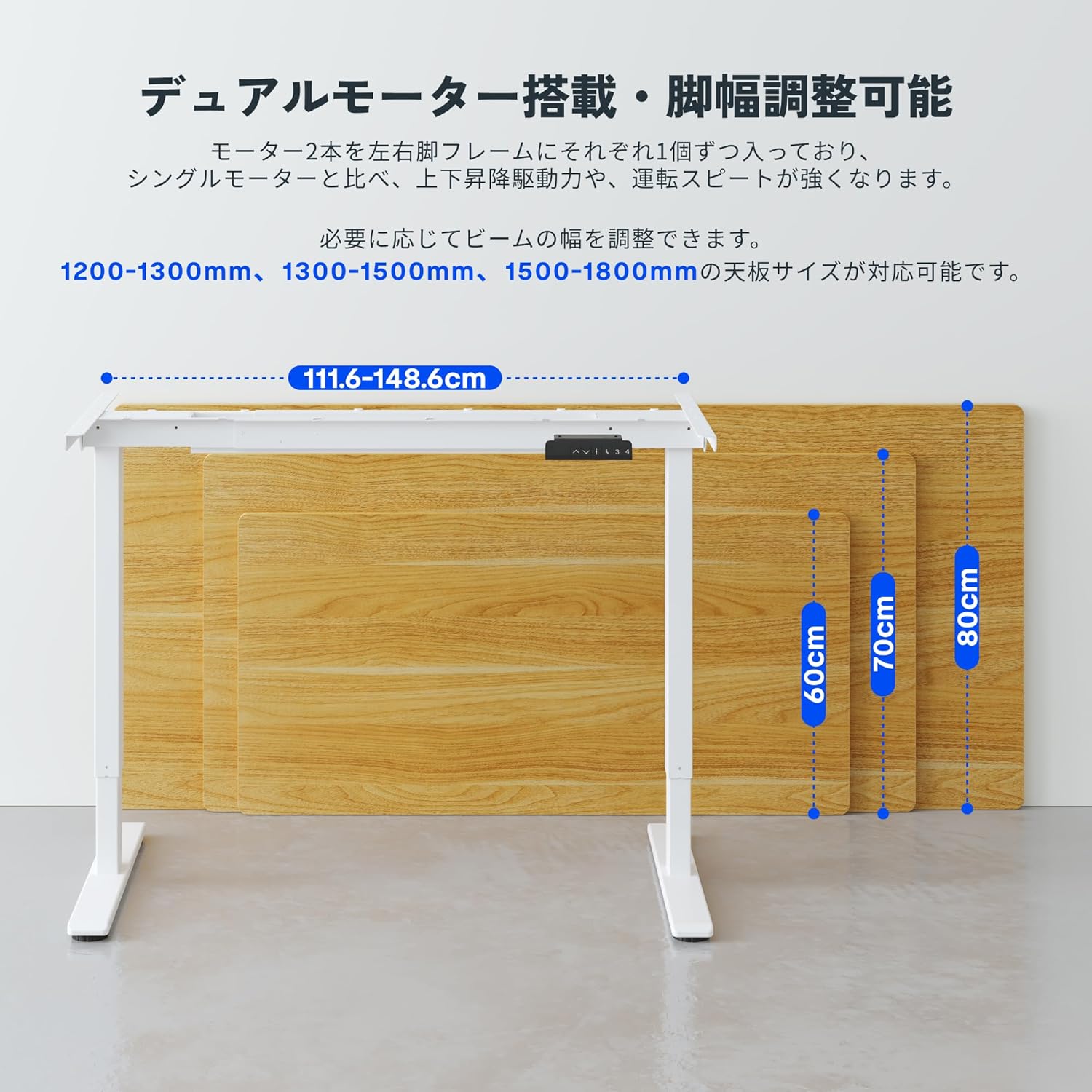
Image: A diagram illustrating the adjustable foot width of the FLEXISPOT EJ2 desk frame, ranging from 111.6 cm to 148.6 cm, and showing compatible tabletop sizes for various lengths and widths.
9. Warranty and Support
FLEXISPOT is committed to providing high-quality products and excellent customer service.
- Manufacturer's Warranty: The FLEXISPOT EJ2 Electric Standing Desk Frame comes with a 5-year manufacturer's warranty. This warranty covers defects in materials and workmanship under normal use.
- Customer Support: FLEXISPOT offers dedicated customer support. For any inquiries, technical assistance, or warranty claims, please contact our support team. Support is available in Japanese.
- Contact Information: Please refer to the official FLEXISPOT website or your purchase documentation for the most current customer support contact details.


