1. Introduction
The FeiyuTech SCORP MINI 2 is an advanced AI tracking camera gimbal stabilizer designed to provide smooth and stable footage across various devices. This manual will guide you through the proper setup, operation, and maintenance of your device to ensure optimal performance.

Image 1.1: The FeiyuTech SCORP MINI 2 gimbal stabilizer with a camera attached, demonstrating its compact design and integrated tripod.
2. What's in the Box
Carefully unpack your FeiyuTech SCORP MINI 2 and verify that all items are present:
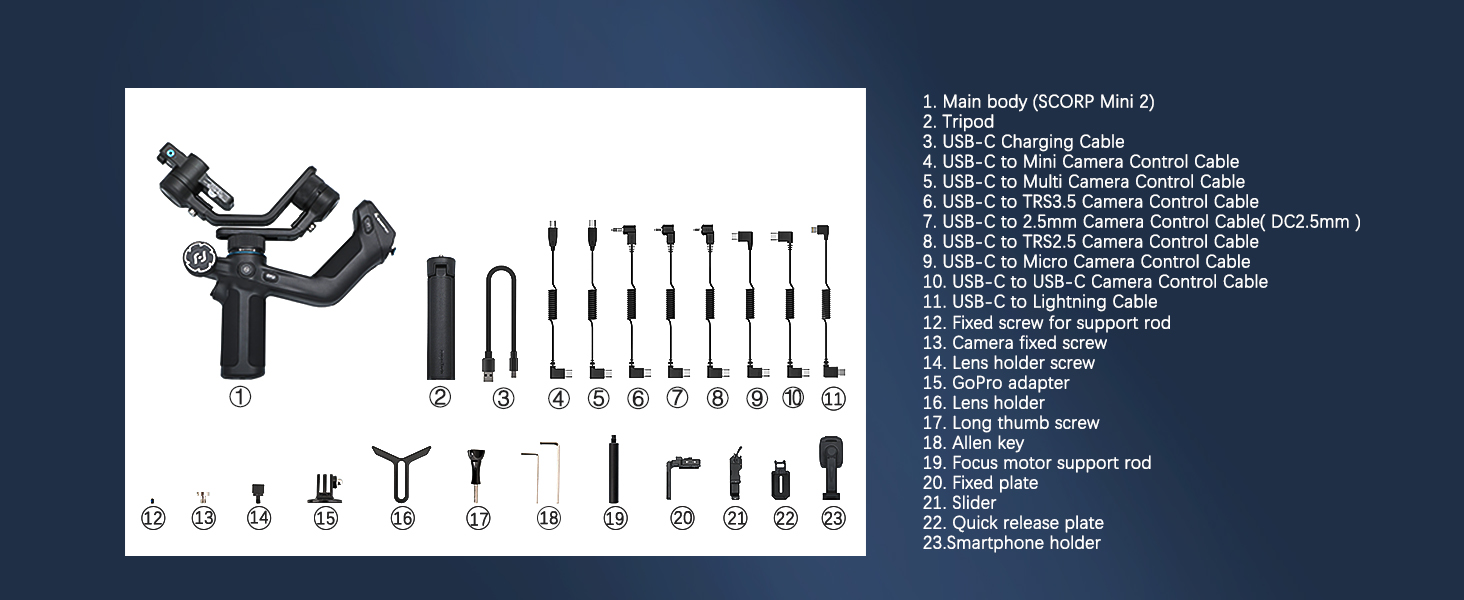
Image 2.1: All components included with the SCORP MINI 2, laid out for identification.
- SCORP MINI 2 Gimbal Main Body
- Tripod
- USB-C Charging Cable
- USB-C to Multi Camera Control Cable
- USB-C to TRS3.5 Camera Control Cable
- USB-C to 2.5mm Camera Control Cable (DC2.5mm)
- USB-C to TRS2.5 Camera Control Cable
- USB-C to Micro Camera Control Cable
- USB-C to USB-C Camera Control Cable
- USB-C to Lightning Cable
- Fixed screw for support rod
- Camera fixed screw
- Lens holder screw
- GoPro adapter
- Lens holder
- Long thumb screw
- Allen key
- Focus motor support rod
- Fixed plate
- Slider
- Quick release plate
- Smartphone holder
- User Manual Book
3. Setup and Balancing
Proper setup and balancing are crucial for optimal gimbal performance and battery life. Ensure the gimbal is powered off before mounting any device.
3.1. Mounting Devices
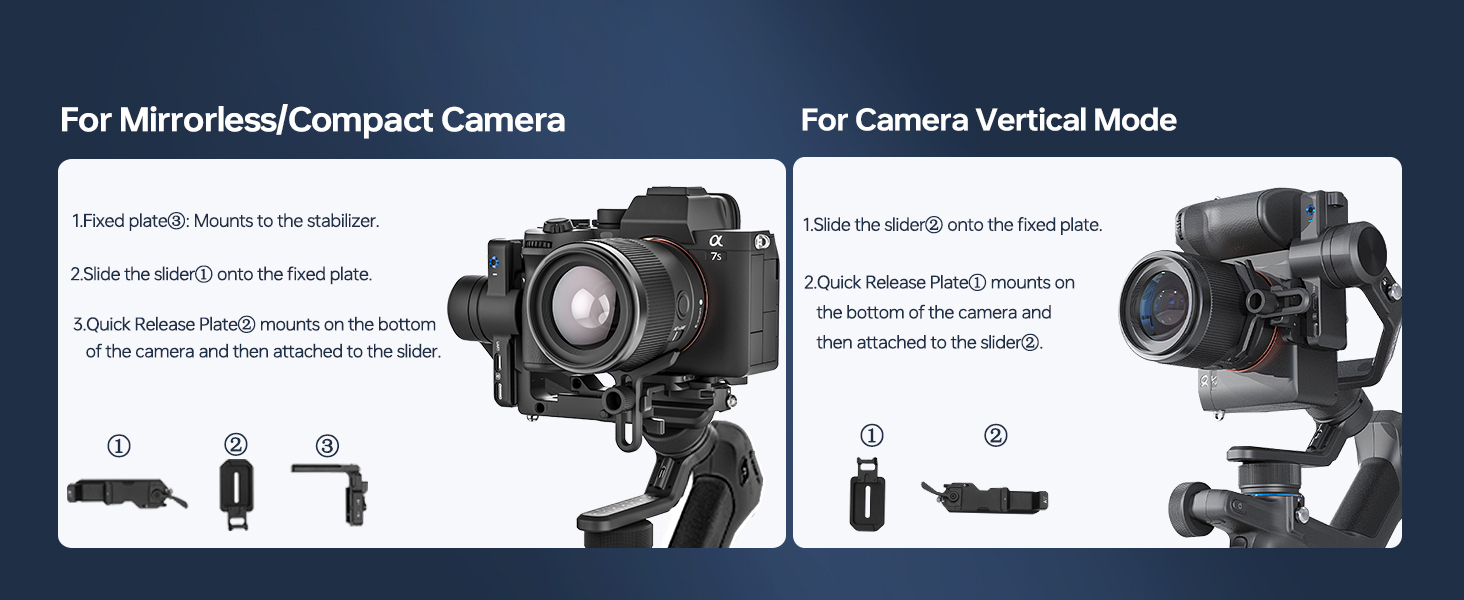
Image 3.1: Visual guide for attaching mirrorless or compact cameras to the gimbal.
3.1.1. For Mirrorless/Compact Camera
- Mount the fixed plate to the stabilizer.
- Slide the slider onto the fixed plate.
- Mount Quick Release Plate 2 on the bottom of the camera and then attach it to the slider.
3.1.2. For Camera Vertical Mode
- Slide the slider onto the fixed plate.
- Mount Quick Release Plate 1 on the bottom of the camera and then attach it to the slider.
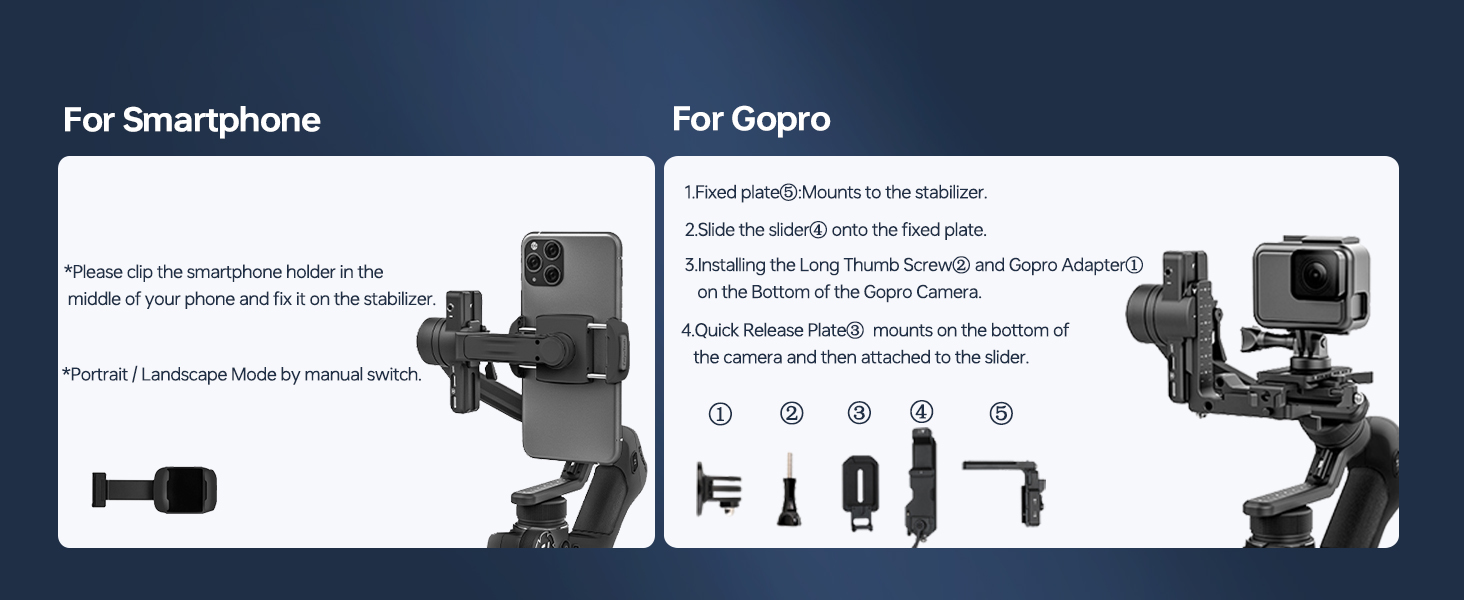
Image 3.2: Visual guide for attaching smartphones and GoPro cameras to the gimbal.
3.1.3. For Smartphone
- Clip the smartphone holder in the middle of your phone and fix it on the stabilizer.
- Portrait/Landscape Mode can be switched manually.
3.1.4. For GoPro
- Mount the fixed plate to the stabilizer.
- Slide the slider onto the fixed plate.
- Install the Long Thumb Screw and GoPro Adapter on the bottom of the GoPro Camera.
- Mount Quick Release Plate 3 on the bottom of the camera and then attach it to the slider.
3.2. Balancing
After mounting your device, balance the gimbal to ensure smooth operation and prevent motor strain. Refer to the detailed instructions in the full manual for precise balancing steps for each axis (tilt, roll, pan).
4. Operating the Gimbal
The SCORP MINI 2 offers various controls and modes for versatile shooting.
4.1. Controls and Display
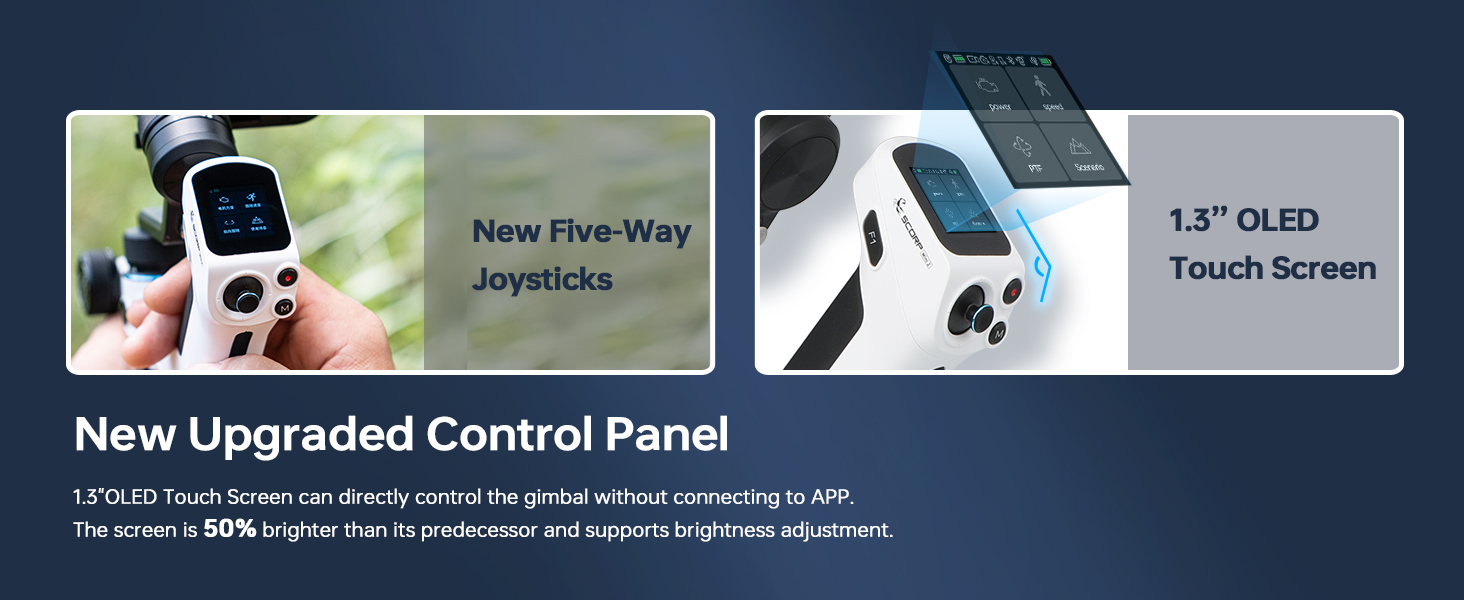
Image 4.1: The upgraded control panel featuring a 1.3-inch OLED touch screen and new five-way joysticks for intuitive control.
The gimbal features a 1.3-inch OLED touch screen and new five-way joysticks for direct control without needing to connect to an app. The screen is 50% brighter than its predecessor and supports brightness adjustment.
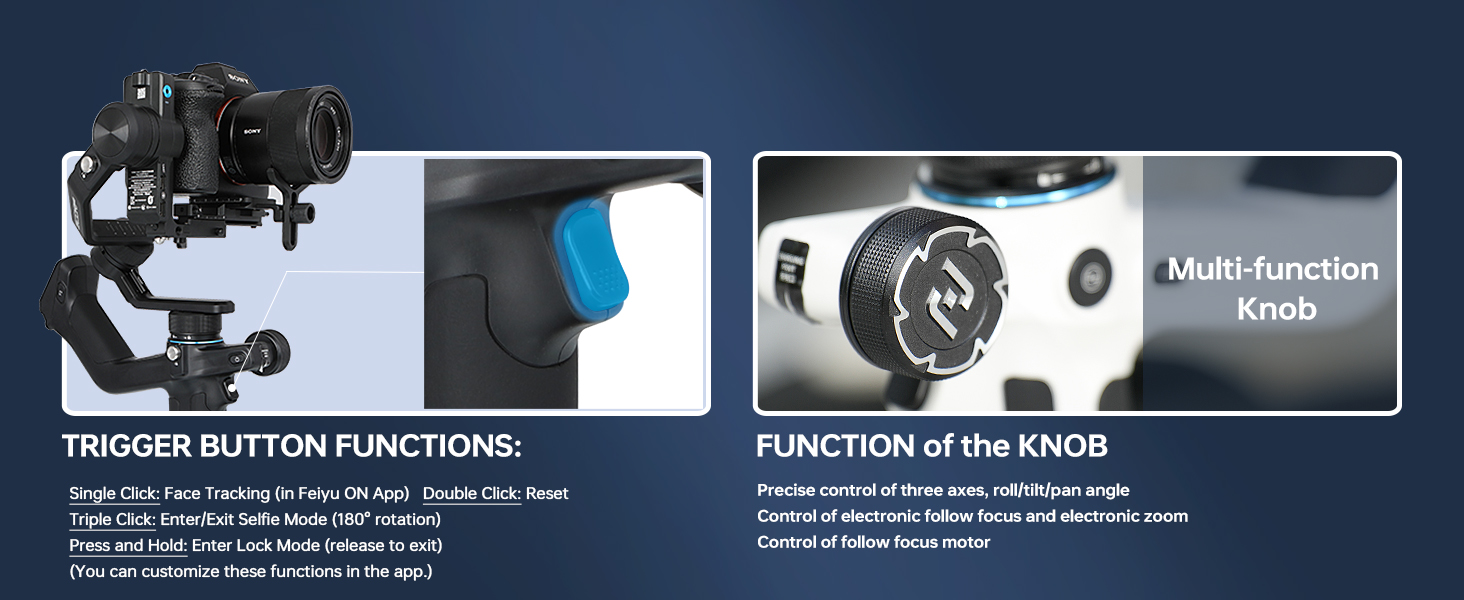
Image 4.2: Explanation of the trigger button functions and the capabilities of the multi-function knob.
4.1.1. Trigger Button Functions
- Single Click: Face Tracking (in Feiyu ON App)
- Double Click: Reset
- Triple Click: Enter/Exit Selfie Mode (180° rotation)
- Press and Hold: Enter Lock Mode (release to exit)
These functions can be customized within the Feiyu ON app.
4.1.2. Multi-function Knob
- Precise control of three axes: roll/tilt/pan angle.
- Control of electronic follow focus and electronic zoom.
- Control of follow focus motor.
4.2. AI Tracking Module
The SCORP MINI 2 features a built-in AI tracking sensor that automatically recognizes and tracks subjects, maintaining focus on moving targets and optimizing composition.
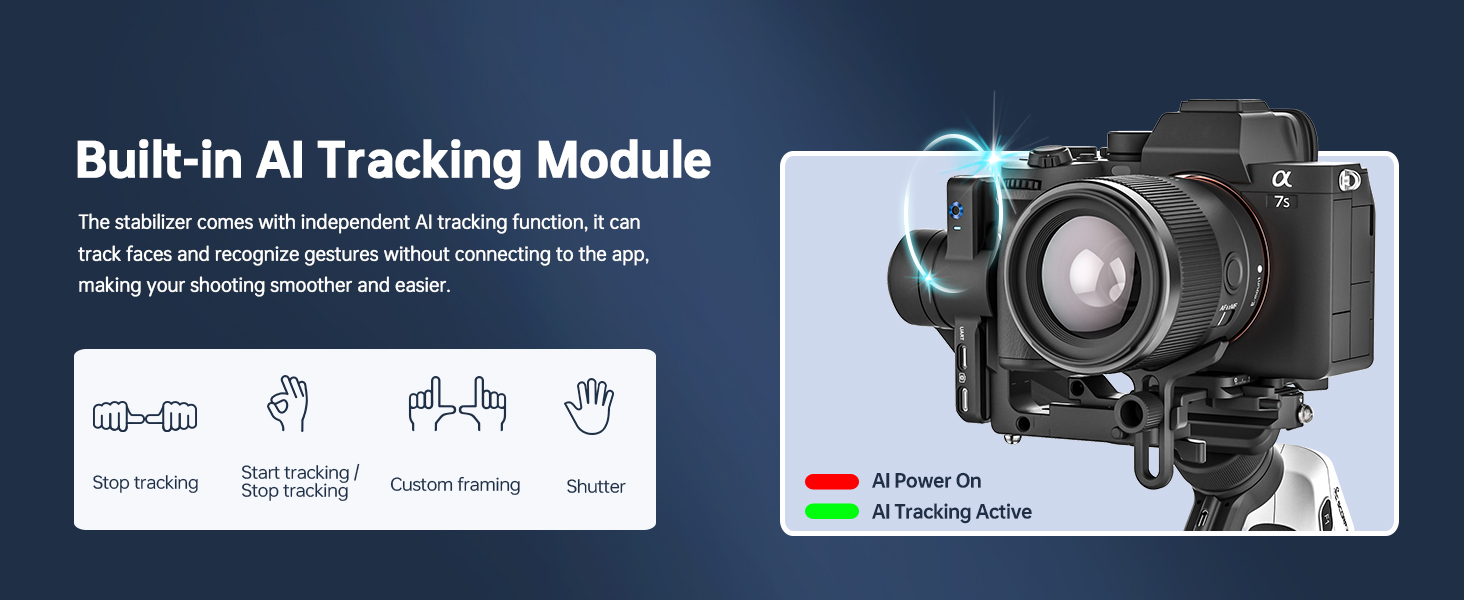
Image 4.3: The built-in AI tracking module with gesture recognition for control without an app connection.
4.2.1. Gesture Controls
- Thumbs Opposite Direction: Stop tracking.
- OK Gesture: Start tracking / Stop tracking.
- Double L-Shaped Gesture: Custom framing (frame the tracking point A→B, prevent misidentifying other subjects, prevent recording screen to shift).
- Spread Palm: Shutter.
4.3. Wireless Control

Image 4.4: The gimbal's capability for wireless control of a camera via Bluetooth.
The gimbal can connect to your camera via a control cable or Bluetooth, allowing you to easily trigger focus and capture photos or videos with a press of a button. Please check the compatibility list for specific models.
5. App Features
Enhance your gimbal experience with the dedicated FeiyuTech applications.

Image 5.1: Overview of advanced features like Rotation Mode, Panorama, and Time-Lapse accessible via the FeiyuTech apps.
- For DSLR, mirrorless, and action cameras, download the Feiyu SCORP app.
- For smartphones, download the Feiyu ON app.
These apps provide additional functions such as Rotation Mode, Panorama, and Time-Lapse, along with customizable joystick speed and axis rotation settings.
6. Compatibility
The FeiyuTech SCORP MINI 2 supports a wide range of cameras and lenses. Refer to the following lists for detailed compatibility information.
6.1. Camera Compatibility
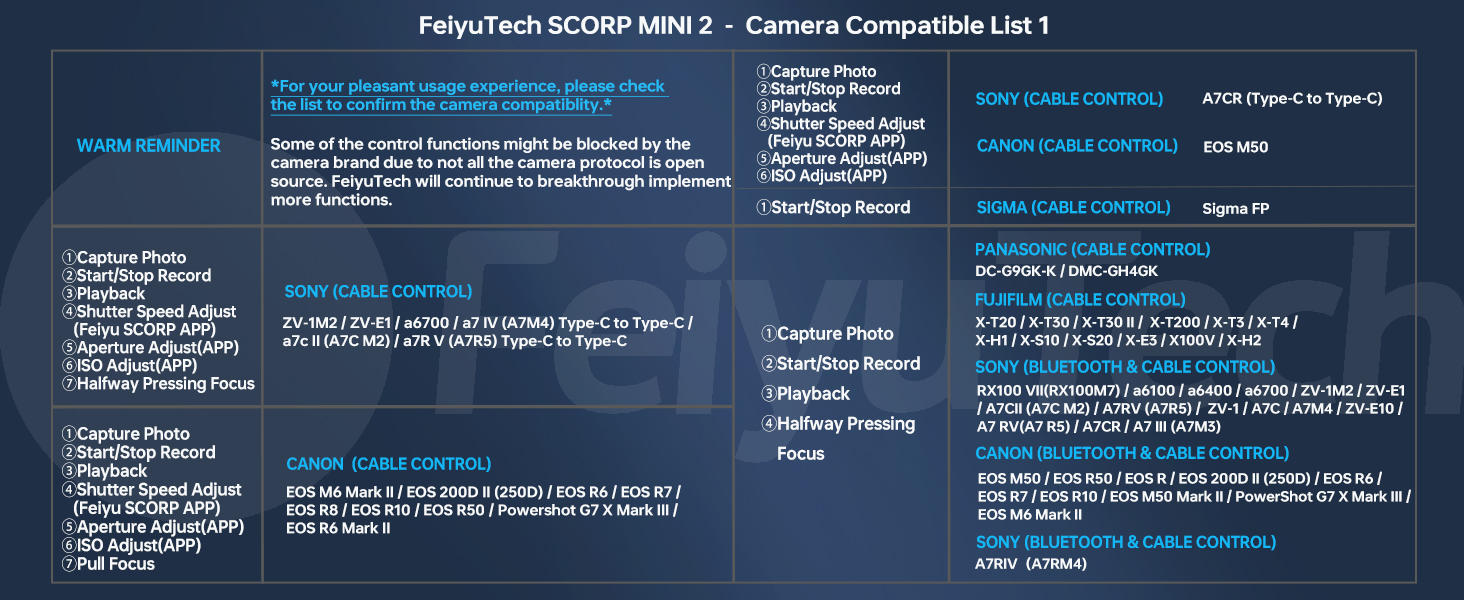
Image 6.1: FeiyuTech SCORP MINI 2 Camera Compatible List 1, detailing supported camera models and control types.
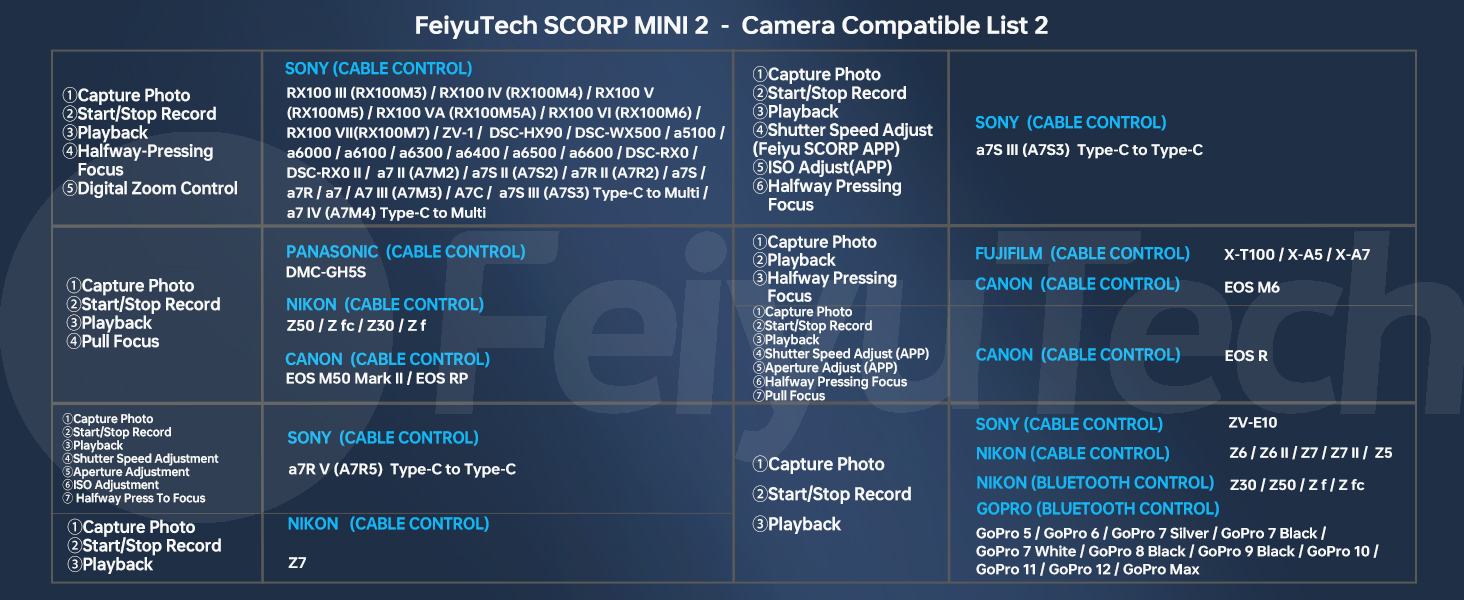
Image 6.2: FeiyuTech SCORP MINI 2 Camera Compatible List 2, providing further details on supported camera models and control types.
Warm Reminder:
- For your pleasant usage experience, please check the list to confirm camera compatibility.
- Some control functions may be blocked by the camera brand due to not all camera protocols being open source. FeiyuTech will continue to implement more functions.
6.2. Lens Compatibility
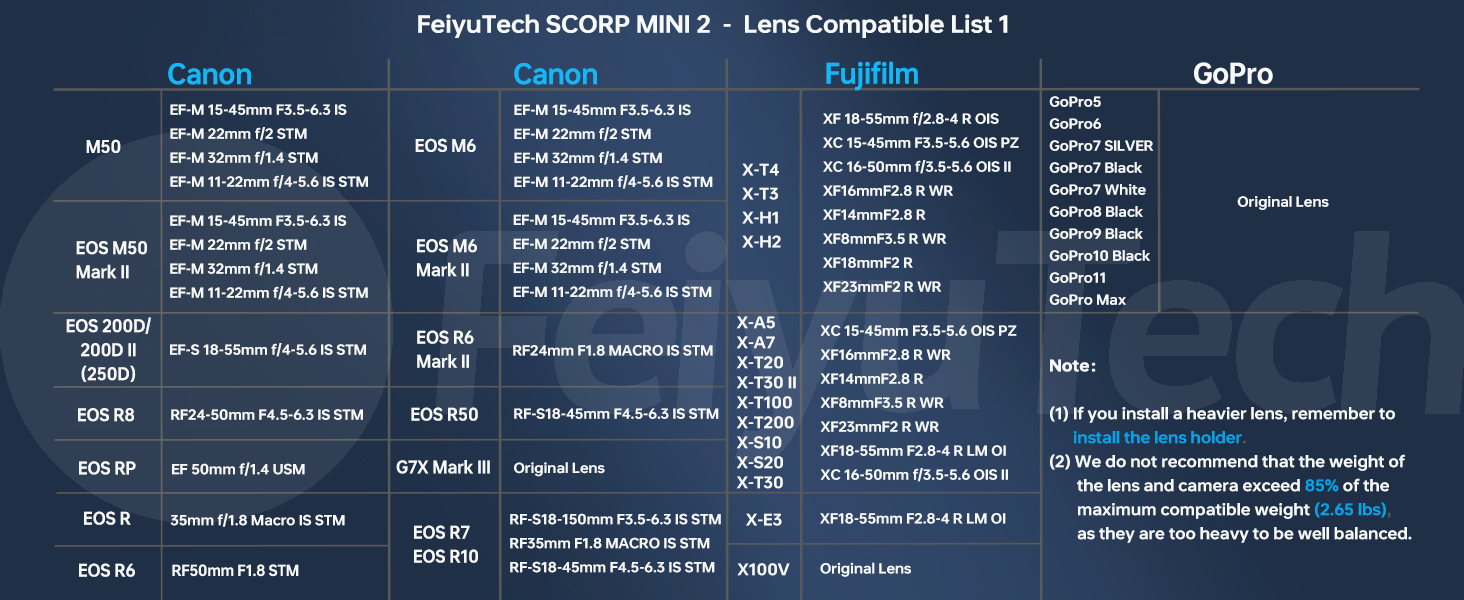
Image 6.3: FeiyuTech SCORP MINI 2 Lens Compatible List 1, showing compatible lenses for Canon, Fujifilm, and GoPro.
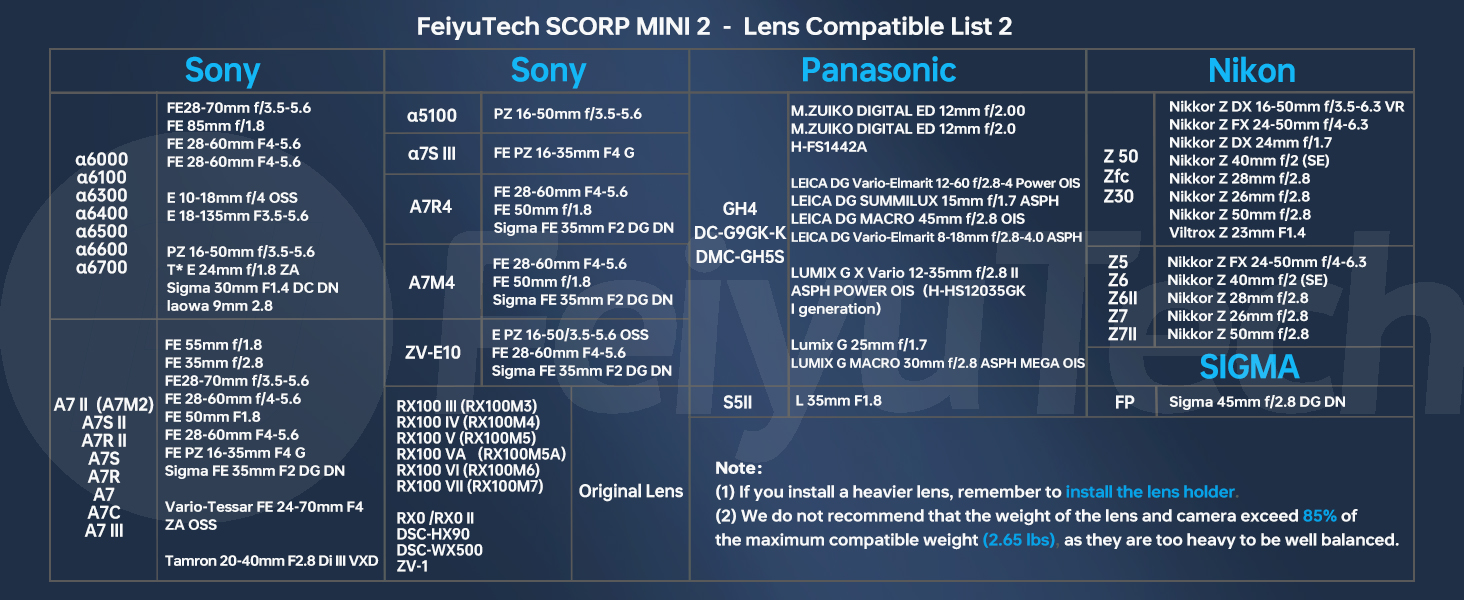
Image 6.4: FeiyuTech SCORP MINI 2 Lens Compatible List 2, showing compatible lenses for Sony, Panasonic, Nikon, and Sigma.
Note:
- If you install a heavier lens, remember to install the lens holder.
- We do not recommend that the weight of the lens and camera exceed 85% of the maximum compatible weight (2.65 lbs), as they may be too heavy to be well balanced.
7. Specifications
| Feature | Specification |
|---|---|
| Model | SCORP MINI 2 |
| Item Weight | 1.9 pounds |
| Folded Size | 247.6 x 59.8 x 234.8 mm |
| Max Payload | 2.65 lbs (1.2 kg) |
| Compatible Devices | Camera, Cellphone |
| Batteries | 1 Lithium Ion battery (included) |
| Manufacturer | Guilin FeiYu Technology Incorporated Company |
| Color | Black |
| Date First Available | August 13, 2024 |
8. Maintenance
To ensure the longevity and optimal performance of your FeiyuTech SCORP MINI 2, follow these maintenance guidelines:
- Cleaning: Use a soft, dry cloth to clean the gimbal body. Avoid using liquid cleaners or solvents that may damage the finish or internal components.
- Storage: Store the gimbal in a dry, cool place, away from direct sunlight and extreme temperatures. When not in use for extended periods, ensure the battery is charged to approximately 50-60% to preserve battery health.
- Battery Care: Avoid fully discharging the battery frequently. Charge the battery using the provided USB-C charging cable.
- Firmware Updates: Regularly check the FeiyuTech official website or app for firmware updates. Keeping your gimbal's firmware up-to-date can improve performance, add new features, and fix bugs.
- Avoid Overloading: Do not exceed the maximum payload capacity of 2.65 lbs (1.2 kg) to prevent damage to the motors.
9. Troubleshooting
If you encounter issues with your FeiyuTech SCORP MINI 2, refer to the following common problems and solutions:
- Gimbal not powering on:
- Ensure the battery is sufficiently charged.
- Verify that the power button is pressed correctly and held for the required duration.
- Gimbal motors vibrate or are unstable:
- Check if the camera is properly balanced on all three axes. Re-balance if necessary.
- Ensure the camera's weight does not exceed the maximum payload capacity.
- Perform a motor auto-tune or calibration via the gimbal's menu or the Feiyu SCORP app.
- AI tracking not working:
- Ensure the AI tracking module is enabled.
- Verify that lighting conditions are adequate for the AI sensor to detect subjects.
- Ensure no obstructions are blocking the AI sensor.
- Try recalibrating the AI tracking feature through the app or gimbal settings.
- Cannot connect to camera via cable/Bluetooth:
- Confirm that your camera model is listed in the compatibility section (Section 6).
- Ensure the correct control cable is used and securely connected.
- For Bluetooth, ensure Bluetooth is enabled on both the gimbal and the camera, and that they are paired correctly.
- Check your camera's settings to ensure external control is enabled.
- App not connecting to gimbal:
- Ensure Bluetooth is enabled on your smartphone.
- Restart both the gimbal and the app.
- Ensure you have downloaded the correct app (Feiyu SCORP for cameras, Feiyu ON for smartphones).
- Check for app updates in your device's app store.
For further assistance, please contact FeiyuTech customer support.
10. Warranty and Support
FeiyuTech products are designed for reliability and performance. For detailed warranty information, please refer to the warranty card included with your product or visit the official FeiyuTech website.
Customer Support: If you require technical assistance, have questions about your product, or need to report an issue, please contact FeiyuTech customer support through their official website or the contact information provided in your product packaging.
Online Resources: Visit the FeiyuTech official website for FAQs, video tutorials, and the latest firmware updates.


