
1. Introduction
Thank you for choosing the OFANTOP 52-inch Smart Ceiling Fan. This modern ceiling fan combines advanced technology with a minimalist design, featuring a silent DC motor, dimmable LED lighting, and multiple control options. This manual provides detailed instructions for safe installation, operation, and maintenance of your new ceiling fan.
2. Safety Information
Please read all safety instructions carefully before installation and use. Failure to follow these instructions may result in electric shock, fire, or personal injury.
- Ensure the power supply is disconnected at the circuit breaker before installation or servicing.
- All electrical wiring must be performed by a qualified electrician and comply with local codes and regulations.
- The mounting structure must be capable of supporting the weight of the fan (approximately 7.04 kg).
- Do not bend the blades during installation or cleaning.
- Keep hands and objects clear of the fan blades when the fan is operating.
- This fan is designed for indoor use only.
3. Package Contents
Verify that all components are present before beginning installation:
- Ceiling Fan Motor Assembly
- Fan Blades (3)
- LED Light Kit
- Remote Control with Wall Mount
- Downrod (25 cm)
- Mounting Bracket and Hardware
- User Manual
4. Setup and Installation
The OFANTOP ceiling fan is designed for easy installation. Follow these steps carefully.
4.1 Mounting the Fan
This fan supports flush mount installation, suitable for rooms with lower ceilings. Ensure the ceiling junction box is securely mounted and capable of supporting the fan's weight.

Image: Fan dimensions, flush mount detail, and recommended room sizes (12x12 ft to 20x20 ft).
- Turn off power at the main circuit breaker.
- Attach the mounting bracket to the ceiling junction box using the provided screws.
- Carefully lift the fan motor assembly and connect the electrical wires according to the wiring diagram in the full instruction manual.
- Secure the fan assembly to the mounting bracket.
- Attach the fan blades to the motor housing.
- Install the LED light kit and diffuser.
4.2 Smart Connectivity
For smart features (Wi-Fi, App, Voice Control), the fan requires a 2.4GHz Wi-Fi network for initial connection. Once connected, it can operate on a 5GHz network.
5. Operating Instructions
Your OFANTOP smart ceiling fan offers multiple convenient control methods.

Image: Illustration of four control methods: Google Assistant, Mobile App, Voice Control with Alexa, and Remote Control. Note: This smart ceiling fan needs to use 2.4GHz Wi-Fi to work when connecting the device, and after connecting it can use the 5GHz.
5.1 Remote Control Operation
The included remote control allows for easy adjustment of fan speed, light settings, and timer functions.

Image: Depicts the fan being controlled by voice (Alexa) and by the remote control.
- Fan Speed: Select from 6 available speeds for optimal airflow.
- Light Control: Turn the LED light ON/OFF.
- Timer Function: Set the fan to turn off automatically after a specified period.
5.2 LED Light Settings
The integrated 20W LED light offers adjustable brightness and color temperature to suit your preference.

Image: Shows the LED light in Warm White (3000K), Natural White (4500K), and Cool White (6000K), along with a dimming scale from 0% to 100% brightness.
- Brightness Adjustment: Dim the light from 0% to 100%.
- Color Temperature: Choose between Warm White (3000K), Natural White (4500K), and Cool White (6000K).
5.3 Reversible Motor Function
The DC motor allows for reversible rotation, providing comfort in both summer and winter.

Image: Illustrates airflow direction for Summer (downward airflow for cooling) and Winter (upward airflow to circulate warm air) modes, controlled by the remote.
- Summer Mode: Blades rotate counter-clockwise, pushing air downwards to create a cooling breeze.
- Winter Mode: Blades rotate clockwise, drawing air upwards to circulate warm air trapped near the ceiling.
5.4 Smart Control (Wi-Fi, App, Voice)
Control your fan using a mobile application or voice commands via smart home assistants like Alexa or Google Assistant.
- Download the dedicated mobile app (refer to the full manual for app details).
- Follow in-app instructions to connect your fan to your 2.4GHz Wi-Fi network.
- Integrate with Alexa or Google Assistant for voice control (e.g., "Alexa, turn on the fan").
6. Maintenance
Regular maintenance ensures optimal performance and longevity of your ceiling fan.
- Cleaning: Periodically clean the fan blades and motor housing with a soft, damp cloth. Do not use abrasive cleaners or solvents.
- Blade Inspection: Check blades for any cracks or damage. Ensure all blade screws are tight.
- Light Source: The LED light source is integrated. Do not attempt to replace individual LEDs.
- Lubrication: The DC motor is permanently lubricated and does not require additional oiling.
7. Troubleshooting
If you encounter issues with your fan, refer to the following common problems and solutions:
| Problem | Possible Cause | Solution |
|---|---|---|
| Fan does not start | No power supply; Loose wiring; Remote control battery low | Check circuit breaker; Verify wiring connections; Replace remote control batteries. |
| Fan wobbles | Loose blades or mounting; Unbalanced blades | Ensure all screws are tightened; Use a balancing kit (not included) if necessary. |
| Light does not work | Loose wiring; LED driver issue | Check light kit wiring; Contact customer support if issue persists. |
| Remote control not working | Battery low; Remote not paired | Replace batteries; Refer to the full manual for remote pairing instructions. |
| Smart features not connecting | Incorrect Wi-Fi band; Network issues | Ensure you are connecting to a 2.4GHz Wi-Fi network initially; Check router settings. |
8. Specifications
Detailed technical specifications for the OFANTOP 52-inch Smart Ceiling Fan.
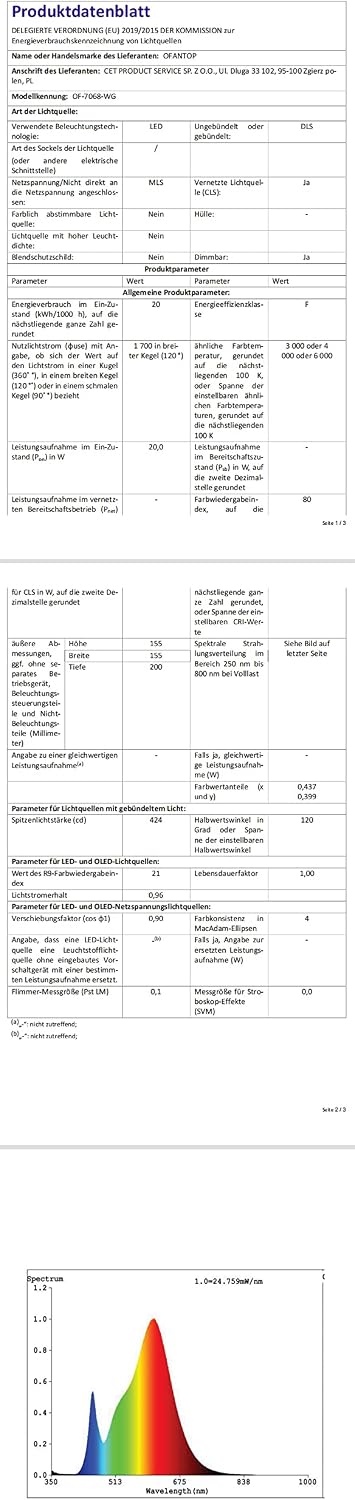
Image: Product data sheet providing detailed technical specifications in German.

Image: EU Energy Label for OFANTOP model OF-7068-WG, showing energy efficiency class F and 20 kWh/1000h consumption. For more details, visit the official EPREL database: https://eprel.ec.europa.eu/qr/1504054
| Feature | Specification |
|---|---|
| Model Name | 52YFT-7068-FM |
| Dimensions (D x W x H) | 132 x 132 x 20 cm (52 x 52 x 7.9 inches) |
| Weight | 7.04 kg |
| Number of Blades | 3 |
| Motor Type | DC Motor |
| Noise Level | <35 dB |
| Fan Speeds | 6 |
| Light Type | Integrated LED |
| LED Power | 20 W |
| Color Temperature | 3000K (Warm), 4500K (Natural), 6000K (Cool) |
| Dimmable | Yes (0-100%) |
| Control Methods | Remote Control, Mobile App, Voice Control (Alexa, Google Assistant) |
| Special Features | Wi-Fi connectivity, Timer, Reversible Rotation |
| Voltage | 240 Volts |
| Power Consumption | 35 watts (fan) |
| Mounting Type | Ceiling Mount (Flush Mount) |
| Recommended Room Size | 12x12 ft. to 20x20 ft. |
9. Warranty and Support
OFANTOP is committed to providing quality products. While specific warranty details are not provided in this document, please retain your proof of purchase for any warranty claims.
- Returns: The product is eligible for a 30-day free return period.
- Technical Support: For further assistance, troubleshooting, or warranty inquiries, please contact OFANTOP customer service through your retailer or the official OFANTOP website.

