
Introduction
Thank you for choosing the AstrHori 120mm F2.8 Macro 2X Full Frame Macro Lens. This manual provides essential information for the proper use, maintenance, and care of your new lens. Please read it thoroughly before using the lens to ensure optimal performance and longevity.
This 120mm F2.8 lens is designed for full-frame cameras with Sony E mount, offering a remarkable 2X magnification ratio for detailed macro photography. It features a manual focus design and a robust construction, making it a versatile tool for various photographic applications.
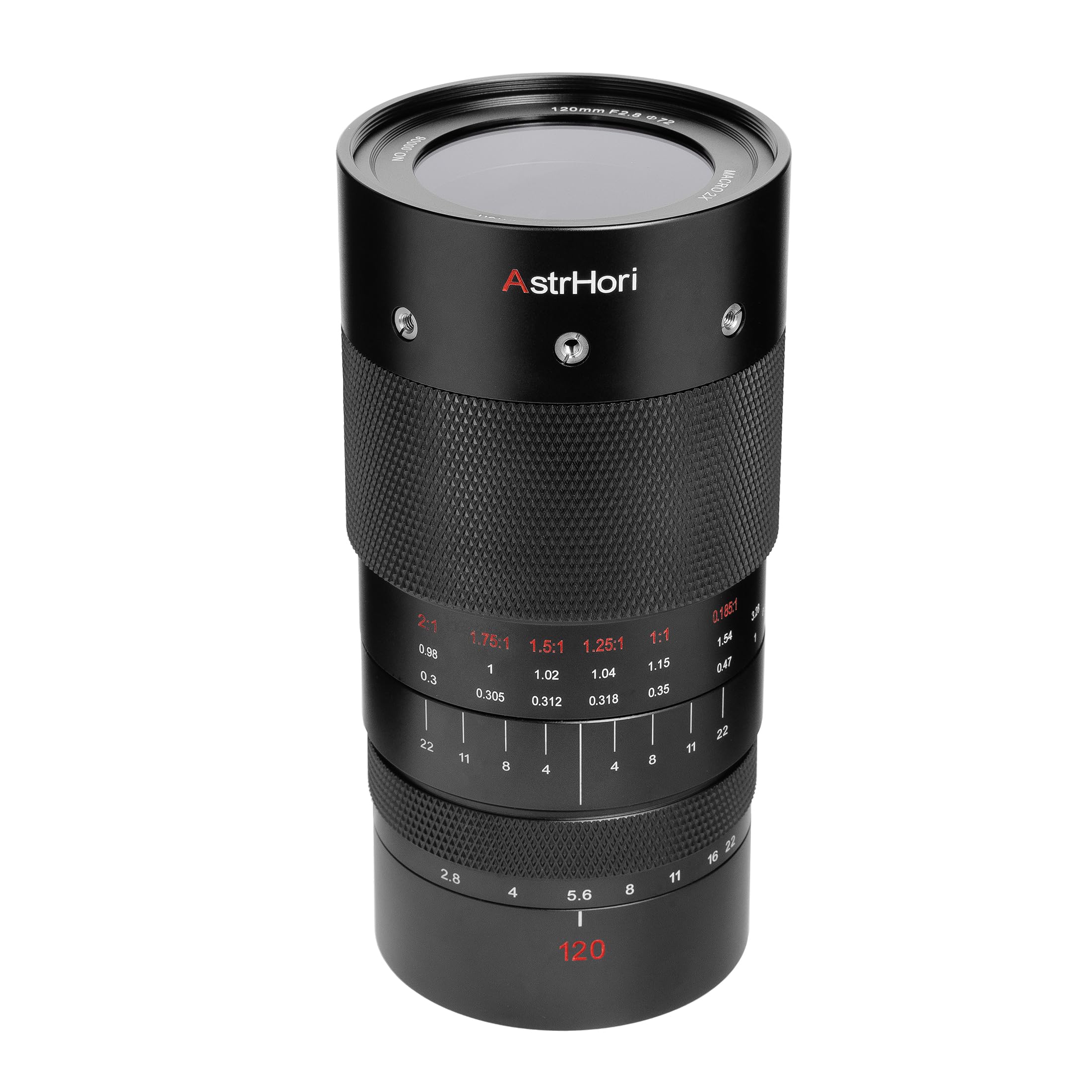
A full view of the AstrHori 120mm F2.8 Macro 2X Full Frame Macro Lens, showcasing its robust construction and clear markings.
Setup
Unpacking the Lens
Carefully remove the lens and its accessories from the packaging. Verify that all components listed in the 'What's in the Box' section are present. Retain the packaging for future storage or transport.
Attaching the Lens to Your Camera
- Ensure your camera is turned off.
- Remove the rear lens cap from the AstrHori 120mm F2.8 lens and the body cap from your Sony E-mount camera.
- Align the white index mark on the lens barrel with the corresponding index mark on your camera's lens mount.
- Insert the lens into the camera mount and rotate it clockwise until it clicks securely into place. Do not force the lens.
- Remove the front lens cap. Your lens is now ready for use.
Removing the Lens
- Turn off your camera.
- While pressing the lens release button on your camera body, rotate the lens counter-clockwise until it detaches.
- Immediately attach the rear lens cap to the lens and the body cap to your camera to protect the sensors and lens elements from dust.
Operating Instructions
Manual Focus
This is a manual focus lens. To achieve sharp focus, rotate the wide knurled focusing ring until your subject appears clear in the viewfinder or on the camera's LCD screen. For critical focus, especially in macro photography, utilize your camera's focus peaking or magnification assist features.
Aperture Control
The lens features a manual aperture ring. Rotate the aperture ring to select your desired f-stop, ranging from F2.8 (maximum aperture) to F22 (minimum aperture). The aperture ring is staged for precise adjustments.

This image provides a detailed view of the lens's physical design, highlighting the staged aperture ring and the wide, knurled non-slip focusing ring for comfortable and precise manual control.
2X Macro Magnification
The AstrHori 120mm F2.8 lens offers a 2X maximum magnification ratio, allowing you to capture subjects at twice their actual size on the camera sensor. To achieve maximum magnification, focus at the closest focusing distance. The lens is capable of imaging from infinity to 2x magnification, providing high-resolution results across its range.

This image demonstrates the lens's capability to capture high-resolution macro images with up to 2x magnification, showcasing fine details like water droplets on a plant.

This image illustrates the high-resolution detail achievable with 2x magnification, focusing on the intricate structures of an ant's eye and leg.
Depth of Field
In macro photography, depth of field is very shallow. Using smaller apertures (higher f-numbers like F11 or F16) will increase the depth of field, bringing more of your subject into focus. The lens features 13 diaphragm blades, creating a rounded aperture for smooth and pleasing bokeh (out-of-focus areas).

This image highlights the lens's ability to produce soft, pleasing bokeh due to its rounded aperture, as seen in the background blur behind a praying mantis.
Recommended Applications
This lens is highly versatile and suitable for:
- Macro Photography: Insects, flowers, products, and other small subjects.
- Portrait Photography: With its 120mm focal length and F2.8 aperture, it can create beautiful subject separation.
- Still Life Photography: Capturing intricate details of objects.
- General Photography: Its optical quality makes it suitable for various scenes beyond macro.

This image illustrates the versatile applications of the AstrHori 120mm F2.8 Macro lens, suitable for various photography genres including business, macro, portrait, still life, and insect photography.

This image showcases the lens's versatility beyond macro photography, demonstrating its use for portraits, still life (sunflower, figurine, ring), and general photography with pleasing out-of-focus areas.
Maintenance
Cleaning the Lens Elements
- Use a blower brush to remove loose dust and debris from the front and rear lens elements.
- For smudges or fingerprints, apply a small amount of lens cleaning solution to a clean microfiber lens cloth. Gently wipe the lens surface in a circular motion from the center outwards.
- Never apply cleaning solution directly to the lens element.
- Avoid using abrasive materials or harsh chemicals, as they can damage the lens coatings.
Cleaning the Lens Body
Wipe the lens barrel with a soft, dry cloth. For stubborn dirt, a slightly damp cloth can be used, followed by a dry cloth. Ensure no moisture enters the lens.
Storage
- Always attach the front and rear lens caps when the lens is not in use.
- Store the lens in a cool, dry, and dust-free environment.
- Avoid storing the lens in direct sunlight or areas with extreme temperature fluctuations or high humidity, which can lead to mold growth.
Troubleshooting
Lens Not Attaching Securely
- Ensure the lens is correctly aligned with the camera's mount index mark.
- Verify that you are rotating the lens clockwise until it clicks.
- Check for any obstructions on the lens mount or camera body.
Images Are Out of Focus
- This is a manual focus lens. Ensure you are actively rotating the focusing ring to achieve sharp focus.
- Utilize your camera's focus peaking or magnification assist features for precise manual focusing, especially in macro.
- Check your camera's diopter adjustment if using the viewfinder.
Dust Inside the Lens
Minor dust particles inside a lens are common and rarely affect image quality. If you notice significant dust or debris impacting your images, it is recommended to contact a professional lens repair service. Do not attempt to disassemble the lens yourself.
Vignetting or Dark Corners
- Ensure no lens hood or filter is improperly attached or too thick, causing obstruction.
- Vignetting can be a natural characteristic of some lenses, especially at wider apertures. It can often be corrected in post-processing.
Specifications
| Feature | Description |
|---|---|
| Brand | AstrHori |
| Model | 120mm F2.8 Macro 2X |
| Focal Length | 120 Millimeters |
| Maximum Aperture | F2.8 |
| Minimum Aperture | F22 |
| Lens Type | Macro, Prime |
| Compatible Mountings | Sony E (also available for Canon RF) |
| Focus Type | Manual Focus |
| Zoom Ratio | Macro 2x |
| Lens Coating | HD Coating |
| Built-In Media | 1X AstrHori 120mm f2.8 Camera lens |
Warranty Information
This AstrHori 120mm F2.8 Macro 2X Full Frame Macro Lens comes with a one-year warranty from the manufacturer. Please retain your proof of purchase for warranty claims. The warranty covers manufacturing defects and malfunctions under normal use. It does not cover damage caused by misuse, accidents, unauthorized repairs, or normal wear and tear.
For detailed warranty terms and conditions, please refer to the official AstrHori website or contact their customer support.
Customer Support
Should you encounter any issues or have questions regarding your AstrHori 120mm F2.8 Macro 2X Full Frame Macro Lens that are not addressed in this manual, please contact AstrHori customer support. You can typically find contact information on the official AstrHori website or through the retailer where you purchased the product.
When contacting support, please have your product model (120mm F2.8 Macro 2X) and purchase details readily available to facilitate a quicker resolution.

