1. Introduction
Thank you for choosing the Bulelink Cordless Vacuum Cleaner. This manual provides essential information for the safe and efficient operation, maintenance, and troubleshooting of your new vacuum cleaner. Please read this manual thoroughly before first use and keep it for future reference.

Figure 1.1: Bulelink Cordless Vacuum Cleaner and included accessories.
2. Safety Information
To reduce the risk of fire, electric shock, or injury, always follow basic safety precautions when using an electrical appliance. This includes:
- Do not use outdoors or on wet surfaces.
- Do not allow to be used as a toy. Close attention is necessary when used by or near children.
- Use only as described in this manual. Use only manufacturer's recommended attachments.
- Do not use with damaged cord or plug. If appliance is not working as it should, has been dropped, damaged, left outdoors, or dropped into water, return it to a service center.
- Do not pull or carry by cord, use cord as a handle, close a door on cord, or pull cord around sharp edges or corners. Do not run appliance over cord. Keep cord away from heated surfaces.
- Do not unplug by pulling on cord. To unplug, grasp the plug, not the cord.
- Do not handle plug or appliance with wet hands.
- Do not put any object into openings. Do not use with any opening blocked; keep free of dust, lint, hair, and anything that may reduce air flow.
- Keep hair, loose clothing, fingers, and all parts of body away from openings and moving parts.
- Do not pick up anything that is burning or smoking, such as cigarettes, matches, or hot ashes.
- Do not use to pick up flammable or combustible liquids, such as gasoline, or use in areas where they may be present.
- Do not pick up toxic material (e.g., chlorine bleach, ammonia, drain cleaner).
- Do not use without dust cup and/or filters in place.
- Turn off all controls before unplugging.
- Use extra care when cleaning on stairs.
- Store the appliance indoors. Put away after use to prevent accidents.
- Use only the charger supplied by the manufacturer to recharge.
3. Package Contents
Please check the box for the following components:
- 1 x Motor Unit
- 1 x Telescopic Rod
- 1 x V-shaped Floor Brush
- 1 x Battery
- 1 x HEPA Filter (pre-installed)
- 1 x Adapter/Charger
- 1 x Wall Mount Bracket
- 1 x Flat Brush
- 1 x 2-in-1 Brush
- 1 x Hardware Bag (for wall mount)
- 1 x Quick Guide
- 1 x Instruction Manual (multi-language)
Figure 3.1: All components included in the package.
4. Setup
4.1 Assembly
- Insert the telescopic rod into the main motor unit until it clicks into place.
- Attach the V-shaped floor brush to the other end of the telescopic rod until it clicks.
- Ensure the battery is securely inserted into the motor unit.
4.2 Charging the Battery
The vacuum cleaner uses an 8-cell 2800 mAh rechargeable battery. For optimal performance, fully charge the battery before first use.
- Wall-Mounted Charging: Install the wall mount bracket in a suitable location. Connect the original charger to the wall mount. Place the vacuum cleaner onto the wall mount for automatic charging.
- Direct Charging: The battery can also be removed from the vacuum cleaner and charged directly using the adapter.
The OLED display will indicate the charging status and battery percentage.

Figure 4.1: Vacuum cleaner charging on its wall mount.
5. Operating Instructions
5.1 Powering On/Off and Suction Adjustment
Press the power button on the handle to turn the vacuum cleaner on or off. The vacuum features three suction levels:
- Low (20KPa): Suitable for light dust and debris, offering up to 70 minutes of runtime.
- Medium (30KPa): For general cleaning tasks.
- High (45KPa): Provides maximum suction for stubborn dirt, pet hair, and deep carpet cleaning, offering up to 30 minutes of runtime.
Press the mode button to cycle through the suction levels. The current level will be displayed on the OLED screen.

Figure 5.1: Visual representation of the three suction power levels.
5.2 OLED Display
The high-definition OLED display provides real-time information:
- Battery Level: Shows remaining battery percentage.
- Suction Mode: Indicates the currently selected suction power.
- Error Alerts: Notifies you of any abnormal operation, such as blockages.

Figure 5.2: Detailed view of the interactive OLED display.
5.3 V-shaped Anti-Tangle Brush
The V-shaped roller brush is designed to minimize hair tangling, making it ideal for homes with pets. The flexible 270° swivel head allows for easy maneuverability around furniture and into tight spaces. An integrated LED light illuminates dust and debris on the floor, ensuring thorough cleaning.
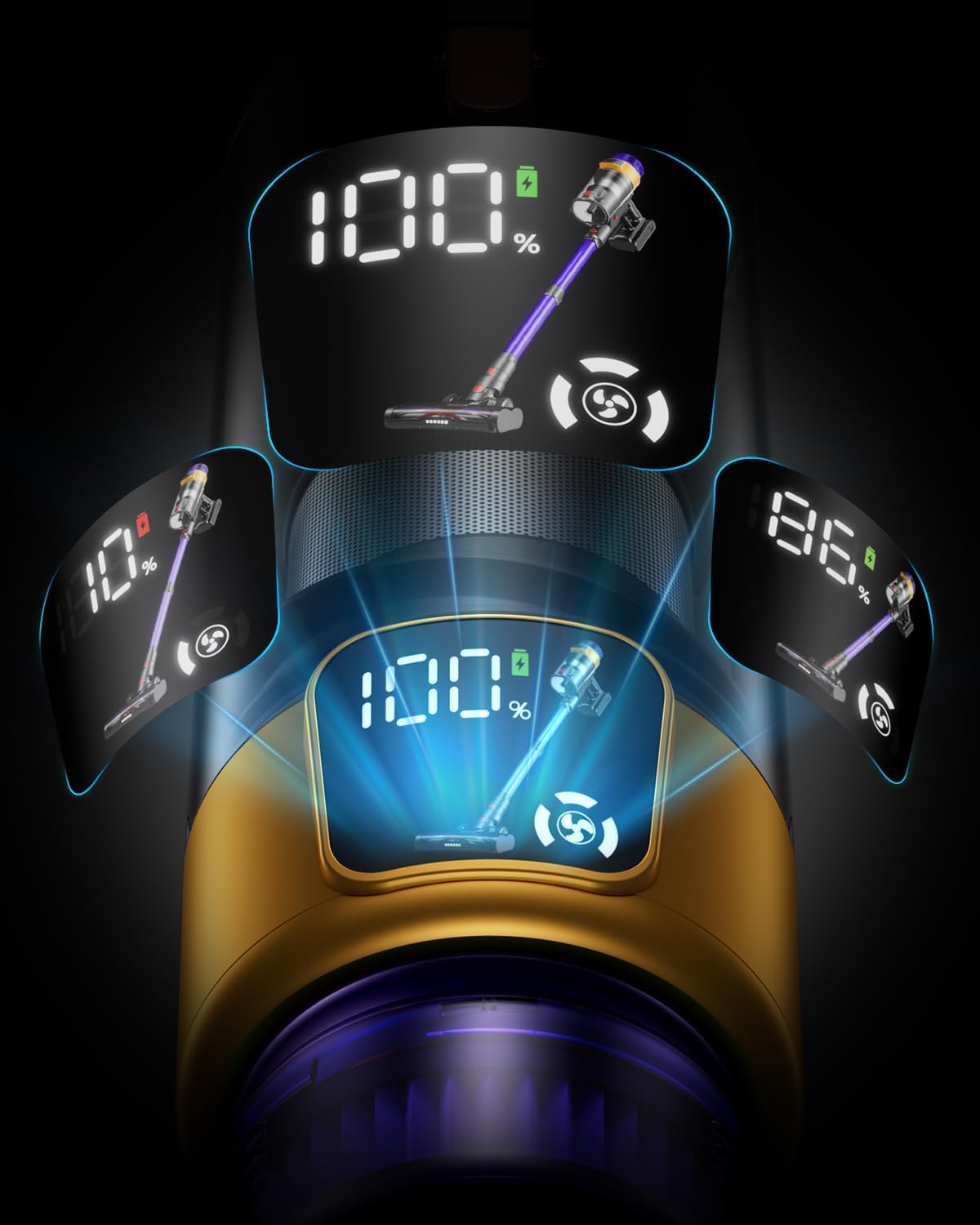
Figure 5.3: The V-shaped anti-tangle brush head in action.
5.4 Aromatherapy Feature
The vacuum cleaner includes a replaceable aromatherapy tablet within its filtration system. This tablet releases a pleasant aroma during cleaning, contributing to a more comfortable environment.

Figure 5.4: The 8-layer filtration system with integrated aromatherapy.
6. Maintenance
Regular maintenance ensures the longevity and optimal performance of your Bulelink Cordless Vacuum Cleaner.
6.1 Emptying the Dustbin
The dustbin has a large capacity of 1.8 liters, reducing the frequency of emptying. To empty:
- Ensure the vacuum is turned off.
- Locate the dustbin release button, typically near the handle.
- Press the button to detach the dustbin.
- Hold the dustbin over a trash can and press the bottom release latch to open the lid and empty contents.
- Close the lid and reattach the dustbin to the motor unit until it clicks.
6.2 Cleaning Filters
The 8-layer high-efficiency filtration system, including a HEPA filter, captures 99.99% of fine dust and odors. Clean filters regularly to maintain suction power.
- Remove the dustbin as described above.
- Twist and pull out the filter assembly from the dustbin.
- Tap the filters gently over a trash can to remove loose dust.
- Rinse the filters under cold running water until the water runs clear. Do not use detergent.
- Allow filters to air dry completely for at least 24 hours before reassembling. Do not use a dryer or heat source.
- Reassemble the filters and reattach the dustbin.

Figure 6.1: Components of the 8-layer filtration system.
6.3 Cleaning the Brush Roll
Periodically check the brush roll for tangled hair or debris. To clean:
- Turn off the vacuum and detach the floor brush.
- Locate the brush roll release mechanism (usually a latch or screw) on the side of the brush head.
- Remove the brush roll.
- Use scissors or the provided cleaning tool to cut and remove any tangled hair or fibers.
- Wipe the brush roll and its housing with a damp cloth.
- Reinsert the brush roll and secure it in place.
7. Troubleshooting
If you encounter issues with your vacuum cleaner, refer to the following table:
| Problem | Possible Cause | Solution |
|---|---|---|
| Vacuum does not turn on | Battery is not charged or not properly inserted. | Ensure battery is fully charged and securely inserted. |
| Reduced suction power | Dustbin is full; Filters are clogged; Brush roll is blocked. | Empty dustbin; Clean/wash filters and allow to dry; Remove debris from brush roll. |
| Brush roll not spinning | Debris tangled in brush roll; Brush roll not properly installed. | Clean brush roll; Ensure brush roll is correctly reinserted. |
| OLED display shows error | Indicates a blockage or malfunction. | Check for blockages in the nozzle, wand, or dustbin. Refer to the manual for specific error codes if available. |
| Short battery runtime | Battery not fully charged; Using high suction mode excessively. | Fully charge battery; Use lower suction modes for lighter tasks. |
If the problem persists after attempting these solutions, please contact Bulelink customer support.
8. Specifications
| Feature | Detail |
|---|---|
| Brand | Bulelink |
| Model | Max 5 |
| Motor Wattage | 550W |
| Suction Power | Up to 45000Pa (45KPa) |
| Battery Capacity | 2800 mAh (8-cell) |
| Runtime | Up to 70 minutes (minimum suction) |
| Dustbin Capacity | 1.8 Liters |
| Filtration System | 8-layer high-efficiency, HEPA filter |
| Noise Level | ≤62 dB |
| Special Features | OLED Display, V-shaped Anti-tangle Brush, Aromatherapy, Wall-mounted Charging, Adjustable Telescopic Rod |
| Weight | 4.1 Kilograms |
| Color | Violet |
9. Warranty and Support
Bulelink is committed to providing high-quality products and excellent customer service. Your Bulelink Cordless Vacuum Cleaner comes with:
- 2-Year Support: Enjoy 2 years of return and replacement service.
- 7*24 Hour Customer Service: Bulelink adheres to a "customer first" concept. If you have any issues or questions regarding your vacuum cleaner, please do not hesitate to contact our professional after-sales support team.
For assistance, please refer to the contact information provided on the product packaging or the official Bulelink website.


