
SEDETA DJ503028_1-02-white
SEDETA Office Desk with 3 Drawers
Instruction Manual
Introduction
Thank you for choosing the SEDETA Office Desk with 3 Drawers. This manual provides detailed instructions for the assembly, operation, and maintenance of your new desk. Please read this manual thoroughly before beginning assembly to ensure proper setup and safe use. Keep this manual for future reference.
Safety Information
Adhering to these safety guidelines is crucial for preventing injury and damage to the product.
- Proper Assembly: Ensure all components are assembled correctly and securely according to the instructions. Improper assembly can lead to instability.
- Weight Capacity: The desk is designed to support a maximum weight of 300 pounds (136 kg). Do not exceed this limit to prevent structural damage or collapse.
- Two-Person Assembly: It is highly recommended that two people assemble this desk for safety and ease of handling heavy components.
- Electrical Safety: When using the built-in power outlets and USB ports, ensure all connected devices are compatible with the desk's electrical specifications (4 AC outlets, 125V/12A; 2 USB charging ports, 5V/2A). Do not overload the outlets.
- Stable Placement: Place the desk on a flat, stable surface to prevent wobbling or tipping.
- Child Safety: Keep small parts and assembly tools away from children. Ensure drawers are properly closed to prevent accidental opening.
Package Contents
Before beginning assembly, verify that all parts listed below are present and undamaged. If any parts are missing or damaged, please contact customer support.
- Desktop Panel
- Drawer Unit (with 3 drawers)
- Leg Supports
- Built-in Power Outlet Strip (pre-installed)
- Assembly Hardware (screws, dowels, cam locks, etc.)
- Assembly Tools (Allen wrench, screwdriver)

Figure 1: Desk dimensions and key components.
Setup & Assembly
Follow these general steps for assembling your SEDETA Office Desk. Refer to the included detailed instructions and numbered parts for specific guidance.
- Unpack and Organize: Carefully unpack all components and lay them out on a clean, soft surface to prevent scratches. Identify all parts using the provided parts list.
- Assemble Frame: Begin by attaching the leg supports to the desktop panel. Ensure all connections are tight and secure.
- Install Drawer Unit: Secure the pre-assembled drawer unit to the desktop and leg supports. Pay close attention to the alignment of the drawer slides for smooth operation.
- Connect Power Strip: The built-in power strip is typically pre-installed. Ensure its power cord is accessible and can be plugged into a wall outlet.
- Final Checks: Once assembled, gently lift and move the desk to its desired location. Verify that the desk is stable and all drawers open and close smoothly.
Video 1: Overview of the Executive Computer Desk with Drawers, showcasing its features and design.
Operating Instructions
Workspace Utilization
The SEDETA Office Desk features a spacious 55"L x 21.7"W desktop, providing ample room for your computer, monitors, printer, and other office essentials. Organize your workspace efficiently to maximize productivity.
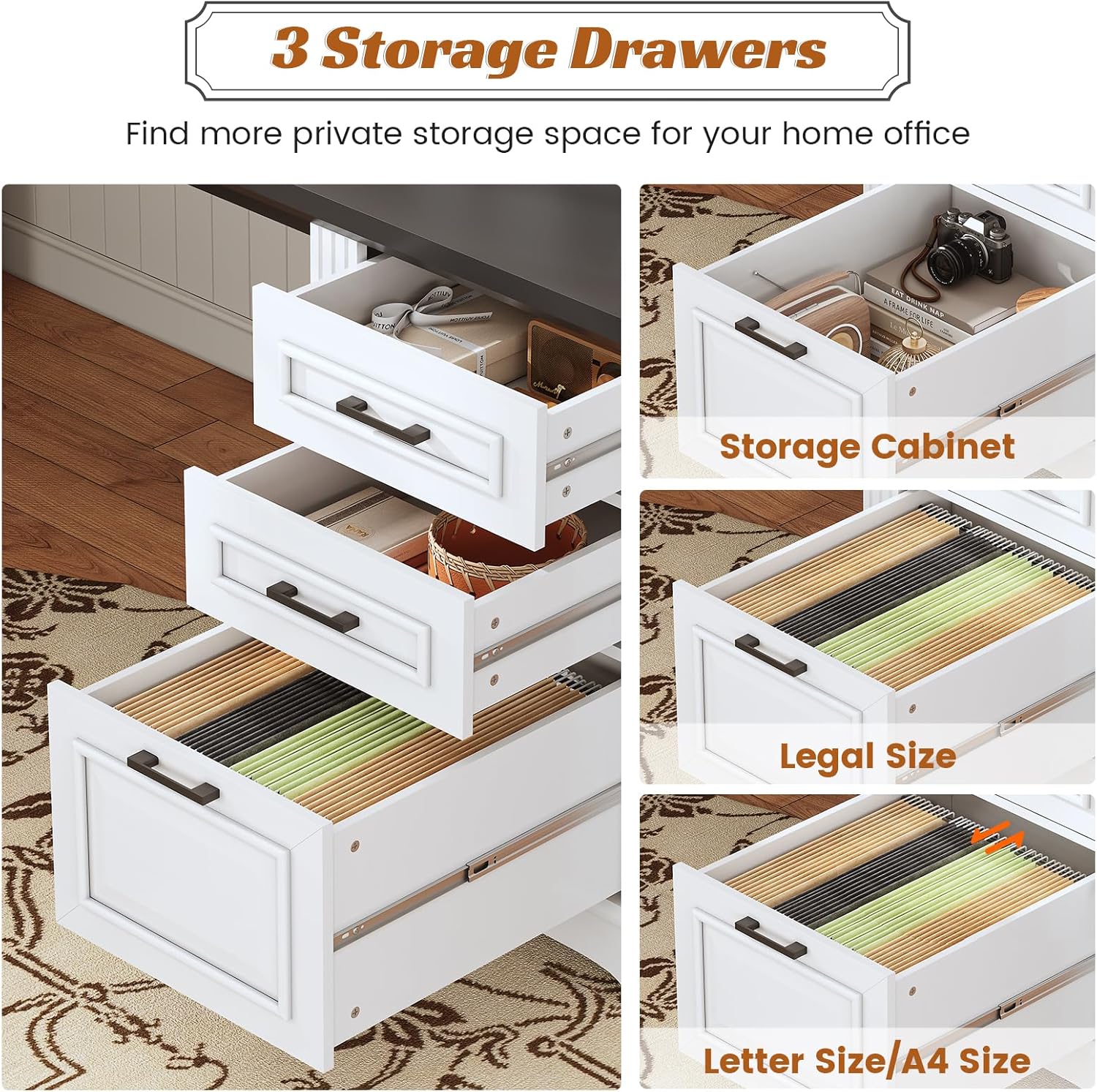
Figure 2: The spacious desktop provides ample room for multiple devices and accessories.
Drawer System
The desk includes three integrated drawers and a storage cabinet for organized storage. The bottom file drawer is designed to accommodate Legal, Letter, and A4 size files, ensuring your documents are neatly stored and easily accessible. The upper drawers are suitable for smaller office supplies and personal items.

Figure 3: The three drawers offer versatile storage for various office items and documents.
Built-in Power Outlets
The desk is equipped with a convenient built-in power strip featuring 4 AC outlets and 2 USB charging ports. This allows for easy charging of your electronic devices such as laptops, tablets, phones, and other peripherals directly from your desk. A power switch is included to safely turn off power to all connected devices when not in use, eliminating the need to unplug them individually.

Figure 4: Integrated power outlets and USB ports for convenient device charging.
Care and Maintenance
Proper care will extend the life and maintain the appearance of your SEDETA Office Desk.
- Cleaning: Wipe the desk surfaces with a soft, damp cloth. Avoid using harsh chemicals, abrasive cleaners, or polishes that may damage the finish.
- Spills: Immediately wipe up any spills to prevent staining or water damage to the engineered wood.
- Heat and Moisture: Avoid placing hot items directly on the desktop. Use coasters or protective pads. Keep the desk away from excessive moisture or direct sunlight to prevent warping or fading.
- Hardware: Periodically check and tighten all assembly hardware to ensure the desk remains stable and secure.
- Electrical Components: Follow the manufacturer's instructions for the care and maintenance of the built-in electrical components. Do not attempt to repair or modify the power strip yourself.
Troubleshooting Common Issues
This section addresses common issues you might encounter with your desk.
| Problem | Possible Cause | Solution |
|---|---|---|
| Desk is wobbly | Loose assembly hardware; Uneven floor surface. | Tighten all screws and bolts. Use furniture levelers or shims under the legs to stabilize on uneven floors. |
| Drawers do not slide smoothly | Misaligned drawer slides; Obstruction in the slide mechanism; Overloaded drawer. | Check that drawer slides are correctly aligned and free of debris. Ensure drawers are not overloaded. Refer to assembly instructions for proper slide installation. |
| Power outlets not working | Power switch is off; Desk not plugged in; Circuit breaker tripped; Device not properly plugged in. | Ensure the power switch on the desk is ON. Verify the desk's power cord is securely plugged into a working wall outlet. Check your home's circuit breaker. Ensure devices are fully inserted into the outlets. |
| Surface scratches easily | Lack of protective measures. | Use desk pads, mouse pads, and coasters to protect the desktop from scratches and spills. |
Product Specifications
| Feature | Detail |
|---|---|
| Brand | SEDETA |
| Model Number | DJ503028_1-02-white |
| Product Dimensions (D x W x H) | 21.7"D x 55.1"W x 29.5"H |
| Desktop Thickness | 1.2 inches |
| Material | Engineered Wood |
| Color | White (with dark top) |
| Number of Drawers | 3 |
| Drawer Glide Mechanism | Metal Runners |
| Power Outlets | 4 AC Outlets (125V/12A) |
| USB Charging Ports | 2 USB Ports (5V/2A) |
| Maximum Weight Recommendation | 300 Pounds |
| Assembly Required | Yes |
| Recommended Number of People for Assembly | 2 |
Warranty and Customer Support
SEDETA is committed to providing high-quality products and excellent customer service. If your item arrives damaged, scratched, or with missing parts, please do not hesitate to contact our customer support team. We will arrange for free replacements as soon as possible.
For any questions, concerns, or assistance with your SEDETA Office Desk, please refer to the contact information provided at the point of purchase or visit the official SEDETA store online.
Ask a question about this manual
Ask about setup, troubleshooting, compatibility, parts, safety, or missing instructions. Manuals+ will review the question and use this page’s manual context to help answer it.