
Welcome
Thank you for choosing the BYTECH BICONIC True Wireless Earbuds. This manual provides essential information on how to set up, operate, maintain, and troubleshoot your new earbuds. Please read this manual thoroughly before use to ensure optimal performance and longevity of your device.
Important Safety Instructions
- Do not expose the earbuds or charging case to extreme temperatures, humidity, or liquids.
- Avoid dropping, impacting, or disassembling the device.
- Do not use abrasive cleaners or harsh chemicals to clean the earbuds or case.
- Listen at moderate volume levels to prevent hearing damage. Prolonged exposure to loud sounds can cause irreversible hearing loss.
- Keep out of reach of children and pets.
- Dispose of the device responsibly according to local regulations. Do not dispose of with household waste.
What's Included
Please check the package contents to ensure all items are present:
- BYTECH BICONIC True Wireless Earbuds (Left and Right)
- Charging Case
- Charging Cable
- User Manual
Product Overview
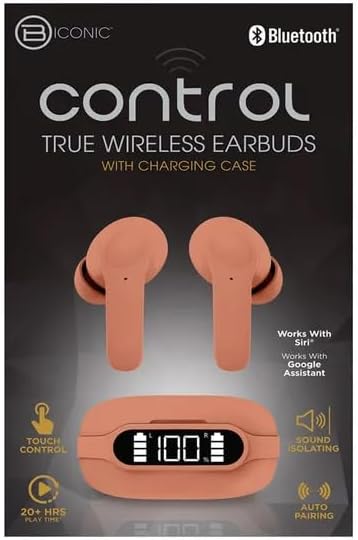
Familiarize yourself with the components of your BYTECH BICONIC True Wireless Earbuds.

Getting Started
Charging the Earbuds and Case
The BYTECH BICONIC earbuds come with a rechargeable battery in both the earbuds and the charging case. Ensure both are fully charged before first use.
- Place the earbuds into the charging case, ensuring they are correctly seated in their respective slots (L for left, R for right).
- Connect the provided charging cable to the charging port on the case and the other end to a USB power source (e.g., computer USB port, wall adapter).
- The digital display on the charging case will show the battery level. Allow sufficient time for a full charge.
- Once fully charged, disconnect the charging cable.
Bluetooth Pairing
Follow these steps to pair your earbuds with your Bluetooth-enabled device:
- Ensure the earbuds are charged and inside the charging case.
- Open the charging case. The earbuds will automatically enter pairing mode, and an indicator light on the earbuds will flash.
- On your device (smartphone, tablet, etc.), go to the Bluetooth settings and turn Bluetooth on.
- Search for available devices. You should see "BYTECH BICONIC" or a similar name appear in the list.
- Select "BYTECH BICONIC" to connect. Once connected, a voice prompt will confirm the successful pairing, and the indicator lights on the earbuds will stop flashing.
- The earbuds will automatically reconnect to the last paired device when taken out of the case, provided Bluetooth is enabled on the device.
Operating Instructions
Touch Controls
The BYTECH BICONIC earbuds feature intuitive touch controls for easy management of your audio and calls.
| Action | Function |
|---|---|
| Single Tap (Left/Right Earbud) | Play/Pause music, Answer/End call |
| Double Tap (Right Earbud) | Next Track |
| Double Tap (Left Earbud) | Previous Track |
| Triple Tap (Left/Right Earbud) | Activate Voice Assistant (Siri/Google Assistant) |
| Long Press (Left/Right Earbud) | Reject Call |
Powering On and Off
- Power On: The earbuds will automatically power on when removed from the charging case.
- Power Off: Place the earbuds back into the charging case and close the lid. They will automatically power off and begin charging.
Maintenance and Care
Proper care will extend the life of your BYTECH BICONIC True Wireless Earbuds.
- Cleaning: Use a soft, dry, lint-free cloth to clean the earbuds and charging case. Do not use liquids or aerosol cleaners.
- Storage: When not in use, always store the earbuds in their charging case to protect them and keep them charged.
- Avoid Extreme Conditions: Do not expose the device to extreme heat, cold, or direct sunlight.
- Water Resistance: These earbuds are not waterproof. Avoid contact with water or excessive moisture.
Troubleshooting
If you encounter any issues with your earbuds, refer to the following common solutions:
| Problem | Solution |
|---|---|
| Earbuds not pairing | Ensure earbuds are charged. Turn off and on Bluetooth on your device. Forget the device in Bluetooth settings and re-pair. |
| Only one earbud working | Place both earbuds back into the charging case, close the lid, wait a few seconds, then take them out again. Ensure both are charged. |
| No sound | Check volume levels on both your device and the earbuds. Ensure earbuds are properly connected. Try playing different audio. |
| Charging case not charging | Ensure the charging cable is securely connected to both the case and the power source. Try a different USB port or power adapter. |
Technical Specifications
Detailed specifications for your BYTECH BICONIC True Wireless Earbuds:
| Feature | Detail |
|---|---|
| Model Number | BC-AU-BE-144-TN |
| Connectivity Technology | Wireless (Bluetooth) |
| Form Factor | In-Ear (Intraurales) |
| Color | Cafe |
| Special Features | Rechargeable Battery, Touch Control, Sound Isolating, Auto Pairing |
| Included Components | Cable |
| Estimated Play Time | 20+ Hours (with charging case) |
Warranty Information and Customer Support
BYTECH products are designed and manufactured to the highest quality standards. For information regarding warranty coverage, please refer to the warranty card included with your purchase or visit the official BYTECH website.
If you require further assistance or have questions not covered in this manual, please contact BYTECH customer support through their official channels. Please have your model number (BC-AU-BE-144-TN) and purchase details ready when contacting support.


