
GNMN M7
GNMN M7 Wireless Earbuds User Manual
Model: M7 | Brand: GNMN
Introduction
Thank you for choosing GNMN M7 Wireless Earbuds. These earbuds are designed to provide a high-fidelity audio experience with deep bass, clear calls, and extended battery life. Featuring Bluetooth 5.3 technology, touch controls, and IPX7 waterproofing, they are suitable for various activities including sports, work, and daily use. This manual will guide you through the setup, operation, and maintenance of your new earbuds.
What's Included
The GNMN M7 Wireless Earbuds package includes the following components:
- Wireless Earbuds (Left and Right)
- Wireless Charging Case
- USB-C Charging Cable
- Eartips (Multiple Sizes)
- User Manual
Setup Guide
1. Initial Charging
Before first use, ensure the earbuds are fully charged. Remove the insulation stickers from the charging contacts on the earbuds. Place both earbuds into the charging case. Connect the USB-C cable to the charging case and a power source, or place the case on a wireless charging pad (not included). The LED display on the case will show the charging status.

Image: GNMN M7 Wireless Earbuds in their charging case, displaying a full charge.

Image: Illustration of the two charging methods for the GNMN M7 earbuds: wireless charging and USB-C cable charging.
2. Pairing with Your Device
- Ensure the earbuds are in the charging case and the case has power.
- Open the charging case. The earbuds will automatically power on and enter pairing mode.
- On your device (smartphone, tablet, laptop), go to the Bluetooth settings.
- Search for "M7" in the list of available devices and select it to connect.
- Once connected, you will hear a confirmation tone, and the earbuds will be ready for use.
The earbuds will automatically reconnect to the last paired device when the case is opened, provided Bluetooth is enabled on the device.

Image: A visual guide demonstrating the one-step auto-pairing process of the M7 earbuds with a smartphone.
3. Wearing the Earbuds
Select the ear tips that provide the most comfortable and secure fit for your ears. Gently insert the earbuds into your ear canal and rotate them slightly to ensure a snug fit. A proper seal is crucial for optimal sound quality and bass performance.

Image: Instructions on how to properly wear the earbuds, including selecting the correct ear tip size.
Operating Instructions
Touch Controls
The GNMN M7 earbuds feature sensitive touch panels for easy control of music playback, calls, and voice assistant activation. Refer to the table below for common touch functions:

Image: A visual guide detailing the various touch control functions of the earbuds, such as play/pause, call management, and volume adjustment.
| Function | Action |
|---|---|
| Play/Pause Music | Single tap on either earbud |
| Next Song | Double tap on the Right earbud |
| Previous Song | Double tap on the Left earbud |
| Volume Up | Triple tap on the Right earbud |
| Volume Down | Triple tap on the Left earbud |
| Answer/End Call | Single tap on either earbud |
| Reject Call | Press and hold either earbud for 2 seconds |
| Activate Voice Assistant | Press and hold either earbud for 3 seconds |
Audio Quality
Equipped with 13mm double-layer diaphragm driver units, the M7 earbuds deliver rich, deep bass, clear vocals, and bright treble, providing an immersive stereo sound experience. The built-in microphone combined with ENC (Environmental Noise Cancellation) technology ensures clear phone calls by filtering out surrounding noise.

Image: A detailed view highlighting the Hi-Fi sound quality capabilities of the earbud's internal components.
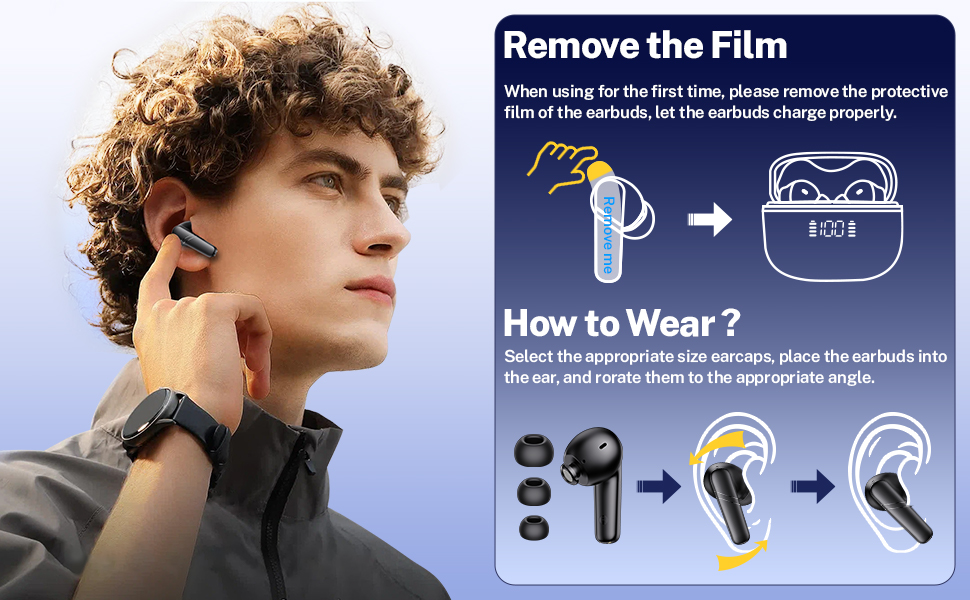
Image: Depiction of the earbud's microphone and its function during a phone call, emphasizing clear communication.
Charging and Battery Life
The GNMN M7 earbuds offer impressive battery life and flexible charging options:
- Earbud Playtime: Up to 8 hours on a single charge.
- Total Playtime with Charging Case: Up to 68 hours.
- Charging Methods: Supports both USB-C cable charging and wireless charging.

Image: Visual representation of the superior battery life, indicating 8 hours on a single charge and 68 hours with the charging case.
LED Power Display
The charging case features a dual LED digital display that shows the remaining battery percentage of the case and the charging status of each earbud. This allows you to monitor power levels in real-time.

Image: Close-up of the charging case's LED power display, showing both the case's battery percentage and the individual earbud charging status.
Maintenance and Care
- Cleaning: Regularly clean the earbuds and charging contacts with a soft, dry cloth. If charging issues occur, try wiping the pins and points with an alcohol cloth.
- Water Resistance: The earbuds feature an IPX7 waterproof nano-coating, protecting them from sweat and rain. They are suitable for workouts and outdoor activities, but are not designed for swimming or submersion.
- Storage: When not in use, store the earbuds in their charging case to protect them and keep them charged.
- Battery Care: To prolong battery life, charge the charging case at least once a week, even if not in frequent use.

Image: The earbuds are shown with water droplets, illustrating their IPX7 waterproof capability.
Troubleshooting
If you encounter any issues with your GNMN M7 Wireless Earbuds, please refer to the following common solutions:
- Earbuds Not Charging Properly:
- Ensure the insulation stickers have been removed from the earbud charging contacts.
- Wipe the charging pins on the earbuds and the charging points inside the case with an alcohol cloth to remove any dirt or debris.
- If the charging case is excessively discharged, the LED display might show "0" initially. Wait 15-30 minutes after plugging in the charging cable; the display should update.
- Only One Earbud Playing Sound:
- Place both earbuds back into the charging case and close the lid.
- Ensure both earbuds are fully charged.
- Perform a factory reset (see "Factory Reset" below).
- Earbuds Not Connecting/Pairing:
- Ensure Bluetooth is enabled on your device and the earbuds are within range (up to 30 ft).
- "Forget" or "Remove" "M7" from your device's Bluetooth list.
- Place both earbuds back into the charging case, close the lid, then open it again to re-enter pairing mode.
- Perform a factory reset.
Factory Reset
To restore the earbuds to their factory settings and clear all pairing records:
- Place both earbuds into the charging case.
- Close the charging case lid.
- Press and hold the reset button on the charging case for 5 seconds.
- All previous pairing records will be cleared. You can now pair the earbuds with a new device or re-pair with an existing one.

Image: A close-up view of the charging case, highlighting the location of the reset button.
Specifications
| Feature | Detail |
|---|---|
| Model Name | M7 |
| Connectivity Technology | Wireless |
| Wireless Communication Technology | Bluetooth 5.3 |
| Battery Life (Earbuds) | 8 Hours (single charge) |
| Battery Life (with Charging Case) | 68 Hours |
| Control Type | Touch Control |
| Water Resistance Level | IPX7 (Water Resistant) |
| Compatible Devices | Bluetooth-enabled devices (Android, iPhone, Laptops, Tablets, TV, etc.) |
| Item Weight (Earbud) | 0.13oz (approx. 3.6g) |
| Charging Case Dimensions | 2.3 x 1.9 x 1 inches (approx.) |
| Material | Plastic |
| Color | Black |
Warranty and Support
GNMN products are designed for reliability and performance. For any product-related inquiries, technical support, or warranty claims, please refer to the contact information provided with your purchase or visit the official GNMN website. Please retain your proof of purchase for warranty purposes.
Related documentsM7


Ask a question about this manual
Ask about setup, troubleshooting, compatibility, parts, safety, or missing instructions. Manuals+ will review the question and use this page’s manual context to help answer it.