
Introduction
This instruction manual provides detailed guidance for the safe installation, operation, and maintenance of your WELLFOR 20" x 30" LED Mirrored Bathroom Cabinet. Please read this manual thoroughly before installation and retain it for future reference.

Image: The WELLFOR 20" x 30" LED Mirrored Bathroom Cabinet, showcasing its illuminated mirror and sleek design in a modern bathroom setting.
Important Safety Information
To reduce the risk of electric shock, fire, injury to persons, or property damage, please observe the following safety instructions:
- Electrical Installation: All electrical work must be performed by a qualified electrician in accordance with local codes and regulations. Ensure power is disconnected at the circuit breaker before installation.
- Mounting: The cabinet must be securely mounted to a structural support in the wall. Do not mount on drywall alone.
- Water Exposure: This product is designed for bathroom use but should not be directly exposed to water spray or submerged.
- Glass Handling: Handle glass components with care. Tempered glass is strong but can break if struck with force.
- Cleaning: Use only mild, non-abrasive cleaners. Avoid harsh chemicals that may damage the mirror surface or electrical components.
Package Contents
Verify that all components are present before beginning installation:
- LED Mirrored Bathroom Cabinet (Main Unit)
- Tempered Glass Shelves
- Removable Aluminum Shelf
- Mounting Hardware (screws, anchors)
- Instruction Manual
Specifications
| Feature | Detail |
|---|---|
| Brand | WELLFOR |
| Model | 20" x 30" LED Mirrored Bathroom Cabinet |
| Dimensions (W x H x D) | 20" x 30" x 5.12" |
| Mounting Type | Surface Mount |
| Door Style | Single Right Opening Mirror Door |
| Lighting | Dimmable LED (3000K-6000K), 2200 Lumens, CRI 90+ |
| Special Features | Defogging, Memory Function, Motion Sensor Interior Lights, Outlets & USB Ports |
| Weight | 48.5 Pounds |
| Safety Certification | ETL-listed (US and Canada) |

Image: Diagram illustrating the dimensions of the cabinet: 20 inches width, 30 inches height, and 5.12 inches depth.
Installation and Setup
Professional installation by a qualified electrician is highly recommended for hardwired connections.
Tools Required:
- Drill
- Measuring Tape
- Level
- Pencil
- Screwdriver
- Wire Strippers (for hardwiring)
Mounting Instructions:
- Prepare the Area: Ensure the wall area is clean and clear. Turn off power to the installation area at the circuit breaker.
- Mark Mounting Points: Use a level and measuring tape to mark the desired height and position for the cabinet. Identify wall studs for secure mounting.
- Drill Pilot Holes: Drill pilot holes at the marked locations. If mounting into drywall without studs, use appropriate wall anchors (not included, or use provided if suitable).
- Hardwire Connection: Connect the cabinet's electrical wiring to the household wiring. Ensure proper grounding and insulation. Consult a qualified electrician if unsure.
- Mount the Cabinet: Carefully lift the cabinet and align it with the pilot holes. Secure it to the wall using the provided mounting screws. Ensure it is level and firmly attached.
- Install Shelves: Insert the tempered glass shelves and the removable aluminum shelf into the desired positions within the cabinet.
- Adjust Hinges: The DTC soft-close hinges are 110° adjustable. Fine-tune the door alignment if necessary using a screwdriver.
- Restore Power: Once installation is complete and all connections are secure, restore power at the circuit breaker.

Image: Detailed view of the cabinet's interior, highlighting features such as internal LED light motion sensors, non-adjustable glass shelf with 4000K lighting, removable aluminum shelf, 110° DTC soft-close hinges, and integrated outlets with USB charger ports.
Operation
Your WELLFOR LED Mirrored Bathroom Cabinet features several advanced functions for convenience and comfort.
1. LED Lighting Control:
- Power ON/OFF: Short touch the power icon on the mirror surface to turn the main LED lighting ON or OFF.
- Brightness Adjustment (Dimming): While the light is ON, long touch the power icon to adjust brightness from 5% to 100%. Release when desired brightness is reached. The cabinet features a memory function that retains your last brightness setting.
- Color Temperature Adjustment: Short touch the color temperature icon to cycle through 6000K (Cool White), 4000K (Neutral White), and 3000K (Warm White). Long touch the color temperature icon to smoothly adjust the light temperature between 6000K and 3000K.

Image: Illustration showing the mirror displaying 6000K White, 4000K Neutral, and 3000K Warm light settings, with instructions for short and long touch controls for color temperature adjustment.
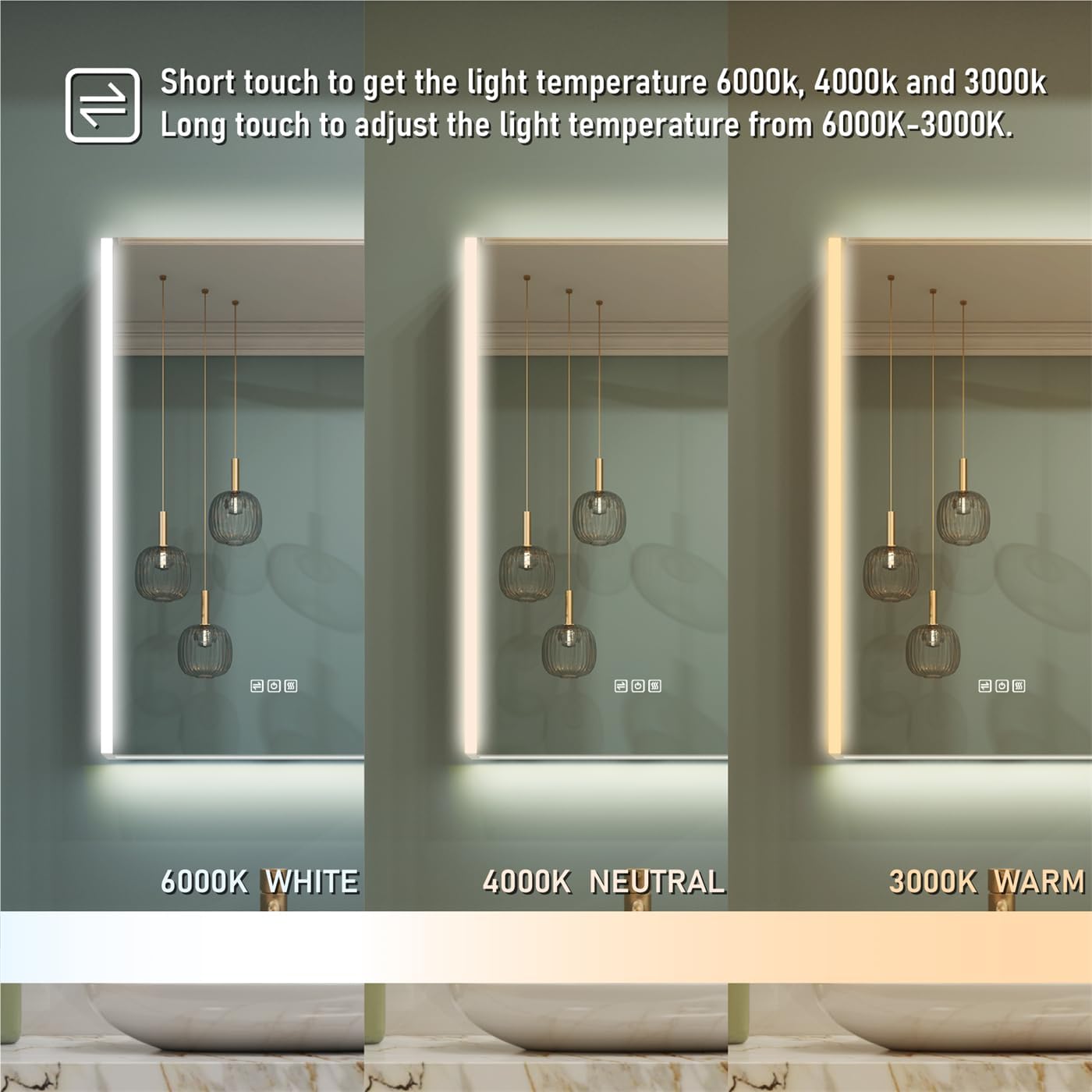
Image: Illustration demonstrating the dimming function, showing the mirror at 100%, 50%, and 5% brightness levels, with instructions for short touch to turn ON/OFF and long touch for brightness control.
2. Anti-Fog Function:
- Activation: Short touch the defogging icon on the mirror surface to activate the anti-fog function.
- Automatic Shut-off: The defogger will automatically turn off after 60 minutes to conserve energy.

Image: Visual comparison of the mirror before and after defogging, with a hand touching the defogging icon and text indicating "Short touch to turn ON/OFF the defogger."
3. Motion Sensor Interior Lights:
- The interior LED stripe lights automatically activate when the cabinet door is opened and turn off when the door is closed. This feature provides convenient illumination for stored items.
4. Outlets & USB Ports:
- The integrated 3-pin outlets and USB ports inside the cabinet provide convenient power for charging small electronic devices like electric toothbrushes, shavers, or smartphones.
- Ensure devices are compatible with the voltage and current provided by the outlets.
Maintenance
- Cleaning the Mirror: Use a soft, damp cloth and a mild glass cleaner. Do not spray cleaner directly onto the mirror surface; apply it to the cloth first. Avoid abrasive cleaners or harsh chemicals.
- Cleaning the Cabinet: Wipe the exterior and interior surfaces with a soft, damp cloth. For stubborn spots, use a mild, non-abrasive household cleaner.
- Electrical Components: Ensure the power is OFF before cleaning near any electrical components. Do not allow water to enter the outlets or USB ports.
- Hinge Care: Periodically check the hinges for smooth operation. If they become stiff, a small amount of silicone-based lubricant can be applied.
Troubleshooting
| Problem | Possible Cause | Solution |
|---|---|---|
| LED lights do not turn ON. | No power supply; loose electrical connection; faulty LED driver. | Check circuit breaker. Ensure all electrical connections are secure. If problem persists, contact a qualified electrician or customer support. |
| Anti-fog function not working. | Function not activated; electrical issue. | Ensure the defogging icon is touched to activate. Check power supply. |
| Interior motion sensor lights not working. | Door not fully closed/opened; sensor obstruction. | Ensure the door is fully opened to trigger the sensor. Check for any obstructions near the sensor. |
| Outlets/USB ports not providing power. | No power supply; internal wiring issue. | Verify the main power to the cabinet is ON. If other functions work, contact customer support. |
Warranty and Support
For warranty information or technical support, please contact WELLFOR customer service. Refer to your purchase documentation for specific warranty terms and contact details.
You can visit the WELLFOR store for more information: WELLFOR Store on Amazon


