1. Introduction
The Hollyland Solidcom SE is a full-duplex wireless intercom headset system designed for seamless team communication in various production environments. This system features Environmental Noise Cancellation (ENC), a robust 2.4GHz frequency band for stable connections up to 1100ft (350m), and a lightweight, durable design. This manual provides essential information for setup, operation, and maintenance of your Solidcom SE system.
2. What's in the Box
Upon unboxing your Hollyland Solidcom SE 4-Set system, you will find the following components:
- 1x Solidcom SE Wireless Master Headset (Single-Ear Version)
- 3x Solidcom SE Wireless Remote Headsets (Single-Ear Version)
- 4x Li-ion Battery Pack 770
- 1x 6-Slot Charging Base
- 1x USB-A to USB-C Cable
- 2x Number Stickers (01)
- 1x Warranty Card

Image: The complete Hollyland Solidcom SE 4-Set system, showcasing four single-ear headsets and a multi-slot charging base.
3. Product Features
- Full-Duplex Communication: Enables simultaneous two-way conversation among team members.
- Environmental Noise Cancellation (ENC): Advanced dual-mic ENC technology processes sound to cancel out environmental noise, ensuring clear voice transmission.
- Extended Range: Provides stable and steady connection up to 1100ft (350m) over the 2.4GHz frequency band.
- Auto Frequency Hopping: Automatically switches frequencies to avoid interference, enhancing communication stability.
- Push-to-Talk (PTT) Function: Allows for quick and intuitive mute/talk control via a dedicated button or microphone boom movement.
- Long Battery Life: Remote headsets offer up to 12 hours of runtime, while master headsets provide over 10 hours.
- Detachable & Rechargeable Batteries: Ensures minimal downtime with replaceable Li-ion battery packs and supports USB-C charging.
- Water and Wind Resistance: Features an advanced algorithm to reduce wind noise and internal protective paint to prevent water penetration, suitable for various outdoor settings.
- Lightweight & Durable Design: Crafted with lightweight and durable materials for comfortable extended wear.

Image: Visual summary of Solidcom SE features including ENC, battery life, and range.
4. Setup
4.1 Initial Setup and Pairing
The Solidcom SE system is designed for hassle-free operation, with all headsets pre-paired at the factory. For adding new headsets or re-pairing:
- Ensure both the master headset and the remote headset(s) are powered on.
- Simultaneously press and hold the [Volume +] button on both the master and remote headsets for 5 seconds.
- The status indicator light on the microphone boom will flash quickly during pairing.
- Once pairing is successful, the indicator light on the mic boom will remain solid green.
For a visual guide on setup and usage, please refer to the official video below:
Video: Detailed guide on how to use the Hollyland Solidcom SE Global Version, covering unboxing, pairing, and basic operations.
5. Operating Instructions
5.1 Speech Control (Mute/Talk)
There are two primary methods to control your speech on the Solidcom SE headset:
- Mute Button: Press the mute button on the headset to toggle between mute and talk modes. A solid green light on the microphone indicates talking, while a solid red light indicates mute.
- Movable Microphone Boom: Rotate the microphone boom upwards to mute your microphone. Rotate it downwards to speak. The indicator light on the mic boom will reflect the speaking status (green for talking, red for mute).

Image: Demonstrates the Push-to-Talk function and the movable microphone boom for intuitive control.
5.2 Auto Frequency Hopping
The system automatically employs frequency hopping technology to ensure a stable connection by switching channels when interference is detected. This feature operates in the background to maintain clear communication.

Image: Illustration of the auto frequency hopping mechanism, showing channel strength and automatic switching.
6. Charging and Battery
The Solidcom SE headsets are powered by detachable Li-ion battery packs, ensuring continuous operation with minimal downtime. The system supports USB-C charging for convenience.
- Battery Life: Remote headsets provide up to 12 hours of working time, while master headsets offer over 10 hours.
- Charging Time: A full charge takes approximately 2.5 hours.
- Charging Method: Use the provided 6-slot charging base or a USB-C cable to charge the headsets. You can charge the headset while it is in use.

Image: Demonstrates the detachable battery and USB-C charging capabilities for continuous power.
7. Maintenance
- Replaceable Ear Pads: The headsets feature replaceable over-ear ear pads, which can be changed for hygiene and comfort, especially during extended use or in warmer climates.
- Cleaning: Regularly clean the headset surfaces with a soft, dry cloth. Avoid using harsh chemicals or abrasive materials.
- Storage: Store the headsets and accessories in the provided storage bag when not in use to protect them from dust and damage.
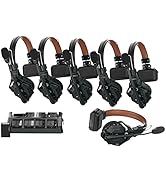
Image: Highlights replaceable ear pads and mic cushions for enhanced hygiene and prolonged product life.
8. Troubleshooting
- No Audio/Microphone Not Connected: If the microphone indicator light is flashing green slowly, it means the microphone is not connected. Ensure the microphone boom is properly attached and rotated to the talk position.
- Low Battery Warning: If the indicator light is red and flashing slowly, the microphone battery is low and will shut down within 10-30 minutes. Charge the headset immediately.
- System Upgrade: If the indicator light is flashing red and green, the headset is undergoing an upgrade. Do not power off the device during this process.
- Interference: The system features auto frequency hopping to mitigate interference. If you experience persistent interference, try moving to a different location or ensuring no other 2.4GHz devices are operating nearby.
9. Specifications
| Feature | Specification |
|---|---|
| Model Name | Solidcom SE |
| Connectivity Technology | Wireless (2.4GHz) |
| Noise Control | Active Noise Cancellation (ENC) |
| Transmission Range | Up to 1100ft (350m) Line-of-Sight |
| Battery Life (Remote Headset) | 12 Hours |
| Battery Life (Master Headset) | Over 10 Hours |
| Charging Time | 2.5 Hours |
| Charging Interface | USB-C |
| Weight | Approximately 4.22 pounds (total package) |
| Water Resistance Level | Water Resistant |
| Material | Plastic |
| UPC | 191460007514 |
10. Warranty and Support
For warranty information and technical support, please refer to the Warranty Card included in your product package or visit the official Hollyland website. Contact details for customer service are typically provided on the warranty card.


