
1. Introduction
This manual provides detailed instructions for the proper use and maintenance of your SUNPOW NX-GD01 Pinpointer Metal Detector. Please read this manual thoroughly before operating the device to ensure safe and efficient use. Keep this manual for future reference.
2. Product Overview
The SUNPOW NX-GD01 is a compact and portable pinpointer metal detector designed for precise target location. It features a rechargeable battery, 360-degree detection, and an IP68 waterproof rating, making it suitable for various environments.
Key Features:
- Rechargeable Battery: Integrated 800mAh lithium battery provides up to 12 hours of continuous operation.
- 360° Detection: Offers comprehensive detection capability for accurate target pinpointing.
- IP68 Waterproof: Fully submersible, allowing for use in wet conditions and underwater.
- User-Friendly Operation: Simple one-button control with intuitive alerts.
- Compact and Portable: Lightweight design with included accessories for easy transport.
Components and Display:
The device features a clear display and a single control button for operation. The display provides visual feedback on various parameters:

Image: The SUNPOW NX-GD01 Pinpointer Metal Detector showing its display with icons for battery power, sensitivity level, detecting signal, sound mode, and vibration mode.
- Battery Power Indicator: Shows the current battery charge level.
- Sensitivity Level: Indicates the current detection sensitivity setting.
- Detecting Signal: Visual representation of detected metal signals.
- Sound Mode: Indicates if audible alerts are active.
- Vibration Mode: Indicates if vibration alerts are active.
3. Setup
3.1 Charging the Battery
The SUNPOW NX-GD01 comes with an integrated 800mAh rechargeable lithium battery. Before first use, fully charge the device.
- Locate the charging port, typically protected by a waterproof plug.
- Connect the provided charging cable to the device and a suitable USB power source.
- The battery indicator on the display will show charging status.
- A full charge provides up to 12 hours of continuous detection.

Image: Visual representation of the SUNPOW NX-GD01's extended battery life, illustrating consistent performance throughout a typical day of use.
3.2 Attaching Accessories
The device includes a spring clip and a belt loop for convenient carrying.
- Attach the spring clip to the designated point on the pinpointer.
- Thread the belt loop through the clip or directly onto the device for secure attachment to your belt or backpack.

Image: The SUNPOW NX-GD01 Pinpointer Metal Detector demonstrating its compact and portable design, easily fitting into a backpack pocket for transport.
4. Operating Instructions
4.1 Powering On/Off
- To power on: Press and hold the control button until the device activates and the display illuminates.
- To power off: Press and hold the control button until the device shuts down.
4.2 Detection Process
The NX-GD01 uses 360-degree side-scan detection to locate metallic objects. It can detect targets up to 6 inches (approximately 15 cm) deep.
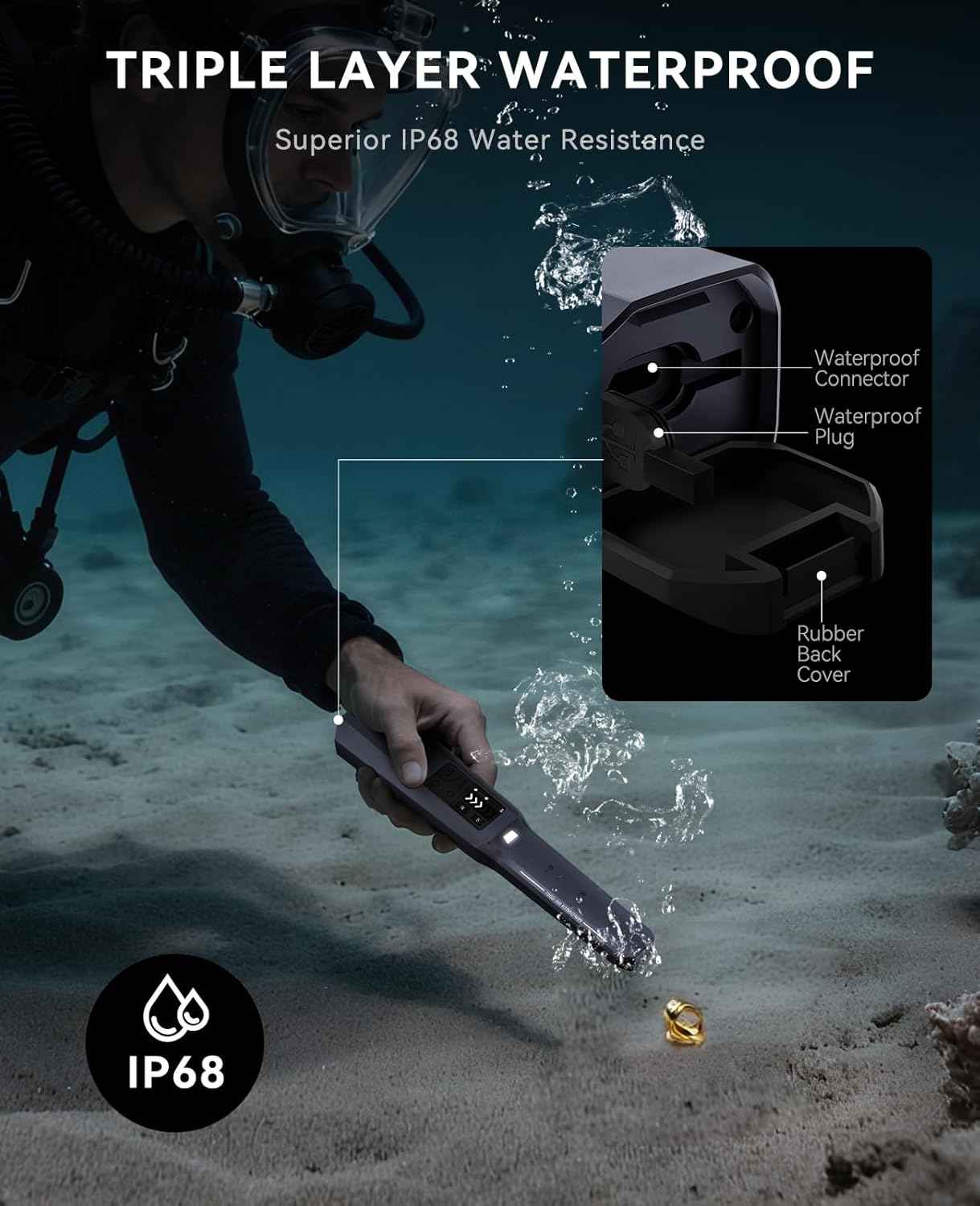
Image: The SUNPOW NX-GD01 Pinpointer Metal Detector demonstrating its ability to detect metallic objects buried up to 6 inches deep.
- With the device powered on, slowly sweep the pinpointer over the area you wish to scan.
- When a metallic object is detected, the device will provide alerts through sound, vibration, or both, depending on your selected mode.
- The intensity of the alerts and the detecting signal on the display will increase as you get closer to the target.
4.3 Adjusting Sensitivity (If Applicable)
Refer to the display for the current sensitivity level. If your model supports sensitivity adjustment, short press the control button to cycle through available sensitivity settings. Higher sensitivity increases detection range but may also increase false signals in mineralized ground.
4.4 Sound and Vibration Modes
The NX-GD01 offers both audible and vibratory alerts. You can typically switch between these modes by a short press or double-press of the control button, depending on the specific model's interface. The display will indicate the active alert mode.
5. Maintenance
5.1 Cleaning
- After each use, especially in dirty or wet conditions, clean the device with a damp cloth.
- Do not use abrasive cleaners or solvents, as these can damage the device's surface or internal components.
- Ensure the charging port cover is securely closed before cleaning or exposing to water.
5.2 Water Resistance Care
The device has an IP68 waterproof rating, meaning it is protected against continuous immersion in water. However, proper care is essential to maintain this rating.
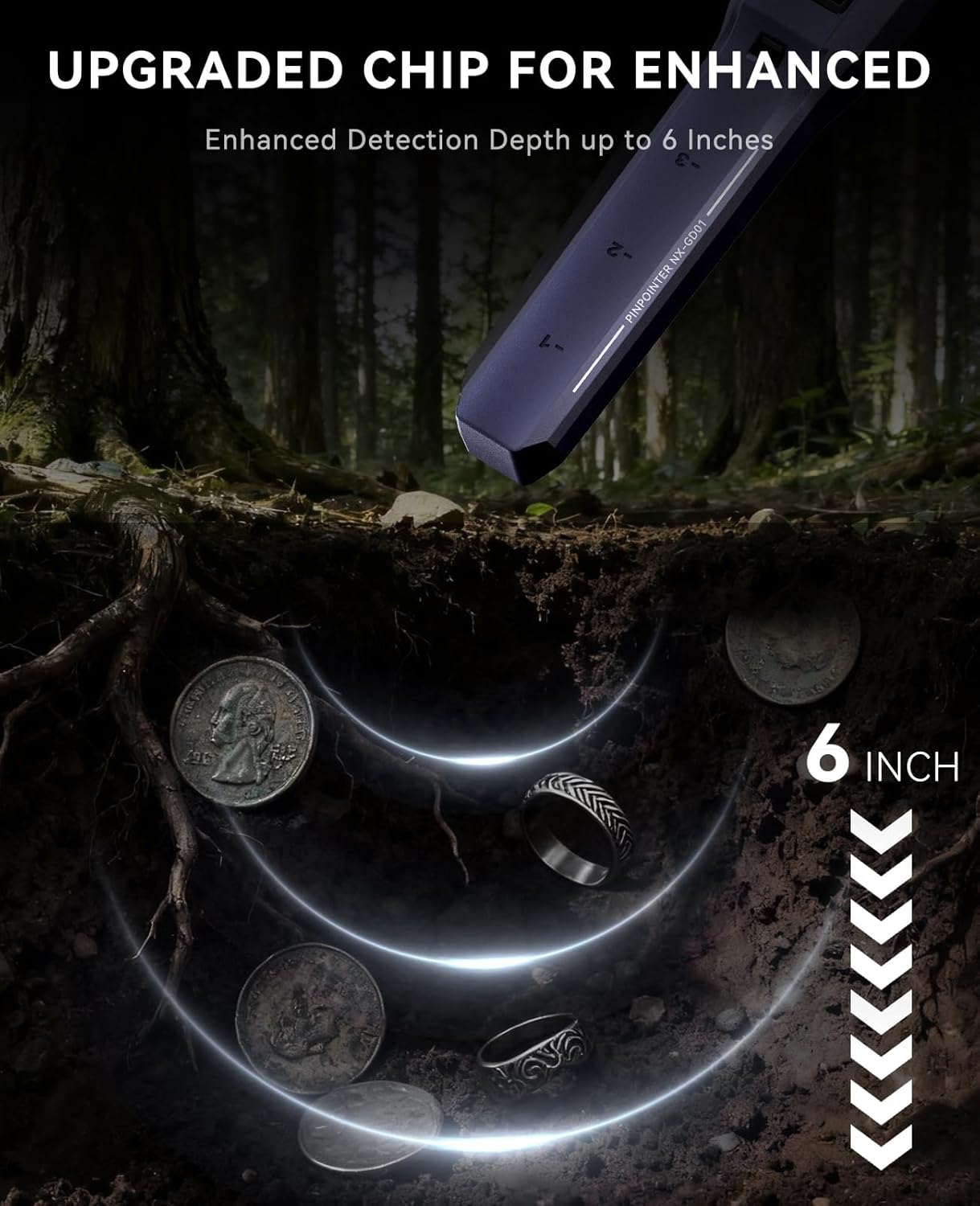
Image: The SUNPOW NX-GD01 Pinpointer Metal Detector submerged in water, highlighting its IP68 waterproof rating and the design of its waterproof components.
- Always ensure the waterproof plug for the charging port is firmly sealed before submerging the device in water.
- Avoid exposing the device to extreme temperatures or harsh chemicals, which could compromise the seals.
- After use in saltwater, rinse the device thoroughly with fresh water and dry it completely.
5.3 Battery Care
- To prolong battery life, avoid fully discharging the battery regularly.
- Store the device in a cool, dry place when not in use, ideally with a partial charge (around 50%).
- If storing for extended periods, charge the battery every few months to prevent deep discharge.
6. Troubleshooting
| Problem | Possible Cause | Solution |
|---|---|---|
| Device does not power on. | Low or depleted battery. | Charge the battery fully. |
| No detection or weak signals. | Low sensitivity setting. / Target too deep. / Battery low. | Increase sensitivity. / Ensure target is within detection range. / Charge battery. |
| False signals or erratic behavior. | High sensitivity in mineralized ground. / Electromagnetic interference. | Reduce sensitivity. / Move away from power lines or other electronic devices. |
| Water ingress after submersion. | Waterproof plug not sealed correctly. / Damage to seals. | Ensure all plugs are securely closed before submersion. If damage is suspected, discontinue use and contact customer support. |
7. Specifications
| Feature | Specification |
|---|---|
| Model Number | NX-GD01 |
| Brand | SUNPOW |
| Battery | 1 Lithium-polymer (800mAh, included) |
| Battery Life | Up to 12 hours (continuous use) |
| Power Source | Battery powered |
| Detection Depth | Up to 6 inches (approx. 15 cm) |
| International Protection Rating | IP68 |
| Product Dimensions (L x W x H) | 26.5 x 6 x 6 cm (10.4 x 2.4 x 2.4 inches) |
| Product Weight | 350 grams |
| Color | Dark black |
| Recommended Use | Metal detection |
| UPC / GTIN | 730198247009 |
8. Warranty Information
Warranty terms and conditions for the SUNPOW NX-GD01 Pinpointer Metal Detector are typically provided with your purchase or can be found on the official SUNPOW website. Please retain your proof of purchase for any warranty claims. The warranty generally covers manufacturing defects under normal use.
9. Customer Support
For technical assistance, troubleshooting not covered in this manual, or warranty inquiries, please contact SUNPOW customer support. Refer to the packaging or the official SUNPOW website for the most current contact information.
Online Resources: Visit the official SUNPOW website for FAQs, product updates, and additional support materials.


