
1. Introduction
This manual provides detailed instructions for the safe and effective operation of your SHEHDS Par IP65 Waterproof Outdoor LED 18x18W RGBWA+UV Stage Light. Please read this manual thoroughly before use and retain it for future reference.
The SHEHDS Par Light is a versatile lighting fixture designed for various applications, including stage performances, parties, weddings, and outdoor events. It features 18x18W RGBWA+UV LEDs, IP65 waterproof rating, and multiple control modes.
2. Safety Information
- Electrical Safety: Ensure the power supply voltage matches the product's requirements (AC 100-240V, 50/60Hz). Always connect to a grounded outlet. Disconnect power before cleaning or servicing.
- Water Resistance: This product is IP65 rated for outdoor use. While it is protected against water jets, avoid submerging the unit. Ensure all connections are properly sealed when used outdoors.
- Temperature: Do not operate the unit in extremely high or low temperatures. Ensure adequate ventilation.
- Mounting: Securely mount the fixture using appropriate hardware. Ensure the mounting surface can support the weight of the fixture.
- Eye Safety: Do not look directly into the light source when the fixture is operating, as it can cause eye damage.
- Repairs: Do not attempt to repair the unit yourself. Refer all servicing to qualified personnel.
3. Product Overview and Components
The SHEHDS Par Light is constructed with a durable aluminum casing and features a fanless design for silent operation. It includes a double bracket for flexible mounting options.

Image: The SHEHDS Par IP65 Waterproof Outdoor LED Stage Light, showcasing its robust design and water resistance with water splashing around it.
3.1 Control Panel and Connections
The rear panel of the fixture houses the control interface and various input/output ports.

Image: A close-up of the rear control panel, highlighting the DMX IN, DMX OUT, POWER IN, POWER OUT ports, the display screen, and control buttons (MENU, UP, DOWN, ENTER).
- Display Screen: Shows current mode and parameter settings.
- MENU Button: Navigates through menu options.
- UP/DOWN Buttons: Adjust parameter values.
- ENTER Button: Confirms selections.
- DMX IN/OUT: For DMX512 signal connection.
- POWER IN/OUT: For power connection and daisy-chaining multiple units.
- Vent-Hole: For heat dissipation (though fanless, proper airflow is still beneficial).
3.2 Package Contents
Verify that all items are present in the package:

Image: The SHEHDS Par Light package contents, showing the light fixture, two mounting brackets, a power cable, a DMX cable, and the user manual.
- SHEHDS Par Light Fixture
- Mounting Brackets (2)
- Power Cable
- DMX Cable
- User Manual
4. Setup
4.1 Mounting
The fixture can be mounted in various positions using the included double bracket:
- Floor Mount: Position the fixture on a stable, level surface.
- Wall Mount: Secure the bracket to a sturdy wall using appropriate screws (not included).
- Ceiling Mount: Attach the bracket to a ceiling truss or beam, ensuring it is securely fastened.
- Truss Mount: Use compatible clamps (not included) to attach the bracket to a lighting truss.
Always ensure the fixture is securely fastened and that any overhead mounting uses a safety cable (not included) as an additional precaution.
4.2 Power Connection
Connect the provided power cable to the POWER IN port on the fixture and then to a suitable power outlet (AC 100-240V, 50/60Hz). Multiple units can be daisy-chained using the POWER OUT port to connect to the POWER IN of another fixture, provided the total power consumption does not exceed the circuit's capacity.
4.3 DMX Connection (Optional)
For DMX control, connect a DMX controller to the DMX IN port of the first fixture using a DMX cable. To control multiple fixtures, connect the DMX OUT of the first fixture to the DMX IN of the next, and so on, in a daisy-chain configuration.
5. Operating Modes
The SHEHDS Par Light offers several operational modes, selectable via the control panel.
5.1 Control Panel Operation
Use the MENU button to cycle through the main settings. Use UP/DOWN to change values and ENTER to confirm.
5.2 DMX512 Mode
This mode allows external control via a DMX controller. The fixture supports 6 or 10 DMX channels. Set the DMX address using the control panel. The DMX address will be retained even after power cycling.
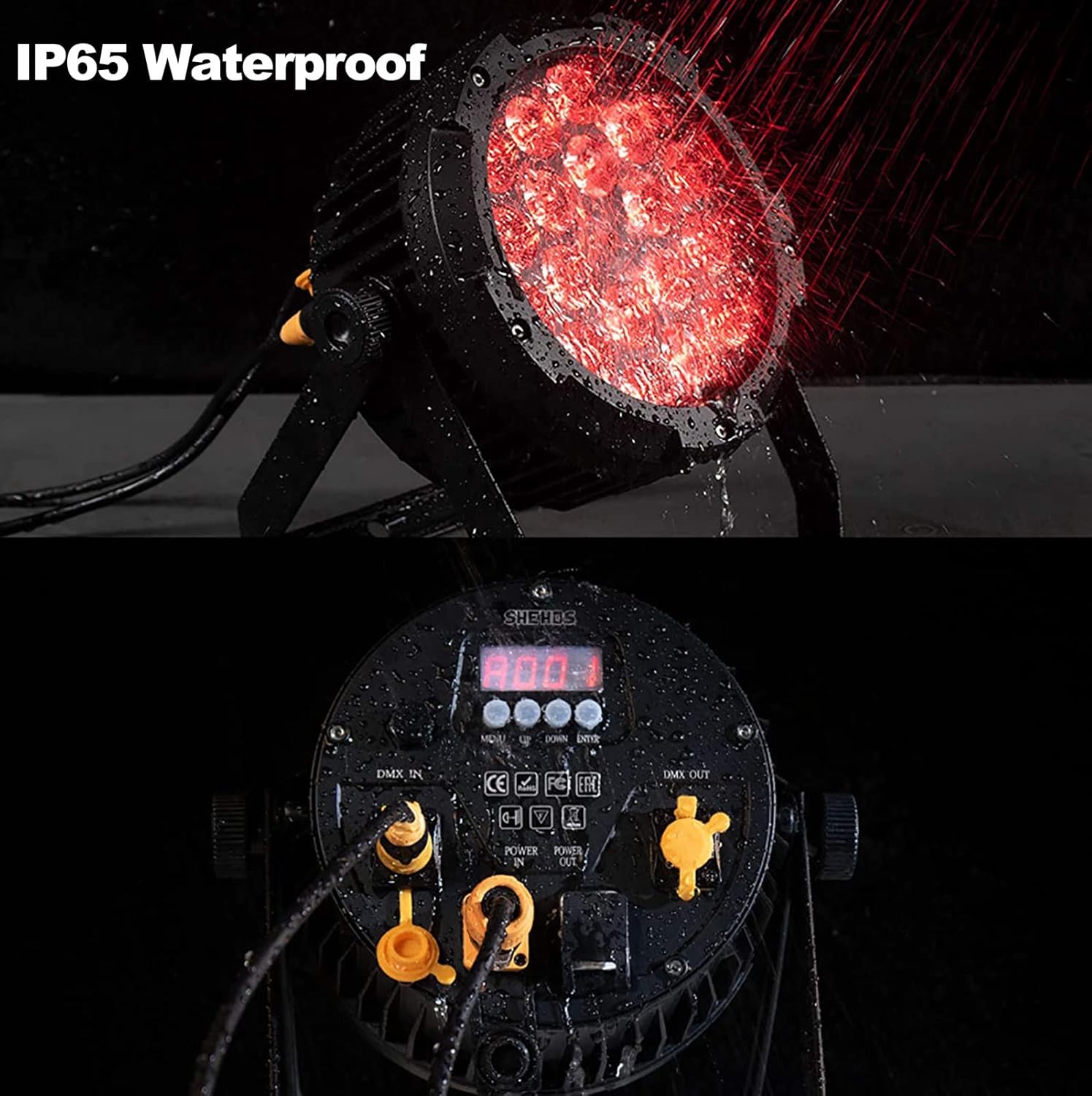
Image: The control panel of the SHEHDS Par Light, shown with water droplets, demonstrating its IP65 waterproof capability. This panel is used to set DMX addresses and other operational parameters.
DMX Channel Functions (Example - refer to specific DMX chart for full details):
| Channel | Function | Value Range |
|---|---|---|
| 1 | Master Dimmer | 0-255 (0-100% brightness) |
| 2 | Red LED Intensity | 0-255 (0-100%) |
| 3 | Green LED Intensity | 0-255 (0-100%) |
| 4 | Blue LED Intensity | 0-255 (0-100%) |
| 5 | White LED Intensity | 0-255 (0-100%) |
| 6 | Amber LED Intensity | 0-255 (0-100%) |
| 7 | UV LED Intensity | 0-255 (0-100%) |
| 8 | Strobe Effect | 0-255 (Speed/Intensity) |
| 9 | Color Macros | 0-255 (Pre-programmed colors) |
| 10 | Sound Active Mode | 0-255 (Sensitivity) |
Note: The exact DMX channel assignments may vary. Refer to the on-screen menu or a dedicated DMX chart for precise control values.
5.3 Auto Run Mode
The fixture will cycle through pre-programmed light shows automatically. Select this mode from the control panel and adjust speed if available.
5.4 Sound Activated Mode
The light will react to ambient sound, changing patterns and colors in sync with music. Adjust sensitivity via the control panel.
5.5 Strobe Mode
Produces a flashing light effect. Adjust the strobe speed and intensity using the control panel.
5.6 Stand Alone Mode
Operates independently without external control. Select desired static colors or effects directly from the control panel.

Image: Six SHEHDS Par Lights demonstrating the full spectrum of RGBWA+UV colors, including red, green, purple, blue, white, and amber output, showcasing the versatility of the 6-in-1 LEDs.
5.7 Master/Slave Mode
Link multiple fixtures together where one acts as the "Master" and others as "Slaves." The Slave units will mimic the Master's operation. Connect DMX OUT of the Master to DMX IN of the first Slave, and so on.
6. Maintenance
6.1 Cleaning
Regular cleaning helps maintain optimal light output and extends the lifespan of the fixture.
- Disconnect power before cleaning.
- Use a soft, lint-free cloth to wipe the exterior casing.
- For lenses, use a soft cloth and a mild glass cleaner. Avoid abrasive materials.
6.2 Storage
When not in use, store the fixture in a dry, dust-free environment. If storing for extended periods, consider using the original packaging or a protective case.
7. Troubleshooting
| Problem | Possible Cause | Solution |
|---|---|---|
| Fixture does not power on. | No power supply; faulty cable; power switch off. | Check power connection; test cable; ensure power switch is on. |
| No DMX control. | Incorrect DMX address; faulty DMX cable; DMX controller issue; incorrect DMX mode. | Verify DMX address; check DMX cable connections; ensure DMX controller is sending signals; set fixture to DMX mode. |
| Light output is dim or inconsistent. | Dimmer setting too low; dirty lens; overheating. | Adjust dimmer; clean lens; ensure proper ventilation. |
| Fixture not responding to sound. | Sound activated mode not selected; microphone sensitivity too low. | Select sound activated mode; adjust microphone sensitivity. |
8. Specifications
- Model: 18w waterproof
- Light Source: 18x18W RGBWA+UV LEDs (6-in-1)
- Power Consumption: 324 Watts
- Voltage: AC 100-240V, 50/60Hz
- Material: Aluminum
- IP Rating: IP65 Waterproof
- Beam Angle: 40 Degrees
- Control Modes: DMX512, Auto Run, Sound Activated, Strobe, Stand Alone, Master/Slave
- DMX Channels: 6/10 Channels
- Product Dimensions: 9.8"L x 5.7"W x 10.6"H (24.9cm L x 14.5cm W x 26.9cm H)
- Item Weight: 10.73 pounds (4.87 kg)
- Features: Fanless Muted Design, Efficient Optics Lens

Image: A diagram showing the 40-degree beam angle of the light, indicating its spread and intensity over distance.

Image: Multiple views of the SHEHDS Par Light, detailing its dimensions (27cm width, 25cm height, 14.5cm depth) and weight (5KG).
9. Warranty and Support
SHEHDS products are designed for reliability and performance. This product comes with:
- 1 Month Replacement: For manufacturing defects or significant malfunctions within the first month of purchase.
- 1 Year Warranty: Covers defects in materials and workmanship for one year from the date of purchase.
For technical support, warranty claims, or service inquiries, please contact SHEHDS customer service through your purchase platform or visit the official SHEHDS store online.

Image: Icons representing SHEHDS customer support, including instant customer service, 1-month replacement policy, and a 1-year warranty.


