
AIRROBO YBS-EU-1
AIRROBO Robot Vacuum Cleaner YBS-EU-1 User Manual
Advanced Cleaning with Self-Emptying Station and LiDAR Navigation
Introduction
Welcome to the world of intelligent home cleaning with your new AIRROBO Robot Vacuum Cleaner, Model YBS-EU-1. This advanced device is designed to provide a comprehensive cleaning experience, combining powerful vacuuming, efficient sweeping, and thorough mopping in one unit. Featuring precise LiDAR navigation, a robust 2700Pa suction, and a convenient self-emptying dust station, the YBS-EU-1 ensures your floors are spotless with minimal effort. Its smart app control allows for customized cleaning schedules, virtual boundaries, and seamless integration with voice assistants like Google Assistant and Amazon Alexa. This manual will guide you through the setup, operation, and maintenance of your robot to ensure optimal performance and longevity.
Important Safety Instructions
To reduce the risk of injury or damage, read these safety instructions carefully and keep them accessible during the product's lifespan.
- This appliance can be used by children aged 8 years and above and persons with reduced physical, sensory or mental capabilities or lack of experience and knowledge if they have been given supervision or instruction concerning use of the appliance in a safe way and understand the hazards involved.
- Children should be supervised to ensure that they do not play with the appliance. Cleaning and user maintenance shall not be made by children without supervision.
- Only use the original power adapter and charging dock provided by the manufacturer.
- Do not use the robot in environments with open flames or fragile objects.
- Ensure the robot is not exposed to water or other liquids.
- Before cleaning, remove loose items like cables, curtains, and small objects from the floor to prevent entanglement.
- Do not operate the robot on elevated surfaces without barriers, such as stairs, to prevent falls.
- Turn off the robot and unplug the charging dock before performing any maintenance or cleaning.
Package Contents
Please check that all items are present and in good condition upon unpacking.

Image: The AIRROBO Robot Vacuum Cleaner YBS-EU-1 and its various accessories laid out, including the robot, self-emptying station, main brush, side brushes, 2-in-1 water tank, mop cloths, disposable mop cloths, cleaning brush, dust bag, filter, remote control, and user manual.
- 1x Robot Vacuum Cleaner
- 1x Self-Emptying Dust and Charging Station
- 1x Main Brush
- 1x Main Brush Cover
- 2x Side Brushes (one pre-installed, one spare)
- 1x 2-in-1 Water Tank (300ml dust box, 250ml water tank)
- 2x Mop Cloths (one pre-installed, one spare)
- 10x Disposable Mop Cloths
- 1x User Manual
- 1x Dust Bag (pre-installed in station)
- 1x Cleaning Brush
- 1x Filter (pre-installed)
- 1x Remote Control
Setup Guide
1. Charging Station Placement
Place the self-emptying and charging station against a wall in an open area. Ensure there is at least 0.5 meters (1.6 feet) of clear space on both sides and 1.5 meters (5 feet) in front of the station for optimal robot navigation and return.
2. Initial Charging
Connect the charging station to a power outlet. Place the robot onto the charging station. The robot will automatically begin charging. For first-time use, ensure the robot is fully charged before starting a cleaning cycle (approximately 6 hours).
3. App Installation and Pairing
Download the "AIRROBO" app from your smartphone's app store (iOS or Android). Follow the in-app instructions to create an account and pair your robot vacuum cleaner. This will enable smart control features.

Image: A person holding a smartphone displaying the AIRROBO application interface, which shows a map of a house and various cleaning control options. This illustrates the smart control feature via the app.
Operating Instructions
1. Starting a Cleaning Cycle
Press the power button on the robot or use the "Start" command in the AIRROBO app or remote control to begin cleaning. The robot will automatically map your home using LiDAR navigation and plan an efficient cleaning path.

Image: The robot vacuum cleaner operating in a modern living room, emitting blue light patterns to illustrate its precise LiDAR navigation system mapping the environment in real-time for efficient cleaning.
2. Cleaning Modes (3-in-1 Function)
The AIRROBO YBS-EU-1 offers sweeping, vacuuming, and mopping functions. You can switch between these modes via the app or remote control. The 2-in-1 water tank allows for simultaneous vacuuming and mopping.
- Vacuuming: Utilizes 2700 Pa suction power to effectively remove dust, debris, and pet hair. Features automatic carpet boost for deeper cleaning on carpets.
- Mopping: Attach the mop cloth and fill the water tank. The electronic water tank supports three levels of water flow for different cleaning needs.
- Sweeping: Side brushes sweep debris into the path of the main brush and suction inlet.

Image: The robot vacuum cleaner operating on a blue carpet, with visual effects indicating strong suction power (2700Pa) and a quiet operation. This highlights its effective cleaning capabilities on various surfaces.
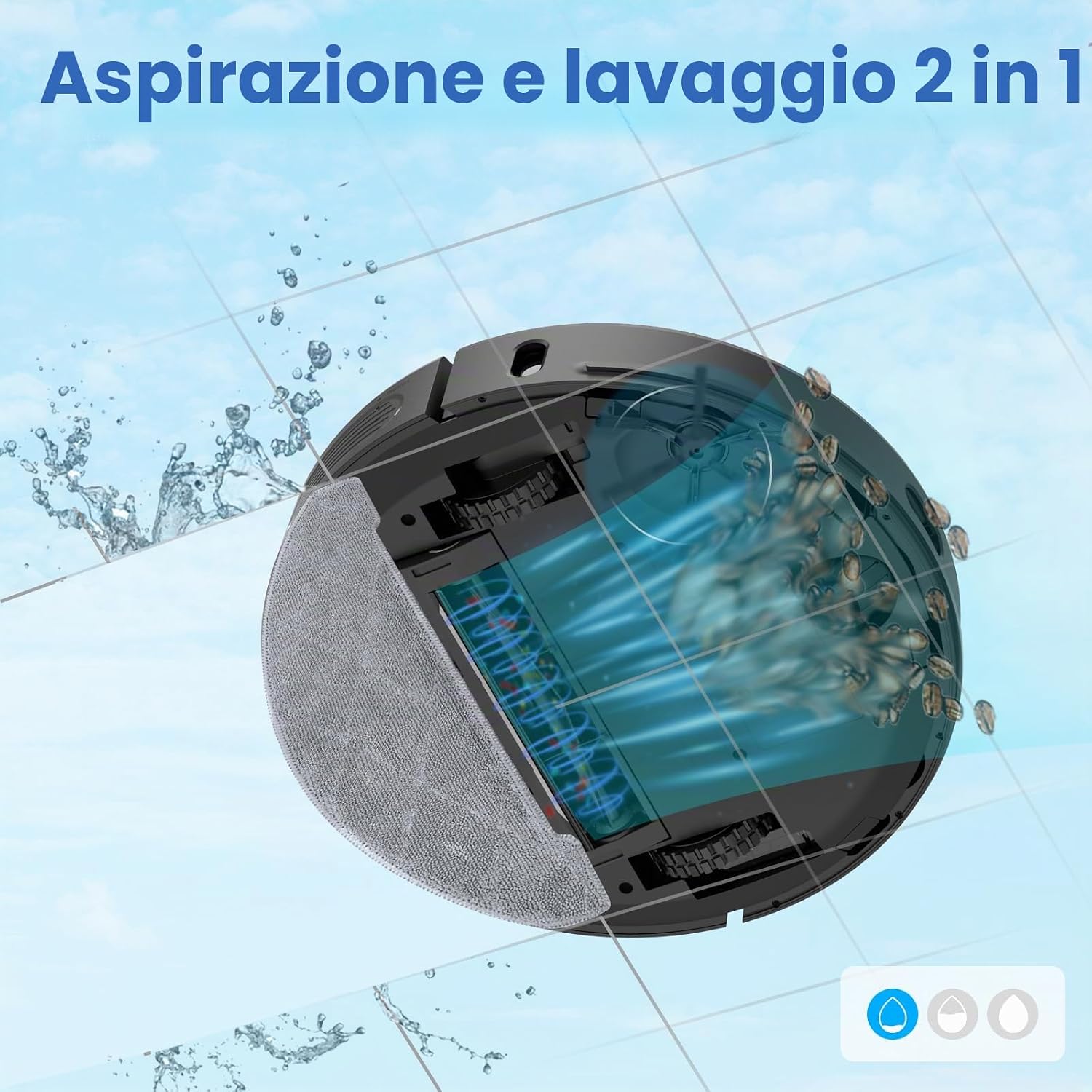
Image: A cutaway diagram of the robot vacuum cleaner illustrating its integrated vacuuming and mopping system. Water is shown being dispensed onto the mop pad while debris is simultaneously vacuumed into the dustbin, demonstrating its 2-in-1 functionality.
3. Smart Control Features
Using the AIRROBO app, you can:
- Set cleaning schedules.
- Define virtual walls and no-go zones.
- Select specific rooms or areas for cleaning.
- Adjust suction power and water flow levels.
- Monitor cleaning progress and battery status.
The robot also supports voice control via Google Assistant and Amazon Alexa.
4. Automatic Charging
When the battery is low, the robot will automatically return to its charging station. After recharging, it will resume cleaning from where it left off.
Maintenance and Care
Regular maintenance ensures optimal performance and extends the lifespan of your robot vacuum cleaner.
1. Self-Emptying Dust Station
The 3.3L dust bag in the self-emptying station can hold dirt for up to 45 days, minimizing manual emptying. Replace the dust bag when the indicator light on the station signals it is full.

Image: The self-emptying dust station with the robot docked, and a separate image showing hands replacing a full dust bag with a new one. This illustrates the automatic dust collection and bag replacement process.
2. Cleaning the 2-in-1 Water Tank and Filter
- After each mopping cycle, empty any remaining water from the tank.
- Rinse the water tank and mop cloth with clean water. Allow them to air dry completely before reattaching.
- Clean the high-efficiency filter in the dust box regularly (e.g., weekly) using the provided cleaning brush. Replace the filter every 3-6 months, depending on usage.
3. Cleaning Brushes and Sensors
- Main Brush: Remove the main brush cover and main brush. Use the cleaning tool to cut and remove any tangled hair or debris.
- Side Brushes: Check side brushes for wear or entanglement. Clean them regularly and replace if damaged.
- Sensors: Wipe the cliff sensors, wall sensors, and charging contacts on the robot and charging station with a clean, dry cloth to ensure proper function.
Troubleshooting
If you encounter issues with your robot vacuum cleaner, refer to the following common problems and solutions:
| Problem | Possible Cause | Solution |
|---|---|---|
| Robot does not turn on or charge. | Battery is completely depleted; charging contacts are dirty; charging station is not powered. | Ensure charging station is plugged in. Clean charging contacts on both robot and station. Manually place robot on station to initiate charging. |
| Robot gets stuck frequently. | Obstacles on the floor (cables, rugs); cliff sensors are dirty. | Clear floor of obstacles. Use virtual walls in the app for problem areas. Clean cliff sensors. |
| Poor cleaning performance. | Dustbin full; filter clogged; brushes tangled; suction power too low. | Check and replace dust bag in station. Clean or replace filter. Clean main and side brushes. Increase suction power via the app. |
| Robot cannot return to charging station. | Charging station is blocked or moved; robot is too far from station. | Ensure charging station is in an accessible location. Manually place robot near station to help it find its way. |
| App connection issues. | Incorrect Wi-Fi password; robot is out of Wi-Fi range; app needs update. | Verify Wi-Fi password and network (2.4GHz only). Move robot closer to router. Update the AIRROBO app. Re-pair the device if necessary. |
If the problem persists, please contact AIRROBO customer support.
Specifications
| Feature | Detail |
|---|---|
| Brand | AIRROBO |
| Model Name | YBS-EU-1 |
| Navigation System | LiDAR, USLAM Air Algorithm |
| Suction Power | 2700 Pa |
| Battery Runtime | Up to 250 minutes |
| Battery Type | Lithium-Ion |
| Self-Emptying Dust Bag Capacity | 3.3 L (up to 45 days hands-free) |
| 2-in-1 Water Tank Capacity | 300 ml (dust box) / 250 ml (water tank) |
| Cleaning Modes | Sweep, Vacuum, Mop (3-in-1) |
| Control Methods | AIRROBO App, Remote Control, Voice Control (Google Assistant, Alexa) |
| Obstacle Climbing Ability | Up to 2 mm |
| Recommended Surfaces | Carpet, Wood, Tile |
| Dimensions (L x W x H) | 34.9 x 35.3 x 10 cm |
Warranty and Support
Warranty Information
The AIRROBO Robot Vacuum Cleaner YBS-EU-1 comes with a standard manufacturer's warranty. Please refer to the warranty card included in your package or visit the official AIRROBO website for detailed terms and conditions regarding warranty coverage and duration.
Customer Support
For technical assistance, troubleshooting not covered in this manual, or any other inquiries, please contact AIRROBO customer support:
- Website: Visit the official AIRROBO website for FAQs and support resources.
- Email: Refer to your warranty card or product packaging for the customer service email address.
- Phone: Check the official website for regional support phone numbers.
When contacting support, please have your product model (YBS-EU-1) and purchase information ready.
Related documentsYBS-EU-1


Ask a question about this manual
Ask about setup, troubleshooting, compatibility, parts, safety, or missing instructions. Manuals+ will review the question and use this page’s manual context to help answer it.