
Introduction
This manual provides essential instructions for the safe and efficient operation, installation, and maintenance of your Hamilton Beach 30-inch Electric Oven with Ceramic Cooktop, model HBRC32AMZ. Please read all instructions carefully before using the appliance and retain this manual for future reference.
This appliance features a true electric convection oven, a ceramic cooktop with five burners, heavy-duty metal knobs, and stainless steel cooking racks. It is designed for household use.
Important Safety Information
WARNING: To reduce the risk of fire, electric shock, injury to persons, or damage when using the appliance, follow basic precautions, including the following:
- Read all instructions before using the appliance.
- Ensure proper installation by a qualified technician.
- Do not touch hot surfaces. Use oven mitts or pot holders.
- Never use the appliance for warming or heating the room.
- Do not store flammable materials in or near the oven.
- Always supervise children when the appliance is in use.
- Disconnect power before servicing.
Setup and Installation
Unpacking
Carefully remove all packaging materials from the oven and cooktop. Inspect the appliance for any shipping damage. Report any damage immediately to the retailer.
Location Requirements
This is a freestanding electric range. Ensure the installation area meets local codes and provides adequate ventilation. The appliance dimensions are 68.6 cm (D) x 76.2 cm (W) x 95.3 cm (H).
Electrical Connection
The appliance requires a 110 Volt electrical supply. A dedicated circuit is recommended. All electrical connections must be performed by a qualified electrician in accordance with all local codes and ordinances.
Leveling the Range
Use a level to ensure the range is perfectly balanced. Adjust the leveling legs located at the bottom corners of the range as needed to prevent spills and ensure even cooking.
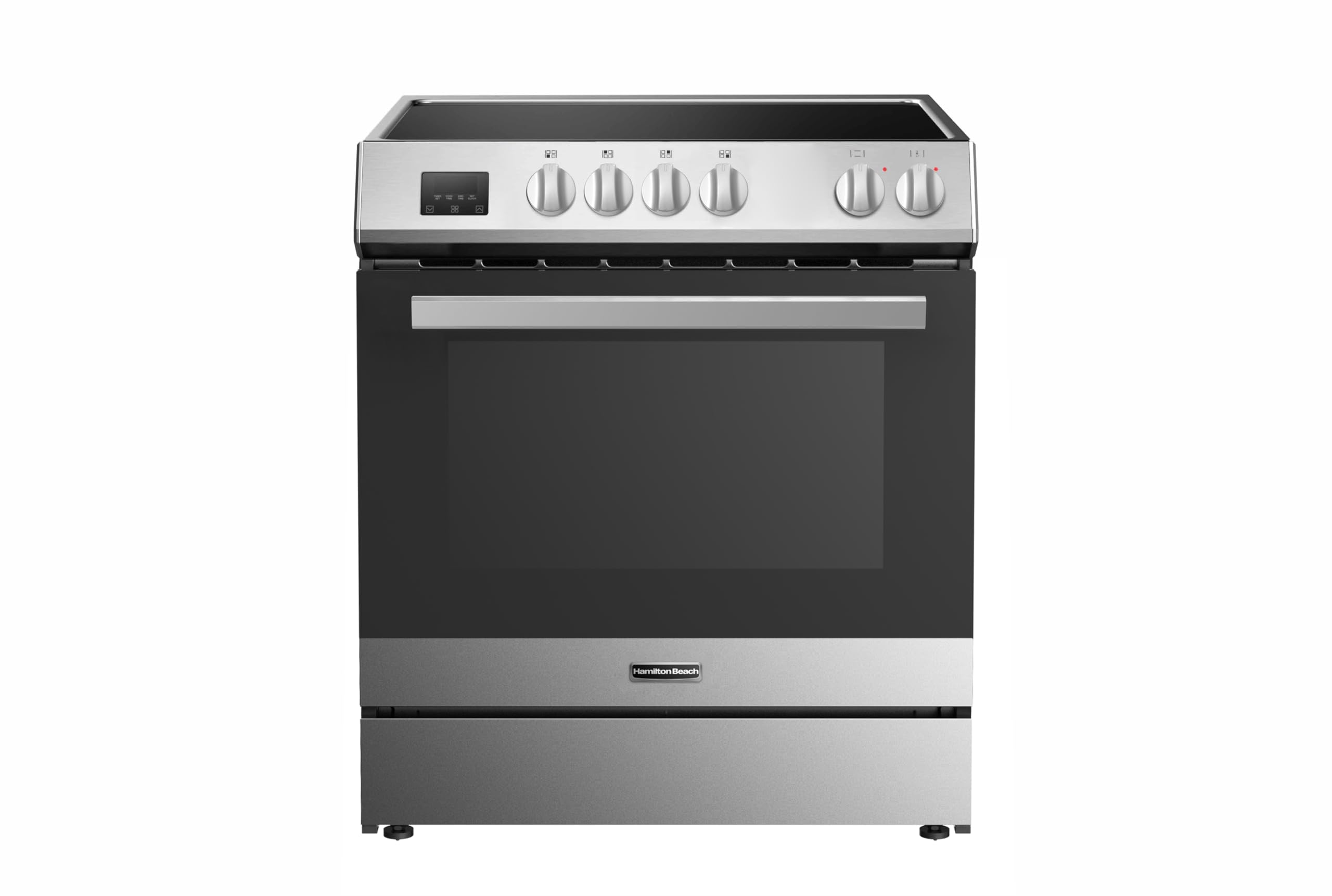
Image: Front view of the Hamilton Beach 30-inch Electric Oven with Ceramic Cooktop, model HBRC32AMZ. The image displays the appliance's stainless steel finish, the smooth black ceramic cooktop with five distinct burner zones, and the heavy-duty metal control knobs located on the front panel. The oven door is visible below the cooktop.
Operating Instructions
Using the Ceramic Cooktop
The ceramic cooktop features five electric burners. Use flat-bottomed cookware for optimal heat transfer. Turn the corresponding knob to the desired heat setting (Low, Medium, High).
- Burner Controls: Each burner is controlled by a dedicated knob on the front panel.
- Heat Settings: Rotate the knob clockwise or counter-clockwise to adjust heat intensity.
- Indicator Lights: A surface hot indicator light will illuminate when any cooktop surface is hot.
Using the Electric Oven
The oven has a 5 cubic feet capacity and features true electric convection for even cooking. It includes two stainless steel cooking racks.
- Preheating: Turn the oven function knob to the desired setting (Bake, Broil, Convection Bake).
- Temperature Setting: Turn the temperature knob to the desired temperature. The oven will begin to preheat.
- Convection Cooking: For convection baking, ensure the convection fan is operating. This setting circulates hot air for faster and more even cooking.
- Oven Racks: Position the two stainless steel racks before preheating. Refer to cooking guides for optimal rack placement.
Note: The oven is equipped with a touch timer for precise cooking duration. Consult the timer section of this manual for detailed operation.
Care and Maintenance
Cleaning the Ceramic Cooktop
Allow the cooktop to cool completely before cleaning. Use a ceramic cooktop cleaner and a non-abrasive pad. Wipe spills immediately to prevent staining.
Cleaning the Oven Interior
For light soils, wipe with warm soapy water. For heavier soils, use an oven cleaner specifically designed for electric ovens, following the product instructions. Remove oven racks before cleaning.
Cleaning Stainless Steel Surfaces
Use a soft cloth and a stainless steel cleaner. Always wipe in the direction of the grain to avoid streaking.
Replacing Oven Light
Ensure the oven is cool and disconnected from power. Remove the protective glass cover and replace the bulb with a new appliance bulb of the same wattage.
Troubleshooting Guide
| Problem | Possible Cause | Solution |
|---|---|---|
| Appliance does not operate | No power supply; circuit breaker tripped. | Check power cord connection; reset circuit breaker. |
| Cooktop burner not heating | Incorrect knob setting; faulty burner. | Ensure knob is set correctly; contact service if issue persists. |
| Oven not heating | Incorrect temperature setting; oven door not closed properly. | Verify temperature setting; ensure door is fully closed. |
| Uneven cooking | Improper rack placement; unevenly leveled range. | Adjust rack position; level the range. |
If troubleshooting steps do not resolve the issue, please contact Hamilton Beach customer support.
Specifications
- Model: HBRC32AMZ
- Brand: Hamilton Beach
- Product Dimensions (D x W x H): 68.6 cm x 76.2 cm x 95.3 cm (27.0" x 30.0" x 37.5")
- Weight: 71.67 kg (158 lbs)
- Oven Capacity: 5 cubic feet
- Cooktop Type: Ceramic Electric
- Number of Burners: 5
- Fuel Type: Electric
- Voltage: 110 Volts
- Material: Stainless Steel
- Control Type: Knob with Touch Timer
- Installation Type: Freestanding
- Included Components: Unit, 2 Stainless Steel Racks
- UPC: 058465834425
Warranty and Support
For warranty information and customer support, please refer to the warranty card included with your appliance or visit the official Hamilton Beach website. Keep your proof of purchase for warranty claims.
Manufacturer: Curtis International Ltd
Contact: Refer to Hamilton Beach customer service contact details provided with the product or on their official website.