Introduction
Thank you for choosing the LIGE Smart Watch. This device combines elegant design with advanced technology to enhance your daily life. Featuring a vibrant 1.19-inch HD AMOLED display, Bluetooth calling capabilities, comprehensive health monitoring, and over 110 sports modes, this smartwatch is designed to be your ultimate companion. This manual provides detailed instructions on how to set up, operate, and maintain your new smartwatch to ensure optimal performance and longevity.
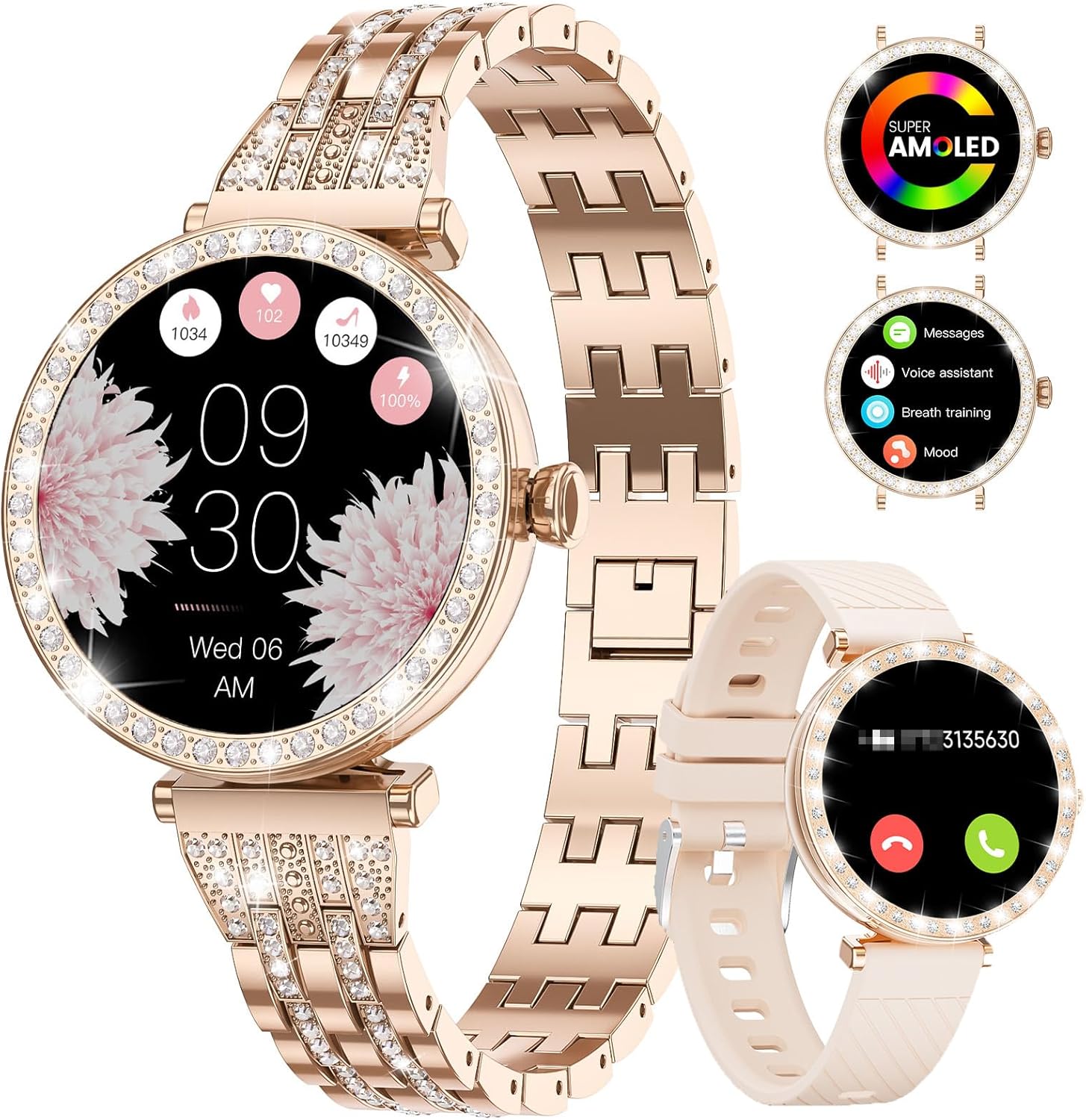
The LIGE Smart Watch, showcasing its elegant rose gold diamond-studded band and an alternative beige silicone band.
What's in the Box
Upon opening your LIGE Smart Watch package, please ensure all the following items are present:
- LIGE Smartwatch
- Charging Cable
- Watch Strap (Diamond-studded stainless steel band)
- Additional Watch Strap (Silicone band)
- Watch Setting Tools (for adjusting the metal strap)
- Smartwatch Manuals (this document)
Setup Guide
Follow these steps to set up your LIGE Smart Watch for the first time.
1. Charging the Smart Watch
Before initial use, fully charge your smartwatch. Connect the magnetic charging cable to the charging points on the back of the watch and plug the USB end into a compatible power adapter (not included) or a computer USB port. A full charge typically takes approximately 2 hours.
2. Downloading the Da Fit App
The LIGE Smart Watch requires the "Da Fit" application for full functionality and synchronization with your smartphone. The app is compatible with Android 5.0 and above, and iOS 9.0 and above.
- Scan the QR code provided in the watch packaging or search for "Da Fit" in your phone's app store (Google Play Store for Android, Apple App Store for iOS).
- Alternatively, you can download the app directly from this link: http://plus.crrepa.com/app-download/dafit
- Install the "Da Fit" app on your smartphone.
3. Pairing with Your Smartphone
To connect your smartwatch to the "Da Fit" app and enable Bluetooth calling and notifications:
- Ensure Bluetooth is enabled on your smartphone.
- Open the "Da Fit" app.
- Navigate to the "Device" tab (usually represented by a watch icon).
- Tap "Add Device" or "Bind Device" and select your LIGE Smart Watch from the list of discovered devices. The watch name might appear as "SML16-C-L1" or similar.
- Follow the on-screen prompts to complete the pairing process. You may need to confirm the connection on both your phone and the watch.
- For Bluetooth calling functionality, after the initial pairing, go to your phone's Bluetooth settings and connect to the "Audio_SML16-C-L1" or similar audio device associated with your watch. This separate connection enables call audio.
- Ensure the "Da Fit" app is allowed to run in the background on your phone to maintain a stable connection and receive notifications consistently.

Visual guide for connecting the LIGE Smart Watch to the Da Fit app, including QR code scanning and Bluetooth pairing steps.
Operating Instructions
This section details the various functions and features of your LIGE Smart Watch.
Display and Customization
The smartwatch features a 1.19-inch HD AMOLED display, offering vivid colors and clear visuals.
- Customizable Watch Faces: The watch comes with several built-in watch faces. More than 120 additional watch faces are available through the "Da Fit" app. To access them, ensure the app is connected, go to the "Watch Faces" section, swipe left to the last face, and click "FACE GALLERY." You can also create custom DIY dials using your own photos.
- Always-On Display (AOD): This feature allows the time to be displayed continuously without needing to raise your wrist or tap the screen. Note that enabling AOD will consume more battery power.

Examples of customizable watch faces available for the LIGE Smart Watch.

The 1.19-inch AMOLED screen and the DIY dial feature, allowing for personalized watch faces.
Communication Features
- Bluetooth Calling: Once connected to your phone via Bluetooth (both the app and the audio connection), you can make and receive calls directly from your watch. Use the dial pad, access recent call logs, or sync contacts through the Da Fit app.
- Smart Notifications: Receive alerts for incoming calls, text messages, and notifications from social media apps (e.g., Facebook, Instagram, WhatsApp) directly on your wrist. Note: The watch can display messages but cannot be used to reply to them.
- Voice Assistant: Interact with your phone's voice assistant (e.g., Siri, Google Assistant) through the watch for hands-free commands.

The LIGE Smart Watch displaying Bluetooth call and message reminder functionalities.

Overview of voice assistant, Bluetooth calling, and message notification capabilities of the smartwatch.
Convenience Features
- Music Control: Control music playback on your smartphone directly from your watch (play, pause, skip tracks).
- Remote Camera Control: Use your watch as a remote shutter button for your phone's camera.
- Weather Updates: Get real-time weather forecasts displayed on your watch.
- Alarms: Set multiple alarms to help you stay on schedule.
- Find Phone: If your phone is misplaced, use this feature on your watch to make it ring.
- Sedentary Reminder: Receive alerts when you've been inactive for too long, encouraging you to move.
- Drink Reminders: Set reminders to stay hydrated throughout the day.
- Timer & Stopwatch: Essential tools for various activities.
- Calculator: A basic calculator function is available on the watch.

The LIGE Smart Watch displaying weather forecast, camera control, and music control functionalities.

Overview of additional convenience features including music control, camera control, weather updates, and alarm clock.
Health Monitoring
The LIGE Smart Watch is equipped with advanced sensors to help you monitor various aspects of your health.
- Heart Rate Monitoring: Continuously track your heart rate throughout the day.
- Blood Oxygen (SpO2) Monitoring: Measure your blood oxygen saturation levels.
- Blood Pressure Monitoring: Provides estimated blood pressure readings.
- Sleep Monitoring: Analyze your sleep patterns, including deep sleep, light sleep, and REM sleep, to help you understand and improve your sleep quality.
- Women's Physiological Cycle Monitoring: Scientifically records and predicts menstrual cycles, including menstrual period, safety period, and ovulation, to support women's health management.
Note: The health monitoring features are for reference only and should not be used for medical diagnosis or treatment. Consult a healthcare professional for any health concerns.

The LIGE Smart Watch displaying all-day health monitoring data, including sleep stages.

The women's health management feature on the LIGE Smart Watch, tracking and predicting physiological cycles.

Visual representation of the health monitoring capabilities, including heart rate, blood pressure, and blood oxygen.
Sports Modes and Activity Tracking
The LIGE Smart Watch supports over 110 sports modes to help you track your workouts and daily activity.
- 110+ Sports Modes: Select from a wide range of activities such as running, walking, cycling, yoga, swimming, and more to get specific data for your workout.
- Activity Tracking: Automatically track daily steps, distance covered, and calories burned.
- GPS via Smartphone: For outdoor activities, the watch can utilize your phone's GPS to map your route and provide more accurate distance data.

The LIGE Smart Watch tracking various sports activities and daily metrics like heart rate, steps, distance, and calories.

The 100+ sport mode feature, designed to help users scientifically record sports data.
Maintenance
Proper care and maintenance will extend the life of your LIGE Smart Watch.
- Water Resistance: The watch has an IP68 waterproof rating, meaning it is resistant to dust and can withstand immersion in water up to 1.5 meters for 30 minutes. It is suitable for daily use, hand washing, and light rain. Avoid hot water, saunas, or diving, as steam and high pressure can compromise the seal.
- Cleaning: Regularly clean the watch and straps with a soft, dry cloth. If necessary, use a slightly damp cloth and mild soap, then dry thoroughly. Avoid harsh chemicals or abrasive materials.
- Battery Care: To preserve battery life, avoid extreme temperatures. Charge the watch fully before long periods of inactivity. The 330mAh battery offers 3-5 days of regular use and up to 20 days in standby mode.
- Storage: Store the watch in a cool, dry place when not in use.
Troubleshooting
If you encounter issues with your LIGE Smart Watch, try the following solutions:
- Watch not connecting to phone:
- Ensure Bluetooth is enabled on your phone.
- Make sure the "Da Fit" app is running and has necessary permissions (location, Bluetooth).
- Restart both your phone and the smartwatch.
- Forget the device in your phone's Bluetooth settings and re-pair through the "Da Fit" app.
- Ensure the "Da Fit" app is allowed to run in the background and is not being closed by your phone's power-saving settings.
- Notifications not appearing:
- Check notification permissions for the "Da Fit" app in your phone's settings.
- Ensure notifications are enabled within the "Da Fit" app for specific applications.
- Verify the watch is properly connected via Bluetooth.
- Call audio not working:
- Confirm that the "Audio_SML16-C-L1" (or similar) Bluetooth device is connected in your phone's Bluetooth settings, in addition to the main watch connection.
- Check the volume settings on both your phone and the watch.
- Inaccurate health data:
- Ensure the watch is worn snugly on your wrist, not too tight or too loose.
- Clean the sensors on the back of the watch.
- Remember that these are not medical devices and readings are for reference only.
- Short battery life:
- Disable features like Always-On Display if not needed.
- Reduce screen brightness.
- Limit the number of apps sending notifications to the watch.
If these steps do not resolve your issue, please refer to the "Warranty and Support" section for further assistance.
Specifications
| Feature | Detail |
|---|---|
| Model Number | SML16-C-L1 |
| Screen Size | 1.19 Inches |
| Display Type | AMOLED |
| Battery Capacity | 330 Milliamp Hours (Lithium Polymer) |
| Battery Life (Typical Use) | 3-5 days |
| Standby Time | Up to 20 days |
| Connectivity | Bluetooth |
| Operating System Compatibility | Android 5.0+ and iOS 9.0+ |
| Waterproof Rating | IP68 |
| Memory Storage Capacity | 256 MB |
| Item Weight | 6.4 ounces |
| Dimensions | 8.07 x 3.82 x 0.87 inches (Package) |
Warranty and Support
LIGE is committed to ensuring your satisfaction with our products.
- Reliable Service: If you have any questions, concerns, or require assistance with your LIGE Smart Watch, please do not hesitate to contact our customer support team.
- 24/7 Support: We offer continuous support to help you with any issues you may encounter.
For support, please refer to the contact information provided with your purchase or visit the official LIGE website.


