
1. Introduction
This manual provides essential instructions for the safe and efficient operation, maintenance, and troubleshooting of your HUTT C65 Window Cleaning Robot. Please read this manual thoroughly before using the product and retain it for future reference.
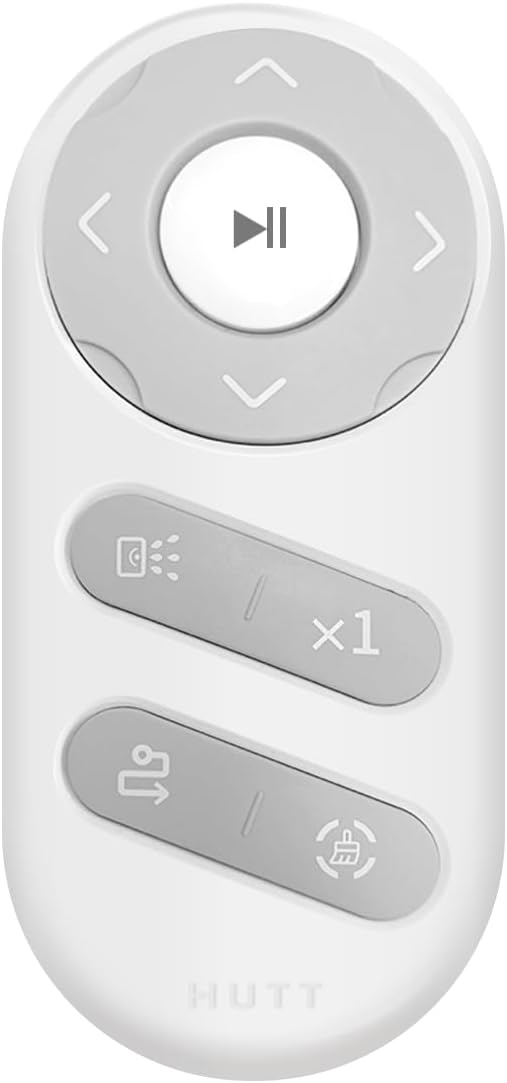
Figure 1: HUTT C65 Window Cleaning Robot. This image displays the main unit of the HUTT C65 robot, showcasing its compact design and white color.
2. Safety Instructions
To prevent injury or damage, always observe the following safety precautions:
- Ensure the safety rope is securely attached to the robot and a fixed indoor object before operation.
- Do not use the robot on broken glass or surfaces with visible damage.
- Keep hands, hair, and loose clothing away from moving parts.
- Do not operate the robot in rainy or extremely humid conditions.
- Supervise the robot during operation, especially when cleaning windows at height.
- Use only the original power adapter and accessories provided by HUTT.
- Keep the robot out of reach of children and pets.
- Before cleaning, remove any obstacles from the window surface.
3. Product Overview
3.1 Components
The HUTT C65 package typically includes the following items:
- HUTT C65 Window Cleaning Robot (Main Unit)
- Power Adapter and Power Cord
- Remote Control
- Cleaning Pads (multiple pairs)
- Safety Rope
- Water Filling Bottle
- User Manual
3.2 Remote Control Functions

Figure 2: Remote Control for HUTT C65. This image shows the compact remote control with buttons for power, start/pause, and directional movement.
The remote control allows you to manually direct the robot and select cleaning modes. Refer to the diagram for button functions:
- Power Button: Turns the robot on/off.
- Start/Pause Button: Initiates or pauses the cleaning cycle.
- Directional Arrows: Manually controls the robot's movement.
- Mode Selection: (If applicable, based on actual remote) Selects different cleaning patterns.
4. Setup
- Charge the Battery: Before first use, fully charge the robot's internal battery using the provided power adapter. The indicator light will change when charging is complete.
- Attach Cleaning Pads: Securely attach clean cleaning pads to the bottom of the robot. Ensure they are properly aligned and cover the cleaning surface.
- Fill Water Tank: Open the water tank cap and fill it with clean water or a recommended window cleaning solution using the provided filling bottle. Do not overfill.
- Connect Safety Rope: Attach one end of the safety rope to the robot's safety buckle and the other end to a sturdy, fixed object indoors (e.g., a heavy piece of furniture, a window frame anchor). This is crucial for preventing falls.
- Connect Power: Plug the power adapter into the robot and then into a power outlet. The robot requires continuous power during operation. The internal battery serves as a backup in case of power loss.
5. Operating Instructions
- Placement: Place the robot on the window surface, ensuring it is flat against the glass.
- Power On: Press the power button on the robot or the remote control. The robot will suction onto the glass. Wait for the suction to stabilize.
- Start Cleaning: Press the Start/Pause button on the robot or remote control. The robot will begin its automatic cleaning pattern.
- Manual Control (Optional): During automatic cleaning, you can use the directional arrows on the remote control to guide the robot to specific areas.
- Pause/Stop: To pause cleaning, press the Start/Pause button. To stop cleaning and release suction, press the power button. The robot will release suction and can be removed from the window.
- Removing the Robot: After cleaning is complete or paused, carefully grasp the robot by its handle and pull it away from the glass. Ensure the safety rope is still attached.
Note: For optimal results, especially on very dirty windows, it is recommended to perform a dry cleaning cycle first to remove loose dirt, then a wet cleaning cycle with cleaning solution.
6. Maintenance
6.1 Cleaning Pads
- Remove cleaning pads after each use.
- Wash pads by hand or machine wash with mild detergent. Do not use bleach or fabric softener.
- Allow pads to air dry completely before reuse or storage.
6.2 Robot Unit
- Wipe the exterior of the robot with a soft, damp cloth.
- Clean the suction cups and sensors regularly to ensure proper adhesion and navigation.
- Empty and rinse the water tank after each use to prevent residue buildup.
- Do not immerse the robot in water.
6.3 Storage
Store the robot and its accessories in a cool, dry place away from direct sunlight and extreme temperatures. Ensure the battery is partially charged before long-term storage.
7. Troubleshooting
| Problem | Possible Cause | Solution |
|---|---|---|
| Robot does not suction to glass. | Insufficient power; dirty suction cups; uneven surface. | Ensure power adapter is connected; clean suction cups; ensure glass surface is flat. |
| Robot leaves streaks. | Dirty cleaning pads; insufficient cleaning solution; very dirty window. | Replace or clean pads; refill water tank; perform a dry clean first. |
| Robot stops unexpectedly. | Power disconnected; low battery backup; sensor obstruction. | Check power connection; ensure battery is charged; clean sensors. |
| Remote control not working. | Dead batteries in remote; obstruction between remote and robot. | Replace remote control batteries; ensure clear line of sight. |
8. Specifications
| Feature | Detail |
|---|---|
| Brand | HUTT |
| Model Name | C65 |
| Recommended Surface | Glass, Mirrors, Glass Tables |
| Special Feature | Window Cleaning |
| Color | White |
| Product Dimensions (L x W x H) | 25 cm x 20 cm x 7 cm |
| Controller Type | Remote Control |
| Included Components | Battery (internal) |
| Filter Type | HEPA |
| Battery Cell Composition | Lithium Polymer |
| Power Source | Battery (requires continuous AC power during operation) |
| Control Method | Remote Control |
| Form Factor | Disc-shaped |
| Usage | Indoor |
| Portable | Yes |
| Number of Wheels | 2 |
| Item Weight | 2.94 Kilograms |
9. Warranty and Support
For warranty information, technical support, or service inquiries, please refer to the warranty card included with your product or contact HUTT customer service through their official website or the retailer where the product was purchased. Please have your model number (C65) and purchase date available when contacting support.
Online Support: Visit the HUTT Store on Amazon


