1. Product Overview
The ORDRO G730 is a versatile 5K mirrorless camera designed for both vlogging and photography. It features advanced capabilities such as a high-resolution sensor, optical zoom, and a vari-angle touchscreen, making it suitable for a wide range of creative applications.
Key Features:
- 8.0MP CMOS 1/2.8-inch Sensor: Captures sharp and detailed images and videos in various lighting conditions.
- 12X Optical Zoom with Manual/Auto Focus: Includes Real-Time Face Focus, adjustable Color Temperature (3000K-9000K), ISO range (100-3200), White Balance Shift, and IR Night Vision for versatile shooting.
- 15 Creative Filters: Enhance your visuals with a variety of unique filters.
- 3.2-Inch Vari-angle Screen: Provides clear visibility and flexibility for shooting from different angles, including vertical and selfie modes.
- Compact and Lightweight Design: Easy to carry for on-the-go vlogging and capturing moments.

This image displays the ORDRO G730 mirrorless camera alongside its essential accessories: a remote control for convenient operation, a USB adapter for data transfer, and two lithium-ion batteries to ensure extended usage.
2. Initial Setup
2.1 Charging the Battery
The camera uses Lithium Ion batteries. Before first use, fully charge the included battery. Insert the battery into the camera and connect the camera to a power source using the provided USB cable and adapter. The charging indicator light will show the charging status.
2.2 Inserting a Memory Card
The ORDRO G730 requires a compatible memory card (not included) to store photos and videos. Locate the memory card slot, typically on the side or bottom of the camera. Insert the memory card with the correct orientation until it clicks into place. Ensure the camera is powered off before inserting or removing the card.
2.3 Powering On/Off
To power on the camera, press and hold the power button located on the top of the camera. To power off, press and hold the power button again until the screen turns off.
3. Camera Operation
3.1 Basic Controls and Display
Familiarize yourself with the camera's buttons and the 3.2-inch vari-angle touchscreen. The screen can be rotated up to 270 degrees, allowing for flexible shooting angles, including vertical and selfie modes.

This image illustrates the flexibility of the ORDRO G730's 270-degree rotating flip LCD screen, showing how it can be positioned for various shooting scenarios, including vertical video and selfie capture.
3.2 Photo and Video Modes
The ORDRO G730 supports high-resolution photo and video capture. For video, it offers 5K 30fps, 4K 60fps, 4K 30fps, 2.7K 60fps, and 1080p 60fps. For photos, resolutions include 64M, 56M, 48M, 36M, and 30M.

This diagram outlines the ORDRO G730's impressive photo and video resolution capabilities, detailing the various frame rates for video and megapixel options for still images.
3.3 Focusing (Auto/Manual)
The camera features both autofocus and manual focus with 12X optical zoom. For autofocus, half-press the shutter button to focus, then fully press to capture. For manual focus, rotate the viewfinder lens to adjust focus on your subject.

This image illustrates the effectiveness of the ORDRO G730's autofocus and manual focus functions, highlighting how it achieves clear and sharp images, contrasting with potentially blurry results from other cameras.
3.4 Shooting Modes and Settings
Utilize the mode dial to select various shooting modes, including Intelligent Auto, Program Auto, Aperture Priority, Shutter Priority, Manual Exposure, Scene Selection, Macro, Infrared Night Vision, and Video Recording. Adjust settings like White Balance Shift (Auto, Daylight, Cloudy, Tungsten Light, Fluorescent (H), Fluorescent (L), Manual Color Temperature 3000K-9000K) as needed. Note that some settings may not be operable in "A" (Auto) mode.

This image showcases the ORDRO G730's mode dial, which allows selection of various shooting modes such as Macro and Scene Selection, and also displays the White Balance Shift options for fine-tuning color temperature.
3.5 Creative Filters
The camera offers 15 creative filters to enhance your photos and videos. These include Standard, Natural, Vivid, Black and White, High Contrast Black and White, Negative, High Contrast Color, Nostalgic, CCD, Warm Tone, Cool Tone, Red Tone, Green Tone, Blue Tone, and Yellow Tone.

This image demonstrates the variety of 15 creative filters available on the ORDRO G730, offering diverse artistic effects. It also highlights the camera's multi-functional hotshoe interface, which allows for the attachment of external accessories like flashes and microphones (sold separately).
3.6 Connectivity Features
- Wi-Fi Connection: For instant photo and video sharing. Download the "OD Cam" app from your app store to remotely control photo shooting and video recording.
- Webcam Function: Connect the camera to your computer for live streaming, video calls, and personal vlogging.
- HDMI Output: Connect the camera to a TV or monitor to view your content on a larger screen.
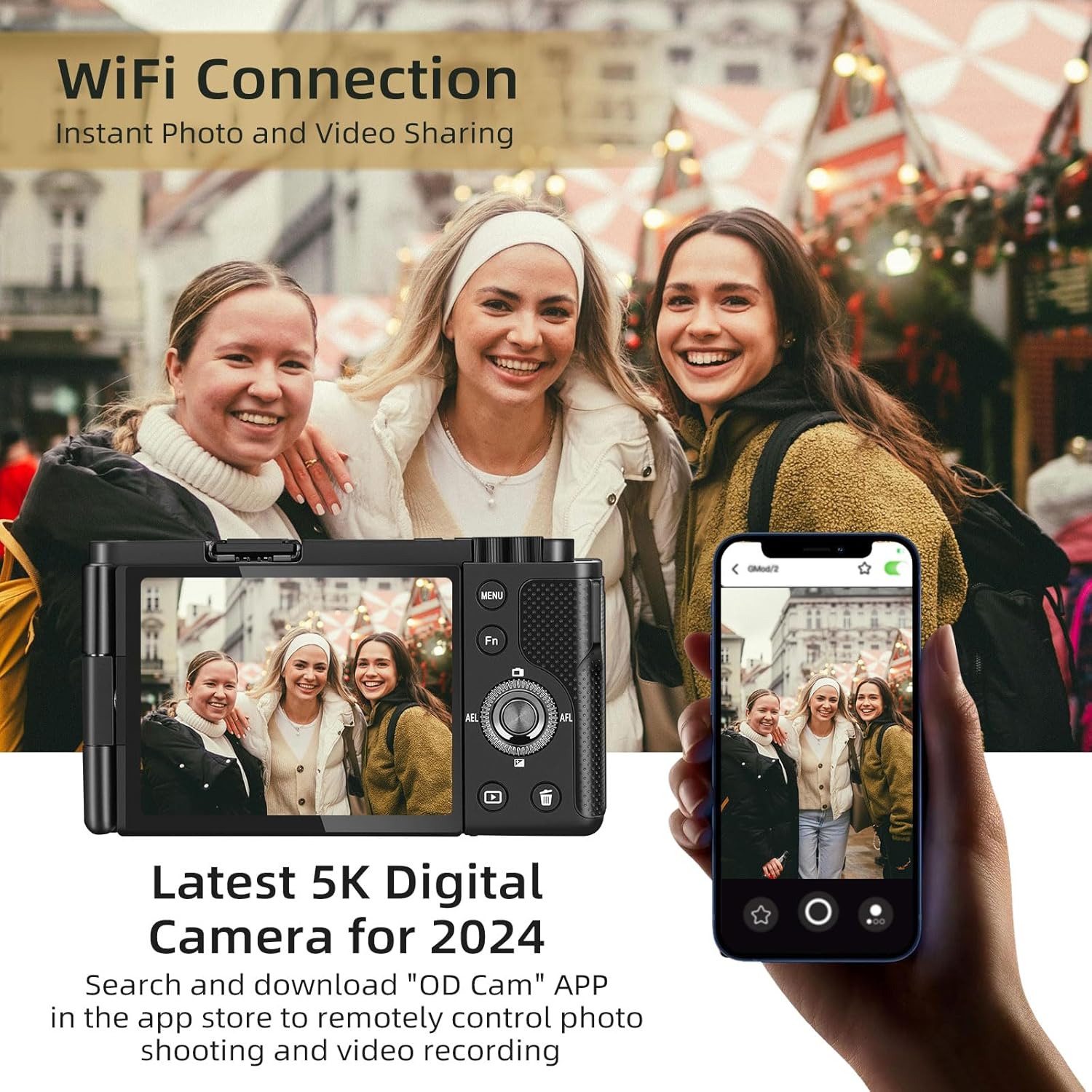
This image illustrates the ORDRO G730's Wi-Fi connectivity feature, showing how the camera can be remotely controlled and content shared instantly using the "OD Cam" application on a smartphone.

This image demonstrates the versatile connectivity of the ORDRO G730, showcasing its use as a webcam for live streaming, video calls, and personal vlogging, as well as its HDMI output capability for display on larger screens.
4. Maintenance and Care
4.1 Cleaning the Camera
- Lens: Use a soft, lint-free microfiber cloth specifically designed for camera lenses. For stubborn smudges, use a small amount of lens cleaning solution applied to the cloth, not directly to the lens.
- Screen: Wipe the vari-angle touchscreen gently with a clean, soft cloth. Avoid abrasive materials that could scratch the screen.
- Camera Body: Use a dry, soft cloth to wipe down the camera body. Do not use harsh chemicals or solvents.
4.2 Battery Care
- Store batteries in a cool, dry place when not in use.
- Avoid fully discharging the battery frequently to prolong its lifespan.
- If storing for an extended period, charge the battery to about 50% capacity.
4.3 Storage
When not in use, store the camera in a protective bag or case to prevent dust accumulation and physical damage. Avoid storing in extreme temperatures or high humidity.
5. Troubleshooting
| Problem | Possible Cause | Solution |
|---|---|---|
| Camera does not power on. | Battery is depleted or not inserted correctly. | Ensure battery is fully charged and correctly inserted. Try a different charged battery if available. |
| Images are blurry. | Incorrect focus, camera shake, or dirty lens. |
|
| Cannot connect to Wi-Fi. | Incorrect password, out of range, or app issue. |
|
| No image on external display via HDMI. | Incorrect cable, TV input, or camera setting. |
|
6. Technical Specifications
| Feature | Detail |
|---|---|
| Brand | ORDRO |
| Model Name | G730 |
| Photo Sensor Technology | CMOS |
| Maximum Webcam Image Resolution | 8 MP |
| Optical Zoom | 12 x |
| Image Stabilization | Digital |
| Supported File Format | MP4 |
| Aspect Ratio | 3:2 |
| Expanded ISO Minimum | 100 |
| Compatible Mountings | Canon EF-M |
| Item Weight | 1.1 pounds |
| Package Dimensions | 4.33 x 3.94 x 3.15 inches |
| Batteries | 1 Lithium Ion batteries required (included) |
| Manufacturer | Degipo |
6.1 What's in the Box
- Camera Body
- Accessories (as shown in Figure 1.1, including remote control, USB adapter, and lithium-ion batteries)
7. Warranty and Support
For product support, warranty information, or service inquiries, please contact the manufacturer, ORDRO, or the seller, Degipo. Refer to your purchase documentation for specific warranty terms and contact details.
You can also visit the official ORDRO store for additional resources and product information: ORDRO Official Store


