
1. Introduction
Thank you for choosing the AUHIFVAX S6 Max Drone. This manual provides essential information for the safe operation, setup, and maintenance of your drone. Please read this manual thoroughly before operating the device to ensure proper use and to prevent damage or injury. Keep this manual for future reference.
Safety Precautions:
- Always operate the drone in open areas, away from people, animals, and obstacles.
- Do not fly near airports, restricted airspace, or sensitive areas.
- Ensure the battery is fully charged before each flight.
- Avoid flying in strong winds or adverse weather conditions.
- Keep hands and face away from rotating propellers.
- Supervise children during drone operation.
2. Product Overview
2.1 Package Contents
Verify that all items are present in your package:

Image: Package contents of the AUHIFVAX S6 Max Drone, showing the drone, remote control, battery, charging cable, screwdriver, user manual, and spare propellers.
- 1 x S6 Max Quadcopter
- 1 x Remote Control
- 1 x 3.7V Lithium Battery
- 1 x USB Charging Cable
- 1 x Screwdriver
- 1 x User Manual
- 2 x Spare Blades
2.2 Key Features
- Professional HD Camera: Captures high-definition aerial photography with 4K resolution.
- Obstacle Avoidance Technology: Intelligent sensors detect and avoid obstacles in real-time.
- Optical Flowable Foldable Design: Compact and portable for easy transport.
- Quadcopter Stability: Advanced flight algorithms and built-in gyroscopes ensure stable flight.
- 5G WiFi Function: Connects to APP for real-time image/video transfer.
- Altitude Hold Mode: Provides stable flight at a set altitude.
- Waypoint Flight Mode: Draw a route on the screen for the drone to follow.
- Headless Mode: No need to adjust aircraft position before flight.
- One-Click Return: Easily recall the drone to its takeoff position.
- One-Click Takeoff/Landing: Automated takeoff and landing.
2.3 Drone Dimensions

Image: Visual representation of the AUHIFVAX S6 Max Drone's dimensions in both folded and unfolded states, including propeller guards.
3. Setup
3.1 Unfolding the Drone
Gently unfold the drone arms until they lock into place. Ensure all propellers are securely attached and free from obstruction.
3.2 Battery Installation
Insert the 3.7V lithium battery into the drone's battery compartment. Ensure it is securely seated. For the remote control, install 3 x 1.5 AAA batteries (not included) into the designated compartment.
3.3 Remote Control Overview
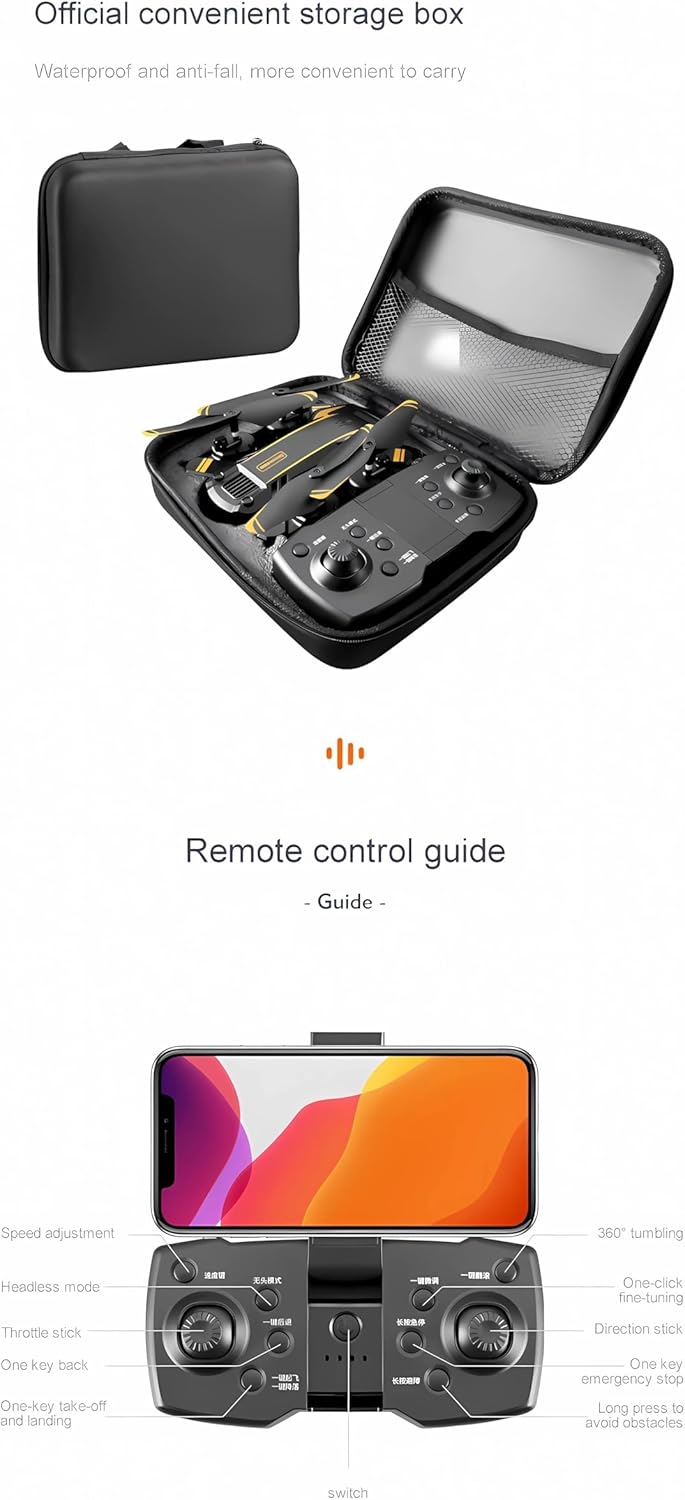
Image: Detailed guide to the remote control, highlighting buttons for speed adjustment, headless mode, one-key back, throttle stick, one-key takeoff/landing, 360° tumbling, one-click fine-tuning, direction stick, one-key emergency stop, and long press to avoid obstacles.
Familiarize yourself with the remote control layout and button functions as shown in the image above. The remote control also features a holder for your smartphone.
3.4 App Installation and Connection
Download the official drone application from the App Store (iOS) or Google Play (Android). Power on the drone and connect your smartphone to the drone's 5G WiFi network. Open the app to establish a connection and view the live feed.

Image: A user controlling the drone with a smartphone mounted on the remote, displaying the live video feed from the drone's camera.
4. Operating Instructions
4.1 Pre-Flight Checklist
- Ensure drone and remote control batteries are fully charged.
- Check that propellers are securely attached and undamaged.
- Select an open, clear area for flight.
- Connect the drone to the app on your smartphone.
4.2 Takeoff and Landing
Press the one-key takeoff button on the remote control or within the app to automatically launch the drone. To land, press the one-key landing button. The drone will descend and land automatically.
4.3 Flight Controls
Use the joysticks on the remote control to maneuver the drone:
- Left Joystick: Controls altitude (up/down) and rotation (left/right).
- Right Joystick: Controls forward/backward and left/right movement.
4.4 Special Flight Modes and Features
The S6 Max Drone offers several intelligent flight modes to enhance your experience:
- Optical Flow Location: Provides stable hovering, especially useful for indoor flight or precise positioning.
- Intelligent Obstacle Avoidance: The drone uses sensors to detect and avoid obstacles, reducing the risk of collisions.
- Gesture Control: Perform specific hand gestures to trigger photo or video recording.
- Intelligent Follow: The drone can automatically follow a designated subject.
- Hand Sliding Trajectory Flight: Draw a flight path on your smartphone screen, and the drone will follow it.
- 360° Tumbling: Execute impressive aerial stunts with a single button press.
- Headless Mode: Simplifies control by eliminating the need to orient the drone's front direction.
- High Brightness Searchlight: Assists with visibility and navigation in low-light conditions.
4.5 Demonstration Video
Video: This video demonstrates various features of the AUHIFVAX S6 Max Drone, including its foldable design, one-key takeoff, optical flow location for stable hovering, high brightness searchlight, intelligent obstacle avoidance, dual high-definition cameras, gesture control for photos and videos, intelligent follow mode, hand sliding trajectory flight, and different speed gears, concluding with one-key landing.
5. Maintenance
- Cleaning: Use a soft, dry cloth to clean the drone and remote control. Avoid using liquids or solvents.
- Propellers: Regularly inspect propellers for damage. Replace any bent or broken blades using the provided spare blades and screwdriver.
- Battery Care: Store batteries in a cool, dry place. Do not overcharge or over-discharge. If storing for extended periods, charge to approximately 50%.
- Storage: When not in use, fold the drone and store it in its original packaging or a protective case to prevent damage.
6. Troubleshooting
| Problem | Possible Cause | Solution |
|---|---|---|
| Drone does not power on | Low battery; Incorrect battery installation | Charge the drone battery; Reinstall battery correctly |
| Remote control does not connect | Low remote battery; Pairing issue | Replace AAA batteries; Re-pair drone and remote (refer to quick start guide for pairing steps) |
| Unstable flight / Drifting | Uncalibrated gyroscope; Strong wind interference | Perform gyroscope calibration (refer to app instructions); Fly in calm conditions |
| No image on app | WiFi not connected; App not open | Connect phone to drone's 5G WiFi; Open the drone app |
| Obstacle avoidance not working | Sensors obstructed; Feature not activated | Clean sensors; Ensure obstacle avoidance mode is enabled in the app or remote |
7. Specifications
| Feature | Detail |
|---|---|
| Brand | AUHIFVAX |
| Model Name | S6 Max |
| Color | Yellow-Dual-4K (Current Variant) |
| Video Capture Resolution | 4K, 6K, 8K (depending on variant) |
| Connectivity Technology | APP Controller, Wi-Fi |
| Special Features | 5G WiFi, Altitude Maintenance, Orbital Flight, Waypoint Flight Mode, One-Click Back Function, Obstacle Avoidance |
| Item Weight | 4.8 ounces |
| Battery Cell Composition | Lithium |
| Charging Time | 120-150 minutes |
| Flight Time | Up to 15-20 minutes |
| FOV | 120° Wide Angle |
| Material | Plastic |
| Product Folding Size | 7.5 x 4.9 x 3.0 inches |
| Product Development Size | 15.7 x 15.7 x 3.0 inches |
8. Warranty and Support
For warranty information, please refer to the specific terms and conditions provided at the time of purchase or visit the official AUHIFVAX website. If you encounter any issues not covered in this manual, please contact AUHIFVAX customer support for assistance.
Manufacturer: AUHIFVAX
UPC: 698704554143