
1. Introduction
This user manual provides essential information for the safe and effective operation, maintenance, and troubleshooting of your Fanttik Fold V10 Ultra Deluxe Handheld Vacuum. Please read this manual thoroughly before first use and retain it for future reference.
2. Important Safety Instructions
- Read all instructions before using this appliance.
- Do not use outdoors or on wet surfaces.
- Do not allow to be used as a toy. Close attention is necessary when used by or near children.
- Use only as described in this manual. Use only manufacturer's recommended attachments.
- Do not use with damaged cord or plug. If appliance is not working as it should, has been dropped, damaged, left outdoors, or dropped into water, return it to a service center.
- Do not pull or carry by cord, use cord as a handle, close a door on cord, or pull cord around sharp edges or corners. Do not run appliance over cord. Keep cord away from heated surfaces.
- Do not unplug by pulling on cord. To unplug, grasp the plug, not the cord.
- Do not handle plug or appliance with wet hands.
- Do not put any object into openings. Do not use with any opening blocked; keep free of dust, lint, hair, and anything that may reduce air flow.
- Keep hair, loose clothing, fingers, and all parts of body away from openings and moving parts.
- Do not pick up anything that is burning or smoking, such as cigarettes, matches, or hot ashes.
- Do not use to pick up flammable or combustible liquids, such as gasoline, or use in areas where they may be present.
- Do not pick up toxic material, such as chlorine bleach, ammonia, or drain cleaner.
- Do not use without dust bag and/or filters in place.
- Turn off all controls before unplugging.
- Use extra care when cleaning on stairs.
- Do not use to pick up hard or sharp objects such as glass, nails, screws, coins, etc.
3. Package Contents
Verify that all components are present and in good condition upon opening the package.

Image Description: An overhead view of the Fanttik Fold V10 Ultra Deluxe Handheld Vacuum along with its various accessories. The main vacuum unit is on the right, with a charging base, USB-C cable, replacement filter, filter cleaning brush, soft bristle brush, hard bristle brush, and a 2-in-1 multi-surface brush arranged around it. This image illustrates all items included in the product package.
- Cordless Handheld Vacuum
- USB-C Cable
- Charging Base
- Soft Bristle Brush
- Hard Bristle Brush
- Replacement Filter
- Filter Cleaning Brush
- 2-in-1 Multi-Surface Brush
- Wall Plug/Screw (x2)
- User Manual (this document)
4. Product Overview
Familiarize yourself with the main components of your Fanttik Fold V10 Ultra Deluxe Handheld Vacuum.

Image Description: A close-up image of the Fanttik Fold V10 Ultra Deluxe Handheld Vacuum's main unit, highlighting its compact design and the transparent dustbin. This view helps in identifying the primary components of the vacuum.
Key Features:
- Foldable & Multi-Angle Cleaning: Adjusts from 30° to 210° for versatile cleaning.
- Type-C Charging & Charging Base: Convenient recharging with included base.
- Powerful Suction: 65AW / 17,000Pa suction power.
- Long Battery Life: Up to 35 minutes runtime with 5x2000mAh batteries.
- Smart LED Display: Real-time battery level and dust full indicator.
- Easy Dust Emptying & Washable Filters: One-click dust disposal and detachable, washable dust bin and filters.
- LED Lighting: Illuminates dark or hard-to-reach areas.
5. Setup
5.1 Initial Charging
Before first use, fully charge the vacuum cleaner. The smart LED display will indicate the battery level.
- Connect the USB-C cable to the charging base and a suitable power adapter (not included) or directly to the vacuum's Type-C port.
- Place the vacuum onto the charging base. Ensure it is seated correctly. The vacuum will automatically begin recharging.
- A full charge typically takes approximately 2.5 hours. The LED display will show 100% when fully charged.
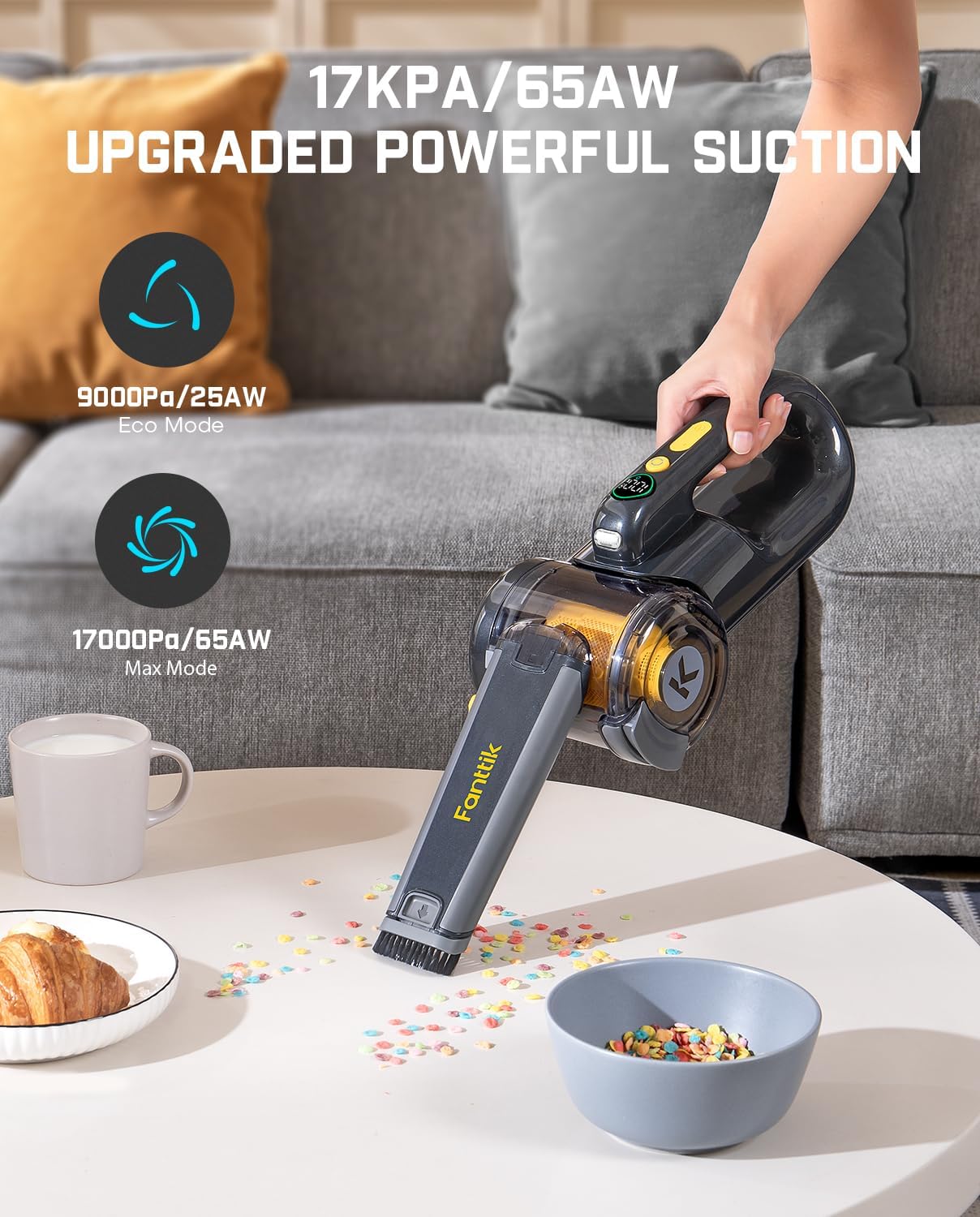
Image Description: The Fanttik Fold V10 Ultra Deluxe Handheld Vacuum is shown upright on its charging base, which is placed on a countertop next to a plant. This image demonstrates the proper way to dock the vacuum for charging and storage.

Image Description: A split image illustrating two charging methods for the Fanttik Fold V10 Ultra Deluxe. On the left, the vacuum is shown charging on its base, plugged into a wall outlet. On the right, the vacuum is shown charging directly via its Type-C port, also connected to a wall outlet. This highlights the flexibility in charging options.
5.2 Assembly and Attachment Installation
The vacuum comes pre-assembled. Attachments can be easily connected to the nozzle for various cleaning tasks.
- Select the desired cleaning attachment (e.g., soft bristle brush, hard bristle brush, 2-in-1 multi-surface brush).
- Align the attachment with the vacuum's nozzle and push firmly until it clicks into place.
- To remove, pull the attachment away from the nozzle.
6. Operation
6.1 Powering On/Off and Suction Modes
The vacuum features two power levels: Eco Mode and Max Mode.
- To turn on the vacuum, press the power button. It will start in Eco Mode (9000Pa / 25AW) by default.
- Press the power button again to switch to Max Mode (17000Pa / 65AW) for stronger suction.
- Press the power button a third time to turn off the vacuum.
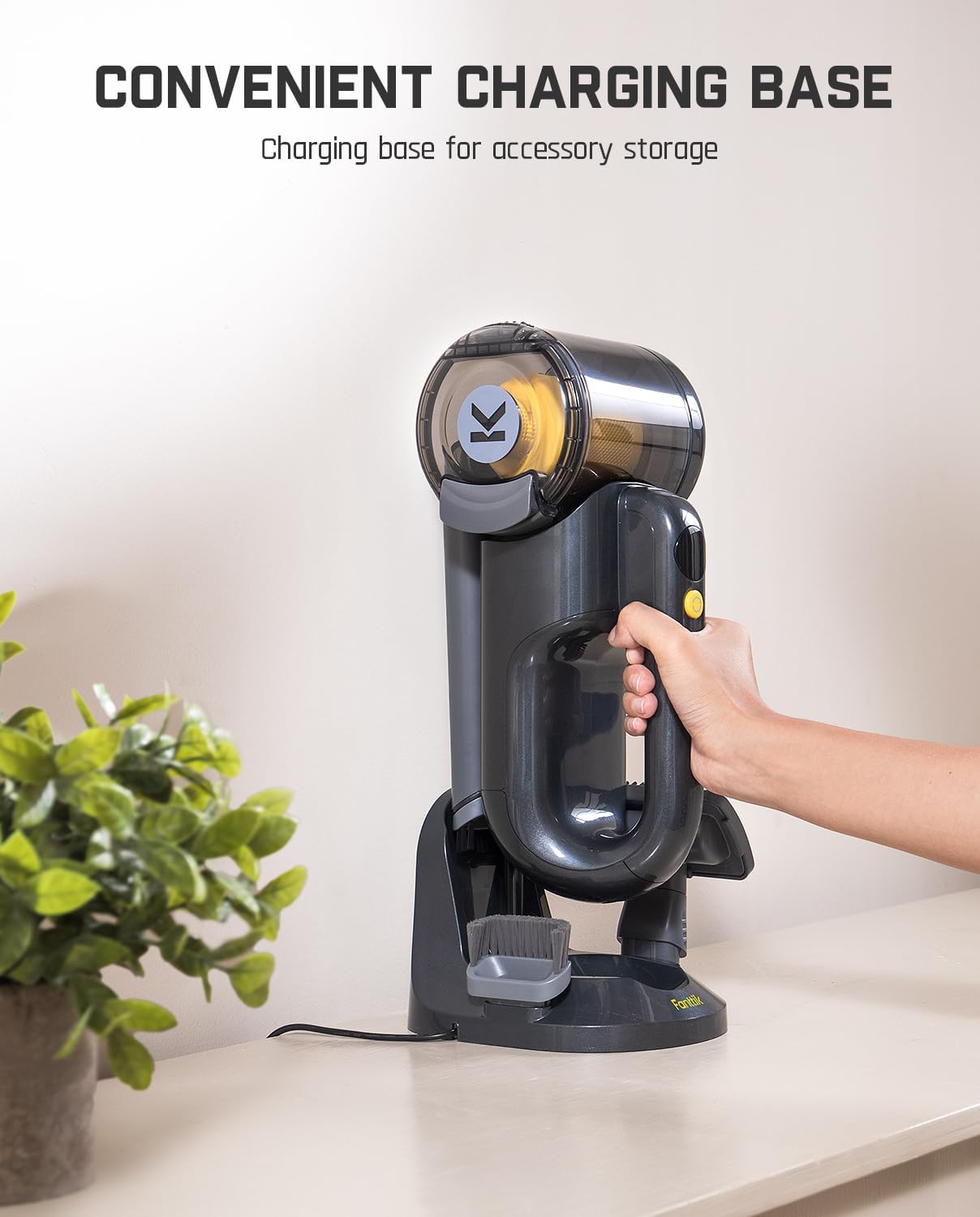
Image Description: A person is using the Fanttik Fold V10 Ultra Deluxe Handheld Vacuum to clean up colorful debris from a white table. The image highlights the vacuum's powerful suction, with graphics indicating 17000Pa/65AW for Max Mode and 9000Pa/25AW for Eco Mode. This visually demonstrates the vacuum's cleaning capability.
6.2 Using the Foldable and Multi-Angle Feature
The unique foldable design allows for cleaning in various hard-to-reach areas.
- Gently pivot the nozzle section of the vacuum to adjust the angle. It can pivot from 30° to 210°.
- Utilize different angles to clean under furniture, high shelves, or tight corners.

Image Description: A person is using the Fanttik Fold V10 Ultra Deluxe Handheld Vacuum to clean a high shelf. An inset diagram shows the vacuum's nozzle pivoting up to 210 degrees, illustrating its flexibility for reaching tight or elevated spaces. This image demonstrates the multi-angle cleaning capability.
6.3 LED Display and Lighting
The smart LED display provides real-time information, and the integrated LED light assists in cleaning dark areas.
- Digital Power Display: Shows the current battery percentage.
- Filter Sensor Indicator: Alerts you when the dustbin is full or the filter needs cleaning.
- LED Lighting: Automatically illuminates the area directly in front of the nozzle, useful for dark spaces like under furniture or car interiors.

Image Description: The Fanttik Fold V10 Ultra Deluxe Handheld Vacuum is shown mounted on a wall, highlighting its smart LED display. The display shows the battery percentage (100%) and icons for a filter sensor indicator, digital power display, and two power levels. This image emphasizes the vacuum's intelligent features and convenient wall-mounted charging option.

Image Description: The Fanttik Fold V10 Ultra Deluxe Handheld Vacuum is shown in use, cleaning debris from a narrow gap between furniture. The integrated LED light on the vacuum illuminates the dark area, making it easier to see and clean. This image demonstrates the utility of the LED lighting feature.
7. Maintenance
Regular maintenance ensures optimal performance and extends the lifespan of your vacuum.
7.1 Emptying the Dustbin
Empty the dustbin when the dust full indicator appears on the LED display or when suction power decreases.
- Ensure the vacuum is turned off.
- Locate the dustbin release button, typically near the handle.
- Press the release button to detach the dustbin from the main unit.
- Position the dustbin over a trash receptacle and press the dust emptying button to release the contents.
Image Description: The Fanttik Fold V10 Ultra Deluxe Handheld Vacuum is shown with its dustbin detached and being emptied into a trash can. An inset image shows the transparent dustbin with collected debris, indicating its capacity. This demonstrates the easy dust emptying feature.
7.2 Cleaning the Filters
The filters are washable and should be cleaned regularly to maintain suction power.
- After emptying the dustbin, twist and pull out the filter assembly from the dustbin.
- Separate the HEPA filter and the pre-filter (if applicable).
- Use the provided filter cleaning brush to remove any loose dust and debris from the filters.
- Rinse the filters under running water until the water runs clear. Do not use detergent.
- Allow the filters to air dry completely for at least 24 hours before reassembling and placing them back into the vacuum. Ensure they are completely dry to prevent mold or damage to the motor.

Image Description: A sequence of images demonstrating how to clean the filters of the Fanttik Fold V10 Ultra Deluxe Handheld Vacuum. It shows detaching the dustbin, removing the filter assembly, cleaning the filters with a brush, and rinsing them under water. The final image shows the separated dustbin and filters drying. This illustrates the washable filter feature and cleaning process.
7.3 Cleaning Attachments and Storage
- Wipe attachments with a damp cloth as needed. Ensure they are dry before storing.
- Store the vacuum and its accessories on the charging base or in a cool, dry place away from direct sunlight and moisture.
8. Troubleshooting
Refer to this section for common issues and their solutions.
| Problem | Possible Cause | Solution |
|---|---|---|
| Vacuum does not turn on. | Battery is depleted. | Charge the vacuum fully. |
| Low suction power. | Dustbin is full. Filter is clogged. Nozzle/hose is blocked. | Empty the dustbin. Clean or replace the filter. Check for and remove any blockages in the nozzle or attachments. |
| Vacuum stops unexpectedly. | Battery is low. Overheating protection activated. | Recharge the battery. Turn off the vacuum and allow it to cool down for at least 30 minutes before resuming use. |
| Charging indicator not working. | Charging cable or base not properly connected. Faulty charger. | Ensure all connections are secure. Try a different USB-C cable or power adapter if available. |
If the problem persists after attempting these solutions, please contact Fanttik customer support for assistance.
9. Specifications
| Feature | Detail |
|---|---|
| Brand | Fanttik |
| Model Name | Fold V10 Ultra Deluxe |
| Special Feature | Cordless, Foldable, Washable Filter |
| Filter Type | HEPA Filter |
| Suction Power | 17,000Pa / 65AW (Max Mode) |
| Wattage | 165 watts |
| Runtime | Up to 35 minutes (Eco Mode) |
| Charging Time | 2.5 Hours |
| Battery Type | Lithium (5x2000mAh) |
| Dust Cup Capacity | Approx. 16.9 oz (500mL) |
| Form Factor | Handheld |
| Color | Gray |
| Product Dimensions | 5.7"L x 5.3"W x 11.9"H |
| Item Weight | 4.6 pounds |
| Noise Level | 70 dB |
| Controller Type | Push Button |
| Indoor/Outdoor Usage | Indoor |
10. Warranty and Support
Fanttik products are designed and manufactured to the highest quality standards. For warranty information and customer support, please refer to the official Fanttik website or contact their customer service directly.
Official Website: www.fanttik.com
Customer Service: Refer to the contact information provided on the Fanttik website or the original product packaging for the most up-to-date support channels.
Please retain your proof of purchase for warranty claims.


