
1. Introduction and Overview
The Zowietek 4K PTZ Camera (Model ZowiePTZ) delivers broadcast-quality 4K video, offering a cost-effective solution for various applications. It features advanced optical zoom capabilities, intuitive control options, and versatile connectivity for seamless integration into professional workflows.
This camera is engineered as a complete system, providing superior stability and consistent performance. It supports multiple output formats and streaming protocols, making it suitable for live events, meetings, educational settings, and more.

Figure 1: Zowietek 4K PTZ Camera showcasing 4K Ultra HD video quality.
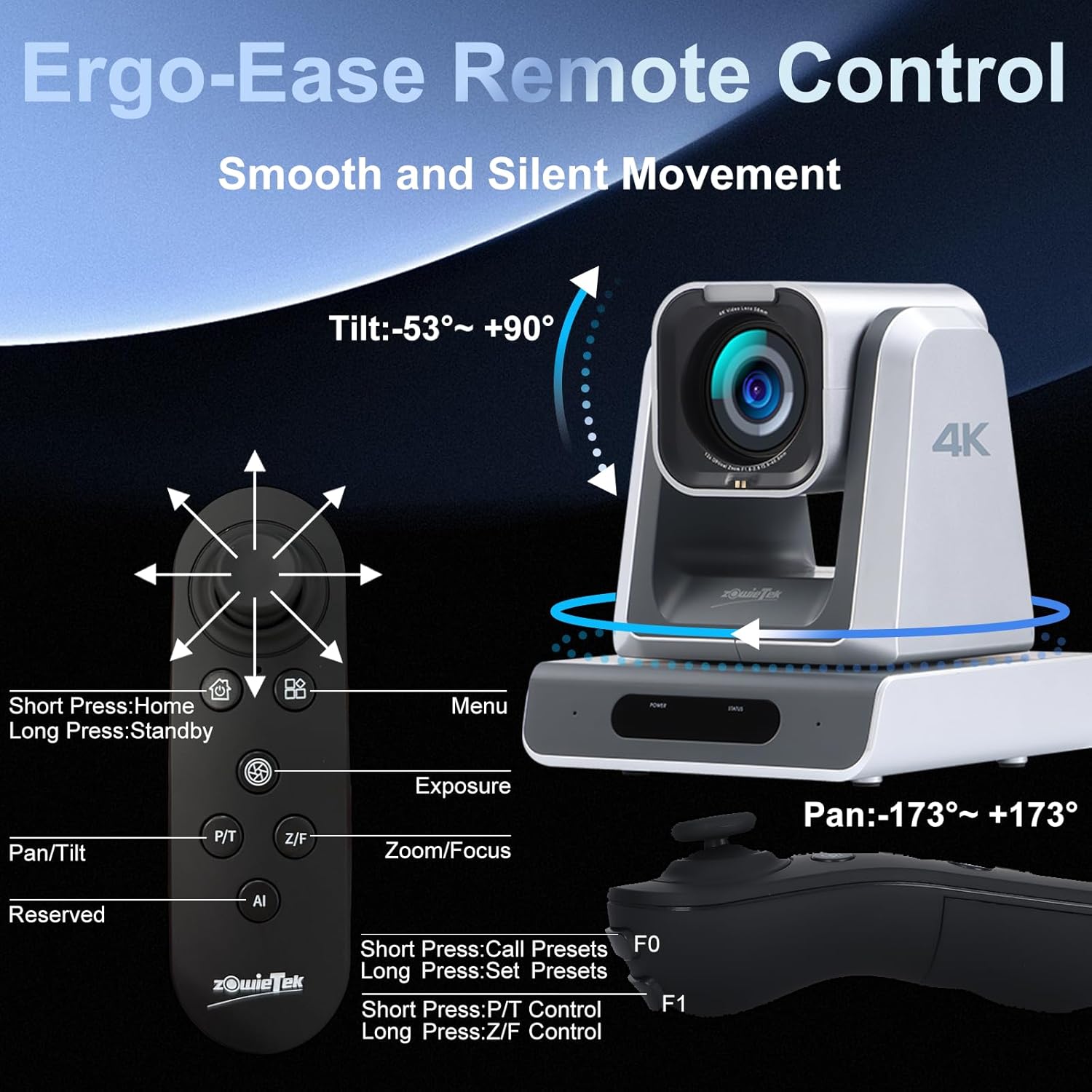
Figure 2: The Ergo-Ease Remote Control for smooth and silent camera movement.
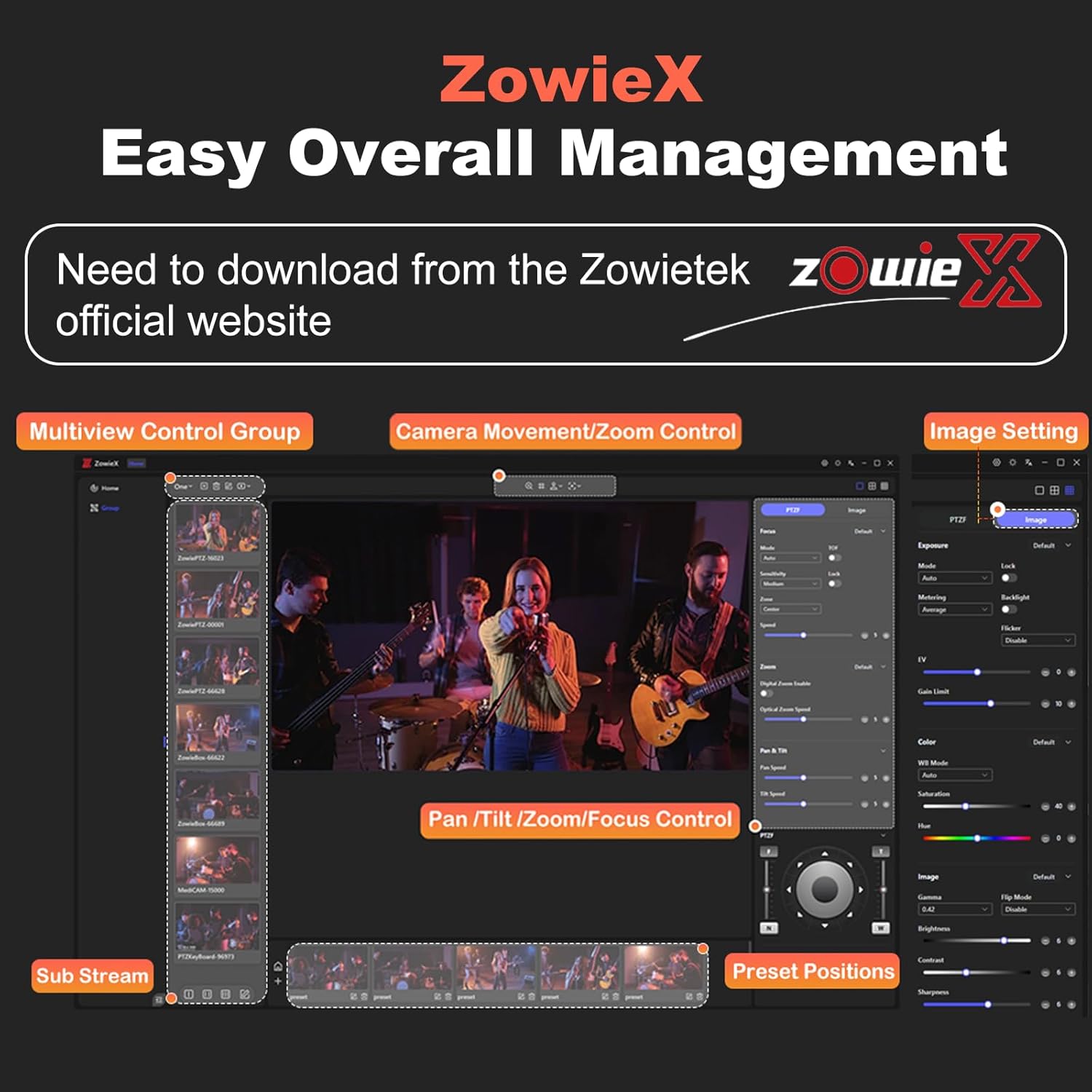
Figure 3: ZowieX App for easy overall management of the camera.

Figure 4: Optical zoom options (12X, 18X, 25X) to meet diverse scene requirements.
2. Setup
The ZowiePTZ camera is designed for plug-and-play simplicity. To access the Web UI, ensure your device and the camera are on the same local area network. Then, enter the mDNS URL found on the camera's bottom. Alternatively, use the ZowieX app to scan for nearby ZowiePTZ cameras and directly access the ZowieUI without needing to find IP addresses.
Video 1: A quick guide to setting up your ZowiePTZ camera.
Video 2: Demonstrates how to easily control the ZowiePTZ camera using an iPad.

Figure 5: Accessing the camera's exclusive web UI for configuration and control.
3. Operating
Control the ZowiePTZ camera using the included Ergo-Ease Remote Controller, designed for intuitive joystick control, one-touch preset recall, and direct zoom/focus buttons. The ZowieUI on mobile devices or the ZowieX App allows for on-the-go adjustments and management of multiple cameras from a single interface. The camera integrates with the ZowieKBD keyboard and offers open ZowieAPI for deep system integration.
Figure 6: The Ergo-Ease Remote Control provides tactile control for pan, tilt, zoom, and focus.

Figure 7: Multiple control options for the ZowiePTZ camera, including NDI, web interface, iPad, and smartphone.
Video 3: Learn to master every angle with the ZowieX control interface.
Video 4: Explore the ZowiePTZ and ZowieCam for live streaming applications.
4. Connectivity and Streaming
The ZowiePTZ camera offers robust connectivity with SDI for long cable runs, dual HDMI, and USB outputs for integration with live switchers, recording decks, or streaming PCs. It features a built-in microphone for clear room audio and a professional Tally light for on-air cues.
Optional NDI|HX3 certification supports Power over Ethernet (PoE), simplifying installation by delivering power and high-quality video over a single network cable. The camera's built-in encoder allows direct live streaming to multiple platforms simultaneously via RTSP/RTMP(S) or SRT without a dedicated PC.

Figure 8: Smooth streaming and low latency to various platforms supported by the ZowiePTZ camera.
Figure 9: NDI|HX3 Certified for high-quality, low-latency video streams.

Figure 10: Rich interface with multiple input/output options including SDI, HDMI, USB, and LAN/PoE/NDI.
5. Recording and Storage
The ZowiePTZ camera offers flexible local and network storage options to securely capture every event. You can record high-quality footage directly to a TF card, an external USB drive, or a Network Attached Storage (NAS) system. This multi-faceted approach is ideal for archiving lectures, live events, or creating on-site backup copies.

Figure 11: Triple-redundant recording options for secure local and network backup.

Figure 12: Conveniently record and store videos to TF card, USB flash drive, and NAS.
6. Image Quality and Features
The ZowiePTZ camera delivers stunning 4K broadcast-quality video, utilizing a Sony 1/2.3" Exmor R CMOS sensor for unmatched clarity. It offers 12X, 18X, and 25X optical zoom models, enhanced by an additional 12X digital zoom, ensuring detailed capture for any venue size.
Key features include a professional Tally light for clear on-air cues and a 58mm filter thread for attaching ND or polarizing filters, allowing for perfect exposure control in diverse lighting conditions.
Figure 13: 4K@30FPS (3840×2160P) Ultra High Definition with Sony's 1/2.3" Exmor R CMOS sensor.
Figure 14: Various optical zoom levels (12X, 18X, 25X) for different environments.

Figure 15: The Tally light provides clear visual cues for live production.

Figure 16: The 58mm filter thread allows for various lens filters to enhance image quality.
7. Installation Options
The ZowiePTZ camera supports multiple installation options to suit various environments. It can be mounted on the ceiling, wall, placed on a desktop, or attached to a tripod. This flexibility ensures optimal camera placement for any setup.

Figure 17: Multiple installation options for the ZowiePTZ camera, including ceiling, wall, desktop, and tripod mounts.

Figure 18: Example installation scenarios for the ZowiePTZ camera in different settings.
8. Troubleshooting
If you encounter issues with your ZowiePTZ camera, please refer to the following common troubleshooting steps:
- No Video Output: Check all cable connections (HDMI, SDI, USB, LAN). Ensure the camera is powered on and the correct input is selected on your display or switcher.
- No Control Response: Verify network connectivity. Ensure the remote control batteries are functional. Check the camera's IP address and ensure it matches the control software settings. For serial control, confirm correct wiring and protocol settings (VISCA, Pelco-D/P).
- Poor Image Quality: Adjust exposure settings (EV, Gain Limit, Shutter, Iris) and white balance (WB Mode, VAR). Check for proper lighting conditions. Ensure the lens is clean and free from obstructions.
- Focus Issues: Use the 'OnePush' focus mode or manual focus adjustment. Ensure the camera is not in a low-light environment that might hinder autofocus performance.
- Streaming Problems: Verify network stability and bandwidth. Check streaming protocol settings (RTSP/RTMP(S)/SRT) and ensure the stream key/URL is correct.
- Camera Movement Issues: If the camera makes grinding noises upon startup, this is normal activation. If movement is jerky or unresponsive, check PTZ speed settings and ensure no physical obstructions.
For further assistance, please contact Zowietek customer support.
9. Specifications
| Feature | Detail |
|---|---|
| Brand Name | zowietek |
| Item Weight | 4.4 pounds |
| Product Dimensions | 4 x 3.8 x 9.36 inches |
| Item Model Number | ZowiePTZ |
| Color Name | HDMI SDI USB |
| Number of Component Outputs | HDMI |
| Photo Sensor Technology | CMOS |
| Video Capture Resolution | 4K |
| Maximum Focal Length | 99.0 |
| Maximum Aperture | 1.67 f |
| Flash Memory Type | SmartMedia |
| Video Capture Format | MP4 |
| Connectivity Technology | Ethernet |
10. What's in the Box
The ZowiePTZ camera package includes the following items:
- 4K PTZ Camera
- Power Supply (U.S. only)
- Quick Start Guide
- Wall Mount
- HDMI Cable
- RS232 Cable
- Lens Cover
11. Warranty and Support
Zowietek offers a 3-year standard manufacturer warranty for the ZowiePTZ camera, along with exceptional after-sales service and LIFETIME technical support. Our in-house R&D, production, and sales ensure full-process traceability and end-to-end support, allowing for rapid diagnosis and resolution of technical issues.
We provide precise remote setup assistance if needed. Your purchase is backed by a 30-Day No-Questions-Asked Money-Back Guarantee for a risk-free experience. Contact us anytime; we promise a reply within 12 hours and a satisfactory solution tailored to your needs.


