
1. Product Overview
The XTRONS 14.9 Inch Android 13 Car Stereo is an advanced multimedia navigation system designed to upgrade your vehicle's infotainment experience. Featuring a large 2K IPS touch screen, this unit offers robust performance with an Octa-core processor, 4GB DDR4 RAM, and 64GB Solid State ROM. It supports global 4G LTE connectivity, wireless CarPlay, and wireless/wired Android Auto, providing seamless integration with your smartphone and access to a wide range of applications.

Image 1.1: The XTRONS 14.9 Inch Android 13 Car Stereo main unit, showcasing its large 2K IPS screen and user interface.
2. Applicable Models & Years
This car stereo is specifically designed for the following left-hand drive Audi models with the MIB2 System:
- AUDI A4 (B9): 2016-2020
- AUDI A5 (B9): 2016-2020

Image 2.1: Visual representation of the car stereo installed in an Audi dashboard, highlighting compatible models and years.
3. Main Features
- 14.9 Inch 2K IPS Touch Screen: Experience enhanced clarity and vibrant colors with the fully-laminated, ultra-slim 2K IPS screen. It features an ultra-wide 32:9 aspect ratio for expansive visuals.
- Latest Android 13 with Octa Core: Powered by an Octa-core processor with 4GB DDR4 RAM and 64GB Solid State ROM, ensuring responsive performance and ample storage for applications.
- Global 4G LTE Connectivity: Insert a Micro-SIM card (not included) to access 4G mobile broadband connection with download speeds up to 300Mbps. Supports 99% of carriers worldwide.
- Built-in Wireless CarPlay and Wireless/Wired Android Auto: Seamlessly integrate your iPhone via Bluetooth for wireless CarPlay, or connect your Android phone wirelessly via Bluetooth or with a USB cable for Android Auto. Access GPS, calls, music, and voice assistants.
- Dual Wi-Fi Band: Connects to both 2.4GHz and 5GHz Wi-Fi bands for faster and more flexible internet access.
- Multi-task Display & Picture-in-Picture (PIP): Run two applications simultaneously on the 14.9-inch screen, such as navigation and music. PIP allows you to watch videos while using other apps.
- Bluetooth 5.0: Provides stable connections and high-quality transmission for hands-free calls and music streaming.
- Retains Original Functions: The system is designed to retain your vehicle's original amplifier system, radio, CD player, Bluetooth, backup camera display, and steering wheel control functions.
4. Package Contents
Verify that all items listed below are included in your package:
- 1 x ISO Wiring Harness
- 1 x 4G SIM Card Slot
- 1 x Mini Microphone
- 1 x 4G Antenna
- 1 x Audio Cable
- 1 x AMI Cable
- 1 x Mini Speaker
- 1 x GPS Antenna
- 1 x User Manual
- 1 x Installation Instruction
- 3 x Trim Strip

Image 4.1: A visual display of all components and accessories included in the product package.
5. Installation Notes
Before beginning installation, please review the following important notes:
- Audi Music Interface (AMI): If your vehicle is equipped with an Audi music interface, you must connect the provided XTRONS AMI cable (connected with the audio extension cable) to the Audi music interface. Both cables are included in the package.
- Original Bracket: Retain the original head unit mounting bracket from your vehicle. It is required as a part to complete the installation of the new stereo.
Refer to the dedicated "Installation Instruction" document included in your package for detailed step-by-step guidance.
Image 5.1: Detailed view of the Audi Music Interface and the importance of retaining the original bracket during installation.
6. Setup
After physical installation, follow these general steps for initial setup:
- Power On: Turn on your vehicle's ignition to power on the XTRONS unit.
- Initial Configuration: The system may guide you through initial language, time zone, and network settings. Follow the on-screen prompts.
- Network Connection: Connect to a Wi-Fi network or insert a 4G Micro-SIM card for internet access.
- Bluetooth Pairing: Pair your smartphone via Bluetooth for hands-free calling and audio streaming.
- GPS Setup: Ensure the GPS antenna is properly connected and the system acquires a satellite signal for navigation.
- System Updates: Check for any available system updates to ensure optimal performance and access to the latest features.
7. Operating Instructions
The XTRONS unit features an intuitive touch screen interface. Navigate through menus by tapping icons and swiping. Key operating features include:
- Navigation: Access pre-installed GPS navigation or download your preferred navigation apps from the Google Play Store.
- Media Playback: Play audio and video files from various sources, including USB, Bluetooth, and streaming apps.
- Multi-task Display: Utilize the large screen to run two applications side-by-side. For example, display navigation on one side and music controls on the other.
- Picture-in-Picture (PIP): While using another application, you can minimize a video to a small window, allowing you to continue watching without interrupting your main task.

Image 7.1: Demonstration of the multi-task display and Picture-in-Picture features on the XTRONS unit.
Video 7.1: A general overview video of an XTRONS 14.9 Inch Car Stereo. While this video specifically mentions Audi A6/A7, it provides a useful visual demonstration of the user interface and features common to XTRONS 14.9-inch units.
8. Connectivity Options
The unit offers versatile connectivity to keep you connected on the go:
- Global 4G LTE: Insert a Micro-SIM card into the dedicated slot to enable 4G mobile data. This allows for internet access, online navigation, and streaming without relying on your phone's hotspot.
- Dual Wi-Fi Band (2.4GHz/5GHz): Connect to available Wi-Fi networks for faster data transfer and stable connections.
- Bluetooth 5.0: For wireless audio streaming, hands-free calling, and connecting Bluetooth-enabled devices.

Image 8.1: Illustration of the 4G LTE and dual-band Wi-Fi capabilities for internet access.
9. Smartphone Integration
Integrate your smartphone for a safer and more convenient driving experience:
- Wireless CarPlay: Connect your iPhone wirelessly via Bluetooth to access iOS features like navigation, music, messages, and Siri voice control directly on the car stereo screen.
- Wireless/Wired Android Auto: Connect your Android phone wirelessly via Bluetooth or using a USB cable to use Android Auto. This provides access to Google Maps, music apps, Google Assistant, and more.
- Screen Mirroring: Wirelessly mirror your smartphone's screen content directly onto the XTRONS unit, allowing you to view apps and media from your phone.

Image 9.1: Visual representation of Wireless CarPlay, Android Auto, and Screen Mirroring in action.
10. Retained Original Functions
The XTRONS system is engineered to seamlessly integrate with your Audi's existing features, ensuring no loss of functionality:
- Amplifier System: Retains the original amplifier system for continued high-quality audio output.
- Original Radio: Maintains access to your vehicle's original FM/AM radio tuner.
- Original CD Player: The functionality of the original CD player is preserved.
- Bluetooth: Original Bluetooth functionality is retained alongside the new unit's Bluetooth.
- Backup Camera Display: Your vehicle's existing backup camera display will continue to function.
- Steering Wheel Control Function: All original steering wheel controls remain operational for convenience and safety.

Image 10.1: Overview of the original vehicle functions that are retained after installing the XTRONS car stereo.
11. Wiring Harness Diagram
The following diagram illustrates the various ports and connections on the wiring harness. Refer to this diagram during installation to ensure correct connections.
- 360 camera system port
- LVDS port
- External microphone port
- Original CD port
- ISO wiring harness
- USB port 1
- USB port 2
- Reverse control cable
- Rear Camera Input
- Rear Camera ACC
- GND
- Audio output
- ACC
- Mini Speaker
- 4G Card Slot
- 4G Antenna
- GPS Antenna
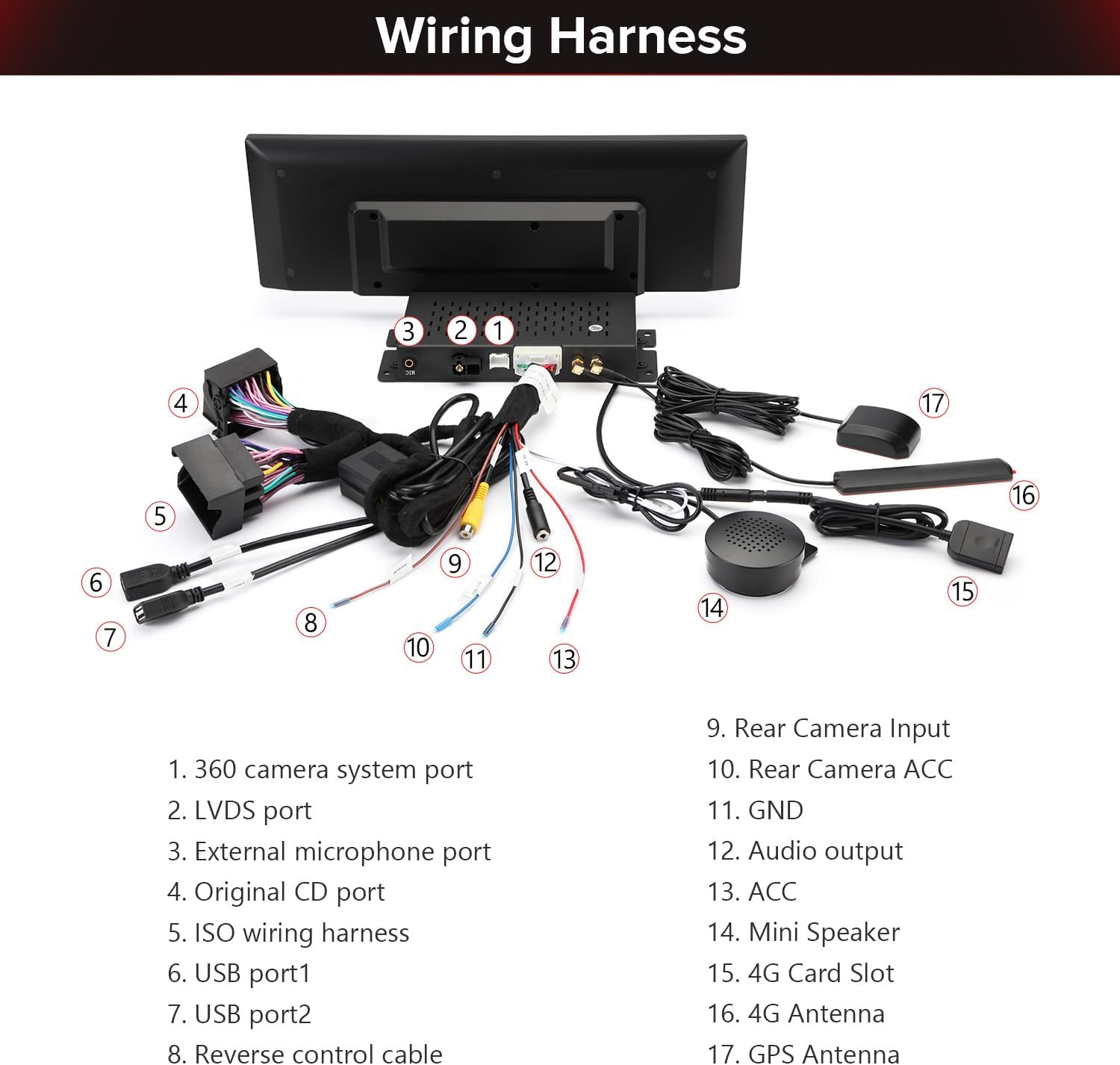
Image 11.1: A comprehensive diagram labeling each port and cable on the XTRONS wiring harness.
12. Product Dimensions
The main unit has the following approximate dimensions:
- Width: 372 mm
- Height: 122 mm
Image 12.1: Diagram illustrating the width and height measurements of the XTRONS 14.9-inch car stereo unit.
13. Maintenance
To ensure the longevity and optimal performance of your XTRONS car stereo, follow these maintenance guidelines:
- Screen Cleaning: Use a soft, lint-free cloth slightly dampened with water or a screen cleaner specifically designed for electronic displays. Avoid harsh chemicals or abrasive materials.
- Software Updates: Periodically check for and install system software updates. These updates often include performance improvements, bug fixes, and new features. Access updates through the system settings menu.
- Avoid Extreme Temperatures: Do not expose the unit to prolonged direct sunlight or extreme cold, as this can affect performance and screen longevity.
- Cable Connections: Ensure all cables are securely connected. Loose connections can lead to intermittent issues.
14. Troubleshooting
If you encounter issues with your XTRONS car stereo, refer to the following common troubleshooting steps:
- No Power: Check all power connections, including the ISO wiring harness and ACC wire. Ensure your vehicle's ignition is on.
- No Sound: Verify speaker connections. Check audio settings in the system menu. Ensure the volume is not muted or set too low. If using original amplifier, confirm AMI cable connection.
- Touch Screen Unresponsive: Try restarting the unit. If the issue persists, perform a system reset (refer to the full user manual for instructions on how to perform a reset).
- GPS Signal Loss: Ensure the GPS antenna is properly installed and has a clear view of the sky. Check GPS settings in the system menu.
- Bluetooth Connection Issues: Ensure Bluetooth is enabled on both the stereo and your smartphone. Delete previous pairings and try re-pairing.
- CarPlay/Android Auto Not Connecting: For wireless connections, ensure Bluetooth and Wi-Fi are enabled. For wired Android Auto, try a different USB cable. Check phone settings for CarPlay/Android Auto permissions.
- System Freezes/Slow Performance: Close unnecessary background applications. Clear cache if possible. If frequent, consider a factory reset (backup data first).
For more complex issues, consult the detailed User Manual or contact XTRONS customer support.
15. Specifications
| Brand | XTRONS |
| Model Name | QLA42A4NL |
| Operating System | Android 13 |
| Screen Size | 14.9 Inches |
| Resolution | 2048 x 1080 |
| Display Type | LCD, IPS Panel |
| Touch Screen Type | Capacitive |
| Memory Storage Capacity | 64 GB |
| RAM | 4 GB DDR4 |
| Connectivity Technology | Bluetooth 5.0, USB, Wi-Fi (2.4GHz/5GHz), 4G LTE |
| Supported Navigation System | GPS (Worldwide Map Type) |
| Human-Interface Input | Microphone, Touchscreen |
| Compatible Devices | Smartphone, iPhone |
| Item Weight | 2.7 Kilograms |
16. Warranty & Support
Your XTRONS car stereo comes with a 1-Year Manufacturer Warranty from the date of purchase. This warranty covers defects in materials and workmanship under normal use.
For warranty claims, technical support, or any questions regarding the operation or installation of your device, please contact XTRONS customer service through their official website or the retailer where the product was purchased. Please have your model number (QLA42A4NL) and proof of purchase ready when contacting support.


