
PROHEAR 037
PROHEAR 037 Bluetooth Hearing Protection Headphones User Manual
Model: 037 Series
Brand: PROHEAR
1. Introduction
Thank you for choosing PROHEAR 037 Bluetooth Hearing Protection Headphones. This manual provides detailed instructions for the safe and effective use of your new hearing protection device. The PROHEAR 037 series offers advanced hearing protection combined with Bluetooth audio capabilities, allowing you to enjoy music and make calls while working in noisy environments. This product is designed to protect your hearing while providing a comfortable and convenient audio experience.

Figure 1: PROHEAR 037 Bluetooth Hearing Protection Headphones. This image displays both the standard headband version (orange earcups) and the hard hat attachment version (black earcups), highlighting their design and controls.
2. Key Features
- Advanced Bluetooth 5.0 Technology: Provides a smoother, faster, and more stable connection with an effective wireless range of up to 80 feet (24 meters).
- Effective Hearing Protection:
- Orange Model: NRR 25dB (Noise Reduction Rating).
- Hard Hat Attachment Model: SNR 30dB (Single Number Rating).
- Long-lasting Battery: Built-in 1100mAh rechargeable lithium battery offers up to 40 hours of playtime in Bluetooth mode.
- Easy-to-Use Controls: Intuitive buttons allow for easy adjustment of volume, song switching, and call management without removing the earmuffs.
- Comfortable Design: Features soft, breathable ear pads and an ultra-padded headband (for the headband model) for extended wear comfort.
- Wired Audio Mode: Supports infinite playtime via a 3.5mm audio input for non-Bluetooth devices or when the battery is low.
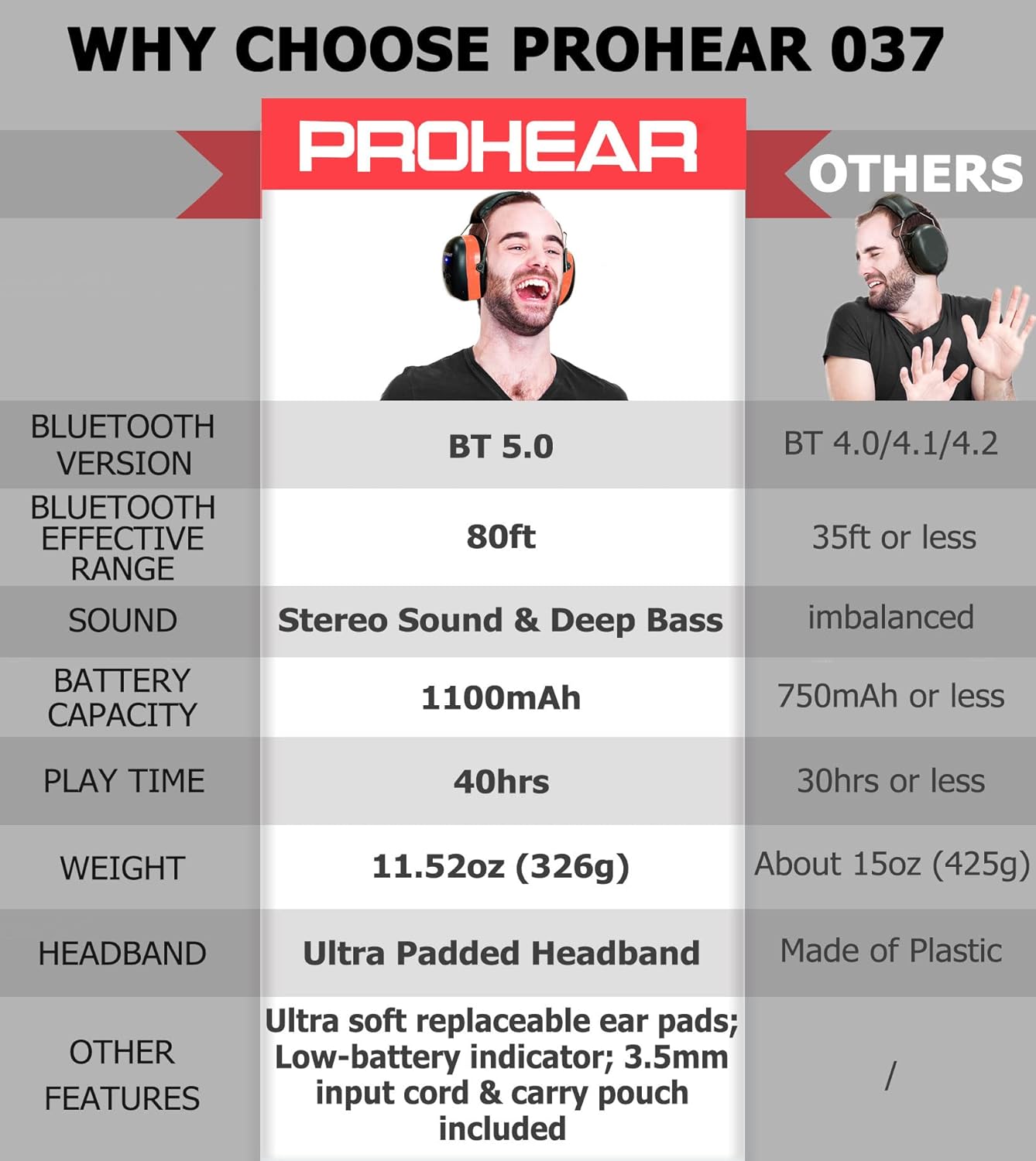
Figure 2: Feature Comparison. This table illustrates key advantages of the PROHEAR 037, including Bluetooth 5.0, 80ft effective range, stereo sound, 1100mAh battery, 40 hours playtime, and ultra-padded headband with soft replaceable ear pads.
3. Setup
3.1 Charging the Battery
Before first use, fully charge the headphones. A full charge takes approximately 4 hours.
- Locate the charging port on the earmuff.
- Connect the provided charging cable to the port and a compatible USB power source (e.g., computer USB port, USB wall adapter).
- The LED indicator will show charging status (refer to the LED indicator section for details). Once fully charged, the indicator will change or turn off.

Figure 3: Battery and Charging Information. This image highlights the 1100mAh rechargeable battery, 4-hour charging time, and 40+ hours of playtime in wireless mode, along with infinite playtime in wired mode.
3.2 Bluetooth Pairing
To connect your PROHEAR 037 headphones to a Bluetooth-enabled device:
- Ensure the headphones are powered off.
- Press and hold the Power/Multi-function button until the LED indicator flashes blue and red alternately, indicating pairing mode.
- On your device (smartphone, tablet, etc.), enable Bluetooth and search for available devices.
- Select "PROHEAR 037" from the list of found devices.
- Once connected, the LED indicator will turn solid blue or flash blue slowly.
Note: The Bluetooth 5.0 technology provides a stable connection up to 80 feet (24 meters) in open areas.
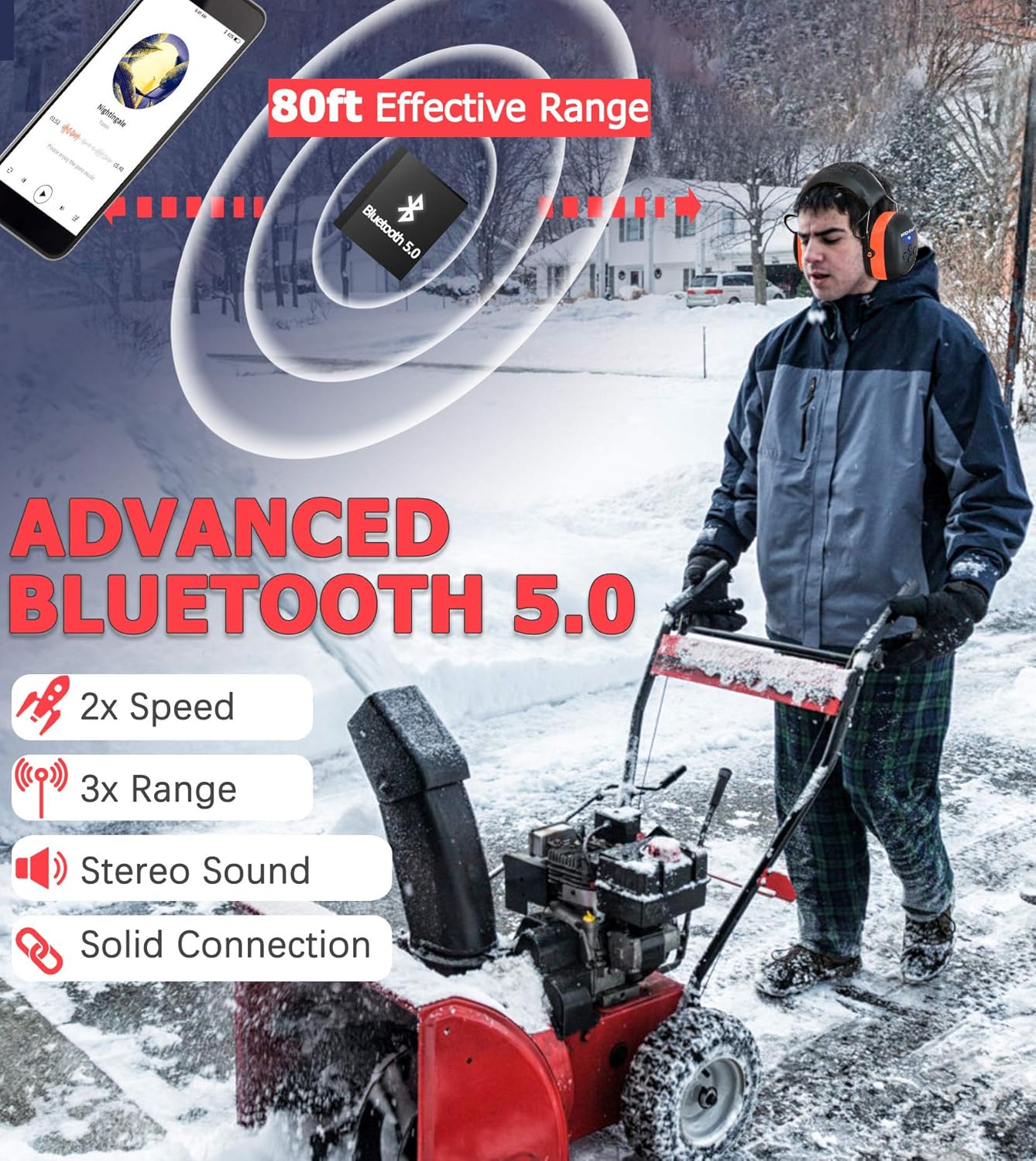
Figure 4: Advanced Bluetooth 5.0 Connectivity. This image demonstrates the 80-foot effective range of the Bluetooth 5.0 connection, emphasizing its speed, range, stereo sound, and solid connection.
3.3 Hard Hat Attachment Installation (for Hard Hat Model)
For the PROHEAR 037 Hard Hat Attachment model, follow these steps to securely attach the earmuffs to a compatible hard hat (hard hat not included):
- Step 1: Easy Installation: Align the attachment clips on the earmuffs with the slots on your hard hat.
- Step 2: Adjustable: Push the earmuffs firmly into the slots until they click into place. Ensure they are securely fastened and can be adjusted up and down.
- Step 3: Usage: Pull the earmuffs down over your ears to achieve a snug fit, ensuring full ear coverage for optimal hearing protection.
- Step 4: Un-usage: When not in use, pivot the earmuffs upwards and away from your ears, allowing them to rest against the hard hat.
Compatible with hard hats such as Pyramex Safety HP50011 HP500 and Dewalt DPG11-W.

Figure 5: Hard Hat Attachment Guide. This image provides a step-by-step visual guide for easy installation, adjustment, proper usage, and storage of the hard hat attachment earmuffs.
4. Operating Instructions
4.1 Controls Overview
The PROHEAR 037 features intuitive controls located on the earmuff. The "raised part" design allows for easy operation even with work gloves.
- Power/Multi-function Button: Used for powering on/off, play/pause, answering/ending calls.
- Volume Up/Next Track Button: Increases volume, skips to the next song.
- Volume Down/Previous Track Button: Decreases volume, skips to the previous song.
4.2 Power On/Off
- Power On: Press and hold the Power/Multi-function button for approximately 3 seconds until you hear a power-on prompt and the LED indicator lights up.
- Power Off: Press and hold the Power/Multi-function button for approximately 3 seconds until you hear a power-off prompt and the LED indicator turns off.
4.3 Music Playback
- Play/Pause: Short press the Power/Multi-function button.
- Next Track: Short press the Volume Up/Next Track button.
- Previous Track: Short press the Volume Down/Previous Track button.
- Volume Up: Long press the Volume Up/Next Track button.
- Volume Down: Long press the Volume Down/Previous Track button.
4.4 Call Management
- Answer/End Call: Short press the Power/Multi-function button when a call comes in or during a call.
- Reject Call: Long press the Power/Multi-function button when a call comes in.
4.5 Wired Audio Mode
The PROHEAR 037 can be used in wired mode using a 3.5mm audio cable (not included). This mode allows for infinite playtime and is useful when the battery is depleted or for non-Bluetooth devices.
- Connect one end of the 3.5mm audio cable to the audio input port on the earmuff.
- Connect the other end to your audio source (e.g., smartphone, MP3 player).
- In wired mode, the volume and track control must be adjusted directly on your connected audio device. The headphone controls will not function.

Figure 6: Wired Audio Mode. This image illustrates the use of the 3.5mm audio input for infinite playtime, noting that volume adjustment is done via the connected device in this mode.
5. Maintenance and Care
- Cleaning: Wipe the earmuffs with a soft, damp cloth. Do not use abrasive cleaners or immerse the device in water.
- Storage: Store the headphones in a cool, dry place away from direct sunlight and extreme temperatures.
- Battery Care: To prolong battery life, charge the headphones regularly, even if not used frequently. Avoid fully discharging the battery for extended periods.
- Ear Pad Replacement: The ultra-soft ear pads are replaceable. Refer to the PROHEAR website or contact customer support for replacement parts and instructions.
6. Troubleshooting
| Problem | Possible Cause | Solution |
|---|---|---|
| Headphones do not power on. | Low battery. | Charge the headphones fully. |
| Cannot pair with Bluetooth device. | Headphones not in pairing mode; device Bluetooth off; too far from device. | Ensure headphones are in pairing mode (flashing blue/red). Turn on Bluetooth on your device. Move headphones closer to the device (within 80ft). |
| No sound or low volume. | Volume too low on headphones or device; not properly connected; wired mode volume. | Increase volume on both headphones and connected device. Re-pair Bluetooth. If in wired mode, adjust volume on the connected device. |
| Intermittent connection. | Too far from device; interference; obstacles. | Move closer to the connected device. Avoid physical obstacles between headphones and device. |
7. Technical Specifications
| Feature | Specification |
|---|---|
| Model | PROHEAR 037 Series |
| Bluetooth Version | Bluetooth 5.0 |
| Bluetooth Effective Range | Up to 80 feet (24 meters) |
| Noise Reduction Rating (NRR) | 25dB (Orange Headband Model) |
| Single Number Rating (SNR) | 30dB (Hard Hat Attachment Model) |
| Battery Capacity | 1100mAh Rechargeable Lithium Battery |
| Playtime (Bluetooth Mode) | Up to 40 hours |
| Charging Time | Approximately 4 hours |
| Audio Input | 3.5mm AUX input |
| Color | Orange (Headband) / Black (Hard Hat Attachment) |
| ASIN | B0DBQ1TBCB |
| Date First Available | July 31, 2024 |
8. Safety Information
Proper use of hearing protection is crucial for preventing noise-induced hearing loss. Please read and follow these safety guidelines:
- Always wear the hearing protection in noisy environments where sound levels exceed safe limits.
- Ensure a snug fit over your ears to achieve the stated Noise Reduction Rating (NRR) or Single Number Rating (SNR). Any gaps can significantly reduce effectiveness.
- Do not modify the earmuffs. Modifications may compromise their protective capabilities.
- Keep the earmuffs clean and free from debris that could affect the seal or internal components.
- While using the Bluetooth audio feature, be aware of your surroundings, especially in environments where situational awareness is critical for safety.
- Avoid listening to audio at excessively high volumes for prolonged periods, even with hearing protection, as this can still contribute to hearing fatigue or damage.

Figure 7: Noise Reduction Effectiveness. This image illustrates common noise levels and highlights the PROHEAR 037's NRR 25dB rating, indicating its capability to effectively reduce harmful noise and allow clear audio listening in loud environments.
9. Warranty and Support
PROHEAR products are designed for durability and performance. For warranty information, technical support, or to purchase replacement parts, please visit the official PROHEAR website or contact their customer service department. Keep your purchase receipt as proof of purchase for warranty claims.
Related documents037


Ask a question about this manual
Ask about setup, troubleshooting, compatibility, parts, safety, or missing instructions. Manuals+ will review the question and use this page’s manual context to help answer it.