
TOPPING E1x2 OTG-Black
TOPPING E1X2 OTG USB Audio Interface User Manual
Model: E1x2 OTG-Black
Introduction
The TOPPING E1X2 OTG USB Audio Interface is a high-performance device designed for professional audio recording, mixing, and live streaming. It offers high-resolution sound with support for 192kHz/24bit, an ultra-linear microphone preamp, and versatile compatibility across various operating systems and devices. This manual provides detailed instructions for setting up, operating, and maintaining your E1X2 OTG audio interface.

Figure 1: Front view of the TOPPING E1X2 OTG USB Audio Interface.
Setup
1. Package Contents
Before you begin, ensure all items are present in the package:
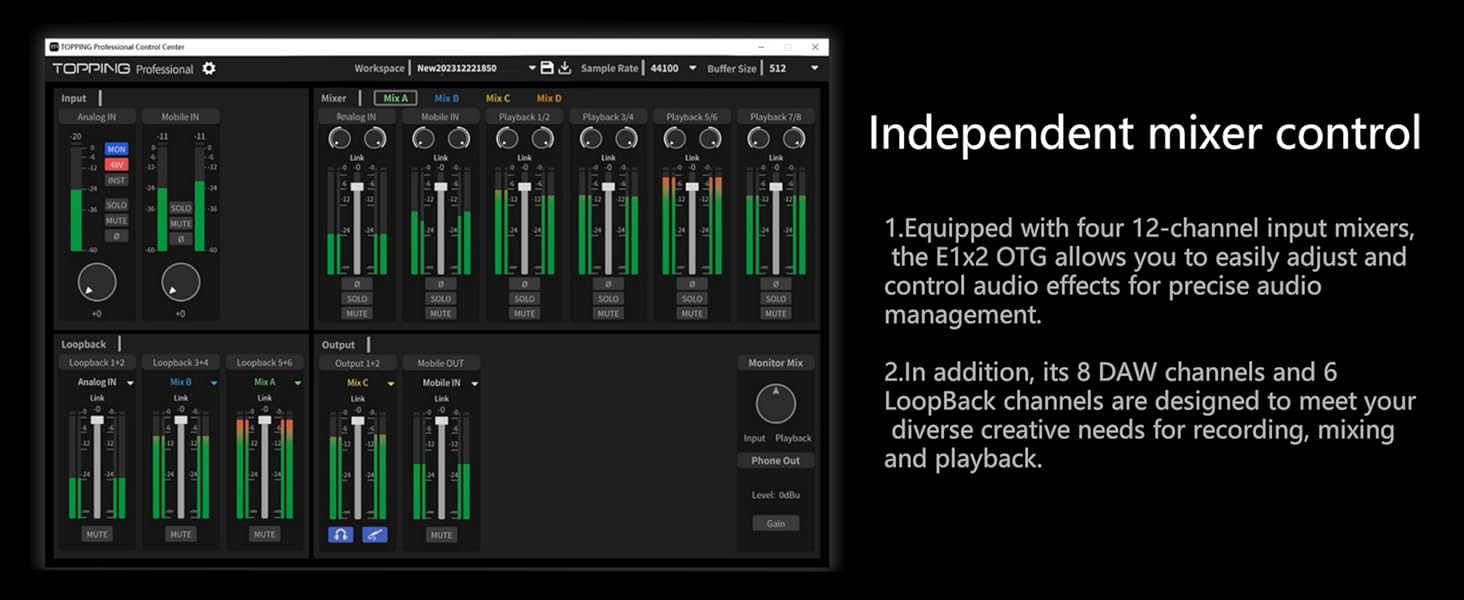
Figure 2: Contents list including the E1X2 OTG unit, Type A to Type C cable, Type C to Type C cable, 6.35 mm to 3.5 mm adaptor, and Quick Start Guide.
- E1X2 OTG Audio Interface Unit
- Type A to Type C USB Cable
- Type C to Type C USB Cable
- 6.35 mm to 3.5 mm Adaptor
- Quick Start Guide
2. Driver Installation (Windows Users)
For Windows operating systems, the E1X2 OTG is not a plug-and-play device. You will need to download and install the "Topping Professional Control Center" software, which includes the necessary drivers. This software is typically available on the TOPPING official website. macOS, iOS, and Android devices generally do not require separate driver installations.
3. Connecting the Device
The E1X2 OTG features multiple connection options for various scenarios. Refer to the diagrams below for proper connection.
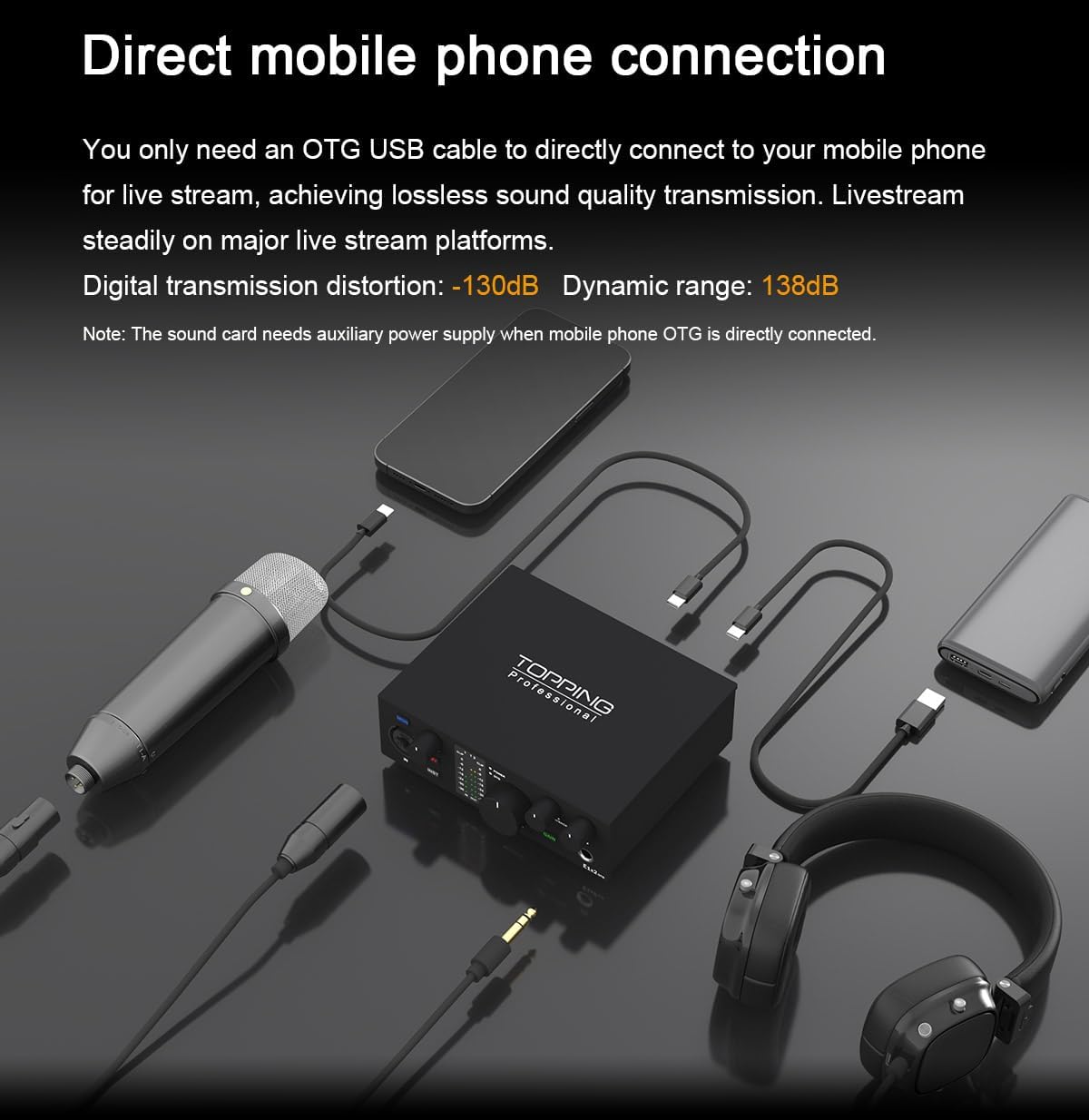
Figure 3: Rear panel connections including Power, USB-C (for computer), OTG (for phone/tablet), and Line Out (1L, 2R).
- Power Connection: Connect the provided power cable to the "POWER" USB-C port on the rear panel.
- Computer Connection: Use the "USB-C" port on the rear panel to connect to your PC or Mac. This port handles data transmission and can also provide power.
- Mobile Device Connection (OTG): Use the "OTG" USB-C port on the rear panel to connect to your smartphone or tablet. This port is specifically designed for On-The-Go (OTG) functionality, enabling direct audio transmission for live streaming and recording.
- Line Out: Connect your studio monitors or other audio playback devices to the 6.35mm TRS balanced "LINE OUT" ports (1L, 2R).
- Microphone/Instrument Input: On the front panel, connect your XLR microphone or 6.35mm TS instrument cable to the "IN" combo jack. Line-level devices should use 6.35mm TRS plugs.
- Headphone Output: Connect your headphones to the 6.35mm headphone output jack on the front panel.
4. Connection Scenarios (Video Demonstration)
Watch the official product video for a visual guide on various connection setups, including single mobile phone, dual mobile phone, dual computer, and mobile phone with computer connections.
Video 1: Demonstrates various connection scenarios for the E1X2 OTG, including single mobile, dual mobile, dual computer, and mobile with computer setups.
Operating the E1X2 OTG
1. Front Panel Controls and Indicators
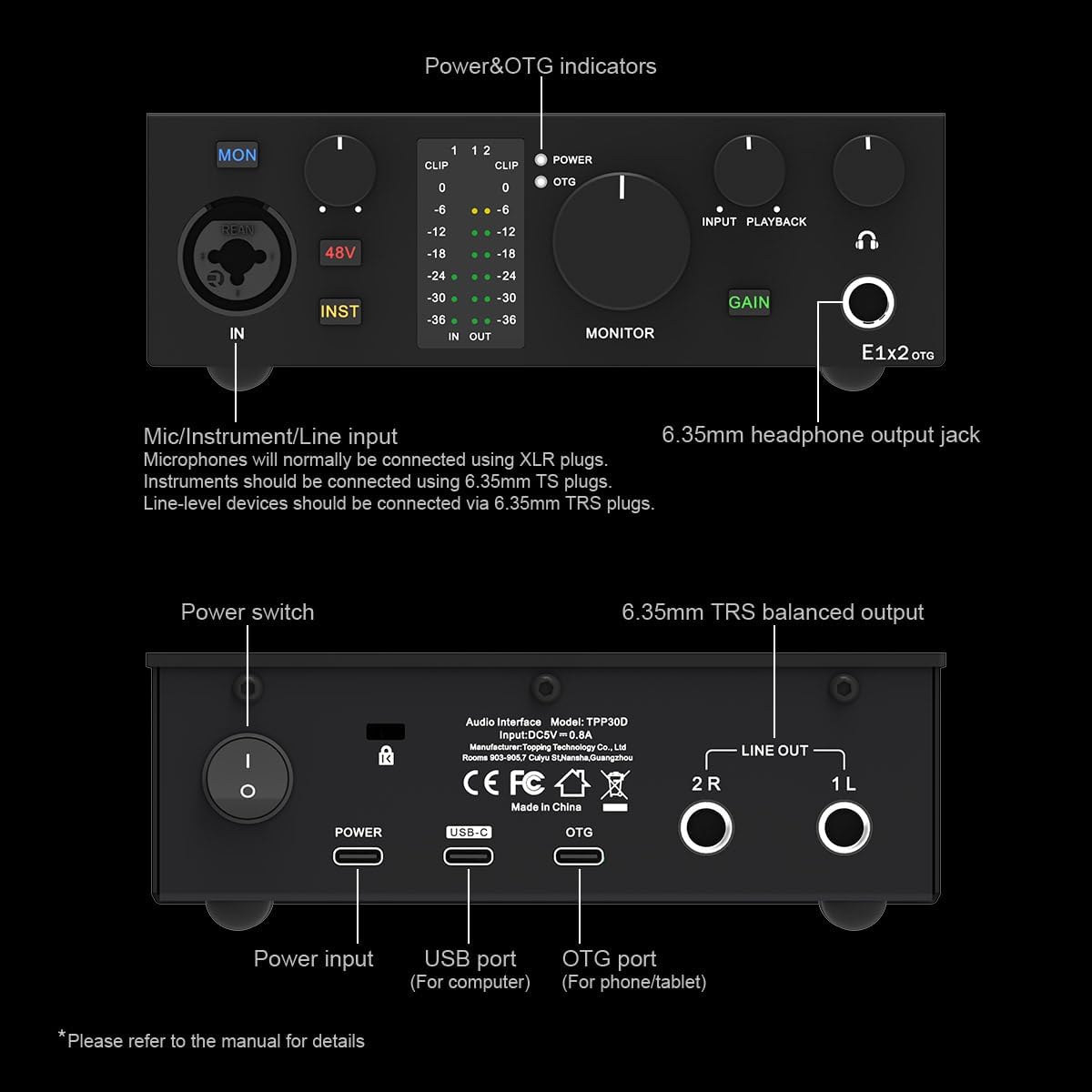
Figure 4: Front panel controls and indicators of the E1X2 OTG.
- IN (Combo Jack): Accepts XLR microphones or 6.35mm TS/TRS instrument/line-level inputs.
- MON (Monitor Button): Toggles direct monitoring on/off for zero-latency input monitoring.
- 48V (Phantom Power Button): Activates +48V phantom power for condenser microphones.
- INST (Instrument Button): Switches the input impedance for instrument-level signals.
- Clip Indicators: Red LEDs indicate input signal clipping. Adjust gain to prevent clipping.
- Level Meters (IN/OUT): Green, yellow, and red LEDs display input and output signal levels.
- POWER/OTG Indicators: Show power status and OTG connection status.
- MONITOR Knob: Adjusts the overall monitoring volume.
- INPUT/PLAYBACK Mix Knob: Blends the direct input signal with the playback signal from your computer/mobile device for monitoring.
- GAIN Knob: Controls the input gain for the connected microphone or instrument.
- Headphone Jack: 6.35mm output for headphones.
2. Key Features and Usage
Ultra-Linear Microphone Preamp
The E1X2 OTG features an ultra-linear microphone preamp with an EIN of -130.5dBu, ensuring minimal background noise and high-fidelity audio capture. This is ideal for professional recording environments.
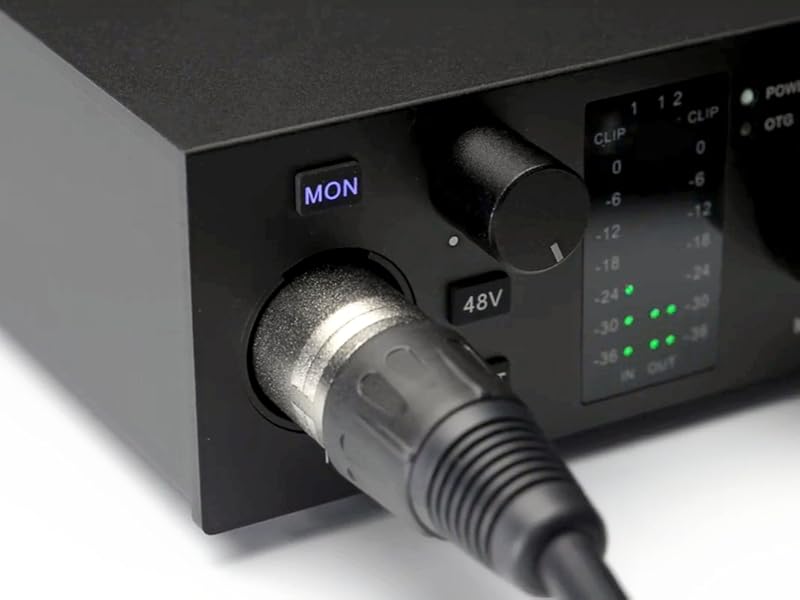
Figure 5: Illustration of the ultra-linear microphone preamp module.
Direct Condenser Microphone Connection
With the integrated 48V phantom power switch, the E1X2 OTG is fully compatible with both condenser and dynamic microphones, providing the necessary power for condenser mics.
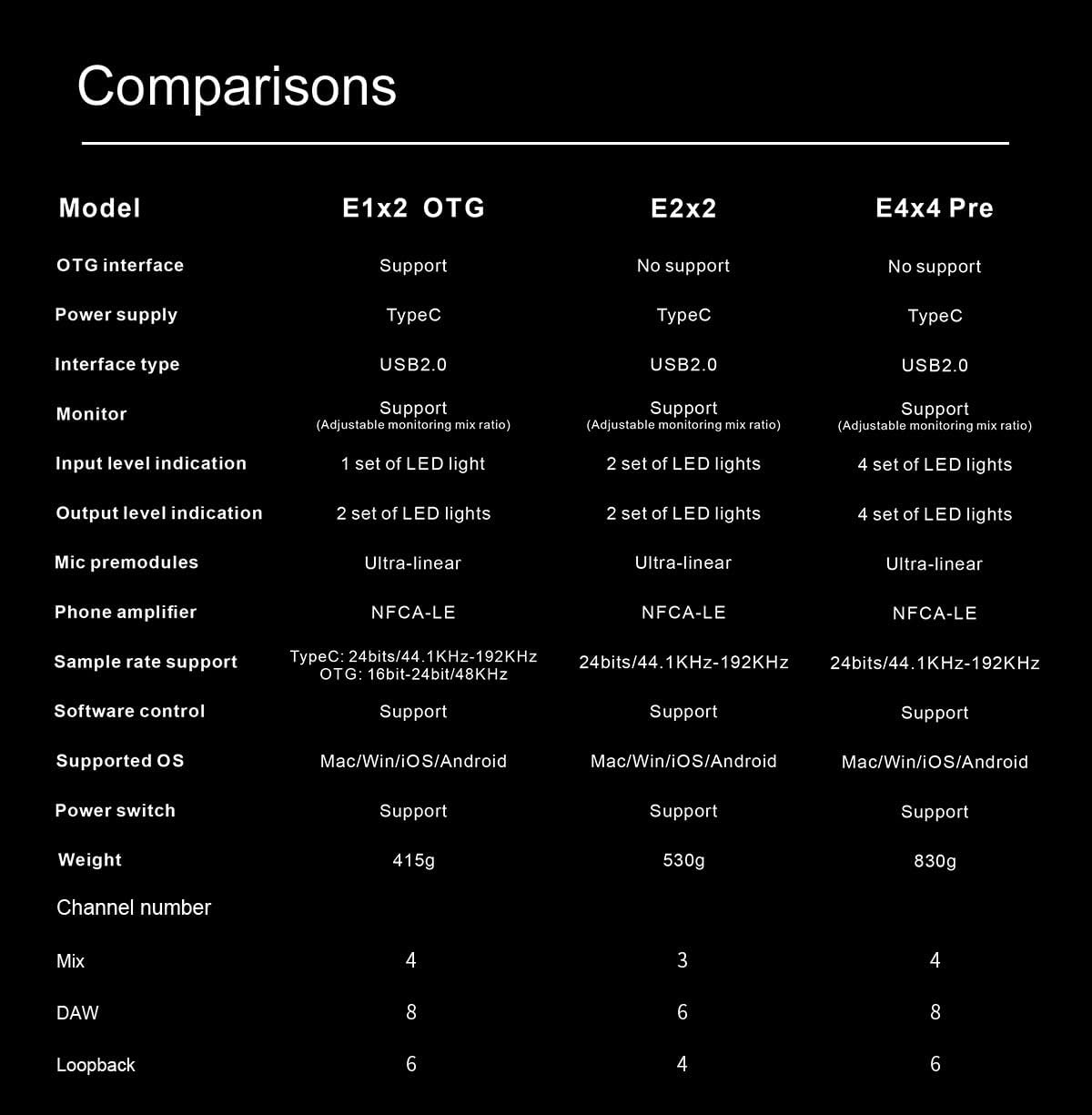
Figure 6: Connecting a microphone to the E1X2 OTG's combo input.
Mobile Phone Live Stream Optimization
The E1X2 OTG allows for direct mobile phone connection via the OTG port for lossless sound quality transmission during live streams. It supports stable streaming on major platforms.

Figure 7: Direct mobile phone connection for live streaming.
PC Synchronization for Live Stream
You can connect the E1X2 OTG to both a computer and a mobile phone simultaneously. This allows you to use a Digital Audio Workstation (DAW) on your PC to optimize audio (e.g., voice processing) while streaming from your mobile phone, resulting in clearer and more melodious sound.

Figure 8: Optimizing mobile live stream with PC synchronization.
Dual Mobile Phone Livestream
The E1X2 OTG supports dual mobile phone livestreaming, allowing you to connect two phones simultaneously. One phone can be used for the main live stream, while the other can provide accompaniment or additional audio material, expanding your audience base and enhancing interaction.

Figure 9: Dual mobile phone livestream setup.
Independent Mixer Control (Software)
The "Topping Professional Control Center" software provides a comprehensive 12-channel input mixer. This allows for precise adjustment and control of audio effects, along with 8 DAW channels and 6 LoopBack channels to meet diverse creative needs for recording, mixing, and playback.
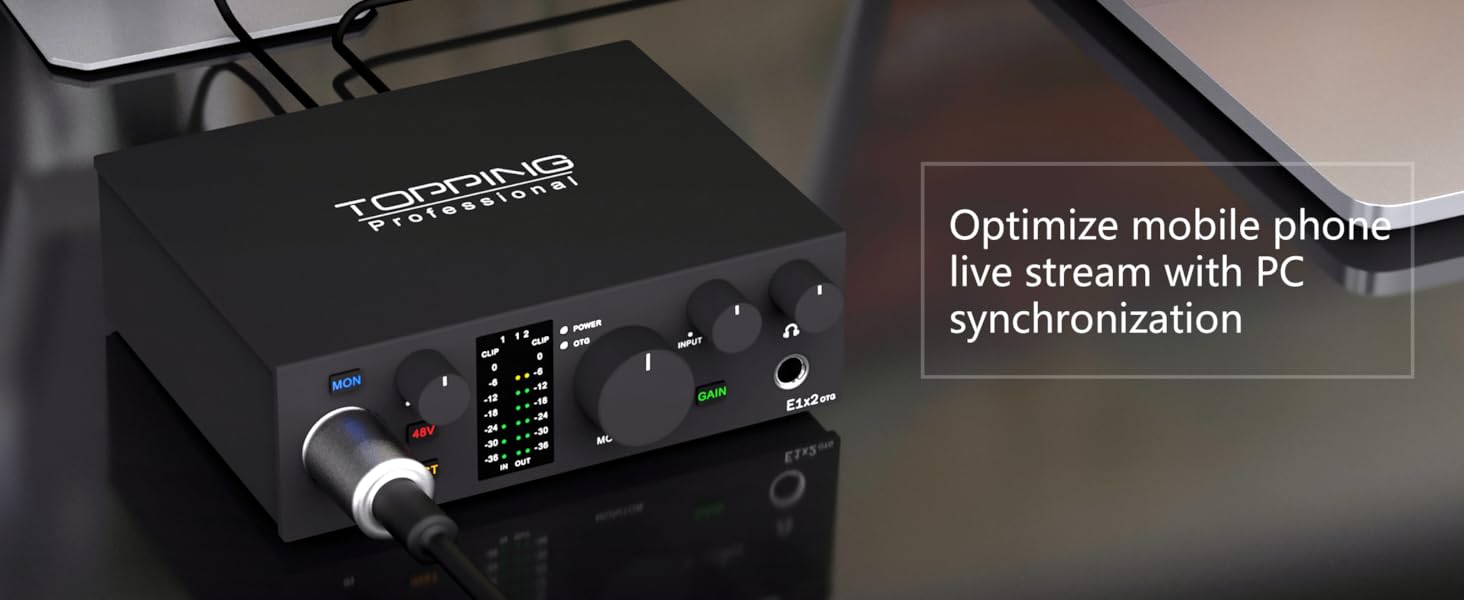
Figure 10: Topping Professional Control Center software for independent mixer control.
Product Overview Video
For a general overview of the TOPPING E1X2 OTG Audio Interface and its features, please watch the following video:
Video 2: General overview of the TOPPING E1X2 OTG Audio Interface.
Maintenance
To ensure the longevity and optimal performance of your E1X2 OTG audio interface, follow these maintenance guidelines:
- Cleaning: Use a soft, dry cloth to clean the exterior of the device. Avoid using abrasive cleaners, solvents, or strong chemicals, as they may damage the finish or internal components.
- Environment: Operate and store the device in a clean, dry environment, away from direct sunlight, excessive heat, humidity, and dust.
- Ventilation: Ensure proper ventilation around the unit to prevent overheating. Do not block any ventilation openings.
- Cables: Handle cables carefully. Avoid bending or crimping them excessively, which can damage the internal wires.
- Storage: If storing the device for an extended period, disconnect all cables and store it in its original packaging or a protective case.
Troubleshooting
If you encounter issues with your E1X2 OTG, refer to the following common problems and solutions:
| Problem | Possible Cause | Solution |
|---|---|---|
| No sound output from headphones/monitors. | Incorrect volume levels, incorrect output selection in software, loose connections. | Check MONITOR and GAIN knobs. Ensure E1X2 OTG is selected as the output device in your computer's sound settings or DAW. Verify all cables are securely connected. |
| Microphone not detected or no input signal. | Incorrect input selection, +48V not enabled for condenser mic, gain too low, driver issue. | Ensure microphone is connected to the "IN" port. Press the "48V" button for condenser mics. Increase the GAIN knob. For Windows, ensure drivers are correctly installed via "Topping Professional Control Center". |
| Distorted or noisy audio. | Input gain too high (clipping), faulty cable, interference. | Reduce the GAIN knob if the CLIP indicator lights up. Try a different cable. Ensure the device is away from sources of electromagnetic interference. |
| Device not recognized by computer (Windows). | Missing or incorrect drivers. | Install the "Topping Professional Control Center" software and drivers from the official TOPPING website. Restart your computer after installation. |
| Mobile device connection issues (e.g., "interface sleeping"). | Mobile mode settings, power supply. | Ensure the audio interface is connected to a power source when using mobile OTG. Check the "Topping Professional Control Center" software for any mobile mode settings that might cause sleep issues. |
| Software mixer controls not reflecting physical knob positions. | Software design. | This is a known characteristic of the "Topping Professional Control Center" where rotary controls on the hardware are not mirrored in the software. Adjust directly on the hardware. |
Specifications
Detailed technical specifications for the TOPPING E1X2 OTG USB Audio Interface:
| Feature | Detail |
|---|---|
| Model Number | E1x2 OTG-Black |
| Connectivity Technology | USB (Type-C) |
| Number of Channels | 5 (Input/Output channels for mixing) |
| Sample Rate Support | 24bit/192kHz (Type-C), 16bit/24bit/44.1KHz/48KHz (OTG) |
| Mic Preamp EIN | -130.5dBu (Ultra-linear) |
| Phantom Power | +48V |
| Headphone Amp Module | NFCA-LE |
| Headphone Output Power | 580mW x 2 @ 32 Ohm |
| Supported Operating Systems | Windows, macOS, iOS, Android |
| Supported Software | Avid Pro Tools, Ableton Live, Steinberg Cubase, Studio One, Logic Pro, Nuendo, Reaper, Audacity, Adobe Audition, etc. |
| Item Weight | 14.6 ounces |
| Package Dimensions | 9.13 x 6.65 x 2.91 inches |
| Country of Origin | China |
Comparison with other models

Figure 11: Comparison of E1X2 OTG with other TOPPING audio interface models.
Warranty and Support
TOPPING products are designed for reliability and performance. For warranty information, please refer to the documentation included with your purchase or visit the official TOPPING website. If you require technical support or have questions not covered in this manual, please contact TOPPING customer service through their official channels or the retailer where you purchased the product.
You can visit the official TOPPING store on Amazon for more information and support: TOPPING Store
Related documentsE1x2 OTG-Black


Ask a question about this manual
Ask about setup, troubleshooting, compatibility, parts, safety, or missing instructions. Manuals+ will review the question and use this page’s manual context to help answer it.