
1. Introduction
The KAPEYDESI Captain 400 is a versatile wireless gaming headset designed for an immersive audio experience across multiple platforms. Featuring a 50mm dynamic driver, ENC noise-canceling microphone, and multiple connectivity options, this headset provides clear sound and communication for gaming and entertainment.
Key features include:
- Advanced 50mm PET Dynamic Drivers for precise audio.
- ENC (Environmental Noise Canceling) microphone for clear voice communication.
- Three connection modes: 2.4GHz wireless, Bluetooth 5.2, and 3.5mm wired.
- Extended battery life of over 40 hours.
- Comfortable design with breathable mesh earmuffs.

Image: The Captain 400 headset provides clear communication, enhancing the gaming experience.
2. Package Contents
Please verify that all items are present in your package:
- 1 x KAPEYDESI Captain 400 Gaming Headset
- 1 x Detachable Noise-canceling Microphone
- 1 x USB Transmitter (2.4GHz Wireless Dongle)
- 1 x Type-C Charging Cable
- 1 x 3.5mm Aux Cable
- 1 x User Manual (this document)
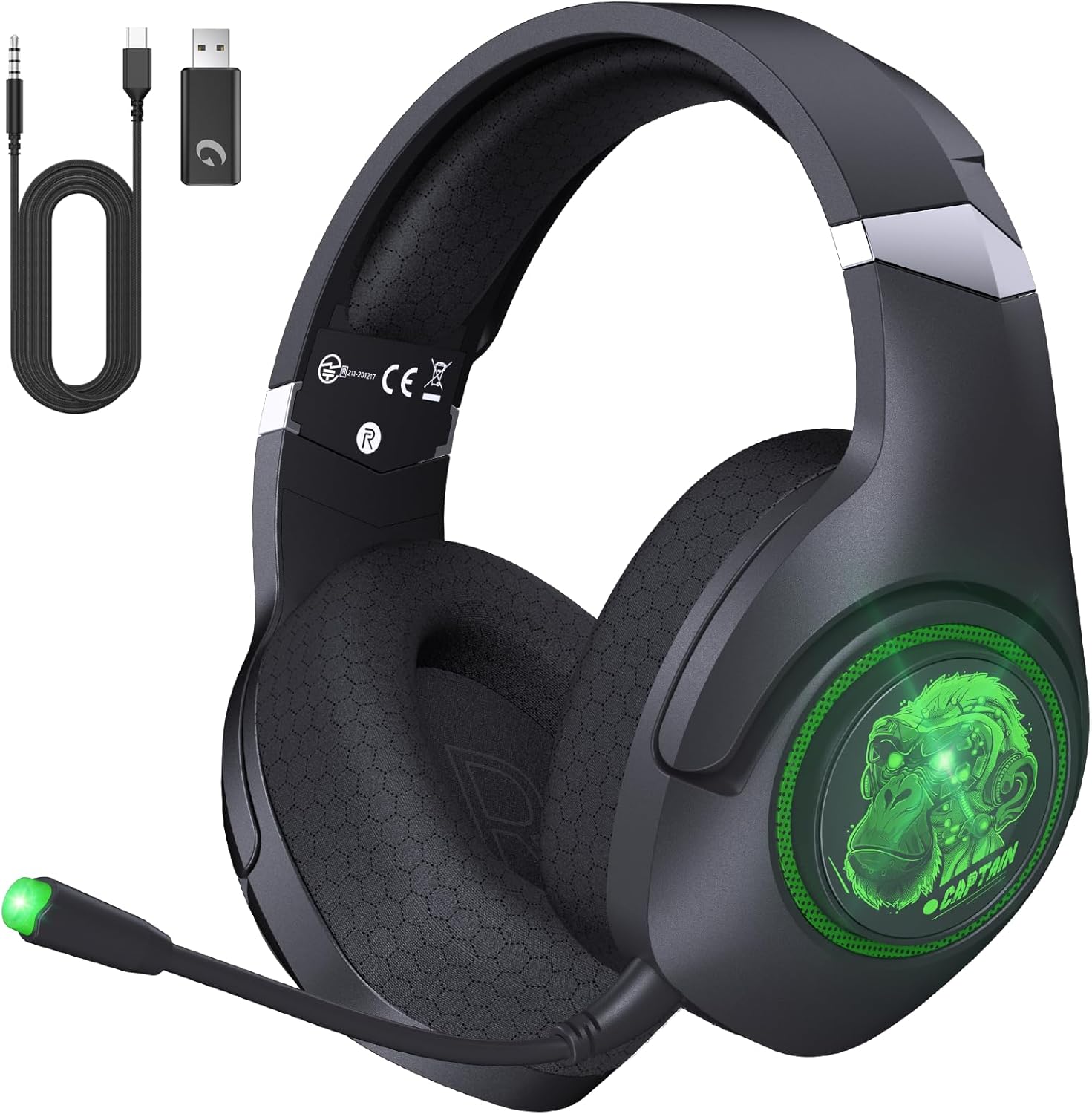
Image: The KAPEYDESI Captain 400 headset and its complete set of accessories.
3. Product Overview
Familiarize yourself with the main components of your Captain 400 headset:
- Headband: Adjustable for a comfortable fit.
- Earcups: Feature breathable mesh earmuffs and house the 50mm dynamic drivers.
- Controls: Integrated buttons for power, volume, and mode switching.
- Microphone Port: For attaching the detachable microphone.
- Charging Port: USB Type-C for charging the internal battery.
- 3.5mm Audio Jack: For wired connections.

Image: Design elements of the Captain 400 headset focusing on comfort and adjustability.

Image: Internal structure of the premium dynamic driver for superior sound quality.
4. Setup
4.1 Initial Charging
Before first use, fully charge the headset. Connect the supplied Type-C charging cable to the headset's charging port and a USB power source. A full charge takes approximately 2.5 hours. The headset can be used while charging.
4.2 Attaching the Microphone
Insert the detachable noise-canceling microphone into the designated port on the left earcup until it clicks securely into place. Ensure it is fully inserted for proper function.

Image: The detachable microphone with ENC technology.
5. Operating Instructions
5.1 Power On/Off
Press and hold the power button (usually located on one of the earcups) for a few seconds to turn the headset on or off.
5.2 Connectivity Modes
The Captain 400 headset supports three connection types:
- 2.4GHz Wireless Connection:
- Insert the USB transmitter into a compatible port on your PC, PS4, PS5, or Nintendo Switch.
- The headset will automatically connect to the transmitter.
- This mode offers ultra-low latency (≤ 20ms) and a stable connection up to 49 feet.
- Note: Wireless mode is not compatible with Xbox series consoles.
- Bluetooth 5.2 Connection:
- Double-click the mode button on the headset to switch to Bluetooth mode.
- On your mobile device (phone, tablet, or Nintendo Switch), search for "Captain 400" in the Bluetooth settings and pair.
- The Bluetooth range is approximately 50 feet.
- 3.5mm Wired Connection:
- Connect the supplied 3.5mm Aux cable to the headset's 3.5mm jack and your device's audio output.
- This mode is compatible with all platforms, including Xbox series consoles.
- Note: For Xbox series controllers, an adapter (not included) may be required, as the cable does not work directly with some Xbox controllers. The headset must be powered off for wired mode.

Image: Visual guide to the three available connection methods.

Image: The headset connected wirelessly via 2.4GHz to a gaming console.
6. Charging and Battery Life
The Captain 400 headset is equipped with a long-lasting battery:
- Battery Life: Over 40 hours of use without LED lights.
- LED Mode Battery Life: Up to 25 hours with LED lights enabled. Lights can be disabled at any time to conserve battery.
- Charging Time: Approximately 2.5 hours for a full charge.
- Low Battery Indicator: Voice prompts will notify you when the power level falls below 3%.
- Use While Charging: The headset supports usage during charging, allowing for uninterrupted gaming or work.

Image: Battery performance details for the Captain 400 headset.
7. Maintenance
To ensure the longevity and optimal performance of your KAPEYDESI Captain 400 headset, follow these maintenance guidelines:
- Cleaning: Use a soft, dry cloth to clean the headset. For the mesh earmuffs, gently wipe with a slightly damp cloth if necessary, and allow to air dry completely before use. Avoid harsh chemicals or abrasive materials.
- Storage: Store the headset in a cool, dry place away from direct sunlight and extreme temperatures.
- Cable Care: Avoid sharp bends or excessive pulling on the cables (charging and aux) to prevent damage.
- Microphone: When not in use, detach the microphone and store it safely to prevent bending or damage.
8. Troubleshooting
If you encounter issues with your headset, please refer to the following common solutions:
| Problem | Possible Solution |
|---|---|
| No sound / Low volume |
|
| Microphone not working |
|
| Cannot connect wirelessly (2.4GHz/Bluetooth) |
|
| Xbox controller 3.5mm connection issue |
|
9. Specifications
| Feature | Specification |
|---|---|
| Model Name | Captain 400 |
| Connectivity Technology | 2.4GHz USB Wireless, Bluetooth V5.2, 3.5mm Jack Wire |
| Wireless Communication | 2.4GHz, Bluetooth |
| Bluetooth Version | 5.2 |
| Bluetooth Range | 50 Feet (approx. 15 meters) |
| Audio Latency | ≤ 20 Milliseconds (2.4GHz mode) |
| Audio Driver Size | 50 Millimeters |
| Audio Driver Type | Dynamic Driver |
| Frequency Range | 20 Hz - 20,000 Hz |
| Impedance | 20 Ohm |
| Noise Control | Sound Isolation (ENC Microphone) |
| Headphones Jack | 3.5 mm Jack |
| Compatible Devices | PC, Mac, Laptop, Desktop, PS5, PS4, Switch, Xbox Series X|S (3.5mm wired) |
| Control Type | Volume Control, Push Button |
| Cable Feature | Detachable |
| Battery Life | 40+ Hours (without LED), 25 Hours (with LED) |
| Charging Time | Approx. 2.5 Hours |
| Material | ABS, Mesh Earmuffs, Metal |
| Item Weight | 1.19 pounds (approx. 540g) |
| Water Resistance Level | Not Water Resistant |
10. Warranty and Support
KAPEYDESI is committed to providing high-quality products and customer satisfaction. While specific warranty details are not provided in this manual, KAPEYDESI offers expert customer support.
If you have any questions, concerns, or require assistance with your Captain 400 Wireless Gaming Headset, please contact KAPEYDESI customer support. You can expect a response within 12-24 hours, ensuring comprehensive assistance for all users.
For the most up-to-date warranty information and support contact details, please refer to the official KAPEYDESI website or the product listing where you made your purchase.
