
TAGRY X08
TAGRY X08 True Wireless Earbuds User Manual
Model: X08
Introduction
The TAGRY X08 True Wireless Earbuds offer an immersive audio experience with advanced features designed for convenience and comfort. This manual provides essential information on setting up, operating, and maintaining your earbuds to ensure optimal performance.

Figure 1: TAGRY X08 Earbuds in Black and Phantom Purple
Video 1: Official product overview of TAGRY X08 True Wireless Earbuds, demonstrating key features and design.
Key Features
- LED Power Display: Dual digital LED display on the charging case shows power levels for both the case and earbuds.
- 60H Playback: Up to 60 hours of total music time with the charging case, and 6 hours on a single earbud charge.
- Wireless & USB-C Charging: Supports both wireless charging and USB-C cable charging for convenience.
- One-Step Pairing: Automatic connection to your device upon opening the charging case after initial pairing.
- Smart Touch Control: Intuitive touch controls for music playback, call management, and voice assistant activation.
- Crystal-Clear Sound: Equipped with 13mm speakers and triple-layer composite diaphragms for powerful bass, stunning treble, and clear mids.
- CVC Noise Reduction: Built-in microphone with CVC noise reduction ensures clear phone calls.
- Ergonomic Design & Lightweight: Designed for comfortable and secure fit with three different sizes of ear tips. Each earbud weighs only 0.14oz.
- IPX5 Waterproof: Nano-coating provides water and sweat resistance, suitable for sports and daily use.
Setup Guide
Initial Pairing
- Ensure the earbuds are charged (refer to the "Charging the Earbuds and Case" section).
- Open the charging case. The earbuds will automatically enter pairing mode.
- On your device (smartphone, tablet, laptop), go to Bluetooth settings.
- Search for "X08" in the list of available devices and select it to connect.
- Once connected, the earbuds will automatically pair with your device whenever you open the charging case.

Figure 2: One-Step Auto Pairing Process
Wearing the Earbuds
The TAGRY X08 earbuds are designed for an ergonomic and secure fit. Experiment with the three different sizes of ear tips included to find the most comfortable and stable fit for your ear canals.

Figure 3: Ergonomic Design and Included Eartips for Comfort
Operating Instructions
Smart Touch Controls
The TAGRY X08 earbuds feature intuitive touch controls on each earbud. You can control music playback, manage calls, and activate your device's voice assistant without needing to access your phone.
| Action | Touch Command |
|---|---|
| Play/Pause Music | Single tap on either earbud |
| Answer Call | Single tap on either earbud |
| Hang Up Call | Single tap on either earbud |
| Next Track | Double tap on the right earbud |
| Previous Track | Double tap on the left earbud |
| Volume Up | Triple tap on the right earbud |
| Volume Down | Triple tap on the left earbud |
| Activate Voice Assistant (Siri, Google Assistant, etc.) | Long press (2 seconds) on either earbud |

Figure 4: Smart Touch Control Functions (Black Earbud)
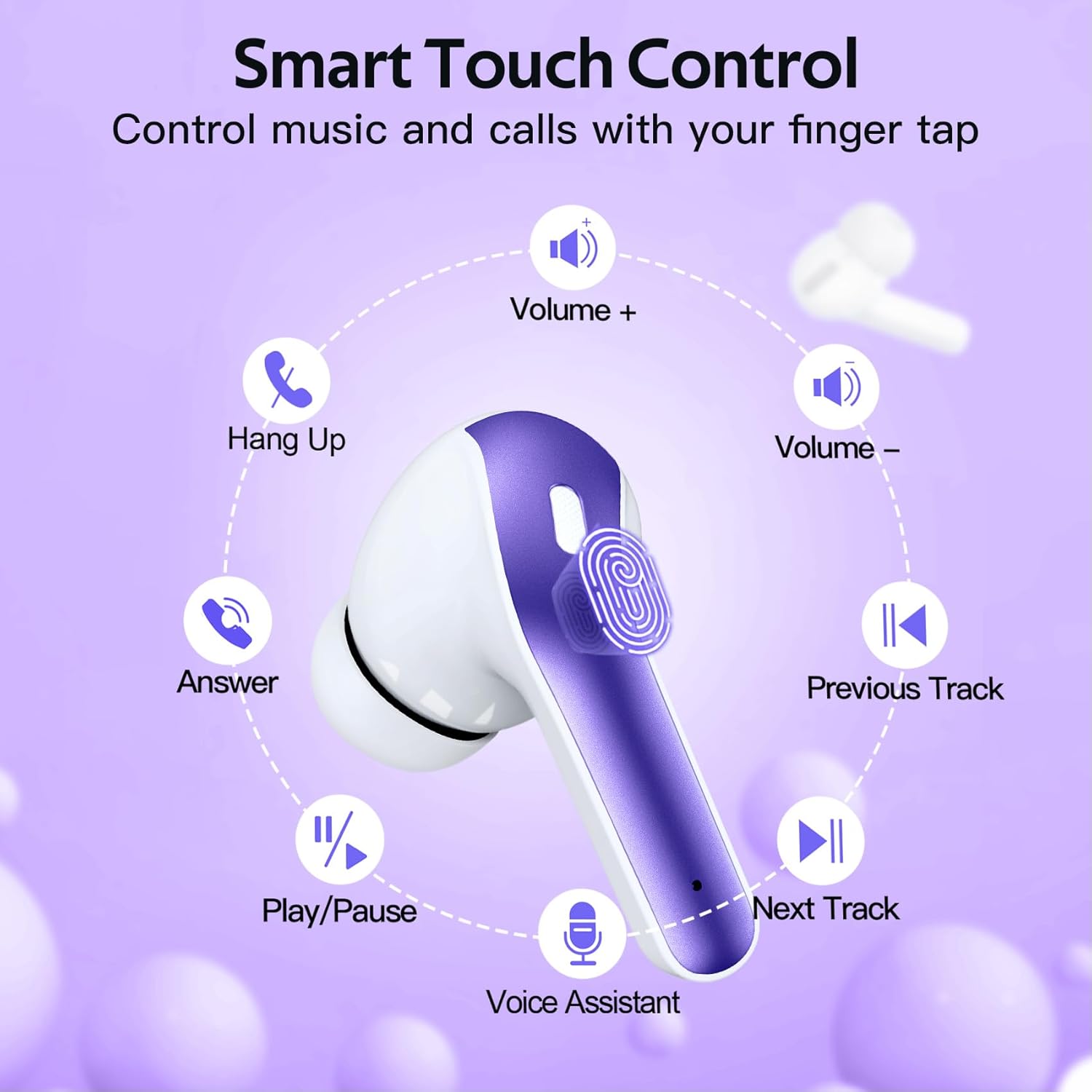
Figure 5: Smart Touch Control Functions (Purple Earbud)
Battery and Charging
LED Power Display
The charging case features a dual digital LED power display that shows the remaining battery level of the charging case (0-100) and the individual charge status of each earbud.

Figure 6: Digital Power Display on Charging Case
Charging the Earbuds and Case
- Earbud Charging: Place the earbuds into the charging case. They will automatically begin charging. The LED display will show their charging status.
- Case Charging (USB-C): Connect the charging case to a power source using a USB-C cable. The LED light will flash from 1 to 100 as it charges.
- Case Charging (Wireless): Place the charging case on a compatible wireless charging pad (not included).
The 470mAh battery capacity of the charging case provides approximately 4 additional full charges for both earbuds, extending total playback time to 60 hours.

Figure 7: USB-C and Wireless Charging for the Case (Purple)

Figure 8: USB-C and Wireless Charging for the Case (Black)
Audio Quality and Design
Crystal-Clear Sound
The TAGRY X08 earbuds are engineered with 13mm speakers and triple-layer composite diaphragms to deliver rich, powerful bass, clear mids, and stunning treble, providing an immersive stereo sound experience. They support both mono and twin stereo modes, allowing you to share one earbud with a friend.

Figure 9: Internal Components for Crystal-Clear Sound
Maintenance
Water Resistance (IPX5)
The earbuds are rated IPX5 waterproof, meaning they are protected against low-pressure water jets from any direction. The nano-coating on the earbud surface prevents water and sweat from penetrating, making them suitable for workouts and outdoor activities. However, they are not designed for submersion in water.
- Do not submerge the earbuds in water.
- Wipe the earbuds dry with a soft cloth after exposure to sweat or water.
- Ensure the charging ports are dry before charging.
Troubleshooting
If you encounter any issues with your TAGRY X08 earbuds, please refer to the following common solutions:
- Earbuds not pairing: Ensure both earbuds are in the charging case, then open the lid to activate pairing mode. Check your device's Bluetooth settings to ensure "X08" is selected.
- Only one earbud working: Place both earbuds back into the charging case, close the lid, wait a few seconds, then open it again. This often resets the connection.
- No sound: Check the volume level on both your device and the earbuds. Ensure the earbuds are properly connected via Bluetooth.
- Charging issues: Verify that the charging cable is securely connected and the power source is active. For wireless charging, ensure the case is correctly placed on the charging pad. Clean any debris from the charging contacts on the earbuds and inside the case.
- Unresponsive touch controls: Ensure your fingers are clean and dry. Try resetting the earbuds by placing them in the case and closing the lid for a few seconds.
If the problem persists, please contact TAGRY customer support for further assistance.
Specifications
| Feature | Detail |
|---|---|
| Model Name | X08 |
| Connectivity Technology | Wireless (Bluetooth) |
| Total Playback Time | Up to 60 hours (with charging case) |
| Single Earbud Playback | 6 hours |
| Charging Case Capacity | 470mAh (provides 4 additional full charges) |
| Charging Methods | Wireless Charging, USB-C Cable Charging |
| Waterproof Rating | IPX5 |
| Speaker Size | 13mm |
| Diaphragm Type | Triple-layer composite |
| Microphone | Built-in (each earbud) with CVC noise reduction |
| Control Type | Touch Control (Volume, Playback, Calls, Voice Assistant) |
| Earbud Weight | 0.14oz (per earbud) |
| Earbud Dimensions | 1.57 x 0.78 x 0.59 inches |
| Charging Case Dimensions | 2.56 x 2.16 x 1 inches |
| Included Components | Wireless Charging Case, Ear Tips (3 sizes) |
Warranty and Support
For warranty information or technical support, please refer to the product packaging or visit the official TAGRY website. You may also contact the seller directly through the platform where you purchased the product.
For further information, visit the product detail page on Amazon.com.
Related documentsX08


Ask a question about this manual
Ask about setup, troubleshooting, compatibility, parts, safety, or missing instructions. Manuals+ will review the question and use this page’s manual context to help answer it.