
Introduction
The Redragon K686 PRO is a high-performance 98-key mechanical gaming keyboard designed for versatility and an enhanced typing experience. It features a gasket-mounted structure, offering a softer and more consistent feel with reduced noise. With its advanced 3-mode connectivity, hot-swappable switches, and dedicated control knob, this keyboard provides extensive customization and convenience for both gaming and productivity across various operating systems.
What's in the Box
- Redragon K686 PRO Keyboard
- USB Cable
- Keycap/Switch Puller
- Spare Switches (4 pieces)
- User Manual
Key Features
Gasket Design
The keyboard's body structure utilizes precision-locked covers with gaskets, differing from traditional screw fixing. This design assists with noise reduction and flexibility, providing even feedback and reducing rigid noise for a crisp, clean, and softer typing feel.

Image: Exploded view of the keyboard's internal structure, highlighting the gasket design and multiple noise-dampening layers.
3-Mode Connection
Equipped with Redragon's advanced tri-mode connection technology, the keyboard supports USB-C wired, BT 3.0/5.0, and 2.4Ghz wireless modes, offering versatile connectivity options for various devices and scenarios.

Image: Side view of the keyboard displaying the connectivity mode switches (2.4G, OFF, BT) and system compatibility switch (MAC, WIN).
Custom Mint Mambo Switches & Hot-Swap Sockets
The K686 PRO features thick-lubed custom linear Mint Mambo switches, providing cushioned, rich linear travel with silky, creamy, and cozy typing feedback. The brand new upgraded sockets are compatible with nearly all 3-pin and 5-pin switches, allowing for easy replacement and customization.
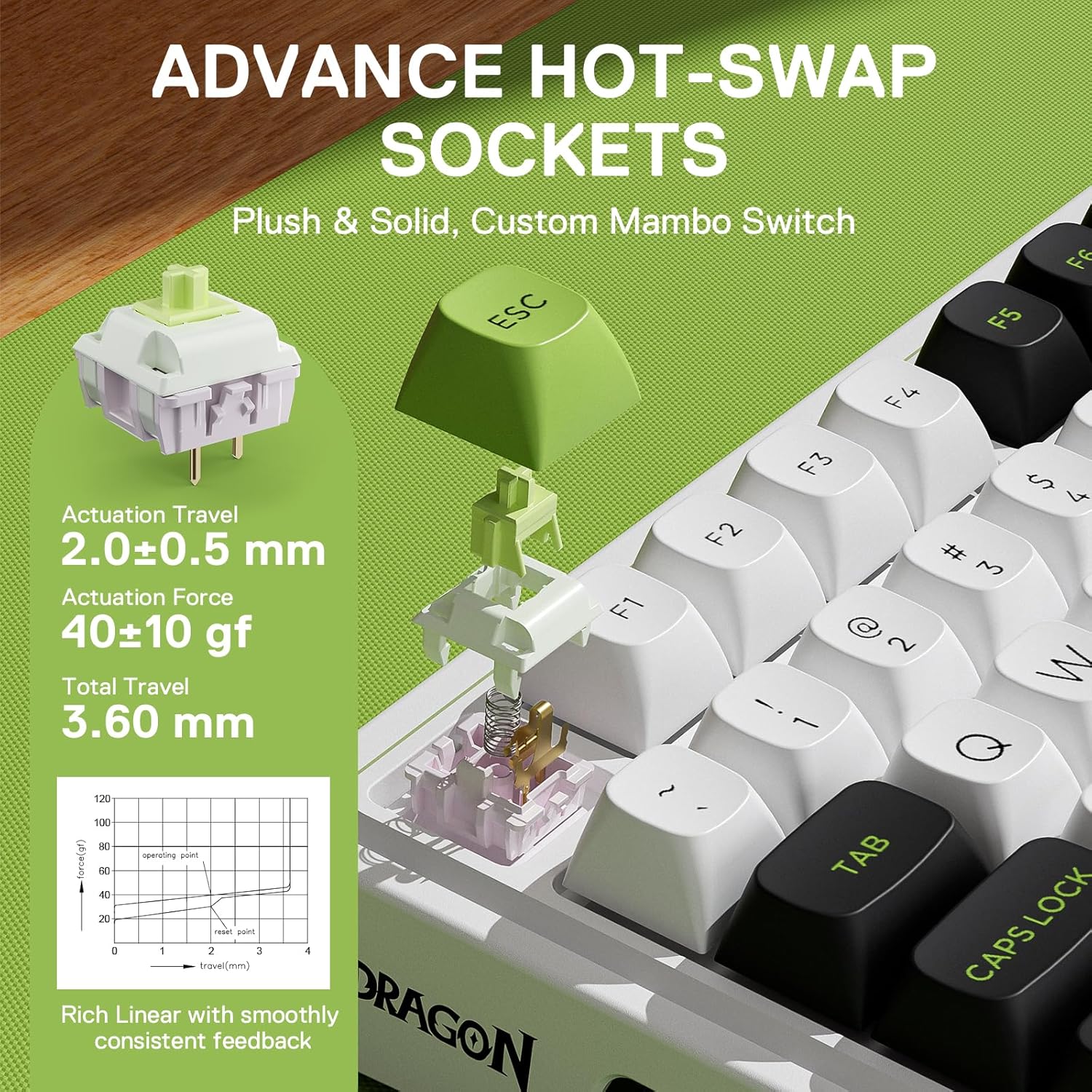
Image: Detailed view of a Mint Mambo switch and the hot-swap socket, illustrating its specifications.
5-Layer Noise Dampening
Equipped with 3.5mm PO foam, IXPE switch foam, PET sound pad, bottom socket foam, and a silicone bottom pad along with the silicone gasket, this keyboard significantly reduces hollow noise, creating dampened and ultra-clean typing acoustics for a satisfying and comfortable keystroke.
Tactical 98 Keys Layout
The innovative 98-key design retains the functionality of a 100% layout while shrinking the size by 20% to provide more compactness, optimizing desk space without sacrificing essential keys.

Image: Overview of the Redragon K686 PRO keyboard, showing its 98-key compact layout.
One-Knob Control
The convenient easy-access control knob allows for hassle-free adjustment of keyboard backlight brightness and media controls (volume, play/pause, switch), providing intuitive control without extra keys or wasted space.

Image: Detail of the multi-function knob and its associated controls.
PBT Round Keycaps
The keycaps are made from high-quality PBT material with a DSA round design. This provides a larger surface area for each key, making typing even more comfortable and ensuring long-lasting durability.

Image: Comparison of the PBT round keycaps with standard keycaps.
4000mAh Battery
The keyboard is equipped with a 4000mAh battery, providing extended usage time in wireless modes.
Pro Software Supported
Expand your options using the available software to design your own new modes and effects. Create macros with different keybindings or shortcuts for more efficient work and gaming.

Image: Software interface for customizing RGB modes and macros.
Setup Guide
Wired Connection
Connect the keyboard to your computer using the provided USB-C cable. The keyboard will be automatically recognized and ready for use.
Bluetooth Connection
- Slide the connection switch on the side of the keyboard to 'BT'.
- Press and hold FN + Q/W/E for 3 seconds to enter pairing mode. The indicator light will flash rapidly.
- On your device (PC, laptop, tablet), search for Bluetooth devices and select 'BT5.0 Keyboard' to connect. The indicator light will stop flashing once connected.
2.4GHz Wireless Connection
- Slide the connection switch on the side of the keyboard to '2.4G'.
- Take out the USB receiver from its compartment on the right side of the keyboard.
- Plug the USB receiver into an available USB port on your computer. The keyboard will automatically connect.
Mac/Windows Layout Switch
Use the dedicated switch on the side of the keyboard to toggle between Mac and Windows layouts for optimized key functionality on your preferred operating system.
Image: Side view of the keyboard displaying the system compatibility switch (MAC, WIN).
Operating Instructions
Knob Control
The dedicated knob on the top right corner allows for quick adjustments:
- Rotate Left/Right: Adjusts volume.
- Press Down: Mutes/unmutes audio.
RGB Backlighting Control
The keyboard features vibrant RGB backlighting with customizable modes and effects. Use the following key combinations:
- FN + INS: Cycle through RGB effects.
- FN + PGUP: Cycle through single colors.
- FN + ↑ (Up Arrow): Increase backlight brightness.
- FN + ↓ (Down Arrow): Decrease backlight brightness.
- FN + → (Right Arrow): Increase effect speed.
- FN + ← (Left Arrow): Decrease effect speed.
Software Customization
For advanced customization, download the Redragon software from the official website. The software allows you to:
- Reprogram key definitions.
- Create and manage in-game macros.
- Customize lighting effects and colors.
Maintenance
Keycap and Switch Replacement
Use the included 2-in-1 keycap/switch puller to carefully remove keycaps and switches. Align new 3-pin or 5-pin switches with the hot-swap sockets and press firmly until seated. Replace keycaps by pressing them onto the switch stems.
Cleaning
Regularly clean your keyboard to maintain performance and appearance. Use a soft, dry cloth to wipe down the keycaps and chassis. For deeper cleaning, remove keycaps and use compressed air to clear debris from between switches.
Troubleshooting
- Keyboard not responding: Ensure the keyboard is charged. Check the connection mode switch (wired, BT, 2.4G). For wireless modes, ensure the receiver is properly plugged in or Bluetooth is paired. Try restarting your computer.
- Keys not registering: If specific keys are not working, try removing and re-inserting the switch using the puller. Ensure the switch is fully seated.
- Bluetooth connection issues: Ensure no other devices are interfering. Try unpairing and re-pairing the keyboard. Ensure your device's Bluetooth is enabled and updated.
- RGB lighting not working: Check brightness settings using FN + Up/Down Arrow. Ensure the keyboard is not in a mode that disables lighting.
Specifications
| Feature | Detail |
|---|---|
| Model Number | K686 PRO MAX |
| Connectivity Technology | 2.4Ghz, BT, USB-C |
| Number of Keys | 98 |
| Keyboard Description | 98 Keys Wireless Gasket Gaming Keyboard |
| Switch Type | Custom Mint Mambo Linear Switch |
| Keycap Material | PBT |
| Backlighting | RGB |
| Battery | 1 Lithium Polymer battery required (4000mAh) |
| Item Weight | 2.57 pounds |
| Package Dimensions | 16.85 x 7.44 x 2.4 inches |
| Compatible Devices | PC, Laptop, Tablet |
Warranty and Support
Redragon products typically come with a standard manufacturer's warranty. For detailed warranty information, technical support, or service inquiries, please refer to the official Redragon website or contact their customer support directly.
You can also find additional resources and the full user manual (PDF) at the following link: User Manual (PDF)
Visit the Redragon Store for more products and information: Redragon Official Store