
1. Important Safety Instructions
Please read this user manual carefully before using the Lefant M210 Robot Vacuum Cleaner. Keep it for future reference.
- Always ensure the robot is placed on a stable, flat surface.
- Do not operate the robot in wet environments or near liquids.
- Keep loose cables, curtains, and other objects that could tangle the robot out of its path.
- The robot is equipped with cliff detection sensors; however, always exercise caution near stairs or elevated surfaces.
- Only use the original charging base and power adapter provided.
- This device supports 2.4 GHz Wi-Fi only. Ensure your network is compatible for app and voice control features.
2. What's Included
Your Lefant M210 Robot Vacuum Cleaner package includes the following components:
- Lefant M210 Robot Vacuum
- Charging Base
- Power Adapter
- 500ml Large Dustbin
- 2 HEPA Filters (1 pre-installed, 1 spare)
- 4 Side Brushes (2 pre-installed, 2 spare)
- Machine Cleaning Brush
- User Manual

Figure 2.1: Lefant M210 Robot Vacuum Cleaner with included accessories.
3. Product Overview
The Lefant M210 is a compact and powerful robot vacuum designed for efficient home cleaning, especially for pet owners.
Unique Suction Port & Strong Suction
Features a large suction port design with dual side brushes to effectively collect hair, debris, and dust. Its brushless design prevents hair tangles, making it ideal for pet hair.

Figure 3.1: The unique brushless suction port efficiently picks up pet hair and dust without tangling.

Figure 3.2: Tangle-free suction port design for easy maintenance, especially with pet hair.
Compact Design & High Coverage
With an 11-inch diameter and 2.99-inch height, the M210 easily navigates under furniture for thorough cleaning.

Figure 3.3: The compact 2.99-inch height allows the robot to clean under low furniture.
Quiet Operation
Operates at a low noise level of 56dB in quiet mode, ensuring minimal disturbance during cleaning.

Figure 3.4: The M210 operates at a quiet 56dB, comparable to a normal conversation.

Figure 3.5: Enjoy quiet cleaning with noise levels as low as 55dB.
Video 3.1: Quiet Robot Vacuum Ideal for Pet Family. This video demonstrates the low noise operation of the Lefant M210, highlighting its suitability for homes with pets.
4. Setup
Follow these steps for initial setup of your Lefant M210 Robot Vacuum Cleaner:
- Unpack: Carefully remove all components from the packaging.
- Charging Base Placement: Place the charging base against a wall in an open, uncluttered area. Ensure there are no obstacles within 1 meter (3 feet) to the front and 0.5 meters (1.5 feet) to the sides.
- Connect Power: Plug the power adapter into the charging base and then into a wall outlet.
- Initial Charge: Place the robot vacuum onto the charging base. Ensure the charging contacts on the robot align with those on the base. The indicator light on the robot will show charging status. Allow for a full charge before first use (approximately 4-5 hours).
- Install Side Brushes: Snap the side brushes onto the posts on the bottom of the robot.
Video 4.1: Lefant M210 robotic vacuum - reasons why you should consider. This video provides a quick overview of the robot's features and ease of setup.
5. Operating Instructions
The Lefant M210 offers multiple ways to start and manage your cleaning tasks.
Starting Cleaning
- Manual Start: Press the power button on the robot to begin cleaning in auto mode.
- Lefant App: Download the Lefant app (supports 2.4 GHz Wi-Fi only) to control the robot from your smartphone.
- Voice Control: Connect to Alexa or Google Assistant for hands-free control (e.g., "Alexa, turn on the M210 robot").

Figure 5.1: Control your M210 via the Lefant app or voice assistants like Alexa and Google Assistant.

Figure 5.2: The Lefant app provides comprehensive control, including scheduling and mode selection.
Video 5.1: Lefant M210 Robot Vacuum - Your Smart Cleaning Assistant! This video showcases the smart features and app control.
Cleaning Modes
The M210 offers six cleaning modes to suit various needs:
- Zigzag Mode: For efficient, thorough cleaning in open areas.
- Random Mode: Ideal for general cleaning and low-pile carpets.
- Spot Mode: Concentrates cleaning on a specific dirty area.
- Edge Mode: Cleans along walls and furniture edges.
- Scheduled Cleaning: Set timed cleaning tasks via the Lefant app.
- Manual Control: Guide the robot manually using the app.

Figure 5.3: Visual representation of Random, Zigzag, Edge, and Spot cleaning modes.

Figure 5.4: Zig-Zag Arranged Mode for efficient, full-area cleaning.

Figure 5.5: Schedule Cleaning Mode allows setting specific cleaning times via the app.

Figure 5.6: Random Cleaning Mode is recommended for low-pile carpets and general cleaning.

Figure 5.7: Spot Cleaning Mode for intensive cleaning of specific areas.
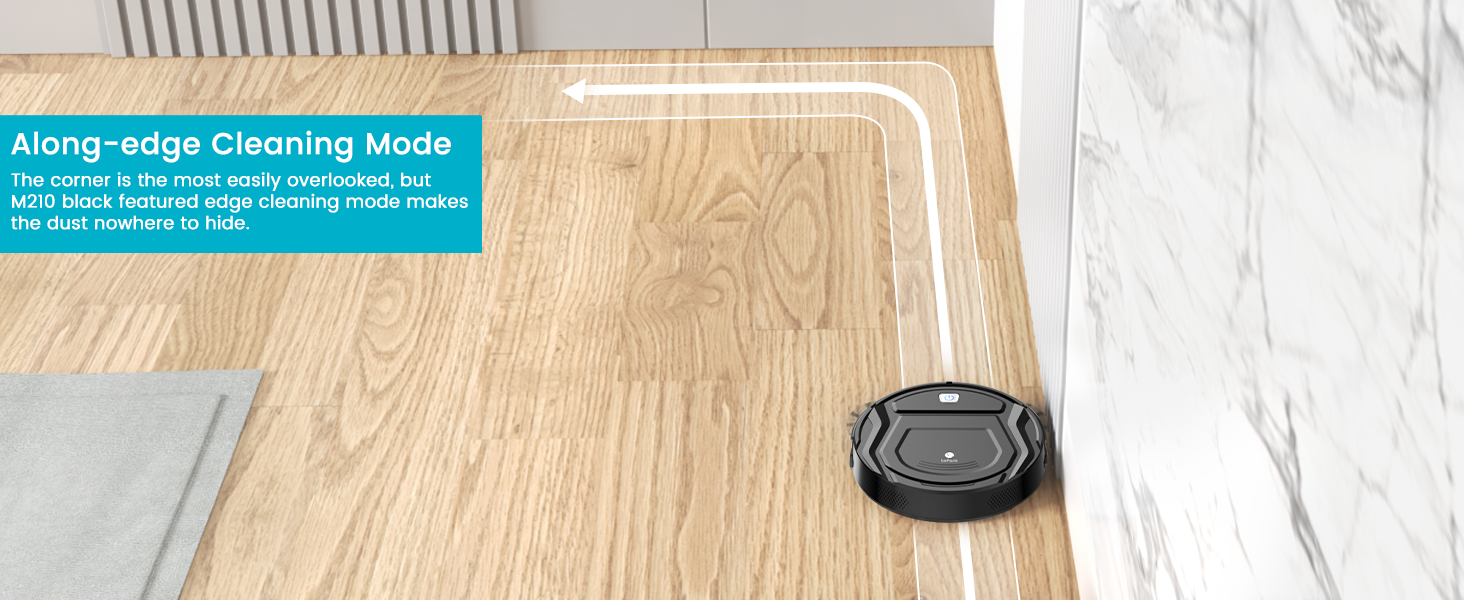
Figure 5.8: Along-edge Cleaning Mode ensures corners and edges are thoroughly cleaned.
Automatic Recharging
The M210 automatically returns to its charging station when the cleaning cycle is complete or the battery runs low.

Figure 5.9: The robot vacuum automatically docks to recharge after cleaning or when battery is low.
6. Maintenance
Regular maintenance ensures optimal performance and extends the lifespan of your robot vacuum.
Dustbin Emptying
The M210 features a 500ml large dustbin. Empty the dustbin after each cleaning cycle or when it appears full.

Figure 6.1: The 500ml dustbin is easy to remove and empty.
HEPA Filter Cleaning/Replacement
Clean the HEPA filter once a week. Replace the HEPA filter every 2-3 months, depending on usage.
Side Brushes Cleaning
Regularly check and clean the side brushes to remove any tangled hair or debris. Use the provided cleaning brush.
7. Troubleshooting
If your Lefant M210 encounters issues, refer to the following common troubleshooting tips:
- Robot not charging: Ensure the charging base is properly plugged in and the robot's charging contacts are aligned with the base. Clean the charging contacts if necessary.
- Robot getting stuck: Clear any loose cables, rugs with long fringes, or small objects from the cleaning path. The FreeMove 3.0 technology helps avoid obstacles, but some items may still cause issues.
- Reduced suction power: Empty the dustbin and clean the HEPA filter. Check the suction port for any blockages.
- Unusual noise: Check if any debris is caught in the side brushes or wheels. Clean them thoroughly.
8. Specifications
| Feature | Detail |
|---|---|
| Brand | Lefant |
| Model Name | M210 |
| Product Dimensions | 11"L x 11"W x 2.99"H |
| Item Weight | 6.58 pounds |
| Dustbin Capacity | 500 Milliliters |
| Battery Life | Up to 120 minutes runtime |
| Filter Type | HEPA |
| Control Method | App, Voice (Alexa, Google Home) |
| Wi-Fi Compatibility | 2.4 GHz only |
9. Warranty and Support
The Lefant M210 Robot Vacuum Cleaner comes with a 2-year battery life warranty. For any product inquiries, technical support, or warranty claims, please contact Lefant customer service through their official website or the contact information provided in your purchase documentation.


