
Talkpod SLT1
Talkpod SLT1 Low Power Transceiver User Manual
Model: SLT1 | Brand: Talkpod
1. Introduction
Thank you for choosing the Talkpod SLT1 Low Power Transceiver. This compact and lightweight two-way radio set is designed for reliable and easy communication in various environments, from outdoor adventures to indoor professional use. It operates without requiring a license or special qualifications, making it accessible for everyone.

Figure 1: The Talkpod SLT1 Transceiver set, featuring one red and one blue unit, along with the included USB charging cables.
2. Package Contents
Please check the package to ensure all items are present:
- Talkpod SLT1 Transceiver Unit (x2)
- USB-C Charging Cable (x1)
- Belt Clip (x2)
- Hand Strap (x2)
- User Manual (x1)
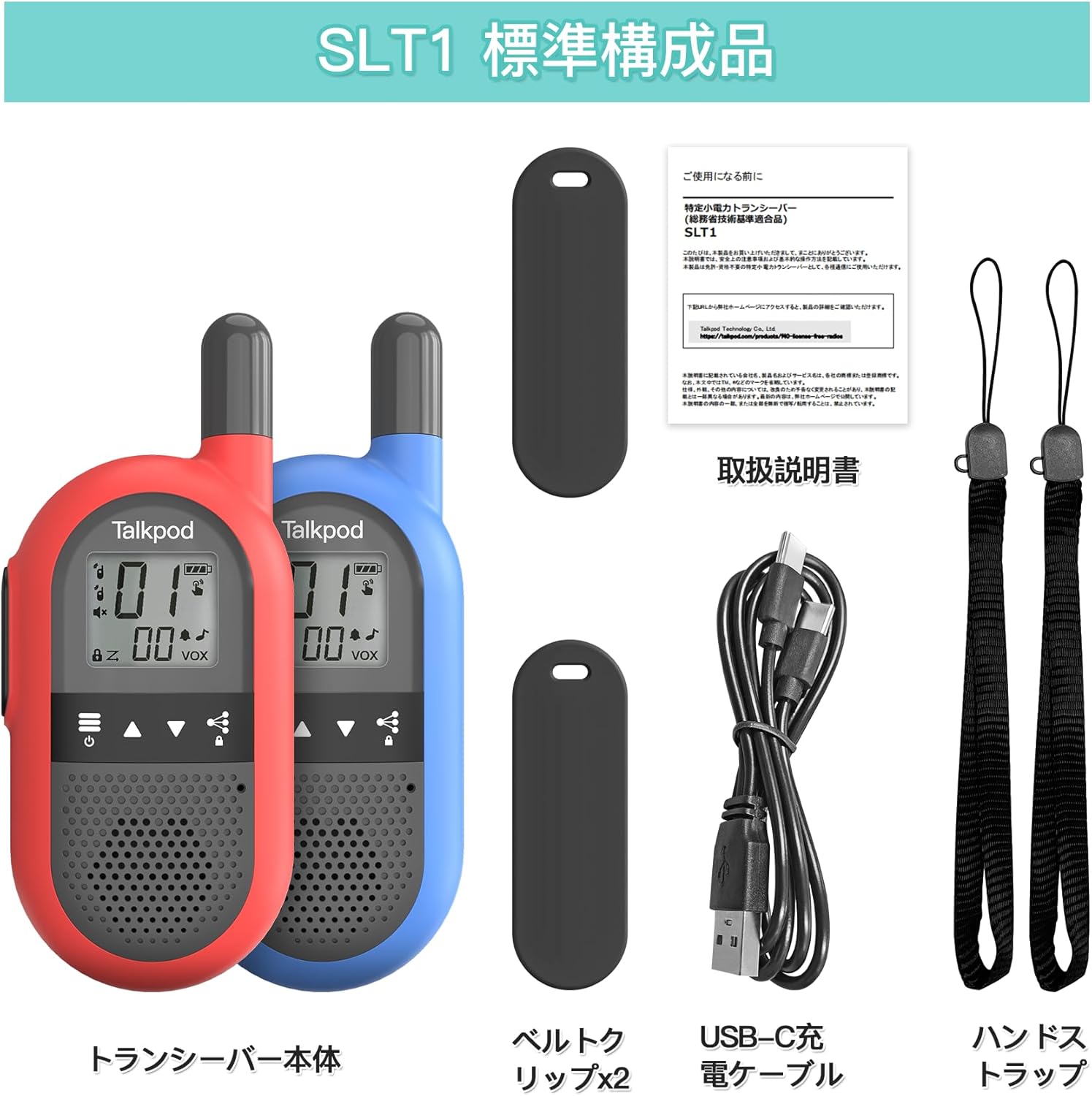
Figure 2: Overview of all items included in the Talkpod SLT1 package.
3. Setup and Charging
3.1. Charging the Transceiver
The Talkpod SLT1 has a built-in lithium-ion battery. Before first use, fully charge the device. Use the provided USB-C charging cable to connect the transceiver to a USB power source (e.g., wall adapter, computer USB port, power bank).

Figure 3: Connect the USB-C cable to the transceiver and a USB power source for charging. A full charge provides approximately 48 hours of use.
3.2. Attaching the Belt Clip
To attach the belt clip, slide it onto the designated slot on the back of the transceiver until it clicks into place. To remove, gently push up and then push in the clip to release it from the slot.

Figure 4: Steps for attaching the belt clip to the transceiver.
4. Operation
4.1. Device Layout and Controls
Familiarize yourself with the buttons and display of your Talkpod SLT1 transceiver:
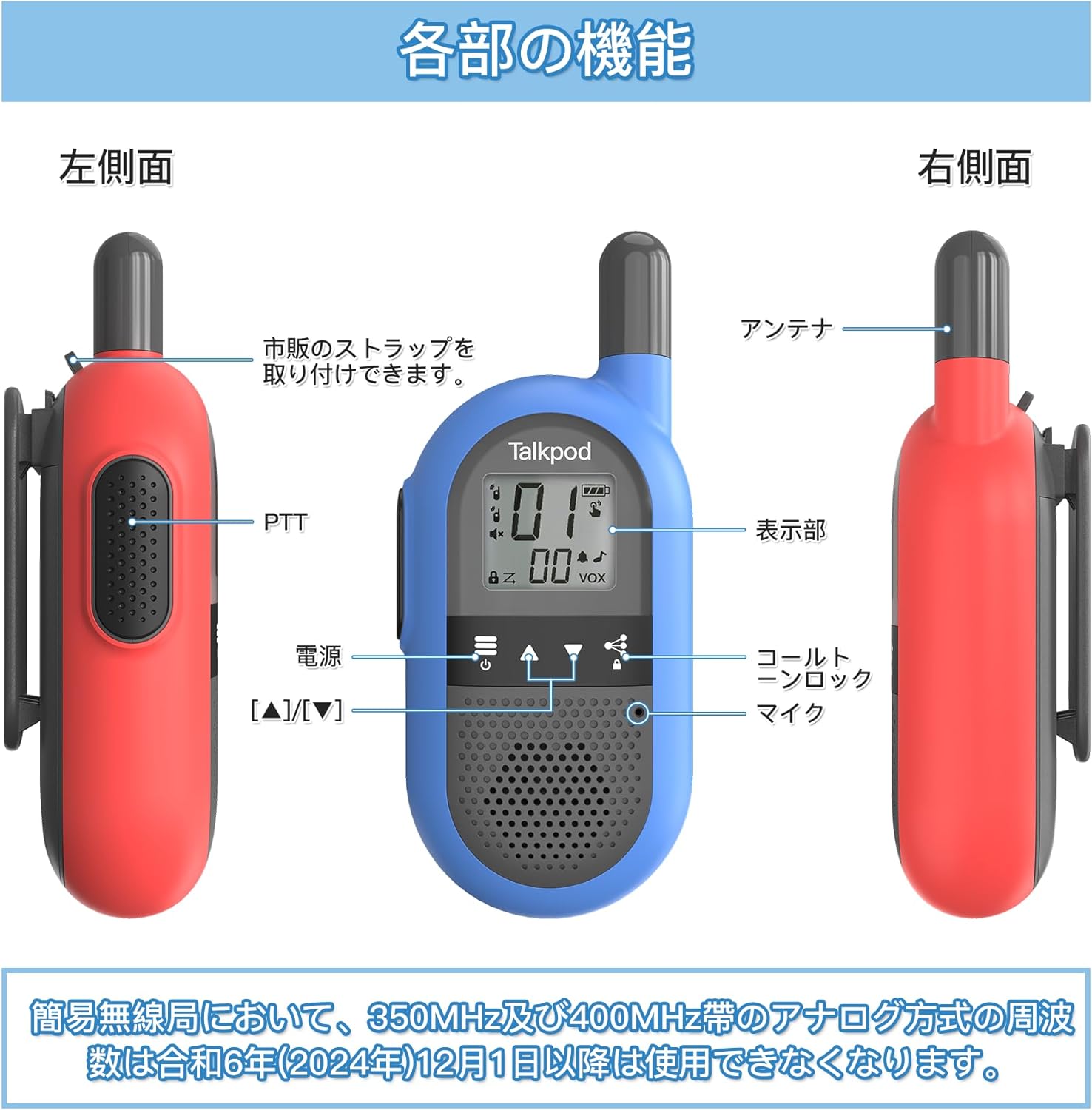
Figure 5: Detailed diagram of the transceiver's components and controls.
- PTT (Push-to-Talk) Button: Located on the left side. Press and hold to transmit, release to listen.
- Power Button: Press and hold to turn the device on or off.
- Display: Shows channel number, battery status, VOX indicator, and other settings.
- Microphone: Located at the bottom front.
- Antenna: Located at the top.
- Channel Up/Down Buttons (▲/▼): Used to change channels.
- Call Tone/Lock Button: Press to send a call tone or to lock/unlock the keypad.
4.2. Basic Communication
- Power On: Press and hold the power button until the display lights up.
- Select Channel: Use the ▲ and ▼ buttons to select a channel. Ensure all transceivers you wish to communicate with are on the same channel. The Talkpod SLT1 supports 27 channels.
- Transmit: Press and hold the PTT button. Speak clearly into the microphone. Release the PTT button to finish transmitting.
- Receive: When not transmitting, the transceiver is in receive mode. You will hear incoming transmissions.
4.3. VOX (Voice Operated Exchange) Function
The VOX function allows for hands-free operation. When activated, the transceiver will automatically transmit when it detects your voice, without needing to press the PTT button. Refer to the full user manual for instructions on how to activate and adjust VOX sensitivity.
4.4. Communication Range
The effective communication range of the Talkpod SLT1 varies significantly based on the environment. Obstacles such as buildings, hills, and dense foliage can reduce the range. Below are general guidelines:
- Open Line of Sight: Approximately 2 km
- Suburban/Rural Areas: Approximately 1-2 km
- Expressways: Approximately 500 m
- Urban Areas (with buildings): Approximately 100-200 m

Figure 6: Communication range varies by environment.
5. Maintenance
To ensure the longevity and optimal performance of your Talkpod SLT1 transceivers, follow these maintenance guidelines:
- Cleaning: Wipe the device with a soft, damp cloth. Do not use harsh chemicals or abrasive cleaners.
- Storage: Store the transceivers in a cool, dry place away from direct sunlight and extreme temperatures.
- Battery Care: Avoid fully discharging the battery frequently. If storing for a long period, charge the battery to about 50% capacity.
- Water Exposure: The device is not waterproof. Avoid exposing it to rain or submerging it in water.
6. Troubleshooting
If you encounter issues with your Talkpod SLT1, try the following solutions:
| Problem | Possible Cause | Solution |
|---|---|---|
| No power | Battery is depleted | Charge the transceiver fully. |
| Cannot communicate | Different channels selected | Ensure both transceivers are on the same channel. |
| Poor sound quality | Out of range or interference | Move closer to the other transceiver or to an area with fewer obstacles. |
| Buttons unresponsive | Keypad is locked | Press the Call Tone/Lock button to unlock the keypad. |
If the problem persists, please contact customer support.
7. Specifications
| Feature | Detail |
|---|---|
| Model Number | SLT1 |
| Brand | Talkpod |
| Color | Red + Blue |
| Dimensions (L x W x H) | 3.8 x 5.6 x 12.5 cm (1.5 x 2.2 x 4.9 inches) |
| Weight | 96 g (0.21 lbs) |
| Battery Type | Lithium-Ion (built-in) |
| Channels | 27 |
| Frequency Range | 422.050~422.300MHz |
| Max Communication Distance | 2 km (open area) |
| Tuner Technology | UHF |
| Special Features | Rechargeable, VOX Hands-Free, Auto Power Saving, Auto Scan |
8. Warranty and Support
Talkpod offers the following support for your product:
- Return/Exchange Policy: 30-day return or exchange period from the date of purchase.
- Manufacturer Warranty: 1-year manufacturer warranty from the date of purchase.
For any questions, concerns, or support inquiries regarding your Talkpod SLT1 transceiver, please contact our customer service. We aim to provide a satisfactory response within 24 hours.
Contact information for support is typically found on the product packaging or the official brand website.
Ask a question about this manual
Ask about setup, troubleshooting, compatibility, parts, safety, or missing instructions. Manuals+ will review the question and use this page’s manual context to help answer it.