
1. Introduction
Thank you for choosing the YESIDO YSP13 Bluetooth Ear Hook Earphones. This manual provides essential information for the proper setup, operation, and maintenance of your device. Please read it carefully before use to ensure optimal performance and longevity.
The YSP13 features an air conduction design, eliminating the need to insert earbuds directly into the ear canal, which can enhance comfort and ear health. It utilizes Bluetooth 5.3 for stable connectivity and delivers HiFi sound quality, making it suitable for music and sports activities.
2. Package Contents
Please check the package for the following items:
- YESIDO YSP13 Bluetooth Ear Hook Earphones (Left and Right)
- Charging Case
- Charging Cable
- User Manual
- Storage Pouch

Image: Contents of the YESIDO YSP13 package, including the earphones, charging case, charging cable, and a small storage pouch.
3. Product Overview
The YESIDO YSP13 earphones feature a rotatable ear hook design for a secure and comfortable fit during various activities. The charging case includes a digital display to indicate battery levels.
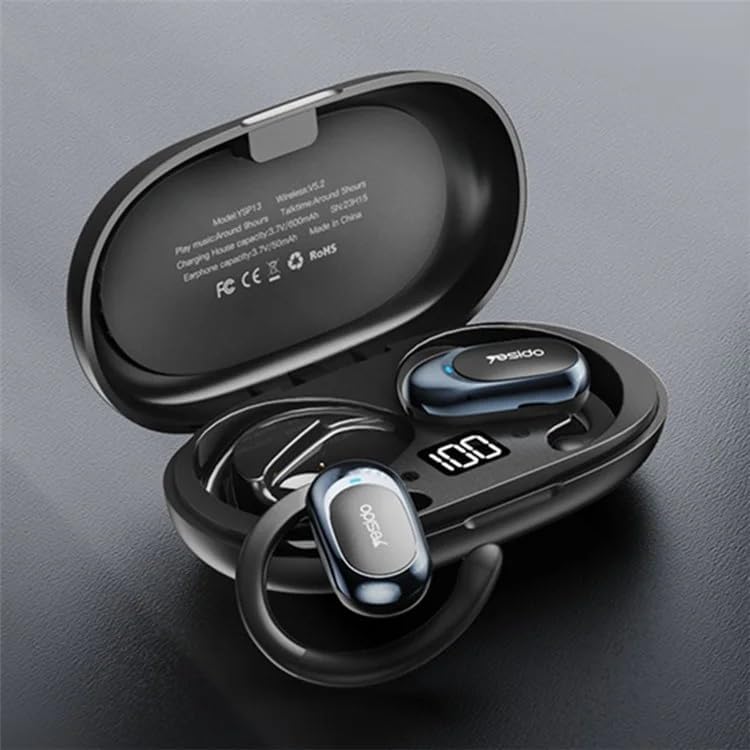
Image: The YESIDO YSP13 earphones resting in their charging case, which features a digital battery level indicator.

Image: A user wearing the YESIDO YSP13 earphone, illustrating how the ear hook design fits securely around the ear.

Image: An exploded diagram of the YESIDO YSP13 earphone, showcasing its internal structure and components responsible for HiFi sound reproduction.
4. Setup
4.1 Charging the Earphones and Case
- Place the earphones into the charging case. Ensure they are correctly seated.
- Connect the charging cable to the charging port on the case and to a USB power source.
- The digital display on the charging case will show the charging status.
- Charging time for earphones is approximately 1 hour. Charging time for the case is approximately 2.5 hours.
- Once fully charged, disconnect the charging cable.
4.2 Bluetooth Pairing
- Ensure the earphones are charged.
- Open the charging case. The earphones will automatically enter pairing mode.
- On your device (smartphone, tablet, etc.), enable Bluetooth.
- Search for available Bluetooth devices and select "YESIDO YSP13" from the list.
- Once connected, you will hear a confirmation tone, and the earphones will be ready for use.
- The earphones will automatically reconnect to the last paired device when taken out of the case, if Bluetooth is enabled on the device.
5. Operating Instructions
5.1 Wearing the Earphones
Gently place the ear hook over your ear, positioning the earphone speaker near your ear canal. Adjust the rotatable ear hook for a comfortable and secure fit.
5.2 Basic Functions
- Power On: Open the charging case, earphones power on automatically.
- Power Off: Place earphones back into the charging case and close the lid, earphones power off automatically.
- Play/Pause: Single tap on either earphone's touch control area.
- Next Track: Double tap on the right earphone's touch control area.
- Previous Track: Double tap on the left earphone's touch control area.
- Answer/End Call: Single tap on either earphone's touch control area during an incoming call.
- Reject Call: Press and hold either earphone's touch control area for 2 seconds during an incoming call.
- Activate Voice Assistant: Triple tap on either earphone's touch control area.
Note: Specific touch control functions may vary slightly. Refer to the quick start guide included in your package for detailed diagrams if available.
6. Maintenance
- Cleaning: Use a soft, dry, lint-free cloth to clean the earphones and charging case. Do not use harsh chemicals or abrasive materials.
- Water Resistance: The earphones are designed to be resistant to splashes. However, they are not waterproof. Do not submerge them in water.
- Storage: When not in use, store the earphones in their charging case to protect them and keep them charged.
- Temperature: Avoid exposing the device to extreme temperatures (hot or cold) or high humidity.

Image: The YESIDO YSP13 earphones shown with water splashes, illustrating their resistance to sweat and light rain.
7. Troubleshooting
| Problem | Possible Solution |
|---|---|
| Earphones not pairing |
|
| No sound |
|
| Charging case not charging |
|
| Intermittent connection |
|
8. Specifications
| Feature | Detail |
|---|---|
| Model Number | YSP13 |
| Bluetooth Version | BT8926B2 V5.3 |
| Earphone Battery Capacity | 50mAh x 2 |
| Charging Case Battery Capacity | 600mAh |
| Music/Call Time | Approximately 6 hours |
| Earphone Charging Time | Approximately 1 hour |
| Charging Case Charging Time | Approximately 2.5 hours |
| Material | PC+ABS+Electroplating UV |
| Connectivity | Wireless (Bluetooth) |
| Additional Features | Microphone Included, Air Conduction Design, Rotatable Ear Hook |
9. Warranty and Support
9.1 Warranty Information
This product comes with a 6-month warranty from the date of purchase. The warranty covers manufacturing defects and malfunctions under normal use. It does not cover damage caused by misuse, accidents, unauthorized modifications, or normal wear and tear.
Please retain your proof of purchase for warranty claims.
9.2 Customer Support
For technical assistance, warranty claims, or any questions regarding your YESIDO YSP13 earphones, please contact your retailer or the manufacturer's customer support. Refer to the packaging or the retailer's website for contact details.