
1. Introduction
Thank you for purchasing the Xiaomi Cordless Vacuum Cleaner G20 Lite. This manual provides essential information for the safe and efficient use, maintenance, and troubleshooting of your new vacuum cleaner. Please read this manual thoroughly before first use and keep it for future reference.
2. Safety Instructions
To reduce the risk of fire, electric shock, or injury, always follow basic safety precautions when using your vacuum cleaner:
- Read all instructions before using the appliance.
- Do not use outdoors or on wet surfaces.
- Do not allow to be used as a toy. Close attention is necessary when used by or near children.
- Use only as described in this manual. Use only manufacturer’s recommended attachments.
- Do not use with damaged cord or plug. If appliance is not working as it should, has been dropped, damaged, left outdoors, or dropped into water, return it to a service center.
- Do not pull or carry by cord, use cord as a handle, close a door on cord, or pull cord around sharp edges or corners. Do not run appliance over cord. Keep cord away from heated surfaces.
- Do not unplug by pulling on cord. To unplug, grasp the plug, not the cord.
- Do not handle plug or appliance with wet hands.
- Do not put any object into openings. Do not use with any opening blocked; keep free of dust, lint, hair, and anything that may reduce airflow.
- Keep hair, loose clothing, fingers, and all parts of body away from openings and moving parts.
- Do not pick up anything that is burning or smoking, such as cigarettes, matches, or hot ashes.
- Do not use to pick up flammable or combustible liquids, such as gasoline, or use in areas where they may be present.
- Do not pick up toxic material, such as chlorine bleach, ammonia, or drain cleaner.
- Do not use without dust cup and/or filters in place.
- Turn off all controls before unplugging.
- Use extra care when cleaning on stairs.
- Store the appliance indoors.
- Do not charge the unit outdoors.
- Use only the charger specified by the manufacturer.
3. Product Overview
The Xiaomi Cordless Vacuum Cleaner G20 Lite is designed for efficient cleaning with its powerful suction and versatile attachments. Key features include:
- Maximum 18,000Pa suction power for thorough cleaning.
- Integrated white LED light on the brush head to illuminate dark areas.
- Advanced 5-stage powerful filter system to prevent secondary pollution.
- Large capacity 2200mAh battery providing up to 45 minutes of runtime.
- One-touch dust disposal for easy and hygienic emptying.
- 2-way brush nozzle and extension rod for versatile cleaning.
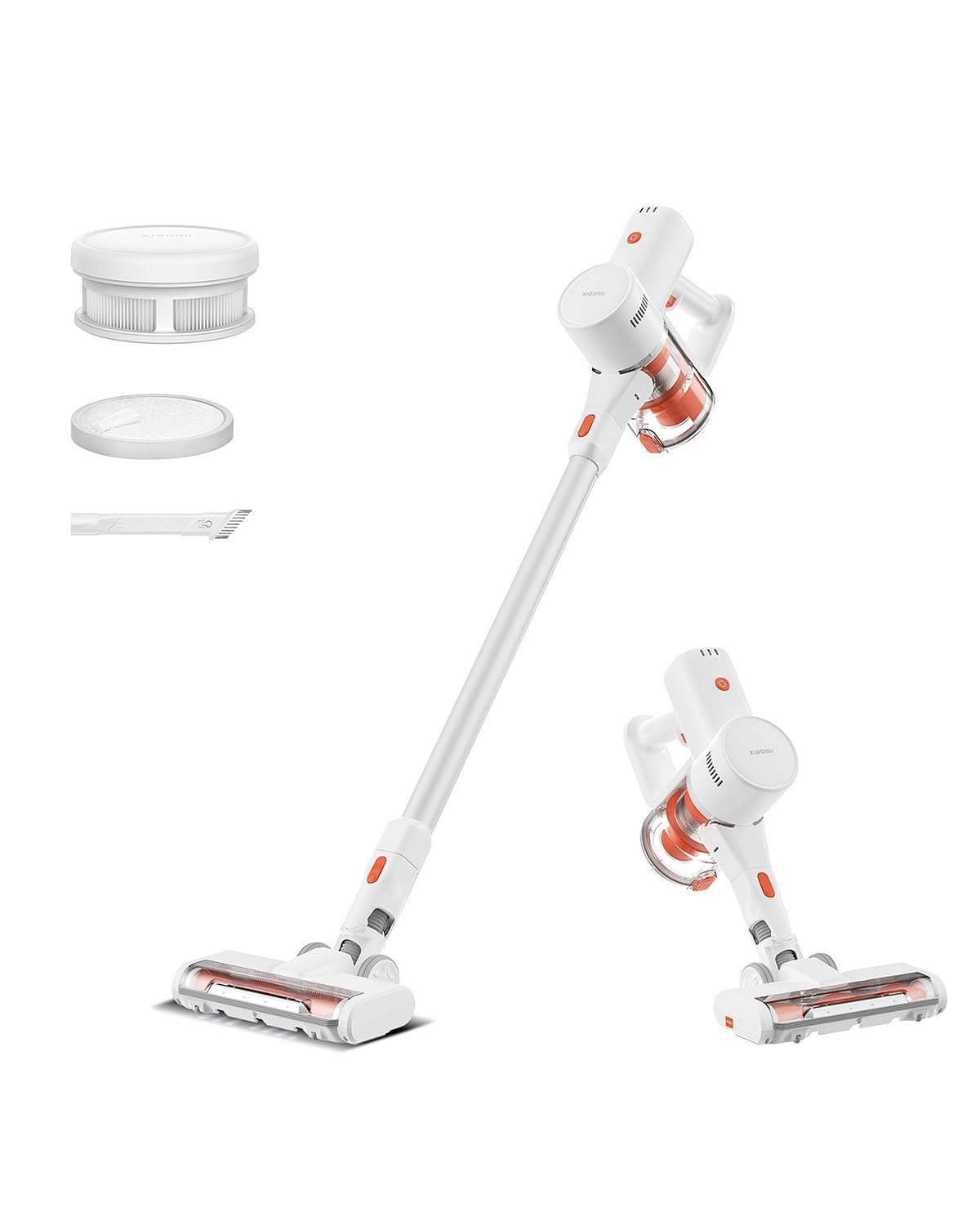
Image: Xiaomi Cordless Vacuum Cleaner G20 Lite, showing the full product assembly.

Image: Illustration of the vacuum cleaner's internal motor, highlighting its 18,000Pa suction power.
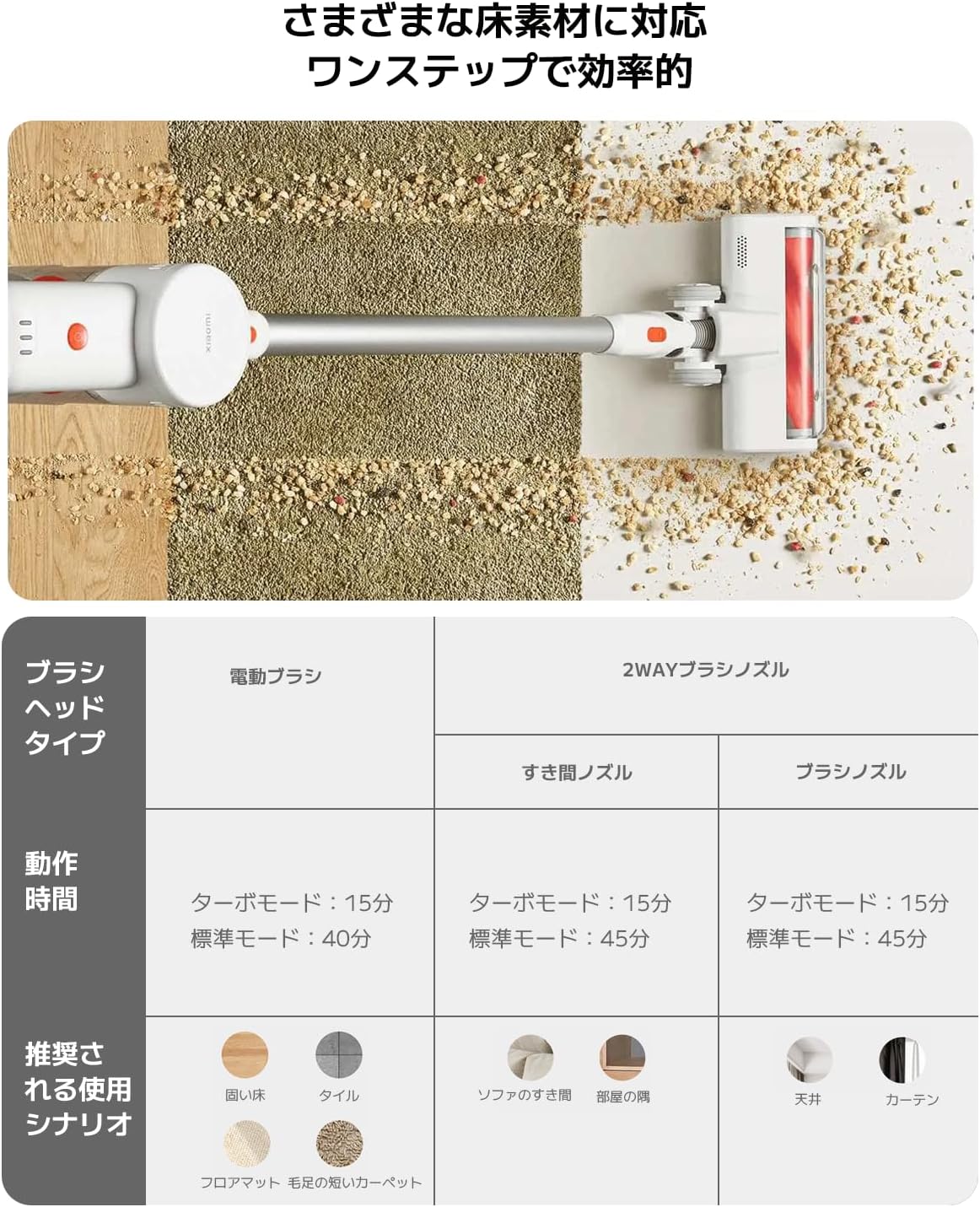
Image: Transparent view of the vacuum cleaner's handle, showing the internal large-capacity battery cells.
4. Setup
Follow these steps to assemble your vacuum cleaner:
- Unpack Components: Carefully remove all parts from the packaging. Ensure all accessories (main unit, extension rod, motorized brush head, 2-way brush nozzle, crevice nozzle, adapter) are present.
- Attach Extension Rod: Connect the extension rod to the main unit until it clicks into place.
- Attach Brush Head: Connect the desired brush head (motorized brush or 2-way brush nozzle) to the other end of the extension rod. For handheld use, attach the 2-way brush nozzle or crevice nozzle directly to the main unit.
- Charge Battery: Before first use, fully charge the vacuum cleaner. Connect the adapter to the charging port on the main unit and plug it into a power outlet. The power indicator lights will show the charging status.

Image: The vacuum cleaner being stored on a wall-mounted charging dock, illustrating convenient storage and charging.
5. Operating Instructions
Your Xiaomi Cordless Vacuum Cleaner G20 Lite offers versatile cleaning options:
Power On/Off and Suction Modes
Press the power button to turn the vacuum on. Press the mode button to cycle through different suction power levels (Standard, Turbo). The power indicator lights will show the current mode and battery level.
Video: A short demonstration of turning the vacuum cleaner on and cycling through its suction modes using the power and mode buttons.
Using Attachments
Select the appropriate brush head for your cleaning task:
| Brush Head Type | Operating Time (Standard/Turbo) | Recommended Use Scenario |
|---|---|---|
| Motorized Brush | 40 min / 15 min | Hard Floor, Tile, Floor Mat, Short Pile Carpet |
| 2-Way Brush Nozzle (Crevice) | 45 min / 15 min | Sofa Crevices, Room Corners |
| 2-Way Brush Nozzle (Brush) | 45 min / 15 min | Ceiling, Curtains |

Image: Close-up of the vacuum cleaner's motorized brush head, showing the integrated white LED lights illuminating the floor.

Image: A person using the vacuum cleaner with the extension rod to clean high areas, and with a specialized nozzle for narrow gaps and desk surfaces.
6. Maintenance
Regular maintenance ensures optimal performance and extends the lifespan of your vacuum cleaner.
Emptying the Dustbin
The vacuum cleaner features a one-touch dust disposal system. Simply press the release button on the dustbin to open the bottom flap and empty collected debris directly into a trash can. Empty the dustbin regularly to maintain suction power.

Image: A hand demonstrating the one-touch dust disposal mechanism, showing debris falling from the dustbin. Also visible is the power indicator light on the handle.
Cleaning the Filters
The 5-stage powerful filter system requires periodic cleaning. Refer to the diagram below for filter components. Remove the dustbin and separate the filter components. Tap off loose dirt and rinse washable parts under running water. Ensure all filter components are completely dry before reassembling them into the vacuum cleaner.

Image: Exploded view of the vacuum cleaner's main unit, illustrating the components of the 5-stage filter system.
Cleaning Brush Heads
Periodically check brush heads for tangled hair or debris. Use scissors to cut away any tangled hair and remove any obstructions to ensure smooth operation.
7. Troubleshooting
If you encounter issues with your vacuum cleaner, refer to the following common problems and solutions:
- No Power:
- Check if the battery is charged. Recharge if necessary.
- Ensure the power button is pressed firmly.
- Low Suction Power:
- Empty the dustbin.
- Clean the filters. Ensure they are dry before reinstallation.
- Check for blockages in the brush head, extension rod, or main unit.
- Brush Head Not Rotating:
- Check for tangled hair or debris obstructing the brush roll.
- Ensure the brush head is correctly attached.
- Unusual Noise:
- Check for any foreign objects caught in the brush head or suction path.
- Ensure all parts are securely assembled.
If the problem persists, please contact customer support.
8. Specifications
| Specification | Detail |
|---|---|
| Brand | Xiaomi |
| Model Number | BHR8232US |
| Product Type | Stick Cleaner |
| Features | Cordless |
| Filter Type | HEPA filter |
| Recommended Use | Carpet, Hard Floors, Sofa, Curtains, Beds, Tiles, Blankets |
| Power Source | Battery Powered (Charges via power cord) |
| Capacity | 0.55 Liters |
| Color | White |
| Portable | Yes |
| Indoor/Outdoor Use | Indoor |
| Operating Voltage | 21.6 Volts |
| Battery Capacity | 215 Watt-hours (2200mAh) |
| Controller Type | Hand control |
| Connectivity | Bluetooth (for potential smart features) |
| Included Components | Accessory kit, Adapter |
| Country of Origin | China |
| Product Weight | 2.4 Kilograms |
| Item Dimensions (L x W x H) | 66.2 cm x 32 cm x 13.2 cm |
9. Warranty and Support
Xiaomi products are designed with quality and reliability in mind. For warranty information and customer support, please refer to the details below:
Warranty Information
This product comes with a standard manufacturer's warranty. Please retain your proof of purchase for warranty claims. For specific warranty terms and conditions, refer to the documentation included with your product or visit the official Xiaomi website.
Customer Support
For technical assistance, troubleshooting, or service inquiries, please contact the Xiaomi Customer Service Center:
- Phone: 0120-767-378 (Reception hours: 9:00 - 18:00, excluding year-end and New Year holidays)
- Email: service.jp@support.mi.com
Xiaomi Service Center (Akihabara Store)
For in-person support or repairs, you may visit our service center:
- Address: 4-6-7 Kanda Sakumacho, Chiyoda-ku, Tokyo
- Business Hours: 10:00 - 19:00
- Closed: Wednesday
- Last Reception: 18:00


