
1. Introduction
The Accsoon CineView 2 SDI Transmitter (Model: WIT08-S-TX) is a professional wireless video transmission system designed for real-time monitoring in filmmaking and video production environments. This device facilitates the transmission of video signals with minimal latency, ensuring smooth operation and reliable performance. Its compact and lightweight design, coupled with versatile connectivity options, makes it suitable for various production needs.
Key features include:
- Low Latency: Experience minimal latency of less than 50ms, ensuring real-time monitoring.
- Compact and Lightweight Design: Crafted from aerospace-grade aluminum alloy, weighing only 200g, for versatility and durability.
- Versatile Connectivity: Equipped with HD-SDI and HDMI inputs, as well as loop-through outputs, supporting video signals up to 1080p/60.
- Compatibility: Backwards compatible with previous CineView models for seamless integration.
- Power Options: Supports NP-F type batteries, DC barrel (7.4~16.8V), and USB-C PD inputs for extended operational flexibility.
2. What's in the Box
Please verify that all items are present in your package:
- Accsoon CineView 2 SDI Transmitter (WIT08-S-TX)
- User Manual (this document)
- Camera Shoe mount (NP style battery not included)
3. Product Overview
Familiarize yourself with the components of your CineView 2 SDI Transmitter.
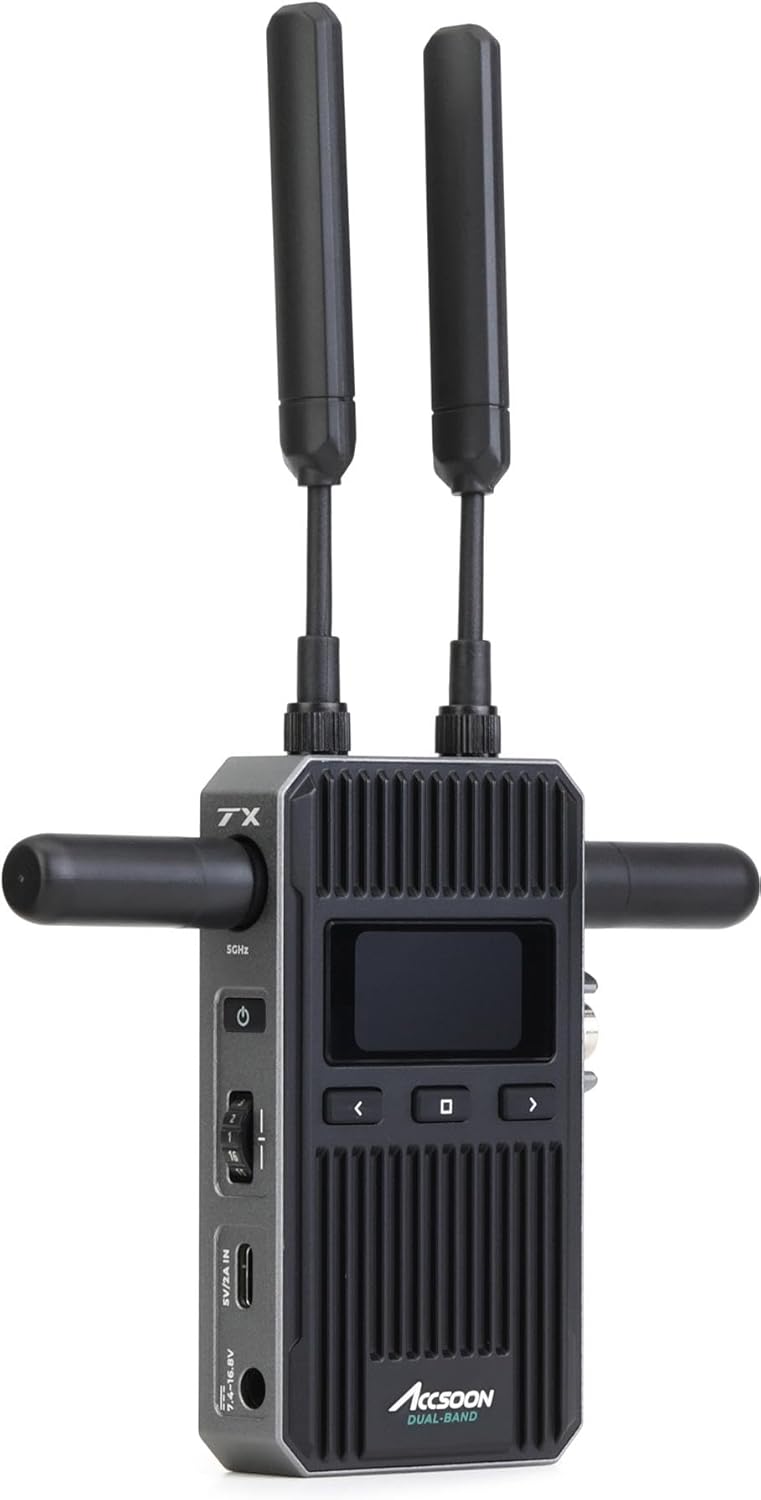
Figure 3.1: Front view of the Accsoon CineView 2 SDI Transmitter, showing the dual antennas, display screen, control buttons, and various ports on the side.
The transmitter features a robust aluminum alloy casing, an integrated display for status monitoring, and multiple input/output ports for video and power.

Figure 3.2: The CineView 2 SDI Transmitter attached to a professional camera setup, demonstrating its compact size and integration capabilities.

Figure 3.3: A detailed view of the side of the transmitter, highlighting the power input, USB-C port, and other connectivity options.
4. Setup Instructions
Follow these steps to prepare your CineView 2 SDI Transmitter for operation:
- Attach Antennas: Carefully screw the included antennas onto the designated ports on the transmitter. Ensure they are securely fastened but do not overtighten.
- Mounting:
- Attach the camera shoe mount to the bottom of the transmitter.
- Slide the transmitter onto your camera's hot shoe or a compatible mounting point on your rig.
- Alternatively, the transmitter can be mounted on a stand using its 1/4"-20 thread.

Figure 4.1: The transmitter mounted on a stand, illustrating flexible placement options on set.
- Powering the Device:
- NP-F Battery: Attach a compatible NP-F type battery to the battery plate on the rear of the transmitter.
- DC Input: Connect a DC power source (7.4V to 16.8V) to the DC barrel input port.
- USB-C PD: Connect a USB-C Power Delivery (PD) source to the USB-C port.
Note: Ensure the power source provides sufficient voltage and current for stable operation.
- Connect Video Source:
- For SDI cameras, connect an HD-SDI cable from your camera's SDI output to the transmitter's SDI input.
- For HDMI cameras, connect an HDMI cable from your camera's HDMI output to the transmitter's HDMI input.
- If loop-through is required, connect an SDI or HDMI cable from the transmitter's loop-through output to an external monitor.
5. Operating Instructions
Once the transmitter is set up and powered, follow these steps for operation:
- Power On: Press and hold the power button on the transmitter until the display illuminates.
- Monitor Status: The integrated display will show important information such as signal strength, battery level, and video format.
- Pairing (if applicable): If using with an Accsoon CineView 2 SDI Receiver, ensure both devices are powered on and within range. They should automatically establish a connection. Refer to the receiver's manual for specific pairing instructions if needed.
- Mobile Device Monitoring: The CineView 2 SDI Transmitter supports monitoring via compatible Android smartphones. Download the Accsoon companion app from your device's app store. Connect your smartphone to the transmitter's Wi-Fi network (SSID and password typically displayed on the transmitter's screen or found in the app).
- Video Transmission: The transmitter will automatically detect the input video signal (up to 1080p/60) and begin transmitting.

Figure 5.1: An example setup showing the CineView 2 SDI Transmitter transmitting video to multiple monitoring devices, including a dedicated monitor and a smartphone.

Figure 5.2: A user holding the CineView 2 SDI Transmitter, demonstrating its portability and ease of handling during operation.
6. Maintenance
Proper maintenance ensures the longevity and optimal performance of your transmitter:
- Cleaning: Use a soft, dry cloth to clean the exterior of the device. Avoid using liquid cleaners or solvents.
- Storage: When not in use, store the transmitter in a cool, dry place, away from direct sunlight and extreme temperatures. Remove batteries if storing for extended periods.
- Antennas: Handle antennas with care. Avoid bending or applying excessive force, as this can damage them and affect signal quality.
- Firmware Updates: Periodically check the Accsoon official website for any available firmware updates to ensure the best performance and compatibility.
7. Troubleshooting
If you encounter issues, refer to the following common troubleshooting steps:
| Problem | Possible Cause | Solution |
|---|---|---|
| No power | Battery depleted or improperly installed; DC/USB-C power not connected or faulty. | Check battery charge and installation. Verify DC or USB-C power connection and source. |
| No video signal on receiver/monitor | Incorrect video input selected; cable not connected properly; incompatible video format; transmitter/receiver not paired. | Ensure video cables are securely connected. Verify camera output settings match supported formats (up to 1080p/60). Check pairing status. |
| Poor signal quality or dropouts | Obstructions between transmitter and receiver; excessive distance; interference from other wireless devices; loose antennas. | Reduce distance and clear line of sight. Ensure antennas are securely attached. Change wireless channel if possible (via app). |
| Mobile app not connecting | Incorrect Wi-Fi password; phone not connected to transmitter's Wi-Fi; app not updated. | Verify Wi-Fi SSID and password. Ensure phone is connected to the correct Wi-Fi network. Update the Accsoon app. |
8. Specifications
Detailed technical specifications for the Accsoon CineView 2 SDI Transmitter (Model: WIT08-S-TX):
| Feature | Detail |
|---|---|
| Model Number | WIT08-S-TX |
| Product Dimensions | 4.92 x 3.03 x 1.22 inches (12.5 x 7.7 x 3.1 cm) |
| Item Weight | 4 ounces (approx. 113 grams) |
| Brand | Accsoon |
| Connectivity Technology | HDMI, SDI (HD-SDI) |
| Controller Type | Android (via companion app) |
| Compatible Devices | Smartphone, Speaker (for audio monitoring) |
| Total HDMI Ports | 1 (Input) |
| Connector Type | HDMI, SDI, USB-C (Power) |
| Audio Output Mode | Surround |
| Surround Sound Channel Configuration | 5.1 |
| Video Encoding | H.264, H.265/HEVC |
| Color | Black |
| Manufacturer | Accsoon |
| Date First Available | August 14, 2024 |
9. Warranty and Support
For warranty information and technical support, please refer to the documentation included with your purchase or visit the official Accsoon website. You may also contact Accsoon customer service directly for assistance with product registration, troubleshooting, or service requests.
Accsoon Official Website: www.accsoon.com


