
1. Introduction
This manual provides essential information for the safe and efficient use of your KTC 27-inch WQHD Fast IPS 200Hz Gaming Monitor (Model H27T22C-3). Please read this manual thoroughly before using the product and retain it for future reference.
2. Safety Information
Observe the following safety precautions to prevent damage to the monitor and ensure user safety:
- Do not expose the monitor to rain or moisture to prevent fire or electric shock.
- Do not open the monitor casing. There are no user-serviceable parts inside. Refer all servicing to qualified service personnel.
- Place the monitor on a stable, flat surface to prevent it from falling.
- Ensure proper ventilation around the monitor. Do not block ventilation openings.
- Use only the power adapter and cables provided by the manufacturer.
- Disconnect the power plug from the wall outlet if the monitor will not be used for an extended period.
3. Package Contents
Verify that all items are present in the package:
- KTC 27-inch WQHD Fast IPS 200Hz Gaming Monitor
- Power Cable
- DisplayPort Cable
- Power Adapter
- Monitor Stand
- Base Stand
- Screwdriver
- Mounting Screws
- Instruction Manual (Japanese Version)
- Quick Start Guide
- Warranty Card
4. Setup
4.1 Assembling the Stand
Attach the base stand to the monitor stand, then secure the assembled stand to the back of the monitor using the provided screws and screwdriver. Ensure all connections are firm.

Image: The KTC 27-inch WQHD Fast IPS 200Hz Gaming Monitor with its stand assembled, viewed from the front.
4.2 Connecting the Monitor
- Connect the DisplayPort cable or HDMI cable from your computer or gaming console (e.g., PS5) to the corresponding input port on the monitor. This monitor features two HDMI 2.0 ports and two DisplayPort 1.4 ports.
- Connect the power adapter to the monitor's DC input port, then plug the power cable into a wall outlet.
- Press the power button located on the back of the monitor to turn it on.

Image: Rear view of the monitor displaying the DC power input, USB 2.0 port, two HDMI 2.0 ports, two DisplayPort 1.4 ports, and an earphone jack. The power button is highlighted.
4.3 VESA Mounting
The monitor supports VESA 100x100mm mounting for alternative setups, such as wall mounts or monitor arms. Ensure the VESA mount is securely attached to the monitor and the mounting surface.

Image: Side and rear views of the monitor, illustrating the VESA 100x100mm mounting compatibility and the tilt adjustment range of -5° to 15°.
5. Operating Instructions
5.1 Power On/Off
Press the power button on the back of the monitor to turn it on or off.
5.2 On-Screen Display (OSD) Menu
The OSD menu allows you to adjust various monitor settings. Use the joystick/buttons on the back of the monitor to navigate and select options.
Key OSD Settings:
- Brightness/Contrast: Adjust image luminance and contrast levels.
- Color Settings: Modify color temperature, gamma, and color space.
- Input Source: Manually select between HDMI 1, HDMI 2, DisplayPort 1, or DisplayPort 2.
- Refresh Rate: View current refresh rate and enable overclocking if desired (up to 210Hz).
- Adaptive Sync: Enable or disable FreeSync/G-Sync compatible technology for smoother gameplay.
- HDR Mode: Toggle HDR400 for enhanced dynamic range.
- Low Blue Light/Flicker-Free: Activate eye-care features.
Video: An official product video demonstrating the features and performance of the KTC gaming monitor, including its high refresh rate and adaptive sync capabilities.
6. Features
- High Refresh Rate & Response Time: Experience ultra-smooth visuals with a 200Hz native refresh rate (overclockable to 210Hz) and a rapid 1ms (MPRT) response time. This minimizes motion blur and ghosting, crucial for fast-paced gaming.

Image: A visual representation highlighting the monitor's 200Hz refresh rate and 1ms response time, crucial for competitive gaming.
- WQHD Fast IPS Display: Enjoy crisp, detailed images with a 2560x1440 WQHD resolution on a Fast IPS panel. This provides wide viewing angles and accurate color reproduction.

Image: A side-by-side comparison demonstrating the superior detail of WQHD (2560x1440) resolution compared to Full HD (1920x1080) on the monitor.
- Adaptive Sync Technology: Compatible with FreeSync and G-Sync, this technology synchronizes the monitor's refresh rate with your GPU's frame rate, eliminating screen tearing and stuttering for a fluid gaming experience.

Image: A visual demonstration of Adaptive Sync, showing a distorted image when Sync is OFF and a smooth, tear-free image when Sync is ON.
- HDR400 Support: With HDR400 compatibility, the monitor delivers enhanced contrast and color accuracy, revealing more detail in both bright and dark scenes. It features 450 cd/㎡ brightness and a 1000:1 contrast ratio.

Image: A split-screen view illustrating the difference between HDR OFF and HDR ON, showcasing richer colors and improved contrast with HDR enabled.
- Integrated Stereo Speakers: The monitor includes built-in 2x2W stereo speakers for clear audio output, enhancing your gaming and multimedia experience.

Image: Rear view of the monitor, indicating the location of the integrated 2x2W stereo speakers with sound wave graphics.
- Eye Care Features: Designed with Flicker-Free technology and a Low Blue Light mode to reduce eye strain and fatigue during prolonged use.
7. Maintenance
- Cleaning the Screen: Gently wipe the screen with a soft, lint-free cloth. For stubborn marks, dampen the cloth with a small amount of screen cleaner. Do not spray cleaner directly onto the screen.
- Cleaning the Casing: Use a soft, dry cloth to clean the monitor casing. Avoid using abrasive cleaners or solvents.
- Storage: If storing the monitor for an extended period, disconnect it from power and store it in a cool, dry place, preferably in its original packaging.
8. Troubleshooting
| Problem | Possible Cause | Solution |
|---|---|---|
| No image on screen |
|
|
| Screen flickering or tearing |
|
|
| No sound from speakers |
|
|
| Image appears distorted or blurry |
|
|
9. Specifications
| Feature | Detail |
|---|---|
| Brand | KTC |
| Model Number | H27T22C-3 |
| Screen Size | 27 inches |
| Panel Type | Fast IPS |
| Resolution | WQHD (2560 x 1440 pixels) |
| Aspect Ratio | 16:9 |
| Refresh Rate | 200 Hz (Overclockable to 210 Hz) |
| Response Time | 1 ms (MPRT) |
| Brightness | 450 cd/㎡ |
| Contrast Ratio | 1000:1 |
| Color Gamut | 131% sRGB |
| HDR Support | HDR400 |
| Viewing Angle | 178° (Horizontal/Vertical) |
| Adaptive Sync | FreeSync & G-Sync Compatible |
| Speakers | 2 x 2W Stereo Speakers |
| Input Ports | 2x HDMI 2.0, 2x DisplayPort 1.4 |
| Other Ports | 1x USB 2.0 (for firmware updates/low power charging), 1x Earphone Jack |
| VESA Mount | 100 x 100 mm |
| Tilt Adjustment | -5° to 15° |
| Power Consumption | 12 Watts (typical) |
| Dimensions (D x W x H) | 11.5 x 62 x 47.5 cm (with stand) |
| Weight | 5.1 kg |
10. Warranty and Support
10.1 Warranty Information
KTC provides a 3-year manufacturer's warranty for this product. Additionally, a 12-month replacement service is offered. The warranty covers manufacturing defects but does not cover damage caused by loss or customer negligence.
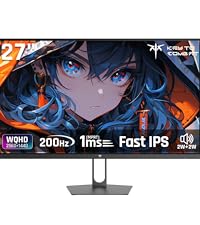
Image: Graphic detailing the 3-year free replacement warranty provided by KTC.
10.2 Customer Support
For any questions or issues regarding your KTC monitor, please contact our support team. We are committed to providing prompt assistance to ensure your satisfaction.
- Phone: 072-275-5798
- Email: support@ktcplay.com

Image: Steps for contacting customer support through Amazon, indicating how to reach the seller for inquiries.


